# Flowsta Developer Documentation - full text
Generated from https://docs.flowsta.com. One section per page, in site order.
---
# Start here
URL: https://docs.flowsta.com/getting-started/
# Start here
**A Flowsta identity lives on the user's device, not on a server.** Their 24-word recovery phrase deterministically derives their keys. The Flowsta Vault app holds those keys and a personal Holochain node. There is no account password on any server - the only password is the one that unlocks the Vault, and it stays on the device. When someone signs in to your app, their Vault signs a challenge and they approve it. Your app asks; the user answers. **No one in between - not even Flowsta.**
## What are you building?
| | Start with | You use |
|---|---|---|
| **A website or web app** - "Sign in with Flowsta" through standard OAuth 2.0 + PKCE; nothing to install, users approve with their Vault. Add webhooks when your server needs to react to events. | **[Web apps](/auth/)** | [`@flowsta/auth`](/sdk/auth), [`@flowsta/login-button`](/sdk/login-button) |
| **A Holochain app** - link your app's agent to a Flowsta identity, get the user's profile without a signup form, encrypted backups, reinstall recovery and the CAL export. | **[Holochain apps](/holochain/)** | [`@flowsta/holochain`](/sdk/holochain), the agent-linking zomes |
| **A desktop app without Holochain** - sign in through the Vault's local bridge, no browser redirect. | **[Desktop apps](/desktop/)** | [`@flowsta/holochain`](/sdk/holochain) |
| **Files people sign** - authorship, approvals and content rights, verifiable by anyone. Works from either path above. | **[Sign It](/sign-it/)** | `signFile` or `signDocument` |
Whatever you pick, you need a `client_id`: **[Register your app](/getting-started/register-app)** at [dev.flowsta.com](https://dev.flowsta.com). The **[Quick Start](/getting-started/quickstart)** walks the first ten minutes of each path.
## How Flowsta works
Traditional authentication services put a company between your users and your app: a single point of failure, a credential store worth breaching, an authority that can close accounts, and user relationships locked in their system. Flowsta moves identity to the person.
| | Traditional auth | Flowsta |
|---------|-----------------|--------------|
| **Where identity lives** | Their database | The user's device |
| **Credential on a server** | Password hash | Nothing - a Vault identity has no server-side password |
| **Identity standard** | Proprietary user IDs | W3C DIDs (permanent - they never change) |
| **Who approves a sign-in** | The provider's session logic | The user, in their Vault |
| **Privacy** | Provider can read user data | Zero-knowledge - private records never leave the user's devices |
| **Single point of failure** | Yes | No - a distributed network with community-run nodes |
**Three building blocks** sit on that identity, and they share one mental model:
- **Sovereign login** - OAuth 2.0 + PKCE for web apps, the local Vault bridge for desktop apps. Either way, the user approves with keys only they hold.
- **Sign It** - cryptographic file signing and verification, approved per signature in the user's Vault, verifiable by anyone.
- **Webhooks** - HMAC-signed events so your server reacts to sign-ins and revocations the moment they happen.
### The identity itself
- **W3C DID**: `did:flowsta:uhCAk...`, based on the Ed25519 public key. Permanent for the life of the identity, across devices, restores and upgrades. Users own it, not Flowsta. Resolvable through Flowsta's [DID resolver](/holochain/identity).
- **One identity, every path**: sign in to any partner website with OAuth, link the same identity to any Holochain app through the Vault. Same DID and keys everywhere.
- **Secure by default**: Ed25519 keys, a 24-word BIP39 recovery phrase that restores the identity on any device, OAuth 2.0 + PKCE with no client secrets for web apps, and no server-side password - nothing to phish, leak or reset on any server. The Vault password never leaves the device.
### What every path shares
| | Web apps | Holochain apps |
|---|:-:|:-:|
| **W3C DID (`did:flowsta:…`)** as the stable user identifier | ✅ | ✅ |
| **Display name, profile picture and optional username** | ✅ | ✅ |
| **The user can revoke your app at any time** from their Flowsta dashboard | ✅ | ✅ |
| **Scope-gated profile fields** (the user grants what your app sees) | ✅ | ✅ |
| **Sign It** for document signing | ✅ | ✅ |
| **Cross-app identity** (the same person across all their Flowsta apps) | ✅ | ✅ |
| **No password handling, no password-reset emails to build** | ✅ | ✅ |
| **Agent linking attestations on a DHT** | - | ✅ |
| **Automatic encrypted backups + reinstall recovery** | - | ✅ |
| **CAL §4.2.1 user data export** | - | ✅ |
| **Encrypted private data on a public DHT** | - | ✅ |
If your app lives in a browser tab, take the web path. If it runs a local Holochain conductor, take the Holochain path. Either way, the user's Flowsta identity follows them.
::: tip About email
Flowsta's server holds only a hash of the user's email. The `email` scope asks the user to **share** the address held in their Vault at the consent screen. If they do, you receive `email` and `email_verified` (verified addresses only); if they revoke your app, the shared copy is deleted. Design your app to work without one.
:::
## Architecture
Flowsta uses three Holochain DNAs (Holochain 0.6.1):
| DNA | Purpose | Where it lives |
|-----|---------|-------------|
| **Identity DNA** (public, v1.4) | Public identity record | DID, agent public key, timestamps, site memberships, agent links - on the shared network. No display name or picture: those are served by Flowsta's API |
| **Signing DNA** (public, v1.4) | Document signing | File signatures, content rights, perceptual hashes, revocations - on the shared network |
| **Private DNA** (sealed, v2) | Sensitive data | Profile details, activity, app records - encrypted on the device before they are written; the DNA's network is the user's own devices only, so nothing reaches Flowsta or other users |
::: info Zero-knowledge guarantee
Private records are sealed with keys derived from the recovery phrase and travel only between the user's own devices. Public data (the DID, signatures) is verifiable by anyone on Flowsta's tamper-proof network, built on Holochain.
:::
**[The Vault](/vault/)** is where all of this lives on the device. **[Security & Privacy](/security/)** says what the server holds, what the Vault sends home, and how data leaves with the user. **[Architecture](/holochain/architecture)** covers the nodes and versions.
## Reference implementations
- **[ProofPoll](https://github.com/WeAreFlowsta/ProofPoll)** (MIT) - a Holochain app with agent linking, the profile from the Vault, canonical-shape backups, seed escrow with authorship-preserving restore, and one profile per Flowsta identity.
- **[Your Own AI](https://github.com/WeAreFlowsta/Your-Own-AI)** (AGPL) - a desktop app that keeps one profile per Flowsta identity and backs up into the Vault.
## Questions?
- **Discord**: [Join our community](https://discord.gg/p7sfaZTaEc)
- **Support**: [Flowsta support options](https://dev.flowsta.com/support)
- **GitHub**: [github.com/WeAreFlowsta](https://github.com/weareflowsta)
---
# Quick Start Guide
URL: https://docs.flowsta.com/getting-started/quickstart
# Quick Start
Get up and running with Flowsta Auth in under 5 minutes. Choose your integration path:
- **[Web Apps](#web-apps)** - OAuth SSO with `@flowsta/auth`
- **[Desktop Holochain Apps](#desktop-holochain-apps)** - Identity linking with `@flowsta/holochain`
Both paths start with registering your app.
## Prerequisites
1. Sign up at [dev.flowsta.com](https://dev.flowsta.com)
2. Create a new application
3. Copy your **Client ID**
::: tip No Client Secret Needed
Flowsta uses **OAuth 2.0 with PKCE** for web apps - no client secret required. Your Client ID is all you need.
:::
See [Register Your App](/getting-started/register-app) for detailed setup instructions.
---
## Web Apps
Add "Sign in with Flowsta" to any website or web application.
### 1. Configure Redirect URIs
In your app settings on the [Developer Dashboard](https://dev.flowsta.com), add your redirect URIs:
```
http://localhost:3000/auth/callback (development)
https://yourapp.com/auth/callback (production)
```
### 2. Install the SDK
```bash
npm install @flowsta/auth
```
### 3. Add the Login Button
```typescript
import { FlowstaAuth } from '@flowsta/auth';
const auth = new FlowstaAuth({
clientId: 'your_client_id',
redirectUri: window.location.origin + '/auth/callback'
});
// When user clicks "Sign in with Flowsta"
document.getElementById('login-btn').onclick = () => {
auth.login(); // Redirects to login.flowsta.com
};
```
### 4. Handle the Callback
On your redirect URI page (`/auth/callback`):
```typescript
const auth = new FlowstaAuth({
clientId: 'your_client_id',
redirectUri: window.location.origin + '/auth/callback'
});
try {
const user = await auth.handleCallback();
console.log('User ID:', user.id);
console.log('Display Name:', user.displayName);
console.log('DID:', user.did);
window.location.href = '/dashboard';
} catch (error) {
console.error('Login failed:', error.message);
}
```
### 5. Check Auth Status and Logout
```typescript
// Check if user is logged in
if (auth.isAuthenticated()) {
const user = auth.getUser();
console.log('Welcome back,', user.displayName);
}
// Get the access token for API calls
const token = auth.getAccessToken();
// Logout - clears the SDK's local session (localStorage). Sign-out is per
// site: the user's Flowsta session on login.flowsta.com is theirs and stays.
auth.logout();
```
### User Data
After authentication, you receive:
| Field | Type | Description |
|-------|------|-------------|
| `id` | `string` | Unique user ID (stable for the life of the identity) - key your own records on it |
| `email` | `string?` | Present only if you requested the `email` scope and the user shared an address at the consent screen (verified addresses only; deleted when they revoke your app). Design your app to work without it. |
| `username` | `string?` | Username (if set by user) |
| `displayName` | `string?` | Display name |
| `profilePicture` | `string?` | Profile picture - usually a `data:` URI, sometimes a URL |
| `agentPubKey` | `string?` | Holochain agent public key |
| `did` | `string?` | W3C Decentralized Identifier |
### Next Steps for Web Apps
- [Auth Overview](/auth/) - Complete OAuth flow documentation
- [Button Widget](/auth/button-widget) - Pre-built "Sign in with Flowsta" buttons
- [React / Vue / Qwik examples](/auth/quickstart) - Framework-specific guides
- [Security Guide](/auth/security) - Best practices
- [@flowsta/auth SDK Reference](/sdk/auth) - Full API reference
---
## Desktop Holochain Apps
Let users prove their Flowsta identity on your Holochain app's DHT through agent linking.
### Prerequisites
- A Holochain application with its own DNA
- A registered app at [dev.flowsta.com](https://dev.flowsta.com) - the Vault refuses a link request without a `client_id`
- Users have [Flowsta Vault](/vault/) installed on their desktop
### 1. Add Agent-Linking Zomes
Add the [`flowsta-agent-linking`](https://github.com/WeAreFlowsta/flowsta-agent-linking) crates to your DNA, pinned to a release tag:
```toml
# integrity/Cargo.toml
[dependencies]
flowsta-agent-linking-integrity = { git = "https://github.com/WeAreFlowsta/flowsta-agent-linking", tag = "v0.3.0" }
```
```toml
# coordinator/Cargo.toml
[dependencies]
flowsta-agent-linking-coordinator = { git = "https://github.com/WeAreFlowsta/flowsta-agent-linking", tag = "v0.3.0" }
```
Tag `v0.3.0` targets Holochain 0.6: your DNA's `hdi` and `hdk` must be on the same line (`hdi = "=0.7.0"`, `hdk = "=0.6.0"`), or the build fails with trait-resolution errors.
Register the zomes in your DNA manifest:
```yaml
# dna.yaml
integrity:
zomes:
- name: agent_linking_integrity
bundled: ../../target/wasm32-unknown-unknown/release/flowsta_agent_linking_integrity.wasm
coordinator:
zomes:
- name: agent_linking
bundled: ../../target/wasm32-unknown-unknown/release/flowsta_agent_linking_coordinator.wasm
dependencies:
- name: agent_linking_integrity
```
### 2. Install the SDK
```bash
npm install @flowsta/holochain
```
### 3. Request Identity Linking
When a user wants to link their Flowsta identity:
```typescript
import { linkFlowstaIdentity, getVaultStatus } from '@flowsta/holochain';
// Check if Flowsta Vault is running
const status = await getVaultStatus();
if (!status.unlocked) {
console.log('Please unlock Flowsta Vault first');
return;
}
// Request identity linking - the user approves in their Vault
const result = await linkFlowstaIdentity({
appName: 'YourApp',
clientId: 'your_client_id',
localAgentPubKey: myAgentKey,
});
console.log('Linked to Flowsta agent:', result.payload.vaultAgentPubKey);
```
Linking binds your app to that identity: one app agent links to one Flowsta identity, and a Vault that later holds a different identity is a stop, never a prompt to link again. See [Identity switching](/vault/identity-switching).
### 4. Commit the Attestation
The Vault returns a signed payload; **your app** commits the `IsSamePersonEntry` attestation to your own DHT with a zome call:
```typescript
import { decodeHashFromBase64 } from '@holochain/client';
// The Vault's signature arrives base64-encoded; the zome wants the raw 64 bytes.
const signatureBytes = (b64: string) =>
Uint8Array.from(atob(b64), (c) => c.charCodeAt(0));
await appWebsocket.callZome({
role_name: 'my-role',
zome_name: 'agent_linking',
fn_name: 'create_external_link',
payload: {
external_agent: decodeHashFromBase64(result.payload.vaultAgentPubKey),
external_signature: signatureBytes(result.payload.vaultSignature),
},
});
```
Anyone on your network can now verify the link - see [Agent Linking](/holochain/agent-linking) for the verification recipe. To check link state later, use [`getFlowstaLinkStatus()`](/sdk/holochain).
### What Users See
When your app sends a link request, Flowsta Vault brings its window forward and shows an approval dialog with:
- Your app name, and "by *your organization*" when your registration carries one
- **Requesting page** - the origin the request came from
- **This app will be able to access:** followed by the scopes you selected at dev.flowsta.com (for example "Decentralized ID (DID)", "Public key", "Display name")
- "Your private key never leaves the vault."
- **Deny** / **Allow** (or **Update** when your app re-links after changing its registration)
The user has 60 seconds to answer; then the request fails with `timeout`.
### What you can also get from `@flowsta/holochain`
Once the agent-link is in place, the same SDK lights up:
- **User profile data** (display name, profile picture, optional unique username) via [`getVaultStatus()`](/sdk/holochain#getvaultstatus) - no signup forms or avatar uploads.
- **Automatic encrypted backups** of your users' Holochain data to their Vault - see [`startAutoBackup`](/sdk/holochain#startautobackup).
- **One-click reinstall recovery** - via [`restoreFromVault`](/sdk/holochain#restorefromvault) or [seed adoption](/sdk/holochain#seed-adoption-shared-dht-apps), your users' polls / games / messages / etc. follow them onto a new device, still authored by them.
- **CAL §4.2.1 data export out of the box** - the Vault's **Export** (Your Data page) gives the user a portable JSON file with their cryptographic keys plus their data in plain English. The export a CAL-licensed Holochain app must provide; you write nothing.
- **Document signing** via Sign It if you want cryptographic provenance for user-authored content - a linked app publishes to the Sign It network from the user's own device (SDK 3.6.0). See [Sign It Developer Guide](/sign-it/developer-guide).
### Next Steps for Holochain Apps
- [Building Holochain Apps](/holochain/build) - Complete integration guide
- [Identity Switching](/vault/identity-switching) - What your app must do when one Vault holds several identities
- [Agent Linking](/holochain/agent-linking) - Payload structure and verification
- [Backups & Reinstall Recovery](/sdk/holochain#backups) - Auto-backup + restore + CAL §4.2.1 in one pipeline
- [@flowsta/holochain SDK Reference](/sdk/holochain) - Full API reference
- [IPC Reference](/vault/ipc-reference) - Direct IPC endpoint documentation
---
## Desktop Apps
Building a desktop app? Sign the user in through Flowsta Vault's local IPC with `@flowsta/holochain` - the user approves in the Vault, and your app never handles credentials.
```typescript
import { authenticateWithVault } from '@flowsta/holochain';
// Your backend issues a random nonce (never a "flowsta-…" string); the Vault
// signs it and your backend verifies the signature with agentPubKey.
const { signature, agentPubKey, did } = await authenticateWithVault(nonce, {
appName: 'YourApp',
});
```
**[Desktop App Authentication →](/desktop/)**
---
## Questions?
- **Discord**: [Join our community](https://discord.gg/p7sfaZTaEc)
- **Support**: [Find out about Flowsta support options](https://dev.flowsta.com/support)
- **GitHub**: [github.com/WeAreFlowsta](https://github.com/weareflowsta)
---
# Register Your App
URL: https://docs.flowsta.com/getting-started/register-app
# Register Your App
**Get your client ID from the Flowsta Developer Dashboard.**
Whether you're building a web app with OAuth or a desktop Holochain app with identity linking, you need a registered app and a client ID.
## Step 1: Create a Developer Account
1. Go to [dev.flowsta.com](https://dev.flowsta.com)
2. Sign in with your Flowsta identity - you approve the sign-in in your Vault
## Step 2: Create an Application
Click **Create New App**. The dialog has three steps for OAuth apps and two for Holochain apps.
**Create New App** (step 1):
- **App Name** - shown to users on the OAuth consent screen or in the Vault approval dialog
- **Description (optional)** - a brief description of your app
- **App Type** - **OAuth Web App** or **Holochain App**. Desktop apps that talk to the Vault over local IPC register as Holochain apps.
Click **Next**.
**Permissions** (step 2): tick the scopes your app needs (tables below). A Holochain app finishes here with **Create App**; an OAuth Web App clicks **Next**.
**Redirect URIs** (step 3, OAuth Web App only): add the URLs users return to after signing in, then click **Create App**.
## Step 3: Configure Your App
Configuration differs based on your integration path. Everything below can be changed later from the app's page (**Save Settings**).
### For Web Apps (OAuth)
#### Redirect URIs
Add the URLs where users are redirected after authentication:
```
http://localhost:3000/auth/callback (development)
https://yourapp.com/auth/callback (production)
```
::: tip
Add both development and production URIs. You can add multiple redirect URIs.
:::
#### Select Scopes
Choose which user data your app needs:
| Scope | Portal label | Data | Notes |
|-------|--------------|------|-------|
| `openid` | User Identifier | User ID (`sub`) | Always on |
| `display_name` | Display Name | Display name | |
| `username` | Username | Username | |
| `email` | Email | Email address | The user chooses at the consent screen whether to share the address held in their Vault; you receive it only if they do |
| `profile_picture` | Profile Picture | Profile picture URL | |
| `did` | Decentralized ID | W3C Decentralized Identifier | |
| `public_key` | Public Key | Holochain agent public key | |
| `sign` | Document Signing | Sign files and manage signatures | Marked as sensitive in the portal; every Sign It integration needs it |
### For Holochain Apps (Identity Linking)
Holochain apps don't need redirect URIs, but they do select **scopes**. Scopes control which profile fields Flowsta Vault exposes to your app via its local IPC server (`GET /status` on port 27777, or the next free port up to 27779). The user sees the selected scopes listed in the Vault approval dialog before they approve.
#### Select Scopes
| Scope | Portal label | What your app receives via `/status` |
|-------|--------------|--------------------------------------|
| `openid` | User Identifier | Basic identity - always on, not shown to the user |
| `did` | Decentralized ID | `did` - the user's decentralized identifier |
| `public_key` | Public Key | `agent_pub_key` - the Vault's Holochain agent key |
| `holochain` | Holochain Access | Granted by default to Holochain apps; shown to the user as "Holochain identity" |
| `display_name` | Display Name | `display_name` - the user's display name |
| `username` | Username | `web_username` - the user's @username |
| `profile_picture` | Profile Picture | `profile_picture` - avatar URL |
Select only the scopes your app actually uses. Fields for unselected scopes are returned as `null` from `/status`, even if the user has that data in their Vault.
The app name, your organization, and the selected scopes are what users see in the Vault approval dialog:
```
Your App Name
by Your Organization
This app will be able to access:
Decentralized ID (DID)
Public key
Holochain identity
Display name
[Deny] [Allow]
```
When an app re-links an identity that was linked before, the confirm button reads **Update**.
## Step 4: Copy Your Client ID
Your client ID looks like: `flowsta_app_abc123def456...`
Use this in your SDK configuration:
**Web App:**
```typescript
const auth = new FlowstaAuth({
clientId: 'flowsta_app_abc123def456',
redirectUri: 'https://yourapp.com/auth/callback'
});
```
**Holochain App:**
```typescript
const result = await linkFlowstaIdentity({
appName: 'YourApp',
clientId: 'flowsta_app_abc123def456',
localAgentPubKey: myAgentKey,
});
```
::: tip No Client Secret
Flowsta uses PKCE for web apps and IPC for desktop apps - no client secret needed for either path.
:::
## Next Steps
- **[Quick Start](/getting-started/quickstart)** - Implement authentication (Web or Holochain)
- **[Web Auth Guide](/auth/)** - OAuth flow documentation
- **[Vault Guide](/vault/)** - Holochain identity linking
- **[Login Button](/sdk/login-button)** - Pre-built button components for web
---
# Flowsta Vault
URL: https://docs.flowsta.com/vault/
# Flowsta Vault
**The home of every Flowsta identity. Every sign-in, every link and every signature is approved here, on the user's own device.**
Flowsta Vault is the desktop app (Windows, macOS, Linux) where a Flowsta identity is created and where it lives. It holds the person's keys, their private data and their app backups, and it is where they say yes or no to anything done in their name. Flowsta's servers hold no password and no keys for a Vault identity, so nothing can be approved anywhere else.
Everything in these docs is a way of asking the Vault for something. A web app asks it to sign the person in. A Holochain app asks it to vouch for the app's agent. Any app can ask it to sign a file. The person answers, and the answer is a signature made with keys that never leave their computer.
## Every path goes through the Vault
| You are building | What your app does | What the person does in their Vault |
|---|---|---|
| **A website or web app** | A standard OAuth 2.0 redirect to Flowsta's login page. Nothing to install, nothing Vault-specific to write. | Approves the sign-in. The login page reaches the Vault on the same computer. Where it cannot, such as Safari, Brave or a phone, the page shows a short code: a link hands it to the Vault on the same computer, or the person types it into their Vault from another device. |
| **A Holochain app** | Asks the Vault to link the app's agent to the person's identity, then commits the attestation to its own DHT. | Approves the link and chooses what the app may see. |
| **A desktop app** | Asks the Vault to sign a nonce over the local bridge; your backend verifies it. | Approves the sign-in. |
| **Anything that signs files** | Sends a file's hash, never the file. | Approves each signature. A linked app's signature is published to the Sign It network from the person's own device. |
**[Web apps](/auth/)** · **[Holochain apps](/holochain/)** · **[Desktop apps](/desktop/)** · **[Sign It](/sign-it/)**
## What the Vault holds
| In the Vault | What it is |
|---|---|
| **Identities** | One Vault can hold several identities on one computer, such as a personal one and a work one. One is open at a time; the person chooses which when they unlock. See [Identity switching](/vault/identity-switching). |
| **Keys** | A 24-word recovery phrase deterministically derives the identity's Ed25519 keys. The same phrase rebuilds the same identity on any computer. A Vault password protects everything stored on this computer, and never leaves it. |
| **Overview** | The person's public profile as others see it: picture, name, username and the link to their page, editable in place. |
| **Sign It** | Sign any file, one or many, with integrity checks and content rights. Signatures are verifiable by anyone. |
| **Connections** | Every app and site the person has linked or signed in to, with what each may see. They can disconnect any of them here. |
| **Your Data** | Encrypted backups from connected apps, and **Export Data**: a readable copy of the person's data together with the keys needed to use it. |
| **Activity** | A record of every sign-in, link, email shared and setting changed. Kept on the device only. |
| **A personal network node** | While unlocked, the Vault runs the person's own node on Flowsta's network: the public Identity and Signing records, and an encrypted Private store that syncs only between the person's own devices. |
## How an approval works
Websites and apps reach the Vault through a local bridge on `127.0.0.1`, port 27777 (or 27778 / 27779 when that one is taken). The SDKs find it for you.
- **Sign-ins, links and signatures always show a dialog** naming the app, where the request came from, and what is being asked. The person allows or declines, and a declined request returns `user_denied`.
- **A remembered site** can be signed in to again without a new dialog. The person chooses this per site and can forget it at any time.
- **A locked Vault waits for a Flowsta sign-in.** A request from Flowsta's login page is held while the person unlocks, then the dialog appears. An app's own request to a locked Vault returns `vault_locked`, and the app asks the person to unlock.
- **The Vault answers only its own computer account.** On a shared computer, each account's browsers and apps reach that account's own Vault.
- **The email address is shared only from the Vault.** When an app asks for it, the dialog shows the address that will be shared, and only a verified address is ever offered.
The exact routes, fields and error codes are in the [IPC reference](/vault/ipc-reference).
## Setting up a Vault
Creating an identity takes three steps:
1. **Your details** - email, display name and a Vault password.
2. **Recovery phrase** - the Vault generates the 24 words; the person writes them down. The phrase is what recreates the identity on another computer.
3. **Ready** - the Vault starts the person's node and joins the network.
Two other paths start on the same screen: **restore** an identity from its recovery phrase, and **move** an identity created on flowsta.com before July 2026 into the Vault.
Requirements: Windows 10 or 11 (64-bit), macOS 12 or later, or Linux (`.deb` and `.rpm`). Download at [flowsta.com/vault](https://flowsta.com/vault/).
## What your app can ask the Vault for
Beyond approval, a linked app gets a set of services it would otherwise build itself. All of them go through [`@flowsta/holochain`](/sdk/holochain), which is the Vault's client for any desktop app, with or without Holochain.
| You want | The Vault provides | Guide |
|---|---|---|
| **The person's profile** | Display name, picture and username, scope-gated by the person at link time. No signup form, no avatar upload. | [`getVaultStatus()`](/sdk/holochain#getvaultstatus) |
| **An identity link on your DHT** | A signed attestation that your app's agent and the person's Flowsta identity are the same person. | [Build a Holochain app](/holochain/build) |
| **Backups and reinstall recovery** | Encrypted storage for your app's data in the person's own Vault, and a restore on a new machine. | [Backups](/sdk/holochain#backups) |
| **The CAL data export** | **Export Data** produces the person's records and keys in readable JSON - the export a CAL-licensed app must provide. You write a small decoder per entry type. | [CAL compliance](/holochain/#cal-compliance) |
| **Document signing** | A signature over a file hash, published to the Sign It network for a linked app. | [Sign It developer guide](/sign-it/developer-guide) |
| **Private data on a public DHT** | A pattern for entries only their author can read, with peers carrying the ciphertext. | [Encrypted entries](/sdk/holochain#encrypted-entries-on-public-dht) |
| **Support for several identities** | The status fields and rules for an app when the person switches identity. | [Identity switching](/vault/identity-switching) |
## Next steps
- **[Start here](/getting-started/)** - pick your path
- **[Security & Privacy](/security/)** - what the server holds, what the Vault sends home, how data leaves with the person
- **[Identity switching](/vault/identity-switching)** - several identities in one Vault
- **[IPC reference](/vault/ipc-reference)** - every route on the local bridge
---
# Security & Privacy
URL: https://docs.flowsta.com/security/
# Security & Privacy
**Flowsta Auth is designed so that no one in between - not even Flowsta - can access your private data.**
## Security Architecture
| Layer | Protection |
|-------|-----------|
| **Authentication** | OAuth 2.0 + PKCE, no client secrets, CSRF protection |
| **Identity & keys** | 24-word BIP39 recovery phrase → HMAC-SHA256 key derivation → Ed25519 keypair, held on your device in Flowsta Vault |
| **Private data** | Sealed records encrypted on your device - never gossiped to Flowsta or any third party |
| **Public data** | Identity and Sign It signatures on Flowsta's tamper-proof network, built on Holochain |
| **Sessions** | Access tokens (24h), SSO session cookie (7d), refresh tokens (30d) |
## Core Principles
### Zero-Knowledge Privacy
Your keys and private data live on your device in Flowsta Vault, kept per identity: each Flowsta identity on a device has its own folder for its keys, records and app backups. Keys derive from your 24-word recovery phrase; no account password exists on any server, so there is no server-side password to steal, phish, or leak. The only password is the one that unlocks your Vault, and it never leaves your device. Flowsta's server holds an email hash and lookup metadata, the public profile you choose to publish (display name, username, picture), your OAuth consents, and usage counters - see [what Flowsta can see](/security/zero-knowledge#what-flowsta-can-see). It never holds keys and cannot decrypt anything.
**[Zero-Knowledge Architecture](/security/zero-knowledge)** - Detailed explanation
### User-Owned Keys
Every identity is anchored to an Ed25519 keypair derived from a BIP39 recovery phrase via HMAC-SHA256. You own your keys - Flowsta cannot revoke, modify, or access them. Your DID never changes for the life of your identity, and your recovery phrase restores your identity on any device.
### No Client Secrets
Flowsta uses PKCE (Proof Key for Code Exchange) instead of client secrets. This is equally secure and works safely in browsers and mobile apps without exposing secrets.
### Data Portability
The **Export** button under **Export Data** on Flowsta Vault's Your Data page produces a structured JSON export containing your identity, keys, decrypted private records, app data backups, and Sign It signatures. Your data, in a format you can read and take anywhere.
**[Data Portability](/security/data-portability)** - How users access their data
## For Developers
- **[OAuth Security Guide](/auth/security)** - PKCE implementation, token handling, production checklist
- **[Sessions](/security/sessions)** - Token lifetimes, refresh flow, revocation
- **[Backups & CAL Compliance](/sdk/holochain#backups)** - Meeting CAL license requirements
## Next Steps
- **[Zero-Knowledge Architecture](/security/zero-knowledge)** - How device-held keys work
- **[Data Portability](/security/data-portability)** - User data export and restore
- **[Sessions](/security/sessions)** - Token management
- **[OAuth Security](/auth/security)** - Developer security guide
---
# Zero-Knowledge Architecture
URL: https://docs.flowsta.com/security/zero-knowledge
# Zero-Knowledge Architecture
**Your keys and your private data live on your device. Flowsta physically cannot access them - and neither can anyone in between.**
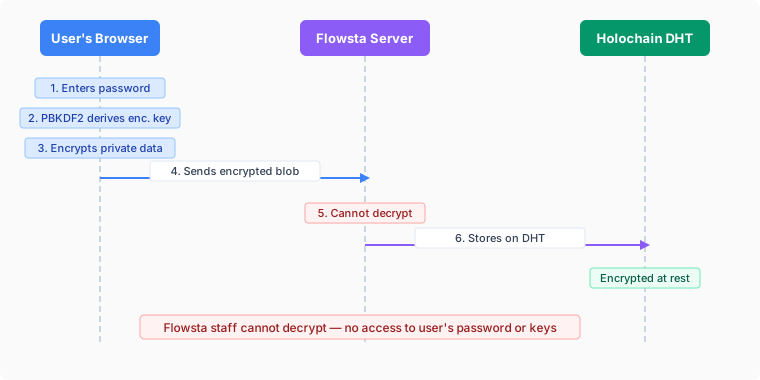
No password exists on any server. The only password is the one that unlocks your Vault, and it never leaves your device. Your identity is a set of cryptographic keys derived from your 24-word recovery phrase, held on your device in [Flowsta Vault](/vault/). Flowsta's server never sees the phrase, never sees the keys, and stores nothing it could decrypt.
## What Only You Hold
Everything sensitive stays on your device:
| Data | Where it lives |
|------|----------------|
| 24-word recovery phrase | With you - written down, never transmitted |
| Ed25519 device keys | Derived on-device from the phrase via HMAC-SHA256 |
| Private records | Sealed (encrypted) on your device in Flowsta Vault |
| App data backups | Stored locally by the Vault |
Sealed private records do not gossip to Flowsta or to anyone else. They never leave your device unless you export them yourself.
## What Flowsta Can See
Flowsta's server stores only what it needs to route sign-ins:
| Data | Purpose |
|------|---------|
| Email hash | Look up your identity at sign-in - a one-way SHA-256 hash, not your address |
| Lookup metadata | Recovery lookup hash, agent public key, DID |
| Display name, username & profile picture | Your public profile, served by Flowsta's API and cached for flowsta.com and app sign-ins (you chose to make these public) |
| OAuth consent records | Audit trail of which apps you authorized |
| Usage counters | Active-connection and signing-quota counts, keyed by an opaque pseudonym - see [What the Vault Sends Home](/security/usage-data) |
What Flowsta does **not** hold for a Vault identity: no password hash, no keys, no recovery phrase, no private records. There is nothing on Flowsta's servers that could decrypt your data - not for staff, not for attackers, not for anyone.
## Public, Verifiable Data
Two kinds of data are public by design, on Flowsta's tamper-proof network, built on Holochain:
### Identity DNA (Public)
Your public identity record - and nothing that identifies you as a person:
- Your DID (`did:flowsta:`) and agent public key
- Created and updated timestamps
- Site memberships and agent links (identity attestations)
Display name, username and profile picture are **not** on the network. They are held by Flowsta's server as your public profile (see above) and served to flowsta.com and to apps you authorize. Your DID never changes for the life of your identity.
### Signing DNA (Public)
Signatures created by Sign It:
- Ed25519 signatures over SHA-256 file hashes
- Signing intent (`Authorship`, `Approval`, `Witness`, `Receipt`, `Agreement`)
- Content rights manifests (license, AI training policy)
- Perceptual hash bands (for fuzzy matching of modified files)
- Revocation entries (signed by the original signer)
Signatures are public and permanent by design - that's how verification works. The DNA holds no name, no email and no file - only hashes, signatures, and whatever public note or thumbnail the signer chose to attach. See [Sign It](/sign-it/) for details.
## How Sign-In Works Without a Password
Signing in is a cryptographic proof, not a shared secret:
1. Your device requests a one-time challenge: `POST /auth/vault/challenge`
2. Flowsta Vault signs the challenge with your device key - the key derived from your recovery phrase, which never leaves the device
3. Your device submits the signature: `POST /auth/vault/token`
4. The server verifies the signature against your public key and issues a JWT plus the `flowsta_session` SSO cookie
The server learns that you control your key. It learns nothing else. There is no credential to phish, reuse, or leak from a database breach.
## Key Derivation
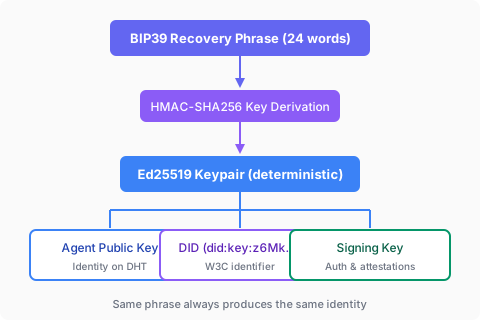
Your 24-word BIP39 recovery phrase deterministically generates your keypair via HMAC-SHA256. That means:
- Your recovery phrase restores your identity on any device - install Flowsta Vault, enter the phrase, and your keys and DID come back exactly as they were
- No key escrow or key recovery service is needed (or possible)
- Flowsta never sees the phrase - derivation happens entirely on your device
## Why This Matters
Most identity providers sit between you and everything you do: they hold your password hash, your session keys, and often your data. A breach of the provider is a breach of you.
Flowsta is built so there is **no one in between** - not even Flowsta. The server can't be compelled, hacked, or tempted to reveal what it never had. Your keys prove who you are; your device holds what's yours; the public network verifies what you choose to publish.
## Implications for Developers
When you receive user data through OAuth:
- **Public data** (display name, username, DID, agent public key) is readable by Flowsta
- **Email** is shared only if the user explicitly grants the `email` scope
- **No data mining** - Flowsta cannot analyze user private data for any purpose, because it never has it
## Next Steps
- **[Data Portability](/security/data-portability)** - How users export and restore their data
- **[Sessions](/security/sessions)** - Token management and lifetimes
- **[OAuth Security](/auth/security)** - Security best practices for developers
---
# What the Vault Sends Home
URL: https://docs.flowsta.com/security/usage-data
# What the Vault Sends Home
**Flowsta Vault is built to keep your identity and data on your device. This page is the complete list of what it sends to Flowsta anyway - every field, every trigger, and who can see what.**
The Vault is [open source](https://github.com/WeAreFlowsta/flowsta-vault-app), so nothing here is taken on trust: each section names the code that does the sending. If you find something leaving your device that isn't on this page, that's a bug - [tell us](https://flowsta.com/support/).
## The short version
While unlocked, the Vault sends these kinds of background traffic - requests you did not make by clicking something:
| What | When | Contains |
|------|------|----------|
| Network version check | On unlock, and when you open the Overview or Settings (`GET /api/v1/vault/dna-versions`) | Nothing about you - a plain request for current network and app versions |
| Reachability probe | Every 30 seconds on the dashboard (`GET /health`) | Nothing about you - the Vault only wants to know whether the API answers |
| Plan lookup | When you open the Overview or the Sign It page (`GET /api/v1/sign-it/quota/by-agent`) | Your agent public key, so the page can show your plan and remaining signing allowance |
| App check | Each time an app contacts your Vault (`GET /api/v1/apps/verify`) | The app's `client_id` only - nothing about you. The Vault asks whether the app is registered and what it is allowed to request |
| Usage record | One record per connected app per calendar month (`POST /api/v1/mau/vault-sync`) | Two fields: which app, which month - plus your recovery lookup hash so the record lands on your plan |
| Sign It quota count | After each signature you publish (`POST /api/v1/sign-it/quota/sync-by-agent`) | A signed counter, so your plan's allowance works offline-first |
| Network join | When the built-in Holochain node starts | Its agent public keys and the Vault's own `client_id`, announced to Flowsta's bootstrap server like any peer on the network |
| Account reconcile | After an offline restore, or at startup for a migrated identity whose config is missing its legacy web key | A challenge-response sign-in with your device key, so the Vault can reattach your username, display name and picture |
Everything else the Vault sends is something you initiated: a sign-in you approved, a signature you published, a plan upgrade you started, an email verification you requested, a settings page you opened (the Identities page lists your connected sites; the contact card reads your contact preference).
The Vault contains no analytics or crash-reporting SDK. There is no telemetry.
## The usage record, field by field
Flowsta's plans (including the free tier and developer pricing, which counts **active connections**) need to know one thing: **how many identities were connected to an app this month.** The Vault answers that with the smallest record we could design. One record exists per connected app per calendar month, and this is the whole of it:
```json
{
"client_id": "flowsta_app_...", // which registered app
"month_year": "2026-07" // which month
}
```
What the record deliberately is not:
- **Not a log.** There is no entry per action, no counter, and no timestamps. A month of heavy use of one app produces exactly one record, identical to a month of light use.
- **Not a stream.** The Vault checks every 30 minutes whether unsynced records exist and sends them if so. Most of those checks send nothing - steady state for someone using three apps is three records a month.
- **Not an identifier.** The record carries no per-app ID, no per-user ID, nothing to correlate. For counting, Flowsta's server derives its own opaque pseudonym from your identity and the app; that pseudonym is what billing tables store, and it never travels anywhere.
- **Not your content.** No files, no file names, no signatures, no messages, no keys, no passwords, no email, no username - the two fields above are the entire record.
Records are stored encrypted on your device until they sync, and each is integrity-signed so tampering is detectable. (The on-device copy keeps a little more detail for its own bookkeeping - a use counter and first/last-seen times - but those fields stay on your device.) Code: [`mau.rs`](https://github.com/WeAreFlowsta/flowsta-vault-app/blob/main/src-tauri/src/mau.rs).
## Pseudonymous to Flowsta, aggregate to everyone else
The sync request carries one identity-level identifier: your **recovery lookup hash**. It's a one-way hash - it cannot be turned back into your recovery phrase, your keys, or your email - but it is stable, and it is how your identity's row is found for billing and quotas.
Being precise about what that means:
- **To Flowsta**, your usage is pseudonymous, not anonymous. Our servers can tie "this identity was active in these apps this month" together - that's what makes plans and quotas work, the same way any business ties service usage to a customer. It is the only place that link exists.
- **To developers**, your usage is an aggregate number: active connections. A developer sees "N identities were connected to your app this month" and nothing else: no identities, no per-user activity, no usage intensity, nothing about other apps or Flowsta services. Active connections are what developer billing is based on, and that billing is what supports running the network - it's how the free tier stays free.
- **To everyone else**, it's nothing. The records travel over HTTPS to Flowsta and appear in no public network, no DHT, and no third-party service.
## Where zero-knowledge fits
It's worth being clear about what "Flowsta can tie usage to an identity" does and doesn't mean, because the identity itself is not what you might expect. What Flowsta bills is a cryptographic identity: public keys, one-way hashes, a DID. Everything personal behind it - your private records, your files, your app data, the email address itself - is encrypted in your Vault, on your device, and nobody sees any of it unless you consent to share it. That includes Flowsta. It's the point of the [zero-knowledge design](/security/zero-knowledge): we can count that an identity was active, but we cannot look inside it.
The identity only becomes *you* if you make that link yourself - by claiming a public username, sharing your DID, or consenting to share your email with an app. What the usage record ties together is only ever what you've chosen to make public.
## The Sign It quota count
When you publish a signature, the Vault tells the API to count it against your monthly allowance - a signed message containing your agent key, the one-way lookup hash, a count, and a timestamp, and, for a signature made through an app, that app's `client_id` so the sponsored signature is attributed to the app's pool. This exists so quotas can be enforced *locally* (you can keep signing offline) while staying accurate server-side. It carries nothing about the file you signed; the signature itself goes to the public signing network only because publishing it is the point. Code: the quota sync in [`commands.rs`](https://github.com/WeAreFlowsta/flowsta-vault-app/blob/main/src-tauri/src/commands.rs).
## The plan lookup and the app check
Two lookups exist so pages and prompts can be accurate:
- **Plan lookup.** Opening the Overview or the Sign It page asks the API for your plan and remaining allowance by agent public key. The request carries that key and nothing else; the reply is your plan name and counters. Code: `routes/layout.tsx`, `routes/index.tsx` and `routes/sign-it/index.tsx` in the Vault front end.
- **App check.** When an app connects to your Vault over local IPC, the Vault asks the API whether that `client_id` is a registered, active app and which scopes it may request, so the approval dialog shows the right name, publisher and permissions. The request carries the app's id only. The answer is cached, so the Vault keeps working offline. Code: [`ipc_server.rs`](https://github.com/WeAreFlowsta/flowsta-vault-app/blob/main/src-tauri/src/ipc_server.rs).
## Joining the network
The Vault runs a Holochain node of its own. Like every peer, that node announces its agent public keys to Flowsta's bootstrap server so other peers can find it, and it presents the Vault's own `client_id` as its authentication material to be admitted to the relay. This is how your public identity record and your signatures reach the network; the bootstrap server sees peer addresses and public keys, never private data. If Flowsta's bootstrap server is unreachable, the node falls back to the community bootstrap list. Code: [`conductor.rs`](https://github.com/WeAreFlowsta/flowsta-vault-app/blob/main/src-tauri/src/conductor.rs).
## What never leaves your device
For contrast, the things the Vault holds that have no path to Flowsta at all: your recovery phrase, your private keys, your vault password, your private records and app backups, and the contents of any file you sign (only its hash is ever published, and only when you publish it).
## Can I verify this?
Yes - that's the reason the Vault is open source. The senders on this page are [`mau.rs`](https://github.com/WeAreFlowsta/flowsta-vault-app/blob/main/src-tauri/src/mau.rs) (usage records), the quota sync in [`commands.rs`](https://github.com/WeAreFlowsta/flowsta-vault-app/blob/main/src-tauri/src/commands.rs), the version check in [`dna_updater.rs`](https://github.com/WeAreFlowsta/flowsta-vault-app/blob/main/src-tauri/src/dna_updater.rs), the app check in [`ipc_server.rs`](https://github.com/WeAreFlowsta/flowsta-vault-app/blob/main/src-tauri/src/ipc_server.rs), the reachability probe and reconcile in [`commands.rs`](https://github.com/WeAreFlowsta/flowsta-vault-app/blob/main/src-tauri/src/commands.rs) and [`device_identity.rs`](https://github.com/WeAreFlowsta/flowsta-vault-app/blob/main/src-tauri/src/device_identity.rs), the plan lookup in the front end's route files, and the bootstrap settings in [`conductor.rs`](https://github.com/WeAreFlowsta/flowsta-vault-app/blob/main/src-tauri/src/conductor.rs). Build from source and watch the wire if you like - the page and the code should always agree.
---
# Data Portability
URL: https://docs.flowsta.com/security/data-portability
# Data Portability
**You own your data and can export it at any time - in a format you can read.**
## Identity vs. Data: The Mental Model
Two different things keep you safe, and it's worth keeping them straight:
- **Your recovery phrase restores your identity anywhere.** The 24 words deterministically regenerate your keys and DID on any device - nothing else is needed to be *you* again.
- **Your export file is how your data survives losing a device.** Private records and app backups live only on your device; the export is your portable copy of them. Some connected apps generate a key of their own that your phrase can't re-derive - those apps place it in their backup's `app_keys` block, so it rides your export too and the app can continue authoring as you on a new machine.
Restore the phrase to get your identity back; import the export to get your data back.
## Export Data {#download-all-data}
In [Flowsta Vault](/vault/), the **Your Data** page has an **Export Data** section whose **Export** button produces a single structured JSON export (format version `2.0`). Every section carries a plain-language `_readme` explaining what it is.
The export contains:
- **Your identity** - display name, email, DID, agent public key
- **Your cryptographic keys** - including `device_seed_hex`, the seed your Ed25519 signing keypair derives from. With it you can recreate your identity on any Holochain conductor. Keep the file safe: anyone with your device seed can sign as you.
- **Private records** - your sealed records, decrypted so you can actually read them. On your device they're encrypted; in your export they're yours in plaintext.
- **App data backups** - decrypted backups stored by connected Holochain apps: every backup the Vault holds for the app (unlabeled auto-snapshots keep the newest 10; named and per-object backups are all kept)
- **Sign It signatures** - your signature records; anyone with your public key can verify them independently
- **Holochain setup** - DNA versions and app IDs, so you can recreate your conductor setup
The export is licensed under the [Cryptographic Autonomy License v1.0 (CAL-1.0)](https://opensource.org/license/cal-1-0), citing §4.2.1 "No Withholding User Data": you can take this export to any compatible Holochain app and use your data independently of Flowsta or the app's original developer.
### Per-app export
Next to each connected app on the **Your Data** page there is also an **Export** button that downloads just that app's data - the same readable records and app keys, scoped to one app.
## Import Data
New or reset device? First restore your identity with your recovery phrase, then bring your data back:
1. Install Flowsta Vault and restore with your 24-word recovery phrase - your identity, keys, and DID come back exactly as they were
2. The Vault asks right away whether to import an export. Choose **Import** and select your export file (or later: **Your Data** → **Import Data** → **Import**)
3. The Vault re-stores your private records and app data backups, and puts your email back once Flowsta has confirmed it is still the address on your identity
Notes:
- **Safe to run repeatedly** - records already present are skipped, so re-importing is a no-op
- **Identity-checked** - the export must belong to the same identity as the vault; you can't import someone else's data (or your own into the wrong identity)
- **Only data is imported** - your identity keys come from your phrase, and Sign It signatures gossip back from the network on their own (a freshly restored Vault says "Syncing from the network" until they do). App-generated keys ride inside the imported app backups (`app_keys`); each app restores its own when you sign back in.
- **Until you choose**, apps keep working but cannot save new backups into the restored Vault, so nothing your export holds can be overwritten by an app opened too early.
### How apps get their data back
Once your Vault holds your identity and backups again, each connected app recovers its own data when you sign in. Depending on the app, that happens by restoring its authoring key from its Vault backup and re-syncing from its network (apps whose data lives on a shared network, like ProofPoll - after the restore, everything you published still shows you as the author), or by restoring records from its Vault backup (apps whose data lives only with you, like Your Own AI, which brings back your conversations automatically at startup). Either way, the app walks you through it - you just sign in and confirm.
## Web Dashboard
At [flowsta.com/dashboard/connected-sites](https://flowsta.com/dashboard/connected-sites) you can see which apps you have authorized and disconnect any of them. What Flowsta's server holds about you is listed in [Zero-Knowledge Architecture](/security/zero-knowledge#what-flowsta-can-see).
## For Developers
All Holochain apps must comply with the [Cryptographic Autonomy License (CAL)](https://opensource.org/license/cal-1-0), whose §4.2.1 "No Withholding User Data" requires that users can access their data and keys. Integrate [auto-backups](/sdk/holochain#backups) so your app's data lands in the user's export automatically.
Every time you add new entry types that store user data, update your backup function to include that data.
## Next Steps
- **[Backups & CAL Compliance](/sdk/holochain#backups)** - Developer guide for data backups
- **[Zero-Knowledge Architecture](/security/zero-knowledge)** - Where keys and private data live
- **[Vault Overview](/vault/)** - Desktop identity manager
---
# Sessions & Tokens
URL: https://docs.flowsta.com/security/sessions
# Sessions & Tokens
How Flowsta issues, scopes, and ends sessions - what your app holds, for how long, and what ends it.
## The Three-Token Model
Flowsta uses three types of tokens with different lifetimes:
| Token | Lifetime | Purpose |
|-------|----------|---------|
| **Access token** | 24 hours | Authorizes API requests from OAuth apps |
| **SSO session cookie** (`flowsta_session`) | 7 days | Keeps the user signed in across Flowsta's own sites and the consent screen |
| **Refresh token** | 30 days | Silently obtains new access tokens |
How they work together:
- When a user signs in with their Vault, Flowsta sets the **SSO session cookie** - a 7-day JWT scoped to `.flowsta.com`. While it's valid, Flowsta sites and "Sign in with Flowsta" consent screens recognize the user.
- When an OAuth app completes the flow, it receives an **access token** (24 hours) and a **refresh token** (30 days).
- When the access token expires, the app exchanges the refresh token for a new access token. The refresh token itself is **not rotated** - it keeps its original 30-day expiration from the time of issue.
- After the refresh token expires, the app sends the user through the sign-in flow again.
All three are stateless JWTs signed by Flowsta: the server keeps no session list, so a token is valid until it expires or, for refresh tokens, until it is revoked through `POST /oauth/revoke`.
## How sign-in works {#how-you-sign-in}
Signing in is a cryptographic challenge the user's Vault answers:
1. [Flowsta Vault](/vault/) requests a one-time challenge (`POST /auth/vault/challenge`)
2. The Vault signs it with the device key - derived from the user's 24-word recovery phrase, never sent anywhere
3. The signed challenge is exchanged for a session (`POST /auth/vault/token`), which returns a JWT and sets the `flowsta_session` cookie
The user approves the sign-in in their Vault, or a site they chose to remember is approved without a prompt. See [Zero-Knowledge Architecture](/security/zero-knowledge) for the full picture.
## What a session is bound to
- **A web session belongs to the identity that signed in.** The JWT carries that identity's user id, agent public key and DID. Switching to another identity in the Vault does not end the session and does not move it: the browser stays signed in as the identity that answered the challenge until the user signs out or the token expires.
- **Sign-out is per site.** `POST /auth/logout` (with the session's bearer token) clears the `flowsta_session` cookie for that browser. It does not touch other browsers or devices, and it does not revoke OAuth tokens your app holds - end those with `POST /oauth/revoke`.
- **Devices are independent.** A user can be signed in on several devices at once; each holds its own JWT with its own expiry. There is no server-side list of sessions and no way to end them all at once.
## For Developers
If you're building an app that uses Flowsta authentication:
1. **Handle expired sessions gracefully**
- Detect 401 responses
- Show a "Session expired" message
- Redirect to sign-in with a return URL
2. **Implement token refresh**
- Check token expiration before requests
- Refresh proactively (before expiration)
- Handle refresh failures gracefully - after 30 days the refresh token itself expires and the user must sign in again
3. **Store tokens securely**
- Use HTTP-only cookies for server-rendered apps (best)
- The `@flowsta/auth` SDK uses `localStorage` for SPA convenience (acceptable for PKCE flows without client secrets)
- Sensitive PKCE data is stored in `sessionStorage` and cleared after use
4. **Key your records to the identity, not the browser.** Use `sub` (or the DID) from `/oauth/userinfo`. Because a session stays with the identity that signed in, a user who switches identities in their Vault and then signs in to your app again arrives as a different `sub`.
See the [SDK Documentation](/sdk/) for implementation details.
## Technical Details
### JWT Structure
A session JWT for a device-hosted identity:
```json
{
"id": "user_abc123",
"userId": "user_abc123",
"email": null,
"agentPubKey": "uhCAk...",
"did": "did:flowsta:uhCAk...",
"hostingModel": "device-hosted",
"iat": 1698765432,
"exp": 1699370232,
"iss": "flowsta-auth",
"aud": "flowsta-sites"
}
```
### Token Claims
| Claim | Description |
|-------|-------------|
| `id` / `userId` | Unique user identifier |
| `email` | `null` for device-hosted identities - the server holds only an email hash |
| `agentPubKey` | Holochain identity (public key) |
| `did` | W3C Decentralized Identifier, `did:flowsta:` |
| `hostingModel` | `device-hosted` for Vault identities; `custodial` for legacy web accounts |
| `iat` | Issued at (timestamp) |
| `exp` | Expires at (timestamp, +7 days) |
| `iss` | Issuer (`flowsta-auth`) |
| `aud` | Audience (`flowsta-sites`) |
The session holds no password, no private data, and no browsing history. Whoever holds a session token can do what that session is authorized to do until it expires; they cannot reach the recovery phrase, the device keys, or the sealed private records, none of which leave the user's device.
### Session Cookie
```http
Set-Cookie: flowsta_session=eyJhbGc...;
HttpOnly;
Secure;
SameSite=Lax;
Max-Age=604800;
Domain=.flowsta.com
```
See the [API Reference](../api-reference/index.md) for complete technical documentation.
## Related Documentation
- [Getting Started Guide](/getting-started/)
- [OAuth Integration](/auth/)
- [API Reference](/api-reference/)
- [SDK Documentation](/sdk/)
## Need Help?
- **Discord**: [Join our community](https://discord.gg/p7sfaZTaEc)
- **Support**: [Find out about Flowsta support options](https://dev.flowsta.com/support)
- **GitHub**: [github.com/WeAreFlowsta](https://github.com/weareflowsta)
---
# Holochain Architecture
URL: https://docs.flowsta.com/holochain/architecture
# Holochain Architecture
**How Flowsta uses Holochain for decentralized, zero-knowledge identity.**
## Three-DNA Architecture
Flowsta separates public, private, and signing data into three Holochain DNAs. Current versions: Identity v1.4, Signing v1.4, Private v1.11 plus the device-only Private v2.
### Identity DNA (Public)
| Field | Description |
|-------|-------------|
| DID | The user's Permanent ID, `did:flowsta:` |
| Timestamps | Created and updated times of the record |
| Agent links | `IsSamePersonEntry` attestations from [agent linking](/holochain/agent-linking) |
That is the whole public record. Display name left it in v1.2 and profile picture in v1.4; both now live in the encrypted Private cell, and the public profile pages read them through the Flowsta API. The Identity DNA is publicly readable: any participant in the network can verify a DID and its agent-link attestations - no one in between.
### Signing DNA (Public)
The [Sign It](/sign-it/developer-guide) DNA carries publicly verifiable document signatures:
| Field | Description |
|-------|-------------|
| Signature records | SHA-256 file hash + Ed25519 signature + timestamp |
| Content rights | License, AI-training policy, contact preference |
| Perceptual hashes | Image/audio/video fingerprints for fuzzy matching |
| Revocations & amendments | Signatures can be revoked or superseded by their author |
Signatures live on Flowsta's tamper-proof network, built on Holochain - anyone can verify a signature against a file without asking Flowsta.
### Private DNA (Encrypted)
Two generations exist:
- **Private v2 (device-only)** - what Flowsta Vault installs for every identity. Each record is an opaque `{cipher, nonce}` blob sealed on the user's device with a key derived from their recovery phrase (HMAC-SHA256 with a domain-separation constant, XSalsa20-Poly1305); entry type, timestamps and relationships live inside the ciphertext. The cell runs on a per-user network whose seed is also derived from the phrase, so the ciphertext gossips only between the person's own devices - which derive the same key and need no key exchange. It holds the profile, activity logs, email permissions, privacy settings, analytics id and profile picture. The recovery phrase and 2FA secrets are never written to any DNA.
- **Private v1.x (legacy)** - the per-user private cells that flowsta.com identities used before the Vault. The Vault still installs v1.11 so an identity moved from flowsta.com can read its earlier records. New integrations should not depend on the Private DNA in either generation: your app's private data belongs in your own DHT, encrypted (below), or in the user's Vault backups.
### Encrypted Public Entries (Third-Party Apps)
Third-party Holochain apps can also store private data on the **public** DHT using client-side encryption. Entries are encrypted with lair's xsalsa20poly1305 crypto_box (256-bit X25519 key exchange) before being committed. Peers replicate the ciphertext for resilience, but only the author can decrypt.
This pattern is used for:
- **Vote rationales** - private notes explaining why a user voted
- **Draft content** - encrypted until the user publishes
- **Any user-owned private data** - the entry type hint is always `"private"` to prevent metadata leakage
See [Encrypted Entries on Public DHT](/sdk/holochain#encrypted-entries-on-public-dht) for implementation details.
## Infrastructure
### Flowsta-Operated Nodes
Flowsta operates infrastructure across three regions:
- **Americas (Iowa)** - the API node, which also runs a full conductor
- **Europe** - a DHT-only node
- **Asia-Pacific (Singapore)** - a DHT-only node
- **A dedicated bootstrap/relay server** - helps peers discover each other and traverse NATs
### Community DHT Nodes
Community-run nodes are **live today** - anyone can run one. The [flowsta-dht-node](https://github.com/WeAreFlowsta/flowsta-dht-node) repository has a step-by-step README that takes you from a fresh machine to a gossiping DHT node.
A community node can also serve as an independent bootstrap/relay, giving the network discovery and relay paths that don't depend on Flowsta's infrastructure at all. Every community node strengthens the network's resilience: the network keeps running even if our cloud provider goes down.
### Flowsta Vault (Local)
When users install [Flowsta Vault](/vault/), it runs a local Holochain conductor that joins the same network. This means:
- The user's public data is replicated locally
- Agent linking attestations and signatures gossip across the network
- The network becomes more resilient with each Vault install
## Key Derivation

Every user's keypair is deterministically derived from their recovery phrase. This means:
- Same phrase always produces the same identity
- Users can restore their identity on any device
- No key escrow or central key server needed
## Holochain Version
Flowsta runs on **Holochain 0.6.1** with the kitsune2 networking layer and Iroh-based peer connectivity.
## Next Steps
- **[Identity & DIDs](/holochain/identity)** - W3C Decentralized Identifiers
- **[For Holochain Developers](/holochain/)** - Integration guide for Holochain devs
- **[Agent Linking](/holochain/agent-linking)** - Identity attestations on your own DHT
- **[Zero-Knowledge Architecture](/security/zero-knowledge)** - Encryption details
- **[Vault Overview](/vault/)** - Local conductor and key management
---
# Identity & DIDs
URL: https://docs.flowsta.com/holochain/identity
# Identity & DIDs
**Every Flowsta user gets a W3C-compliant Decentralized Identifier.**
In the Vault and on flowsta.com it is shown as the **Permanent ID**. The way to explain it to a person: your username is how people find you; your permanent ID is how your signatures and sign-ins prove they came from you. It never changes, and anyone can verify a signature against it without asking Flowsta - the public key is inside the identifier. People never need to read or type it; everything that must keep pointing at them after a username change points at it.
## W3C DIDs
Flowsta generates a [W3C DID](https://www.w3.org/TR/did-core/) for each user based on their Ed25519 public key:
```
did:flowsta:uhCAk7JpEWfkiV_RdAFfCnRZcJ9PwJR4yTLN-E3EcVU7KYCnRRZc
```
### DID Properties
| Property | Value |
|----------|-------|
| **Method** | `did:flowsta` |
| **Key type** | Ed25519 |
| **Self-sovereign** | User owns the DID, not Flowsta |
| **Resolvable** | Flowsta's DID resolver (`GET /did/{did}`) returns a W3C DID Document; the embedded key is a standard Ed25519 key any library can verify with |
| **Verifiable** | Cryptographically linked to user's keypair |
| **Deterministic** | Same recovery phrase always produces the same DID |
### Accessing a User's DID
**Via OAuth:**
```typescript
const auth = new FlowstaAuth({
clientId: 'your_client_id',
redirectUri: 'https://yourapp.com/callback',
scopes: ['openid', 'did']
});
const user = await auth.handleCallback();
console.log('DID:', user.did);
// did:flowsta:uhCAk7JpEWfkiV_RdAFfCnRZcJ9PwJR4yTLN-E3EcVU7KYCnRRZc
```
**Via userinfo API:**
```json
{
"sub": "550e8400-...",
"did": "did:flowsta:uhCAk...",
"agent_pub_key": "hCAk7JpEWfkiV/RdAFfCnRZcJ9PwJR4yTLN+E3EcVU7..."
}
```
Note the two spellings: the DID carries the agent key as `uhCAk` + base64url, while `/oauth/userinfo` returns `agent_pub_key` as plain standard base64 of the same 39 bytes. Compare keys by decoding to bytes, never by string equality.
**Via the Vault (desktop):** `getVaultStatus()` returns `did` (SDK 3.6.0) and `agentPubKey` while the Vault is unlocked.
## Agent Public Keys
Each user also has a Holochain agent public key (`uhCAk...` format). This is the raw Ed25519 public key used for:
- Signing Holochain actions
- Agent linking attestations
- Identity verification on the DHT
For an identity created in the Vault, the DID and the agent public key are the same Ed25519 key in different formats. An identity moved into the Vault from flowsta.com keeps the DID it always had, built on its original web agent key, while the Vault signs with the device key derived from the recovery phrase - so for those identities the DID's key and the Vault's agent key differ. Verify a Vault signature with the agent key the Vault returns alongside it, and treat the DID as the stable identifier.
## Identity Linking
Users can prove their Flowsta identity across multiple Holochain apps using [agent linking](/holochain/agent-linking). Each app has its own agent key, but `IsSamePersonEntry` attestations on the DHT prove they belong to the same person.
## Next Steps
- **[Agent Linking](/holochain/agent-linking)** - Cross-app identity verification
- **[Holochain Architecture](/holochain/architecture)** - DHT and DNA details
- **[For Holochain Developers](/holochain/)** - Integration guide
---
# Sign in with Flowsta
URL: https://docs.flowsta.com/auth/
# Sign in with Flowsta
**Add "Sign in with Flowsta" to your application and let users sign in with their Flowsta identity.**
Sign in with Flowsta works like "Login with Google" or "Sign in with Apple" from your side of the integration: standard OAuth 2.0 with PKCE, a pre-built button, and a `/oauth/userinfo` endpoint. The difference is what happens on Flowsta's side - there is no one in between. A Flowsta identity lives on the user's own device, secured by a 24-word recovery phrase and the Flowsta Vault app. The user approves every sign-in with keys only they hold.
## How Flowsta Identities Work {#how-flowsta-accounts-work}
- **Device-hosted identity** - the user's identity is a keypair on their device, backed by a 24-word recovery phrase. Flowsta never holds the keys.
- **No password to phish** - the login page has no password field. When a user signs in on `login.flowsta.com`, their Flowsta Vault signs a one-time challenge to prove they hold their keys.
- **Standard OAuth for you** - your app never touches any of this. You implement ordinary OAuth 2.0 Authorization Code + PKCE; Flowsta handles the Vault interaction on its login page.
- **The Vault decides who is signing in** - on a computer, a remembered browser session is only reused when it belongs to the identity the Vault holds right now. If the Vault holds a different identity, the sign-in runs again as that identity; if the Vault is locked or closed, the user unlocks or opens it first. On phones, and in browsers that cannot reach a Vault, the remembered session stands.
## Why Sign in with Flowsta?
### For Your Users
- **One identity, everywhere** - sign in across all Flowsta partner sites
- **Keys only they hold** - no password to phish, no credential database to breach
- **Every sign-in approved** - the user's own Vault signs each login challenge
- **W3C DIDs** - self-sovereign, portable identity
### For Developers
- **Quick integration** - add a button, configure OAuth, done
- **Standard OAuth 2.0** - industry-standard protocol with PKCE
- **Multiple frameworks** - React, Vue, Qwik, Vanilla JS support
- **Beautiful UI** - pre-built login buttons and hosted auth pages
- **Free tier** - get started without a credit card
## How It Works
## OAuth 2.0 Flow
Sign in with Flowsta implements the **OAuth 2.0 Authorization Code Flow with PKCE**:
1. **User clicks** "Sign in with Flowsta" button
2. **Your app redirects** to `login.flowsta.com` (a full-page redirect)
3. **User approves the sign-in** with their Flowsta Vault (or creates an identity in the Vault first)
4. **User grants consent** for the scopes you requested
5. **Flowsta redirects back** to your redirect URI with an authorization code
6. **Your app exchanges** the code for an access token
7. **Your app fetches** user profile data from `/oauth/userinfo`
8. **User is logged in** to your application
## Features
### Security
- **OAuth 2.0 with PKCE** - protection against authorization code interception
- **Refresh tokens** - long-lived sessions (30 days)
- **Token revocation** - refresh tokens can be revoked at any time; access tokens expire within 24 hours
- **Rate limiting** - on the token endpoint (30 requests per minute per IP and client ID)
- **Activity log** - OAuth events per app in your developer dashboard, privacy-preserving (no IP addresses, user agents, or user IDs are stored)
### Email Stays With the User
Flowsta identities are device-hosted, and the server keeps only a hash of the user's email - Flowsta has no email database to hand out.
- The `email` scope means **asking the user to share their address**. On a computer the address comes from the user's Flowsta Vault, which shows its own "share your email" dialog; nothing is typed. On phones and browsers that cannot reach a Vault the user types it at the consent screen and Flowsta verifies it against the hash it holds before accepting it.
- Once shared, `/oauth/userinfo` returns `email` and `email_verified` **for your app only**. Only verified addresses can be shared, so the claim is trustworthy.
- The shared copy is held per-app for delivery and **deleted when the user revokes your app** from their dashboard - design for the possibility that it goes away.
### Customization
- **Pre-built buttons** - responsive designs (light/dark/neutral)
- **Hosted pages** - professional login and consent screens
- **Custom scopes** - request only what you need
## Available Scopes
Flowsta uses **granular scopes** so users only consent to the specific data your app needs:
| Scope | Description | User Data |
|-------|-------------|-----------|
| `openid` | User identifier *(auto-included)* | `sub` (stable user UUID) |
| `display_name` | Display name | `name` |
| `username` | Username | `preferred_username` |
| `email` | Email address | `email`, `email_verified` - only after the user **explicitly shares** it at consent (verified addresses only; revocable) |
| `profile_picture` | Profile picture | `profile_picture`, `has_custom_picture` |
| `did` | Decentralized ID | `did` (W3C DID) |
| `public_key` | Public key | `agent_pub_key` (Holochain) |
| `holochain` | Holochain identity access | `agent_pub_key` and `did` in `/userinfo` |
| `sign` | Sign It signing | Gates Sign It signing endpoints (no extra `/userinfo` fields) |
| `verify` | Sign It verification | Gates Sign It verification endpoints (no extra `/userinfo` fields) |
::: tip Request Only What You Need
Instead of requesting all profile data, choose only the scopes your app actually needs. This builds user trust and simplifies the consent screen.
:::
::: warning Email Is a Gift, Not a Given
The `email` scope asks the user to **share** their address at the consent screen - they can decline by denying, and they can revoke it later (which deletes Flowsta's shared copy). Design your app to work without an email, and treat one you receive as revocable.
:::
## Quick Start
Get Sign in with Flowsta running in 5 minutes:
### 1. Register on dev.flowsta.com {#_1-create-a-flowsta-developer-account}
1. Go to [dev.flowsta.com](https://dev.flowsta.com)
2. Sign in with your Flowsta identity
3. Click **Create New App** - the three steps are app details, **Permissions** (scopes), and **Redirect URIs**
### 2. Configure OAuth Settings
In the create steps (or later, on the app's page, via **Edit Settings** and **Save Settings**):
1. Add **redirect URIs** (where users return after login)
```
https://yourapp.com/auth/callback
```
2. Select the **scopes** your app needs
- `openid` (auto-included, returns user ID)
- `display_name`, `username`, `profile_picture` (profile data)
- `did`, `public_key` (technical identifiers)
- `email` (asks the user to share their address at consent)
A scope that is not ticked here cannot be requested - `/oauth/authorize` answers `invalid_scope`.
### 3. Install the Button Widget
```bash
npm install @flowsta/login-button
```
### 4. Add the Button
The button performs a **full-page redirect** to `login.flowsta.com`. There is no success callback in your app - the authorization code arrives at your redirect URI on a fresh page load, and you handle it there (step 5).
::: code-group
```tsx [React]
import { FlowstaLoginButton } from '@flowsta/login-button/react';
function App() {
return (
console.error('Could not start login:', error)}
/>
);
}
```
```vue [Vue 3]
```
```tsx [Qwik]
import { FlowstaLoginButton } from '@flowsta/login-button/qwik';
import { $, component$ } from '@builder.io/qwik';
export default component$(() => {
const handleError = $((error: any) => {
console.error('Could not start login:', error);
});
return (
);
});
```
```html [Vanilla JS]
```
:::
### 5. Handle the Callback
After the user approves the sign-in, Flowsta redirects to your redirect URI with `?code=...&state=...`. On that page, validate the state, retrieve the PKCE verifier the button stored, and exchange the code for tokens:
```javascript
// On your redirect URI page (e.g. /auth/callback)
import {
handleCallback,
validateState,
retrieveCodeVerifier,
} from '@flowsta/login-button';
const { code, state, error, errorDescription } = handleCallback();
if (error) throw new Error(errorDescription || error);
if (!state || !validateState(state)) throw new Error('State mismatch');
const codeVerifier = retrieveCodeVerifier(state);
// Exchange code for tokens (PKCE - no client secret needed!)
const response = await fetch('https://auth-api.flowsta.com/oauth/token', {
method: 'POST',
headers: {
'Content-Type': 'application/json',
},
body: JSON.stringify({
grant_type: 'authorization_code',
code,
redirect_uri: 'https://yourapp.com/auth/callback',
client_id: 'your_client_id',
code_verifier: codeVerifier,
}),
});
const { access_token, refresh_token } = await response.json();
```
::: tip No Client Secret Required
With PKCE, you don't need a client secret for browser or mobile apps. The `code_verifier` proves you initiated the request.
:::
### 6. Fetch User Data
```javascript
const userResponse = await fetch('https://auth-api.flowsta.com/oauth/userinfo', {
headers: {
'Authorization': `Bearer ${access_token}`,
},
});
const user = await userResponse.json();
// { sub, name, preferred_username, did, agent_pub_key, profile_picture, has_custom_picture }
// email and email_verified appear only if the email scope was requested
// and the user shared an address at the consent screen.
```
**That's it!** Your users can now sign in with Flowsta.
## Next Steps
- **[Quickstart Guide](/auth/quickstart)** - Detailed step-by-step tutorial
- **[Button Widget](/auth/button-widget)** - Customize the login button
- **[API Reference](/auth/api-reference)** - Complete OAuth endpoints
- **[Security](/auth/security)** - Best practices and security guide
- **[Holochain Integration](/holochain/)** - Sign Holochain actions with Flowsta
## Need Help?
- 💬 Discord: [Join our community](https://discord.gg/p7sfaZTaEc)
- 🆘 Support: [Find out about Flowsta support options](https://dev.flowsta.com/support)
- 🐙 GitHub: [github.com/WeAreFlowsta](https://github.com/weareflowsta)
---
# Quick Start
URL: https://docs.flowsta.com/auth/quickstart
# Quickstart: Sign in with Flowsta
This guide will walk you through integrating "Sign in with Flowsta" into your application in under 15 minutes.
## What You'll Build
A complete OAuth integration with:
- "Sign in with Flowsta" button in your frontend
- OAuth callback page at your redirect URI
- Token exchange in your backend
- User profile retrieval
## Prerequisites
- A Flowsta identity, to sign in to the developer portal at [dev.flowsta.com](https://dev.flowsta.com)
- A web application (static HTML or modern framework)
## How Users Sign In
Flowsta identities are device-hosted: the user's identity is a keypair on their own device, backed by a 24-word recovery phrase and the Flowsta Vault app. The login page has no password field. When your button redirects a user to `login.flowsta.com`, their Vault signs a one-time challenge to approve the sign-in - keys only they hold, no one in between. Your app just sees a standard OAuth flow.
## Choose Your Integration Method
Flowsta offers multiple ways to integrate "Sign in with Flowsta" depending on your tech stack:
### 🚀 NPM Package (Recommended for Modern Apps)
Best for React, Vue, Qwik, or any app with a build system.
- ✅ Pre-built components
- ✅ TypeScript support
- ✅ Automatic PKCE generation
- ✅ Framework-specific optimizations
**Continue with this guide below** →
### 🌐 Vanilla JavaScript (No Build Tools)
Best for static HTML sites or simple JavaScript projects.
- ✅ No npm required
- ✅ Works with any (or no) framework
- ✅ Copy-paste ready examples
- ✅ CDN or self-hosted buttons
**[View Vanilla JS Guide](/auth/vanilla-js)** →
### 🎨 Direct Button Download
Best for quick prototyping or custom implementations.
- ✅ Download button images (SVG/PNG)
- ✅ Hotlink from CDN
- ✅ Manual OAuth URL construction
- ✅ Maximum flexibility
**[View Button Downloads](/sdk/buttons)** →
---
## Step 1: Create Your App
### 1.1 Register Your Application
1. Go to [dev.flowsta.com/dashboard/apps](https://dev.flowsta.com/dashboard/apps)
2. Click **"Create New App"**. The dialog has three steps: app details, **Permissions**, and **Redirect URIs** (both covered in 1.2 below)
3. Enter your app details:
- **Name**: My Awesome App
- **Description**: A cool app using Flowsta Auth
4. **Copy your Client ID**:
```
Client ID: flowsta_app_abc123...
```
::: tip No Client Secret Needed
Flowsta uses **OAuth 2.0 with PKCE**, which means you don't need a client secret for browser or mobile apps. Your Client ID is all you need!
:::
### 1.2 Configure OAuth Settings
The **Permissions** and **Redirect URIs** steps of the create dialog set these. To change them later, open the app's page, click **"Edit Settings"**, and finish with **"Save Settings"**.
#### Add Redirect URIs
Add the URLs where users will be redirected after login:
```
http://localhost:3000/auth/callback (for development)
https://yourapp.com/auth/callback (for production)
```
::: tip Multiple Redirect URIs
You can add up to 10 redirect URIs per app. This allows you to use different URLs for development and production.
:::
#### Select Scopes
Choose which data your app needs:
- ✅ **openid** - User ID (always included)
- ☐ **display_name** - User's display name
- ☐ **username** - User's @username
- ☐ **did** - W3C Decentralized Identifier
- ☐ **public_key** - Holochain agent public key
- ☐ **profile_picture** - Profile picture
- ☐ **email** - Asks the user to share their address at consent (verified only; revocable)
- ☐ **sign** / **verify** - Access to Sign It endpoints
::: warning Email Scope
Flowsta stores no email address for the identity - only a hash. The `email` scope asks the user to **share** their address at the consent screen. If they do, `/oauth/userinfo` returns `email` and `email_verified` for your app (verified addresses only); if they decline or later revoke your app, there is no email. Design your app to work without one.
:::
A scope that is not ticked cannot be requested - `/oauth/authorize` answers `invalid_scope`.
## Step 2: Install the Button Widget
The `@flowsta/login-button` package provides pre-built login buttons for React, Vue, Qwik, and Vanilla JS.
```bash
npm install @flowsta/login-button
```
::: tip Framework Support
- ✅ React 18 or 19
- ✅ Vue 3 (composition API)
- ✅ Qwik (resumable)
- ✅ Vanilla JavaScript (any framework or no framework)
:::
## Step 3: Add the Login Button
The button generates PKCE parameters, stores them in `sessionStorage`, and performs a **full-page redirect** to `login.flowsta.com`. Nothing else happens in this page's JavaScript - the authorization code arrives at your redirect URI on a fresh page load (Step 4). The only callbacks that fire are `onClick` (just before the redirect) and `onError` (if the authorization URL could not be built).
Choose your framework:
::: code-group
```tsx [React]
// src/components/LoginButton.tsx
import { FlowstaLoginButton } from '@flowsta/login-button/react';
export function LoginButton() {
const handleError = (error) => {
console.error('Could not start login:', error);
alert(`Login failed: ${error.errorDescription || error.error}`);
};
return (
);
}
```
```vue [Vue 3]
```
```tsx [Qwik]
// src/components/login-button.tsx
import { component$, $ } from '@builder.io/qwik';
import { FlowstaLoginButton } from '@flowsta/login-button/qwik';
export default component$(() => {
const handleError = $((error: { error: string; errorDescription?: string }) => {
console.error('Could not start login:', error);
});
return (
);
});
```
```html [Vanilla JS]
```
:::
## Step 4: Create the Callback Page
When the user approves the sign-in, Flowsta redirects the browser to your redirect URI with `?code=...&state=...`. This is a fresh page load - create a page at that route which:
1. Reads the `code` and `state` from the URL
2. Validates the `state` (CSRF protection)
3. Retrieves the PKCE `code_verifier` the button stored in `sessionStorage`
4. Sends `code` + `code_verifier` to your backend for the token exchange
```javascript
// Runs on your /auth/callback page
import {
handleCallback,
validateState,
retrieveCodeVerifier,
} from '@flowsta/login-button';
async function completeSignIn() {
const { code, state, error, errorDescription } = handleCallback();
if (error) {
throw new Error(errorDescription || error);
}
if (!code) {
throw new Error('No authorization code received');
}
if (!state || !validateState(state)) {
throw new Error('State mismatch - possible CSRF attack');
}
// The button stored the verifier keyed by state; this retrieves and clears it
const codeVerifier = retrieveCodeVerifier(state);
if (!codeVerifier) {
throw new Error('Missing PKCE code verifier');
}
// Hand off to your backend for the token exchange
const response = await fetch('/api/auth/exchange', {
method: 'POST',
headers: { 'Content-Type': 'application/json' },
body: JSON.stringify({ code, code_verifier: codeVerifier }),
});
if (!response.ok) throw new Error('Authentication failed');
window.location.href = '/dashboard';
}
completeSignIn().catch((err) => {
console.error('OAuth callback error:', err);
});
```
::: tip Browser-Only Apps
If you have no backend, you can do the token exchange directly from the callback page - PKCE makes this safe for public clients. See the [Vanilla JS guide](/auth/vanilla-js) for a complete browser-only example.
:::
## Step 5: Exchange the Code in Your Backend
Your backend receives the `code` and `code_verifier` from the callback page, exchanges them for tokens, and creates a session.
::: code-group
```javascript [Node.js/Express]
// routes/auth.js
import express from 'express';
const router = express.Router();
router.post('/exchange', async (req, res) => {
const { code, code_verifier } = req.body;
if (!code || !code_verifier) {
return res.status(400).json({ error: 'Missing code or code_verifier' });
}
try {
// Exchange authorization code for tokens
const tokenResponse = await fetch('https://auth-api.flowsta.com/oauth/token', {
method: 'POST',
headers: {
'Content-Type': 'application/json',
},
body: JSON.stringify({
grant_type: 'authorization_code',
code,
redirect_uri: 'http://localhost:3000/auth/callback',
client_id: process.env.FLOWSTA_CLIENT_ID,
code_verifier, // PKCE - no client_secret needed!
}),
});
if (!tokenResponse.ok) {
const error = await tokenResponse.json();
throw new Error(error.error || 'Token exchange failed');
}
const { access_token, refresh_token, expires_in } = await tokenResponse.json();
// Fetch user profile
const userResponse = await fetch('https://auth-api.flowsta.com/oauth/userinfo', {
headers: {
'Authorization': `Bearer ${access_token}`,
},
});
const user = await userResponse.json();
// Store tokens in session
req.session.accessToken = access_token;
req.session.refreshToken = refresh_token;
req.session.user = user;
res.json({ success: true });
} catch (error) {
console.error('OAuth exchange error:', error);
res.status(500).json({ error: 'Authentication failed' });
}
});
export default router;
```
```javascript [Next.js App Router]
// app/api/auth/exchange/route.ts
import { NextRequest, NextResponse } from 'next/server';
export async function POST(request: NextRequest) {
const { code, code_verifier } = await request.json();
if (!code || !code_verifier) {
return NextResponse.json({ error: 'Missing code or code_verifier' }, { status: 400 });
}
try {
// Exchange code for tokens
const tokenResponse = await fetch('https://auth-api.flowsta.com/oauth/token', {
method: 'POST',
headers: { 'Content-Type': 'application/json' },
body: JSON.stringify({
grant_type: 'authorization_code',
code,
redirect_uri: `${process.env.NEXT_PUBLIC_APP_URL}/auth/callback`,
client_id: process.env.FLOWSTA_CLIENT_ID!,
code_verifier, // PKCE - no client_secret needed!
}),
});
const { access_token, refresh_token } = await tokenResponse.json();
// Fetch user info
const userResponse = await fetch('https://auth-api.flowsta.com/oauth/userinfo', {
headers: { 'Authorization': `Bearer ${access_token}` },
});
const user = await userResponse.json();
// Set secure cookies
const response = NextResponse.json({ success: true, user });
response.cookies.set('access_token', access_token, {
httpOnly: true,
secure: process.env.NODE_ENV === 'production',
sameSite: 'lax',
maxAge: 60 * 60 * 24, // 24 hours (access token lifetime)
});
return response;
} catch (error) {
console.error('OAuth error:', error);
return NextResponse.json({ error: 'auth_failed' }, { status: 500 });
}
}
```
:::
## Step 6: Store Credentials Securely
Create a `.env` file in your project root:
```bash
# .env
FLOWSTA_CLIENT_ID=your_client_id_here
```
Load environment variables in your app:
```javascript
// Node.js
import dotenv from 'dotenv';
dotenv.config();
const clientId = process.env.FLOWSTA_CLIENT_ID;
```
::: tip PKCE Security
With PKCE, your Client ID can safely be in frontend code - there's no secret to protect. The `code_verifier` generated per-session provides security.
:::
## Step 7: Test Your Integration
### 7.1 Start Your App
```bash
npm run dev
```
Visit `http://localhost:3000`
### 7.2 Click "Sign in with Flowsta"
You'll be redirected to `login.flowsta.com`
### 7.3 Sign In or Sign Up
- **Existing users**: Approve the sign-in with the Flowsta Vault - the Vault signs a challenge with keys only the user holds. The login page has no password field.
- **New users**: In the Vault, choose **Create identity** - the Vault gives them a 24-word recovery phrase, and the login page continues the moment they are done
### 7.4 Review Consent Screen
The user sees which data your app is requesting - for example, profile information.
### 7.5 Approve Access
Click **Allow** to grant access. (**Don't allow** sends the browser to your redirect URI with `error=access_denied`.)
### 7.6 Return to Your App
The browser lands on your callback page with an authorization code, which your backend exchanges for an access token.
### 7.7 You're Logged In!
Check your console logs to see the user data:
```json
{
"sub": "550e8400-e29b-41d4-a716-446655440000",
"name": "John Doe",
"preferred_username": "johndoe",
"did": "did:flowsta:uhCAk7JpEWfkiV_RdAFfCnRZcJ9PwJR4yTLN-E3EcVU7KYCnRRZc",
"agent_pub_key": "uhCAk...",
"profile_picture": "data:image/svg+xml;base64,PHN2ZyB3aWR0aD0...",
"has_custom_picture": true
}
```
::: tip No Email in the Response?
Not a bug - `email` appears only when the user explicitly shared their address at the consent screen (and the `email` scope was requested). No sharing, no email.
:::
## Step 8: Handle User Sessions
### Store User in Session
```javascript
// After successful token exchange
req.session.user = {
id: user.sub,
name: user.name,
username: user.preferred_username,
did: user.did,
};
```
### Protect Routes
```javascript
// Middleware
function requireAuth(req, res, next) {
if (!req.session.user) {
return res.redirect('/login');
}
next();
}
// Protected route
app.get('/dashboard', requireAuth, (req, res) => {
res.render('dashboard', { user: req.session.user });
});
```
### Logout
```javascript
app.post('/logout', async (req, res) => {
// Revoke refresh token
if (req.session.refreshToken) {
await fetch('https://auth-api.flowsta.com/oauth/revoke', {
method: 'POST',
headers: {
'Content-Type': 'application/json',
},
body: JSON.stringify({
token: req.session.refreshToken,
token_type_hint: 'refresh_token',
client_id: process.env.FLOWSTA_CLIENT_ID,
}),
});
}
// Clear session
req.session.destroy();
res.redirect('/');
});
```
## Next Steps
### 📚 Deep Dive
- **[Button Widget](/auth/button-widget)** - Customize appearance and behavior
- **[API Reference](/auth/api-reference)** - Complete endpoint documentation
- **[Security Guide](/auth/security)** - Best practices and security patterns
### 🎨 Customization
- Try different button variants: `light-pill`, `neutral-rectangle`, etc.
- Customize redirect behavior
### 🔐 Production Checklist
- [ ] Use HTTPS for all redirect URIs
- [ ] Implement CSRF protection with `state` parameter (SDK handles this automatically)
- [ ] Use secure session storage (httpOnly cookies recommended)
- [ ] Implement token refresh logic
- [ ] Add error handling and user feedback
- [ ] Test with more than one Flowsta identity
- [ ] Watch the Activity log in the developer dashboard
::: tip No Client Secrets
With PKCE, you don't need to manage client secrets! Your Client ID can safely be in frontend code. The `code_verifier` provides security without secrets.
:::
## Common Issues
### "Invalid redirect_uri" Error
**Cause**: The redirect URI doesn't match any URI configured in your app settings.
**Solution**: Go to your app settings and add the exact redirect URI (including protocol and port).
### "Invalid client" Error
**Cause**: Client ID is incorrect, or the app is disabled.
**Solution**: Double-check your Client ID in the `.env` file or Developer Dashboard.
### "Code has expired" Error
**Cause**: Authorization codes expire after 10 minutes.
**Solution**: Ensure your backend exchanges the code immediately after receiving it.
### Email Not Returned
**Cause**: The user didn't share their address at the consent screen (or revoked your app, which deletes the shared copy). Flowsta's server stores only a hash - an email exists in `/oauth/userinfo` only after the user explicitly shares it.
**Solution**: Don't require the `email` field. If the user didn't share one and your app needs it, ask them directly after sign-in.
## Need Help?
- 💬 **Discord**: [Join our community](https://discord.gg/p7sfaZTaEc)
- 🆘 **Support**: [Find out about Flowsta support options](https://dev.flowsta.com/support)
- 🐙 **GitHub**: [github.com/WeAreFlowsta](https://github.com/weareflowsta)
---
# Login Button Widget
URL: https://docs.flowsta.com/auth/button-widget
# Login Button Widget
The `@flowsta/login-button` package provides beautiful, pre-styled "Sign in with Flowsta" buttons for all major frameworks.
## Installation
```bash
npm install @flowsta/login-button
```
## How the Button Works
Clicking the button performs a **full-page redirect** to `https://login.flowsta.com/login` with PKCE and state parameters. The user approves the sign-in there with their Flowsta Vault, and Flowsta redirects the browser back to your `redirectUri` with `?code=...&state=...` - a fresh page load.
That means:
- **There is no success callback.** The page that rendered the button is gone by the time authorization completes. Handle the authorization code on a **callback page** at your `redirectUri` (see [Handling the Callback](#handling-the-callback)).
- `onClick` fires just before the redirect (useful for analytics or a loading state).
- `onError` fires only if the authorization URL could not be built - not for authorization failures, which arrive as `error` parameters on your callback page.
- The button stores the PKCE `code_verifier` and `state` in `sessionStorage` automatically; the package exports helpers to retrieve them on your callback page.
::: warning Email Scope
`email` is not in the default scopes. Requesting it asks the user to **share** their address at the consent screen: on a computer their Flowsta Vault shows its own dialog and nothing is typed; on phones and browsers that cannot reach a Vault they type it and Flowsta checks it against the hash it holds. If they share, `/oauth/userinfo` returns `email` and `email_verified` (verified addresses only); if they decline or later revoke your app, there is no email. Design your app to work without one.
New apps created on dev.flowsta.com start with `openid` and `display_name` only - tick **email** in the Permissions step (or under **Edit Settings**) before requesting it, or `/oauth/authorize` answers `invalid_scope`.
:::
## Supported Frameworks
| Framework | Import Path | Status |
|-----------|-------------|--------|
| **React** | `@flowsta/login-button/react` | ✅ React 18 or 19 |
| **Vue 3** | `@flowsta/login-button/vue` | ✅ Composition API |
| **Qwik** | `@flowsta/login-button/qwik` | ✅ Resumable |
| **Vanilla JS** | `@flowsta/login-button/vanilla` | ✅ Framework-agnostic |
## Button Variants
The widget comes with 6 pre-designed variants:
| Variant | Description | Best For |
|---------|-------------|----------|
| `dark-pill` | Dark background, pill shape | Light backgrounds |
| `dark-rectangle` | Dark background, rectangle | Light backgrounds, formal UI |
| `light-pill` | White background, pill shape | Dark backgrounds |
| `light-rectangle` | White background, rectangle | Dark backgrounds, formal UI |
| `neutral-pill` | Gray background, pill shape | Any background |
| `neutral-rectangle` | Gray background, rectangle | Any background |
### Visual Preview
Top row: `dark-pill`, `dark-rectangle`, `neutral-pill`, `neutral-rectangle`. Bottom row (on a dark background): `light-pill`, `light-rectangle`. Downloadable SVG and PNG files are on the [Button Downloads](/sdk/buttons) page.
## React
### Basic Usage
```tsx
import { FlowstaLoginButton } from '@flowsta/login-button/react';
function App() {
return (
console.error('Could not start login:', error)}
/>
);
}
```
### Props
| Prop | Type | Required | Description |
|------|------|----------|-------------|
| `clientId` | `string` | ✅ | Your Flowsta app's client ID |
| `redirectUri` | `string` | ✅ | Where the authorization code is delivered after login |
| `scopes` | `FlowstaScope[]` | ❌ | Scopes array (default: `['openid', 'display_name']`) |
| `variant` | `ButtonVariant` | ❌ | Button style (default: `'dark-pill'`) |
| `onClick` | `() => void` | ❌ | Called when the button is clicked, just before the redirect |
| `onError` | `(error) => void` | ❌ | Called if the authorization URL could not be built |
| `loginUrl` | `string` | ❌ | Flowsta login URL (default: `'https://login.flowsta.com'`) |
| `className` | `string` | ❌ | Custom CSS class |
| `disabled` | `boolean` | ❌ | Disable the button |
### Full Example
```tsx
// Login page - renders the button. The result arrives at /auth/callback.
import { useState } from 'react';
import { FlowstaLoginButton } from '@flowsta/login-button/react';
function LoginPage() {
const [error, setError] = useState(null);
return (
);
}
```
```tsx
// Callback page - route this at /auth/callback
import { useEffect, useState } from 'react';
import {
handleCallback,
validateState,
retrieveCodeVerifier,
} from '@flowsta/login-button';
function AuthCallbackPage() {
const [error, setError] = useState(null);
useEffect(() => {
async function completeSignIn() {
const { code, state, error, errorDescription } = handleCallback();
if (error) throw new Error(errorDescription || error);
if (!code) throw new Error('No authorization code received');
if (!state || !validateState(state)) throw new Error('State mismatch');
const codeVerifier = retrieveCodeVerifier(state);
if (!codeVerifier) throw new Error('Missing PKCE code verifier');
// Exchange on your backend (recommended) or directly via /oauth/token
const response = await fetch('/api/auth/exchange', {
method: 'POST',
headers: { 'Content-Type': 'application/json' },
body: JSON.stringify({ code, code_verifier: codeVerifier }),
});
if (!response.ok) throw new Error('Authentication failed');
window.location.href = '/dashboard';
}
completeSignIn().catch((err) => setError(err.message));
}, []);
if (error) return
{error}
;
return
Completing sign-in...
;
}
```
## Vue 3
### Basic Usage
```vue
```
### Props
| Prop | Type | Required | Description |
|------|------|----------|-------------|
| `client-id` | `string` | ✅ | Your Flowsta app's client ID |
| `redirect-uri` | `string` | ✅ | Where the authorization code is delivered after login |
| `:scopes` | `FlowstaScope[]` | ❌ | Scopes array (default: `['openid', 'display_name']`) |
| `variant` | `string` | ❌ | Button style (default: `'dark-pill'`) |
| `login-url` | `string` | ❌ | Flowsta login URL (default: `'https://login.flowsta.com'`) |
| `class-name` | `string` | ❌ | Custom CSS class |
| `:disabled` | `boolean` | ❌ | Disable the button |
### Events
| Event | Payload | Description |
|-------|---------|-------------|
| `@click` | - | Emitted when the button is clicked, just before the redirect |
| `@error` | `{ error: string, errorDescription?: string }` | Emitted if the authorization URL could not be built |
### Full Example
```vue
Welcome to My App
{{ error }}
```
```vue
{{ error }}
Completing sign-in...
```
## Qwik
### Basic Usage
```tsx
import { component$, $ } from '@builder.io/qwik';
import { FlowstaLoginButton } from '@flowsta/login-button/qwik';
export default component$(() => {
const handleError = $((error: { error: string; errorDescription?: string }) => {
console.error('Could not start login:', error);
});
return (
);
});
```
### Props
| Prop | Type | Required | Description |
|------|------|----------|-------------|
| `clientId` | `string` | ✅ | Your Flowsta app's client ID |
| `redirectUri` | `string` | ✅ | Where the authorization code is delivered after login |
| `scopes` | `FlowstaScope[]` | ❌ | Scopes array (default: `['openid', 'display_name']`) |
| `variant` | `ButtonVariant` | ❌ | Button style (default: `'dark-pill'`) |
| `onClick$` | `QRL<() => void>` | ❌ | Click callback (QRL wrapped, fires just before the redirect) |
| `onError$` | `QRL<(error) => void>` | ❌ | Called if the authorization URL could not be built (QRL wrapped) |
| `loginUrl` | `string` | ❌ | Flowsta login URL (default: `'https://login.flowsta.com'`) |
| `class` | `string` | ❌ | Custom CSS class |
| `disabled` | `boolean` | ❌ | Disable the button |
::: tip Qwik QRLs
Qwik requires event handlers to be wrapped with `$()` for lazy loading. Use `onClick$` and `onError$` (with dollar sign).
:::
### Full Example
```tsx
// Callback route - src/routes/auth/callback/index.tsx
import { component$, useSignal, useVisibleTask$ } from '@builder.io/qwik';
import {
handleCallback,
validateState,
retrieveCodeVerifier,
} from '@flowsta/login-button';
export default component$(() => {
const error = useSignal(null);
// eslint-disable-next-line qwik/no-use-visible-task
useVisibleTask$(async () => {
try {
const { code, state, error: authError, errorDescription } = handleCallback();
if (authError) throw new Error(errorDescription || authError);
if (!code) throw new Error('No authorization code received');
if (!state || !validateState(state)) throw new Error('State mismatch');
const codeVerifier = retrieveCodeVerifier(state);
if (!codeVerifier) throw new Error('Missing PKCE code verifier');
const response = await fetch('/api/auth/exchange', {
method: 'POST',
headers: { 'Content-Type': 'application/json' },
body: JSON.stringify({ code, code_verifier: codeVerifier }),
});
if (!response.ok) throw new Error('Authentication failed');
window.location.href = '/dashboard';
} catch (err) {
error.value = err instanceof Error ? err.message : 'Unknown error';
}
});
return (
{error.value ? (
{error.value}
) : (
Completing sign-in...
)}
);
});
```
## Vanilla JavaScript
### Basic Usage
```html
Sign in with Flowsta
```
### Options
| Option | Type | Required | Description |
|--------|------|----------|-------------|
| `clientId` | `string` | ✅ | Your Flowsta app's client ID |
| `redirectUri` | `string` | ✅ | Where the authorization code is delivered after login |
| `scopes` | `FlowstaScope[]` | ❌ | Scopes array (default: `['openid', 'display_name']`) |
| `variant` | `string` | ❌ | Button style (default: `'dark-pill'`) |
| `onClick` | `function` | ❌ | Click callback (fires just before the redirect) |
| `onError` | `function` | ❌ | Called if the authorization URL could not be built |
| `loginUrl` | `string` | ❌ | Flowsta login URL (default: `'https://login.flowsta.com'`) |
| `className` | `string` | ❌ | Custom CSS class |
| `disabled` | `boolean` | ❌ | Disable the button |
### Functions
```javascript
import { createFlowstaLoginButton, initFlowstaLoginButton } from '@flowsta/login-button/vanilla';
// Create and append to a container (recommended)
initFlowstaLoginButton('#login-button', options);
initFlowstaLoginButton(document.getElementById('login-button'), options);
// Create a button element (manual DOM management)
const button = createFlowstaLoginButton(options);
document.body.appendChild(button);
```
### Full Example (Callback Page)
```html
Completing sign-in...
Completing sign-in...
```
## Handling the Callback
Whatever framework you use, the pattern is the same:
1. **Create a page at your `redirectUri`.** Flowsta delivers `?code=...&state=...` there on a fresh page load.
2. **Parse and validate.** `handleCallback()` reads the URL parameters; `validateState(state)` checks the CSRF state the button stored; `retrieveCodeVerifier(state)` returns the PKCE verifier. Both helpers clear what they read from `sessionStorage`, so call each once per callback.
3. **Exchange the code.** POST `code` + `code_verifier` to `https://auth-api.flowsta.com/oauth/token` - from your backend (recommended) or directly from the browser. See the [API Reference](/auth/api-reference#token-endpoint).
All three helpers are exported from the package root:
```javascript
import {
handleCallback, // parse code/state/error from the callback URL
validateState, // verify the state matches what the button stored
retrieveCodeVerifier // fetch (and clear) the stored PKCE verifier
} from '@flowsta/login-button';
```
::: tip Prefer a Full SDK?
The `@flowsta/auth` package wraps the whole flow - `auth.login()` to start (or this button widget), and `auth.handleCallback()` on the callback page to exchange the code and fetch the user in one call. From v2.3.1, `handleCallback()` completes button-initiated logins too.
:::
## Advanced Usage
### PKCE and State (Automatic)
The button widget automatically handles PKCE and CSRF state for you:
- Generates a random `code_verifier` and `code_challenge` per login
- Generates a random `state` parameter
- Stores both in `sessionStorage` (the verifier is keyed by state) so your callback page can retrieve them after the redirect
### Dynamic Redirect URI
Use environment variables for different environments:
```javascript
const redirectUri = import.meta.env.DEV
? 'http://localhost:3000/auth/callback'
: 'https://yourapp.com/auth/callback';
```
### Programmatic Login
For programmatic login without a button, use the `@flowsta/auth` SDK instead:
```javascript
import { FlowstaAuth } from '@flowsta/auth';
const auth = new FlowstaAuth({
clientId: 'your_client_id',
redirectUri: 'https://yourapp.com/auth/callback',
scopes: ['openid', 'display_name'],
});
// Redirect to Flowsta login
auth.login();
// ...and on your callback page:
const user = await auth.handleCallback();
```
## Styling
The button widget uses inline styles and doesn't require external CSS. However, you can wrap it in a container for additional styling:
```css
.login-button-container {
display: flex;
justify-content: center;
margin: 40px 0;
}
.login-button-container button {
cursor: pointer;
transition: transform 0.2s;
}
.login-button-container button:hover {
transform: translateY(-2px);
}
```
## TypeScript Support
The package includes full TypeScript definitions:
```typescript
import { FlowstaLoginButton, ButtonVariant } from '@flowsta/login-button/react';
interface Props {
variant?: ButtonVariant; // 'dark-pill' | 'dark-rectangle' | etc.
}
function CustomLogin({ variant = 'dark-pill' }: Props) {
return (
);
}
```
## Browser Support
Current evergreen browsers. The button needs the Web Crypto API (`crypto.subtle`, for the PKCE challenge) and `sessionStorage`, both of which every maintained desktop and mobile browser provides. Internet Explorer is not supported.
## Bundle Size
Measured on the published `dist/` of 0.1.6. Every entry imports one shared chunk that inlines the six button images as data URIs (77.9 KB minified / 6.9 KB gzipped); the framework entry itself adds 1-3 KB.
| Entry | Minified | Gzipped |
|-------|----------|---------|
| React | ~81 KB | ~8.3 KB |
| Vue | ~80 KB | ~8.1 KB |
| Qwik | ~80 KB | ~7.9 KB |
| Vanilla JS | ~80 KB | ~8.1 KB |
Framework runtimes (React, Vue, Qwik) are peer dependencies and not included.
## Next Steps
- **[API Reference](/auth/api-reference)** - OAuth endpoint documentation
- **[OAuth Overview](/auth/)** - Complete OAuth integration guide
- **[Security](/auth/security)** - Best practices and security guide
## Need Help?
- 💬 **Discord**: [Join our community](https://discord.gg/p7sfaZTaEc)
- 🆘 **Support**: [Find out about Flowsta support options](https://dev.flowsta.com/support)
- 🐙 **GitHub**: [github.com/WeAreFlowsta](https://github.com/weareflowsta)
---
# Vanilla JS
URL: https://docs.flowsta.com/auth/vanilla-js
# Vanilla JavaScript OAuth Integration
Complete example of integrating Flowsta authentication without npm or build tools - just plain HTML and JavaScript.
## Overview
This guide shows how to implement the full OAuth 2.0 with PKCE flow using only vanilla JavaScript. Perfect for:
- Static HTML sites
- Sites without build tools
- Learning how OAuth works under the hood
- Quick prototypes
## Complete Example
### 1. Login Page (`index.html`)
```html
Sign in with Flowsta - Vanilla JS Example
```
## How It Works
### Step 1: Generate PKCE Challenge
```javascript
// Create a random code verifier
const codeVerifier = generateRandomString(128);
// Hash it with SHA-256 and base64url encode
const codeChallenge = await generatePKCEChallenge(codeVerifier);
// Store verifier for later use
sessionStorage.setItem('pkce_code_verifier', codeVerifier);
```
### Step 2: Redirect to Authorization
```javascript
const authUrl = `https://auth-api.flowsta.com/oauth/authorize?
client_id=${clientId}&
redirect_uri=${redirectUri}&
response_type=code&
scope=openid display_name&
state=${state}&
code_challenge=${codeChallenge}&
code_challenge_method=S256`;
window.location.href = authUrl;
```
### Step 3: Handle Callback
```javascript
// Extract authorization code from URL
const code = new URLSearchParams(window.location.search).get('code');
// Exchange for tokens
const response = await fetch('https://auth-api.flowsta.com/oauth/token', {
method: 'POST',
headers: { 'Content-Type': 'application/json' },
body: JSON.stringify({
grant_type: 'authorization_code',
code: code,
redirect_uri: redirectUri,
client_id: clientId,
code_verifier: codeVerifier // PKCE verification
})
});
const tokens = await response.json();
```
### Step 4: Get User Info
```javascript
const userResponse = await fetch('https://auth-api.flowsta.com/oauth/userinfo', {
headers: {
'Authorization': `Bearer ${tokens.access_token}`
}
});
const user = await userResponse.json();
// { sub, name, preferred_username, did, agent_pub_key, profile_picture, has_custom_picture }
```
::: warning Email Is Shared, Not Fetched
Flowsta stores no email address for the identity - only a hash. The `email` scope asks the user to **share** their address at the consent screen. If they do, `/oauth/userinfo` returns `email` and `email_verified` for your app (verified addresses only); if they revoke your app later, the shared copy is deleted. Design your app to work without one.
:::
## Security Best Practices
### ✅ Do's
- **Always use PKCE** - Never skip the code challenge
- **Validate state** - Prevents CSRF attacks
- **Use HTTPS** - Required for production
- **Store tokens securely** - a backend session is best; in the browser, `sessionStorage` or `localStorage` (the `@flowsta/auth` SDK uses `localStorage`). Never in URLs
- **Set appropriate scopes** - Only request what you need
### ❌ Don'ts
- **Don't expose client secrets** - Public apps shouldn't have secrets (that's why we use PKCE)
- **Don't put tokens in URLs or global variables** - keep them in a backend session or, for a single-page app, `sessionStorage`/`localStorage`
- **Don't skip error handling** - Always handle authorization errors gracefully
- **Don't trust URL parameters** - Always validate state and other parameters
## Production Considerations
For production applications, you should:
1. **Use your backend** - Exchange authorization codes on your server, not in the browser
2. **Implement token refresh** - Handle expired access tokens gracefully
3. **Add logout** - Call the revocation endpoint when users log out
4. **Error tracking** - Log authentication errors for debugging
5. **Loading states** - Show proper UI feedback during OAuth flow
## Next Steps
- [OAuth API Reference](/auth/api-reference)
- [Security Best Practices](/auth/security)
- [SDK Documentation](/sdk/) (for easier integration)
---
# Security
URL: https://docs.flowsta.com/auth/security
# Security Best Practices
Learn how to implement "Sign in with Flowsta" securely and protect your users.
## Overview
OAuth 2.0 is secure when implemented correctly. This guide covers best practices, common pitfalls, and security patterns for Sign in with Flowsta.
A note on what you're integrating with: Flowsta identities are device-hosted. Users hold their own keys, backed by a 24-word recovery phrase and the Flowsta Vault app, and approve every sign-in by signing a challenge - no password is entered on the login page, and no one is in between. Your side of the integration is standard OAuth 2.0 hygiene, covered below.
## Critical Security Measures
### 1. Always Use PKCE
**Proof Key for Code Exchange (PKCE)** prevents authorization code interception attacks.
::: danger Required for Public Clients
If your application runs in the browser (SPA) or on mobile devices, PKCE is **mandatory**. Without it, attackers can steal authorization codes.
:::
**How PKCE Works** (browser, in a `
```
```tsx [Qwik]
import { FlowstaLoginButton } from '@flowsta/login-button/qwik';
import { $, component$ } from '@builder.io/qwik';
export default component$(() => {
const handleError = $((error: { error: string; errorDescription?: string }) => {
console.error('Could not start login:', error);
});
return (
);
});
```
```html [Vanilla JS]
```
:::
## Handling the callback
The authorization code arrives at your `redirectUri` as query parameters. The package exports helpers to read and validate them:
```typescript
// On your callback page
import { handleCallback, validateState, retrieveCodeVerifier } from '@flowsta/login-button';
const { code, state, error, errorDescription } = handleCallback();
if (error) {
showError(errorDescription || error);
} else if (!state || !validateState(state)) {
showError('State mismatch - possible CSRF, start over');
} else {
// Exchange the code for tokens at POST /oauth/token,
// sending the PKCE verifier stored when the button was clicked:
const codeVerifier = retrieveCodeVerifier(state);
// ...POST { grant_type, code, redirect_uri, client_id, code_verifier }
}
```
::: tip Want session management too?
If you'd rather not hand-roll the token exchange, use **[@flowsta/auth](/sdk/auth)** (v2.3.1+) - call `auth.handleCallback()` on your callback page and it completes the flow, whether the login was started by this button or by `auth.login()`. It handles PKCE, the token exchange, user info, and session storage in one call.
:::
## Props
| Prop | Type | Required | Default | Description |
|------|------|----------|---------|-------------|
| `clientId` | `string` | Yes | - | Your app's client ID |
| `redirectUri` | `string` | Yes | - | OAuth callback URL |
| `scopes` | `FlowstaScope[]` | No | `['openid', 'display_name']` | OAuth scopes array |
| `variant` | `ButtonVariant` | No | `'dark-pill'` | Button style variant |
| `loginUrl` | `string` | No | `'https://login.flowsta.com'` | Flowsta login URL |
| `className` | `string` | No | `''` | Custom CSS class |
| `disabled` | `boolean` | No | `false` | Disable the button |
Framework extras:
- **React** - `children` replaces the default button image with your own content.
- **Vue** - the default slot replaces the default button image.
- **Qwik** - `class` is accepted as an alias for `className`.
::: warning Requesting `email`? Don't count on getting one
The `email` scope asks the user to share their address at the consent screen - they can decline (by denying) or revoke it later. If shared, userinfo includes `email` and `email_verified` (verified addresses only). Design your app to work without one.
:::
### FlowstaScope
```typescript
type FlowstaScope =
| 'openid' | 'email' | 'display_name'
| 'username' | 'did' | 'public_key'
| 'profile_picture' | 'holochain';
```
::: tip `public_key` and `holochain`
Both return `agent_pub_key` from `/oauth/userinfo`; `holochain` also returns `did`. Both remain valid.
The server also accepts `sign` and `verify` (Sign It scopes), which this type does not list. To request them through the button, cast the array (`scopes={['openid', 'sign'] as FlowstaScope[]}`) or start the flow with `@flowsta/auth`, whose `scopes` option is `string[]`.
:::
## Callbacks
| React | Vue | Qwik | Payload | When it fires |
|-------|-----|------|---------|---------------|
| `onClick` | `@click` | `onClick$` | - | Button clicked, before the redirect |
| `onError` | `@error` | `onError$` | `{ error: 'authorization_failed', errorDescription?: string }` | Building the authorization URL failed - the redirect never happened |
There is **no success callback**: on success the browser has navigated away to Flowsta's login page, and the result arrives at your `redirectUri` (see [Handling the callback](#handling-the-callback)). `onSuccess` / `onSuccess$` / `@success` exist in the type definitions but never fire.
## Button Variants
| Variant | Best For |
|---------|---------|
| `dark-pill` | Light backgrounds (recommended) |
| `dark-rectangle` | Light backgrounds, square corners |
| `light-pill` | Dark backgrounds |
| `light-rectangle` | Dark backgrounds, square corners |
| `neutral-pill` | Any background |
| `neutral-rectangle` | Any background, square corners |
**[View all button styles and download SVGs](/sdk/buttons)**
## Vanilla JS API
The vanilla JS export provides two functions:
```typescript
// Create a button element and append it to a container
initFlowstaLoginButton(selector: string | HTMLElement, options): HTMLButtonElement;
// Create a button element (manual DOM management)
createFlowstaLoginButton(options): HTMLButtonElement;
```
## Without npm
Use buttons without a package manager:
```html
```
See the **[Vanilla JS guide](/auth/vanilla-js)** for a complete implementation without npm.
## Next Steps
- **[Button Downloads](/sdk/buttons)** - Download SVG/PNG button assets
- **[@flowsta/auth SDK](/sdk/auth)** - Core authentication SDK
- **[Auth Overview](/auth/)** - OAuth flow documentation
- **[Vanilla JS Guide](/auth/vanilla-js)** - Complete implementation without npm
---
# Sign in with Flowsta Buttons
URL: https://docs.flowsta.com/sdk/buttons
# Sign in with Flowsta Buttons
Official "Sign in with Flowsta" button assets for your website or app.
## Button Variants
We provide 6 button variants in multiple formats:
### Dark Buttons (for light backgrounds)
- **Dark Pill** - Rounded corners, dark background
- **Dark Rectangle** - Square corners, dark background
### Light Buttons (for dark backgrounds)
- **Light Pill** - Rounded corners, light background
- **Light Rectangle** - Square corners, light background
### Neutral Buttons (works on any background)
- **Neutral Pill** - Rounded corners, neutral colors
- **Neutral Rectangle** - Square corners, neutral colors
## Available Formats
All buttons are available in three formats:
- **SVG** - Vector format, scalable without quality loss (recommended)
- **1x PNG** - Standard resolution (175×40px)
- **2x PNG** - High DPI/Retina displays (350×80px)
## Download Buttons
### Dark Pill
## Using the Buttons
**Building with React, Vue, Qwik, or vanilla JavaScript?** Use the **[@flowsta/login-button](/sdk/login-button)** package - it ships these same assets as ready-made components with PKCE and the OAuth redirect built in.
The options below are for using the raw assets directly.
### Direct Download (Static HTML)
Download a button above, host it yourself, and link it to your OAuth authorization URL:
```html
```
You'll need to construct the OAuth URL manually - see [OAuth URL Construction](#oauth-url-construction) below and the [OAuth guide](/auth/quickstart).
### Hotlink
Link directly to our hosted buttons:
```html
```
## Button Guidelines
### Size Recommendations
- **Minimum size**: 175×40px (1x)
- **Retina displays**: 350×80px (2x)
- **Responsive**: Use SVG for automatic scaling
### Do's ✅
- Use official button assets
- Maintain aspect ratio (175:40)
- Ensure sufficient contrast with background
- Add appropriate `alt` text for accessibility
### Don'ts ❌
- Don't modify button colors or design
- Don't stretch or distort the button
- Don't add custom text to the button
- Don't use low-resolution versions for large displays
## OAuth URL Construction
All buttons should link to the Flowsta authorization URL:
```
https://login.flowsta.com/login?
client_id=YOUR_CLIENT_ID
&redirect_uri=https://yoursite.com/callback
&response_type=code
&scope=openid+display_name
&state=RANDOM_STATE
&code_challenge=PKCE_CHALLENGE
&code_challenge_method=S256
```
The `state` and PKCE parameters must be generated fresh per login. If you'd rather not build this by hand, [@flowsta/login-button](/sdk/login-button) generates the URL for you - see the [OAuth Quickstart](/auth/quickstart) for a complete implementation guide.
## License
These button assets are provided for use with Flowsta authentication. You may use them in any application that integrates with Flowsta.
---
# Holochain apps
URL: https://docs.flowsta.com/holochain/
# Holochain apps
**Pick the option that fits your app. Linking an agent to a Flowsta identity is the one with rules; the rest is optional.**
## Required and optional
If your app links a Flowsta identity through the Vault (Option 2 below), this is **required**:
- The two `flowsta-agent-linking` zomes in your DNA and `@flowsta/holochain` in the front end.
- A `client_id` from [dev.flowsta.com](https://dev.flowsta.com) - the Vault refuses a link request without one.
- **One app agent links to one Flowsta identity.** Linking binds your app to the identity it linked with; when the Vault holds a different one, your app stops and says so - it never links the same agent again. Since Vault 1.5.0 one Vault can hold several identities on one computer, so every linked app meets this case. Read [Identity switching](/vault/identity-switching) before you ship.
Everything else is **optional**: the user's profile fields, encrypted backups and reinstall recovery, document signing through Sign It, the email scope on sign-in, and per-identity profiles so the app works for several identities on one computer. Option 1 (sign-in only) and Option 3 (desktop sign-in) carry none of the linking requirements.
## Option 1: Sign-in only
Use Flowsta's OAuth for user authentication while managing your own Holochain infrastructure:
```typescript
import { FlowstaAuth } from '@flowsta/auth';
const auth = new FlowstaAuth({
clientId: 'your-client-id',
redirectUri: 'https://yourapp.com/callback',
scopes: ['openid', 'public_key', 'did']
});
const user = await auth.handleCallback();
console.log('DID:', user.did);
console.log('Flowsta agent key:', user.agentPubKey);
```
**Best for:** apps that want a consistent user identity across the Flowsta ecosystem but run their own conductor and agent keys. Key your records by `sub` (the stable user id): a person who switches identity in their Vault and signs in again arrives with a different `sub` and is a different user to your app, never the same user with new fields.
**[Web apps guide](/auth/)** - the OAuth integration, the login button, and webhooks.
## Option 2: Link your app's agent to a Flowsta identity
Let users prove their Flowsta identity on your DHT with cryptographic attestations:
```typescript
import { linkFlowstaIdentity } from '@flowsta/holochain';
import { decodeHashFromBase64 } from '@holochain/client';
const result = await linkFlowstaIdentity({
appName: 'YourApp',
clientId: 'your-client-id',
localAgentPubKey: myAgentKey,
});
// The Vault's signature arrives base64-encoded; the zome wants the raw 64 bytes.
const signatureBytes = (b64: string) =>
Uint8Array.from(atob(b64), (c) => c.charCodeAt(0));
// Commit to your DHT
await appWebsocket.callZome({
role_name: 'my-role',
zome_name: 'agent_linking',
fn_name: 'create_external_link',
payload: {
external_agent: decodeHashFromBase64(result.payload.vaultAgentPubKey),
external_signature: signatureBytes(result.payload.vaultSignature),
},
});
```
**Best for:** apps where users need a verifiable identity across Holochain networks. Users need [Flowsta Vault](/vault/) installed. The link binds your app to that identity - what that means when the Vault switches is on [Identity switching](/vault/identity-switching).
**[Full guide: Build a Holochain app](/holochain/build)** - the six steps from zomes to a queried link.
### What a linked app gets
The agent link is the foundation. Once your app is linked, the same SDK provides, for about fifty more lines in total:
- **The user's display name, profile picture and username** via [`getVaultStatus()`](/sdk/holochain#getvaultstatus). Read once; no signup form, no avatar upload, no profile-management UI to build. Scope-gated at link time so the user controls what your app sees.
- **Automatic encrypted backups** of your users' Holochain data to their Vault, debounced after writes plus a heartbeat retry. Store as many named backup objects as your data needs (50 MB per object - split larger payloads into named parts yourself) plus rotated snapshots. The Vault handles the encryption, the storage, and the user-facing Your Data page.
- **Reinstall recovery** - when a user reinstalls your app, the SDK walks the Vault backup and replays each entry through a small dispatcher you write; shared-DHT apps escrow their agent seed instead, so a new machine continues as the same author.
- **The CAL §4.2.1 data export** - the Vault's **Export** on the Your Data page produces a portable JSON file with the user's cryptographic keys, your app's records as human-readable JSON, and the [Cryptographic Autonomy License](https://opensource.org/license/cal-1-0) citation. The export a CAL-licensed app is obliged to provide; you write nothing.
- **Document signing** via [`signDocument()`](/sign-it/developer-guide) if your app produces user-authored content worth signing. A linked app publishes the signature to the Sign It network from the user's own device, so anyone can verify it. With sponsored signing, your organization's signing pool pays for app-initiated signatures instead of the user's personal quota - the Vault approval dialog tells the user so.
These compose: a public game in your app uses the player's display name and avatar; the next backup includes those names in the human-readable view; the CAL export inlines them alongside the user's keys.
**[`@flowsta/holochain` reference](/sdk/holochain)** has the full API. [ProofPoll](https://github.com/WeAreFlowsta/ProofPoll) (MIT) is the live reference implementation: linking, the profile fields, backups and reinstall recovery, and one profile per Flowsta identity.
## Option 3: A desktop app without Holochain
Sign the user in to any desktop app through the Vault's local bridge - no browser redirect, and your app never handles credentials:
```typescript
import { getVaultStatus, authenticateWithVault } from '@flowsta/holochain';
const status = await getVaultStatus();
if (status.unlocked) {
console.log('Permanent ID:', status.did);
// Have the Vault sign a random nonce from YOUR backend, which verifies
// the signature and issues its own session - see the Desktop guide
}
```
**Best for:** Tauri, Electron and other desktop apps that want Flowsta sign-in without a browser redirect. Despite its name, `@flowsta/holochain` is the Vault's client for any desktop app: it needs no Holochain in yours, and it runs in any JavaScript environment. **[Full guide: Desktop apps](/desktop/)**
## Adding the agent-linking zomes
For Option 2, add the [`flowsta-agent-linking`](https://github.com/WeAreFlowsta/flowsta-agent-linking) zomes to your DNA, pinned to a release tag:
```toml
# integrity/Cargo.toml
[dependencies]
flowsta-agent-linking-integrity = { git = "https://github.com/WeAreFlowsta/flowsta-agent-linking", tag = "v0.3.0" }
# coordinator/Cargo.toml
[dependencies]
flowsta-agent-linking-coordinator = { git = "https://github.com/WeAreFlowsta/flowsta-agent-linking", tag = "v0.3.0" }
```
Tag `v0.3.0` targets Holochain 0.6: your DNA's `hdi` and `hdk` must be on the same line (`hdi = "=0.7.0"`, `hdk = "=0.6.0"`). Name the zomes `agent_linking_integrity` and `agent_linking` in your `dna.yaml` - the full manifest is in [Build a Holochain app](/holochain/build#step-1-add-agent-linking-zomes).
The zomes provide:
- `create_external_link` - commit the identity attestation (refuses a second live link to a different identity)
- `get_linked_agents` - query linked agents
- `are_agents_linked` - check whether two agents are linked
- `revoke_link` - revoke a link (the app-side agent, on your DHT)
**[Zome reference](/holochain/agent-linking#zome-functions)**
## CAL compliance
Holochain itself is licensed under the [Cryptographic Autonomy License (CAL)](https://opensource.org/license/cal-1-0), and many hApps adopt it. If yours does, §4.2.1 requires that users can access their data and the cryptographic keys needed to use it. Flowsta Vault makes that easy - integrate [auto-backups](/sdk/holochain#backups) so users can export their data at any time. The canonical-shape signature dumps the user's source chain and runs your per-entry-type decoder, so backups stay human-readable and restorable:
```typescript
import { startAutoBackup } from '@flowsta/holochain';
const backups = startAutoBackup({
clientId: 'flowsta_app_abc123',
appName: 'YourApp',
adminWebsocket, // @holochain/client AdminWebsocket
cellId: myCellId, // your app's primary cell
cellRoleName: 'my-role',
agentPubKey: myAgentKey, // Uint8Array
decodeRecordForExport: async (entryType, entryBytesB64) => {
// Decode one entry to plain JSON for the user's data export -
// one match arm per entry type.
return decodeMyEntry(entryType, entryBytesB64);
},
});
// Call from zome-write success handlers (debounced internally):
backups.triggerBackupSoon();
// On sign-out / unmount:
backups.stop();
```
The returned controller has `triggerBackupSoon()` and `stop()`; a heartbeat retry runs every 30 minutes by default. The original `getData`-based signature still works, but new integrations should use the canonical shape - it unlocks per-entry-type counts in the Vault UI, readable CAL data exports, and [reinstall recovery](/sdk/holochain#reinstall-recovery).
If your app stores [encrypted entries on the DHT](/sdk/holochain#encrypted-entries-on-public-dht), decrypt them in `decodeRecordForExport` so the user's export remains readable. The Vault encrypts backups at rest - no need to double-encrypt. Every time you add a new entry type, add a decoder arm for it.
## How Flowsta uses Holochain
Flowsta uses [Holochain](https://holochain.org) as the foundation for its zero-knowledge architecture. Private records are encrypted on the user's own device before anything leaves it, and the ciphertext is shared only with the user's own devices. Public data, like the Permanent ID and Sign It signatures, lives on Flowsta's tamper-proof network, built on Holochain, where anyone can verify it and no one can silently alter it.
| Feature | How Holochain helps |
|---------|---------------------|
| **Zero-knowledge storage** | Private records are encrypted on the user's device with a key derived from their recovery phrase - Flowsta staff physically cannot read them |
| **Decentralized identity** | Each user has an agent public key that serves as their cryptographic identity |
| **W3C DIDs** | User identities are W3C Decentralized Identifiers anchored to Holochain |
| **Censorship resistance** | No central authority can revoke or modify user identities |
| **Data portability** | Users own their data and can [export it anytime](/security/data-portability) |
| **Backups and recovery** | Connected apps [back up into the user's own Vault](/sdk/holochain#backups) - encrypted, restorable on a new machine, CAL-export ready |
### Three Holochain DNAs
Flowsta uses three separate Holochain DNAs (current versions: Identity v1.4, Signing v1.4, Private v1.11 plus the device-only Private v2, on Holochain 0.6.1):
**Identity DNA (public)**
- W3C DID and timestamps - nothing else. Display name and profile picture left the public record in v1.2 and v1.4
- Agent linking attestations (`IsSamePersonEntry`)
- Publicly readable by other users
**Private DNA (encrypted, device-only)**
- Profile, login and dashboard activity, OAuth activity, email permissions, privacy settings, analytics id, profile picture
- Every record is an opaque `{cipher, nonce}` blob; entry type, timestamps and relationships live inside the ciphertext
- Encrypted on the device with a key derived from the recovery phrase; gossips only between the person's own devices, which derive the same key
- The recovery phrase itself and 2FA secrets are never stored in any DNA
- The earlier per-user Private cells (v1.x) that flowsta.com identities used are legacy
**Signing DNA (public)**
- File signatures (SHA-256 hash + Ed25519 signature)
- Content rights manifests (license, AI training policy)
- Perceptual hashes for fuzzy file matching
- Publicly verifiable by anyone
::: info Zero-knowledge guarantee
Private records are encrypted on the user's device with keys derived from their recovery phrase - no password is involved in that encryption, and the ciphertext travels only to the user's own devices. Flowsta's servers never hold the data or the keys.
:::
**[Architecture](/holochain/architecture)** - nodes, DNAs and versions. **[Identity & DIDs](/holochain/identity)** - what the Permanent ID is and how to resolve it.
## Next steps
- **[Build a Holochain app](/holochain/build)** - step-by-step integration
- **[Identity switching](/vault/identity-switching)** - the one-agent-one-identity rule and the two app models
- **[Agent linking](/holochain/agent-linking)** - attestation mechanics
- **[Desktop apps](/desktop/)** - sign in through the Vault without Holochain
- **[Encrypted entries](/sdk/holochain#encrypted-entries-on-public-dht)** - private data on a public DHT
- **[`@flowsta/holochain`](/sdk/holochain)** - the SDK reference
## Learn more about Holochain
- [Holochain.org](https://holochain.org) - official Holochain website
- [Holochain Developer Portal](https://developer.holochain.org) - build on Holochain
- [Holochain Forum](https://forum.holochain.org) - community discussions
---
# Building Holochain Apps with Flowsta
URL: https://docs.flowsta.com/holochain/build
# Build a Holochain app
**Let users prove their Flowsta identity on your Holochain app's DHT.**
When users link their Flowsta identity to your app, a cryptographic attestation (`IsSamePersonEntry`) is committed to your DHT. Anyone on your network can verify the link using Ed25519 cryptography - no shared DNA or API dependency required.
## Required and optional
**Required** for every Holochain app that links a Flowsta identity:
- The two agent-linking zomes in your DNA (Step 1) and `@flowsta/holochain` in your front end (Step 2).
- A registered app at [dev.flowsta.com](https://dev.flowsta.com) - the Vault refuses a link request without a `client_id`.
- The link ceremony (Steps 4-5), and the rule that comes with it: **one app agent links to one Flowsta identity.** A Vault that holds a different identity than the one your app linked with is a stop, never a prompt to link again - see [Identity switching](/vault/identity-switching).
**Optional**, each a few lines once the link exists: the user's profile fields (Step 3 scopes), [encrypted backups and reinstall recovery](#user-data-backups-reinstall-recovery), [encrypted private data](#encrypted-private-data), [document signing](/sign-it/developer-guide) through Sign It, and per-identity profiles so the app works for several identities on one computer ([Model 2](/vault/identity-switching#model-2-one-agent-per-identity)).
## Prerequisites
1. A Holochain application with its own DNA
2. A registered app at [dev.flowsta.com](https://dev.flowsta.com) (for `client_id`)
3. Users have [Flowsta Vault](/vault/) installed on their desktop
::: tip Works with any framework
This guide applies to Tauri, Electron, and any other desktop framework. The `@flowsta/holochain` SDK communicates with Flowsta Vault via its localhost IPC server and works in any JavaScript environment - no framework-specific adapter needed.
:::
## Step 1: Add Agent-Linking Zomes
Add the [`flowsta-agent-linking`](https://github.com/WeAreFlowsta/flowsta-agent-linking) crates to your DNA, pinned to a release tag:
```toml
# integrity/Cargo.toml
[dependencies]
flowsta-agent-linking-integrity = { git = "https://github.com/WeAreFlowsta/flowsta-agent-linking", tag = "v0.3.0" }
```
```toml
# coordinator/Cargo.toml
[dependencies]
flowsta-agent-linking-coordinator = { git = "https://github.com/WeAreFlowsta/flowsta-agent-linking", tag = "v0.3.0" }
```
Tag `v0.3.0` (integrity 0.2.0, coordinator 0.3.0) targets Holochain 0.6. The crates pin exact HDK versions, so your DNA's `hdi` and `hdk` must be on the same line - `hdi = "=0.7.0"` and `hdk = "=0.6.0"` for this tag - or the build fails with trait-resolution errors. Build the zomes with `RUSTFLAGS='--cfg getrandom_backend="custom"' cargo build --release --target wasm32-unknown-unknown`.
Reference them in your `dna.yaml`:
```yaml
integrity:
zomes:
- name: agent_linking_integrity
bundled: ../../target/wasm32-unknown-unknown/release/flowsta_agent_linking_integrity.wasm
coordinator:
zomes:
- name: agent_linking
bundled: ../../target/wasm32-unknown-unknown/release/flowsta_agent_linking_coordinator.wasm
dependencies:
- name: agent_linking_integrity
```
Keep the zome names `agent_linking_integrity` and `agent_linking`: the SDK's `getFlowstaIdentity` calls the coordinator zome `agent_linking` by default.
## Step 2: Install the SDK
```bash
npm install @flowsta/holochain
```
## Step 3: Configure Scopes
In your app's settings at [dev.flowsta.com](https://dev.flowsta.com), select the scopes your app needs. Scopes control which Flowsta profile fields the Vault's local IPC server (`GET /status`) returns to your app once the user has linked it. The user sees the scope list in the Vault approval dialog before they approve.
| Scope | What you receive | Notes |
|-------|-----------------|-------|
| `openid` | Basic identity *(auto-included)* | Always present - not shown to the user |
| `did` | The user's Permanent ID (`did:flowsta:…`) | Always returned by `/status` while unlocked; the scope is shown in the dialog for transparency |
| `public_key` | The Vault's Holochain agent public key | Always returned by `/status` while unlocked; the scope is shown in the dialog for transparency |
| `holochain` | "Holochain identity" line in the dialog | Default scope for Holochain-type apps. No runtime effect in the Vault; at the Flowsta API it adds `agent_pub_key` to `/oauth/userinfo` |
| `display_name` | User's display name | Profile UI |
| `username` | User's @username | Profile UI |
| `profile_picture` | Avatar (data URI or URL) | Profile UI |
Profile fields for scopes you haven't selected are returned as `null` from `/status`, even if the user has that data in their Vault, and all profile fields are `null` until the user has linked your app (the Vault recognizes your app by the origin it linked from). Note that the `username` scope yields the `web_username` field in the `/status` response (`webUsername` in the SDK). The Vault stores the granted scopes at link time: a scope change at dev.flowsta.com takes effect the next time the user links your app - no rebuild needed, but no effect on an already-linked install until it re-links.
## Step 4: Request Identity Linking
```typescript
import { linkFlowstaIdentity } from '@flowsta/holochain';
// Request link from Vault
const result = await linkFlowstaIdentity({
appName: 'ChessChain',
clientId: 'flowsta_app_abc123', // from dev.flowsta.com
localAgentPubKey: myAgentKey, // uhCAk... format
});
// result.payload contains:
// - vaultAgentPubKey: the Vault's agent key
// - vaultSignature: Ed25519 signature of the 78-byte linking payload (base64)
```
Linking also **binds** your app to that Vault identity (SDK v3): later write-shaped calls - backups, document signing, Vault sign-in - refuse with `IdentityMismatchError` when the Vault holds a different identity. See [Identity binding](/sdk/holochain#identity-binding-v3).
::: warning One app agent, one identity
Linking attests on your public DHT that this app agent and this Flowsta identity are the same person. Never link the same app agent to a second identity: a Vault that holds another identity is a stop, not a prompt to call `linkFlowstaIdentity` again. Since Vault 1.5.0 one Vault can hold several identities on one computer, so your app will meet this case. The Vault refuses an agent that another identity in the same Vault already links (`409 agent_linked_elsewhere`), and the zome refuses a second live link to a different identity. Read [Identity switching](/vault/identity-switching) before you ship.
:::
## Step 5: Commit to Your DHT
```typescript
import { decodeHashFromBase64 } from '@holochain/client';
// The Vault's signature arrives base64-encoded; the zome wants the raw 64 bytes.
const signatureBytes = (b64: string) =>
Uint8Array.from(atob(b64), (c) => c.charCodeAt(0));
await appWebsocket.callZome({
role_name: 'my-role',
zome_name: 'agent_linking',
fn_name: 'create_external_link',
payload: {
external_agent: decodeHashFromBase64(result.payload.vaultAgentPubKey),
external_signature: signatureBytes(result.payload.vaultSignature),
},
});
```
The `create_external_link` function:
1. Refuses when your agent already holds a live link to a *different* external agent (linking the same one again is allowed - reinstall, restore)
2. Verifies the Vault's Ed25519 signature
3. Creates a local signature from your app's agent key
4. Commits an `IsSamePersonEntry` with both signatures
5. Creates lookup links for querying
## Step 6: Query Linked Agents
```typescript
import { getFlowstaIdentity } from '@flowsta/holochain';
const linkedAgents = await getFlowstaIdentity({
appWebsocket,
roleName: 'my-role',
agentPubKey: someAgentKey,
});
// linkedAgents is Uint8Array[] - array of linked agent public keys
if (linkedAgents.length > 0) {
console.log(`Linked to ${linkedAgents.length} Flowsta identities`);
}
```
Or call the zome directly:
```typescript
const linkedAgents = await appWebsocket.callZome({
role_name: 'my-role',
zome_name: 'agent_linking',
fn_name: 'get_linked_agents',
payload: myAgentKey,
});
```
## Error Handling
Handle Vault availability gracefully:
```typescript
import { getVaultStatus, linkFlowstaIdentity } from '@flowsta/holochain';
// Check if Vault is available first
const status = await getVaultStatus();
if (status.blocked) {
showMessage('Your browser blocked access to Flowsta Vault - allow local network access for this site');
return;
}
if (!status.running) {
showMessage('Please install and start Flowsta Vault');
return;
}
if (!status.unlocked) {
showMessage('Please unlock your Flowsta Vault');
return;
}
try {
const result = await linkFlowstaIdentity({ /* ... */ });
} catch (error: any) {
if (error.name === 'UserDeniedError') {
showMessage('Identity linking was canceled');
} else if (error.name === 'InvalidClientIdError') {
showMessage('App registration error');
} else if (error.code === 'agent_linked_elsewhere') {
// Another identity in this Vault already links this app agent.
showMessage(error.description);
}
}
```
`status.blocked` (SDK 3.1.0) means the browser refused the loopback request - Chrome 142+ asks for a Local Network Access permission - so the Vault may well be running; write-shaped calls throw `VaultBlockedError` in that case. See the full error reference in [Agent Linking](/holochain/agent-linking#error-handling).
## When the user switches identity
From Vault 1.5.0 one Vault holds several identities on one computer, one unlocked at a time. Your app is linked and bound to one of them. When the Vault holds another, every write-shaped SDK call refuses with `IdentityMismatchError` and the Vault answers `409 identity_mismatch` to any request that names the expected identity. Show the state and offer to switch back, open the app as the identity the Vault holds now, or disconnect - never link the same agent again. The full contract, and the two ways to build for it, are on [Identity switching](/vault/identity-switching).
## User Data Backups & Reinstall Recovery
Integrate the [canonical-shape backup pipeline](/sdk/holochain#backups) so your users never lose data on reinstall, device wipe, or move to a new machine. Start by [choosing your recovery model](/sdk/holochain#choose-your-recovery-model): **recognition + seed adoption** (shared DHT - the network is the durability; the backup escrows the app's agent seed, so a new machine [adopts the seed](/sdk/holochain#seed-adoption-shared-dht-apps) and continues as the same author while data re-syncs, nothing replayed), **replay** (per-user DHT or single-author data - the Vault backup is the durability; walk it and re-commit records), or **extension blocks** for data that isn't on Holochain at all (settings, local files, images). All three ride the same payload, and most real apps mix them.
For replay apps, you write two small Tauri commands - `decode_record_for_export` (decode an entry to plain JSON for the user's data export) and `restore_record` (re-create an entry by calling the matching zome function). When you add a new entry type, you add one `match` arm in each. The SDK handles the rest: it captures the user's source chain, runs your decoder per record, posts the canonical-shape payload to Vault. On reinstall, the SDK's `restoreFromVault` walks the backup and calls your `restore_record` once per entry. For shared-DHT apps, you instead generate your agent seed app-side, escrow it in the payload's `app_keys` block, and reuse the [adoption flow](/sdk/holochain#seed-adoption-shared-dht-apps) on restore. Either way, Vault provides the encryption, storage, the Your Data UI, and the [CAL §4.2.1](https://github.com/holochain/cryptographic-autonomy-license)-compliant data export with the user's cryptographic keys included.
From one payload, users get the full story on Vault's **Your Data** page: your app listed with per-entry-type counts, a per-app **Export** of just your app's data, the all-app **Export Data** section (one **Export** button for everything), and delete. Backups are encrypted at rest with the user's Vault key and stored per identity.
Auto-backups run on every write (debounced 30s) plus a 30-minute heartbeat retry. They work even when the Vault is locked, as long as it has been unlocked at least once in the current session. Three write guards protect the reinstall window, where the first auto-backup fires before recovery: `backupToVault` refuses an empty payload over a non-empty backup (on by default; since SDK v3 the guard covers every write path, not just auto-backup), refuses to write while the Vault holds a different identity than the one your app [linked and bound to](/sdk/holochain#identity-binding-v3) (`IdentityMismatchError`, v3), and apps whose payload carries `app_keys` must also refuse to overwrite a backup escrowing a different key than the local one - see [the guard contract](/sdk/holochain#when-restore-runs). Each backup object is capped at 50 MB (`BackupTooLargeError`); the SDK does not split payloads, so split larger data into named parts yourself.
If your app stores [encrypted entries](#encrypted-private-data) on the public DHT, decrypt them when you build the `human_readable` view so the user's export remains readable - the Vault encrypts the backup at rest, so no double-encryption is needed.
## Encrypted Private Data
Your app can store private data on the public DHT using client-side encryption: peers replicate the ciphertext for resilience, but only the key-holder can decrypt. **Pick the key model before the cipher** - it decides whether the data is readable on a second device and whether it survives losing the first one:
- **Agent-keyed data** - encrypt with the agent's lair-managed keys (xsalsa20poly1305 crypto_box, 256-bit). Generate the agent seed app-side and escrow it in `app_keys` so the key survives device loss - after [seed adoption](/sdk/holochain#seed-adoption-shared-dht-apps) the restored device decrypts everything the lost one authored. [ProofPoll](https://github.com/WeAreFlowsta/ProofPoll) is the working reference.
- **Multi-device / recoverable data** - derive a symmetric key from a user-level secret (recovery phrase or password) with HMAC and a domain-separation constant. Every device derives the same key, and recovery needs only the secret. Flowsta Vault itself uses this model in production for its own private data.
- **Standalone-first apps** (fully usable before the user links a Flowsta identity) - generate a random symmetric key locally, give the user a key-export UX, and escrow the key in their Vault backup via the `app_keys` block once they link Flowsta - it then rides both their single-app export and their full data export.
Whatever the model: use a generic `"private"` hint on encrypted entries and keep metadata (entry type, relationships) inside the ciphertext - don't leak what kind of private data is stored. If your app keeps data for more than one Flowsta identity on the same computer, name that storage by `partitionKeyFor(agentPubKey)` (SDK 3.3.0) so one identity's data never mixes with another's.
See [Encrypted Entries on Public DHT](/sdk/holochain#encrypted-entries-on-public-dht) for the full pattern and key-model guidance.
## Next Steps
- **[Identity Switching](/vault/identity-switching)** - The rule every linked app must follow, and the two models
- **[Agent Linking](/holochain/agent-linking)** - Detailed attestation mechanics and API reference
- **[Encrypted Entries](/sdk/holochain#encrypted-entries-on-public-dht)** - Private data on public DHT
- **[@flowsta/holochain SDK](/sdk/holochain#backups)** - Backup API reference
- **[IPC Endpoints](/vault/ipc-reference)** - Raw IPC API reference
---
# Agent Linking
URL: https://docs.flowsta.com/holochain/agent-linking
# Agent Linking
**Link your Holochain app's agent key with the user's Flowsta Vault identity.**
Flowsta Vault acts as a local identity provider for Holochain apps. When a user approves a link request, the Vault signs a cryptographic attestation that is committed to your app's DHT as an `IsSamePersonEntry`. Anyone on your DHT can verify the link using Ed25519 cryptography - no shared DNA, no API dependency, no one in between.
## How It Works
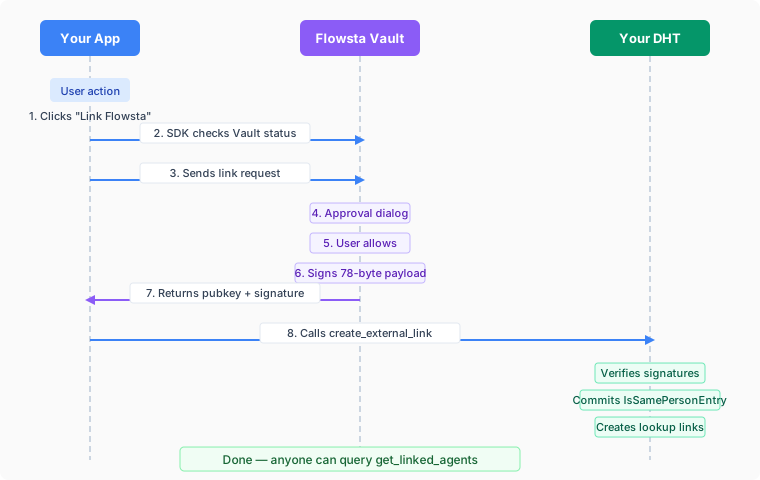
### The 78-Byte Payload
Vault constructs the signing payload itself (apps cannot influence what gets signed):
| Bytes | Content |
|-------|---------|
| 0-38 | First agent public key (39 bytes: 3-byte prefix + 32-byte key + 4-byte checksum) |
| 39-77 | Second agent public key (39 bytes, same format) |
The two 39-byte Holochain `AgentPubKey`s are sorted lexicographically to produce a canonical 78-byte payload, and both agents sign the raw 78 bytes (no MessagePack encoding). The dual-signature design means:
- The app agent attests "I am the same person as this Vault agent"
- The Vault agent attests "I am the same person as this app agent"
- Anyone can verify both signatures using the public keys in the payload
Because the attestation is a public claim that two keys are one person, **one app agent links to one Flowsta identity**. A second live link from the same app agent to a different identity would claim that two people are one; the zome refuses it, and so does the Vault. See [Identity switching](/vault/identity-switching).
## Prerequisites
1. **Register your app** at [dev.flowsta.com](https://dev.flowsta.com) to get a `client_id`
2. **Add the `flowsta-agent-linking` zomes** to your DNA (see [Integration Guide](#integration-guide))
3. **Install the SDK**: `npm install @flowsta/holochain`
## Quick Start
```typescript
import { linkFlowstaIdentity, getFlowstaIdentity } from '@flowsta/holochain';
import { decodeHashFromBase64 } from '@holochain/client';
// Link identity
const result = await linkFlowstaIdentity({
appName: 'ChessChain',
clientId: 'flowsta_app_abc123...', // from dev.flowsta.com
localAgentPubKey: myAgentKey, // uhCAk... format
});
// The Vault's signature arrives base64-encoded; the zome wants the raw 64 bytes.
const signatureBytes = (b64: string) =>
Uint8Array.from(atob(b64), (c) => c.charCodeAt(0));
// Commit to your DHT
await appWebsocket.callZome({
role_name: 'chess',
zome_name: 'agent_linking',
fn_name: 'create_external_link',
payload: {
external_agent: decodeHashFromBase64(result.payload.vaultAgentPubKey),
external_signature: signatureBytes(result.payload.vaultSignature),
},
});
// Query linked identities
const linked = await getFlowstaIdentity({
appWebsocket,
roleName: 'chess',
agentPubKey: myAgentKey,
});
```
## Integration Guide
### 1. Add zomes to your DNA
Add the [`flowsta-agent-linking`](https://github.com/WeAreFlowsta/flowsta-agent-linking) crates (MIT) to your DNA's integrity and coordinator zomes, pinned to a release tag:
```toml
# integrity Cargo.toml
[dependencies]
flowsta-agent-linking-integrity = { git = "https://github.com/WeAreFlowsta/flowsta-agent-linking", tag = "v0.3.0" }
# coordinator Cargo.toml
[dependencies]
flowsta-agent-linking-coordinator = { git = "https://github.com/WeAreFlowsta/flowsta-agent-linking", tag = "v0.3.0" }
```
Tag `v0.3.0` (integrity 0.2.0, coordinator 0.3.0) targets Holochain 0.6. The crates pin exact HDK versions, so your DNA's `hdi` and `hdk` must be on the same line - `hdi = "=0.7.0"` and `hdk = "=0.6.0"` for this tag. Build with `RUSTFLAGS='--cfg getrandom_backend="custom"' cargo build --release --target wasm32-unknown-unknown`.
Reference them in your `dna.yaml`:
```yaml
integrity:
zomes:
- name: agent_linking_integrity
bundled: ../../target/wasm32-unknown-unknown/release/flowsta_agent_linking_integrity.wasm
coordinator:
zomes:
- name: agent_linking
bundled: ../../target/wasm32-unknown-unknown/release/flowsta_agent_linking_coordinator.wasm
dependencies:
- name: agent_linking_integrity
```
### 2. Install SDK
```bash
npm install @flowsta/holochain
```
### 3. Register your app
Go to [dev.flowsta.com](https://dev.flowsta.com) and create an app to get a `client_id`.
## API Reference
### SDK Functions
| Function | Description |
|----------|-------------|
| `linkFlowstaIdentity(options)` | Request identity link from Vault. Also binds the app to that identity (v3) |
| `getFlowstaIdentity(options)` | Query linked agents on your DHT |
| `getVaultStatus(ipcUrl?)` | Check if Vault is running/unlocked; `did` (v3.6.0), `activeIdentity`, `identityEpoch`, `instanceId` (v3.5.0) |
| `revokeFlowstaIdentity(options)` | Notify Vault of revocation (removes the app from the Vault's connected list; the DHT entry is revoked with `revoke_link`) |
| `getFlowstaLinkStatus(options)` | Check link status - three-state result (`linked`/`unlinked`/`offline`). Recommended. _(v2.3.0)_ |
| `checkFlowstaLinkStatus(options)` | Check if Vault still considers agent linked. **Deprecated** since v2.3.0; use `getFlowstaLinkStatus`. |
| `getVaultIdentity(ipcUrl?)` | The unlocked agent key or `null`, one status read _(v3.4.0)_ |
| `onIdentityChanged(cb, opts?)` | Poll for an identity switch in the Vault; compares the identity epoch on Vault 1.5.0+ _(v3.0.0, epoch v3.5.0)_ |
| `reconnectIdentity(options)` | After a switch: rebind silently when the identity now in the Vault already links this app, else `approval_needed` _(v3.4.0)_ |
| `partitionKeyFor(agentPubKey)` | Folder-safe key to keep one identity's data apart from another's _(v3.3.0)_ |
| `resolveVaultUrl(ipcUrl?)` | Probe ports 27777-27779 in parallel and pick the best Vault _(v3.0.0, parallel since v3.4.0)_ |
The full list, with the backup and signing functions, is on the [SDK page](/sdk/holochain#function-reference).
### Zome Functions
These are the Holochain zome calls available after adding the `flowsta-agent-linking` zomes to your DNA:
| Function | Input | Output | Description |
|----------|-------|--------|-------------|
| `create_external_link` | `ExternalLinkInput` | `ActionHash` | Commit attestation to DHT. Refuses when the calling agent already holds a live link to a different external agent |
| `get_linked_agents` | `AgentPubKey` | `Vec` | Get all linked agents (non-deleted) |
| `are_agents_linked` | `AgentPair` | `bool` | Check if two agents are linked |
| `revoke_link` | `ActionHash` | `ActionHash` | Revoke a link. Called by the app-side agent on your DHT; the integrity zome rejects a delete by anyone but the two agents named in the entry |
#### ExternalLinkInput
```typescript
{
external_agent: Uint8Array, // 39-byte Holochain AgentPubKey
external_signature: Uint8Array, // 64-byte Ed25519 signature
}
```
`create_external_link` first refuses if your agent already holds a live link to a *different* external agent (linking the same one again is allowed - reinstall, restore; `revoke_link` the old entry to move an agent on purpose). It then verifies the external agent's signature over the 78-byte payload, adds a local signature from your app's agent key, commits the `IsSamePersonEntry` with both signatures, and creates lookup links for querying.
What the integrity zome enforces on every peer (a modified coordinator cannot get around it): an entry carries two different keys in canonical order, its author is one of them, and both raw Ed25519 signatures verify over the sorted 78-byte pair; only one of the two agents can delete (revoke) it; a lookup link must start from one of the two agents and be written by one of them. The "one agent, one external identity" refusal is a coordinator rule, since it has to read the DHT.
## Error Handling
| Error | Cause | Suggested UX |
|-------|-------|--------------|
| `VaultNotFoundError` | Vault not running or not installed | "Install or start Flowsta Vault" |
| `VaultBlockedError` _(v3.1.0)_ | The browser refused the loopback request (Chrome 142+ Local Network Access permission); the Vault may be running | "Allow local network access for this site in the browser" |
| `VaultLockedError` | Vault is locked (password required) | "Please unlock your Flowsta Vault" |
| `UserDeniedError` | User rejected the approval dialog | "Identity linking canceled" |
| `InvalidClientIdError` | `client_id` not registered, disabled, or invalid | Developer error - check registration |
| `MissingClientIdError` | No `client_id` provided | Developer error |
| `ApiUnreachableError` | Can't reach Flowsta API to verify app (the first link needs internet) | "Check internet connection" |
| `IdentityMismatchError` _(v3.0.0)_ | Thrown by later calls (backups, `signDocument`, `authenticateWithVault`) when the Vault holds a different identity than the one this app linked with | Stop. "Your Vault is signed in as someone else" - offer switch back / open as / disconnect, never re-link |
| `FlowstaHolochainError` with `code: 'agent_linked_elsewhere'` | Vault 1.5.0+ answered `409`: another identity in this Vault already links this app agent | Show `error.description` (it names the identity); the person opens the app as that identity or disconnects it there |
| `FlowstaHolochainError` with `code: 'timeout'` | The user did not answer the Vault dialog within 60 seconds (`408`) | "No answer from the Vault - try again" |
## Data Backups
Once linked, your app can back up user data to Flowsta Vault's encrypted local storage. Users can view, export, or delete their backups at any time from the Vault UI.
If your app is licensed under the [Cryptographic Autonomy License (CAL)](https://github.com/holochain/cryptographic-autonomy-license), §4.2.1 requires that users can get a copy of their own data and the keys needed to use it. Flowsta Vault handles the key export - your app just needs to back up the **user's own data** (not the entire DHT).
See the **[Backup functions in the SDK reference](/sdk/holochain#backups)** for implementation details and examples.
## Security
- **User-custodied keys**: Private keys never leave the user's device (Flowsta Vault)
- **Purpose-specific signatures**: Vault computes the signing payload itself, preventing apps from tricking users into signing arbitrary data
- **User approval required**: Every link request shows an approval dialog in Vault
- **Verifiable on-chain**: Anyone on your DHT can verify the attestation using Ed25519 public key cryptography
- **One app agent, one identity**: A second attestation from the same agent to another identity is a public claim that two people are one - the zome and the Vault both refuse it
- **Revocable**: The app-side agent can revoke a link on your DHT at any time (`revoke_link`); `revokeFlowstaIdentity` tells the Vault so the app leaves the user's connected list
- **No shared infrastructure**: Verification requires no API calls or shared DNAs - no one in between
## Next Steps
- **[Building Holochain Apps](/holochain/build)** - Step-by-step integration guide
- **[Identity Switching](/vault/identity-switching)** - What a linked app does when the Vault holds another identity
- **[SDK Reference](/sdk/holochain)** - Full `@flowsta/holochain` documentation
- **[Backup Guide](/sdk/holochain#backups)** - CAL-compliant data backups
- **[IPC Endpoints](/vault/ipc-reference)** - Raw IPC API for custom implementations
- **[Holochain Architecture](/holochain/architecture)** - How Flowsta's Holochain infrastructure works
---
# Identity Switching
URL: https://docs.flowsta.com/vault/identity-switching
# Identity Switching
**One Vault, several identities, one unlocked at a time - and one rule for every app that links.**
From Flowsta Vault 1.5.0 a person can keep several Flowsta identities in one Vault on one computer. Before that, "this computer" and "this Flowsta identity" were the same thing; now the same computer, the same OS user and the same install of your app can see identity A now and identity B after a switch. Nothing changes in the wire contract. What changes is a question every app has to answer: **what is one app agent attached to?**
## What the switcher is
- The Vault stores each identity in its own partition on disk: its own vault file, keystore, conductor data, linked apps, backups and scopes.
- One identity is unlocked at a time, and one conductor runs at a time. Switching means locking the current identity and unlocking another; the person picks the identity on the Vault's unlock screen.
- The Vault remembers which identity it holds even while locked, and counts every change to that in an **identity epoch**: first setup, a restore of another identity, a switch, and a removal all move it.
- Removing an identity (a reset) leaves the Vault holding no identity at all until one is created or restored. That is not a switch to someone else: there is nobody to act for.
## What your app observes
Everything below comes from `GET /status` on the Vault's IPC server, and the SDK (`@flowsta/holochain` 3.5.0+) surfaces it through `getVaultStatus()`:
| `/status` field | SDK field | Meaning |
|---|---|---|
| `active_identity` | `activeIdentity` | The agent key of the identity the Vault holds - **also while locked**. `null` before any identity is set up or after a removal |
| `agent_pub_key`, `did` | `agentPubKey`, `did` | The unlocked identity's agent key and Permanent ID; absent while locked |
| `identity_epoch` | `identityEpoch` | Counts every identity change on that computer. A→B→A between two reads is still a change |
| `instance_id` | `instanceId` | Identifies the answering Vault process; two Vault copies on different ports (two OS users) have different ids |
| `claims` | - | Relay-login claim nonces from the last two minutes, so a web page can tell which of several Vaults on a computer is this person's. Not needed by desktop apps |
Every response also carries the header `x-flowsta-vault-identity` with the agent key the Vault holds. The full endpoint is in the [IPC reference](/vault/ipc-reference#status).
**Requests that name an identity.** An app bound to an identity sends `expected_identity` with its requests - the SDK does this for you after `linkFlowstaIdentity`, in the POST body of `backupToVault`, `signDocument` and `authenticateWithVault` and in the query string of `getFlowstaLinkStatus` and `listVaultBackups`. A Vault holding a different identity refuses with **`409 identity_mismatch`**; a Vault holding none refuses with `409 identity_unconfirmed`. The check runs again after any unlock or approval wait, so a switch during a dialog cannot slip through.
**What the SDK throws.** `linkFlowstaIdentity` records the identity it linked with ([identity binding](/sdk/holochain#identity-binding-v3)). From then on `backupToVault`, `signDocument` and `authenticateWithVault` throw `IdentityMismatchError` when the Vault is unlocked under a definitely different identity, and `retrieveFromVault` / `restoreFromVault` throw it when the Vault answers 409. Keys are compared by decoding to bytes, so the base64url and base58 spellings of one key never false-mismatch.
**Locked is not a switch.** A locked Vault reports `unlocked: false` and no `agent_pub_key`; calls fail with `VaultLockedError`. On Vault 1.5.0 `active_identity` still names the held identity, so a switch made and then locked is visible; on older Vaults a locked Vault says nothing about who it is.
**Noticing a switch.** `onIdentityChanged(callback)` polls `/status` (there is no push channel to apps) and fires when the identity epoch moves or the held key changes; it is seeded from the bound identity, so an app that opens against a Vault already switched hears about it on the first tick. Correctness never depends on receiving it: every call asserts on its own.
## Required for every Holochain app
These three hold whichever model you pick below.
1. **One app agent links to one Flowsta identity.** The `IsSamePersonEntry` on your DHT is a public claim that two keys are one person. Linking the same app agent to a second identity would claim that two people are one. The zome refuses it (`create_external_link` fails when the agent already holds a live link to a different external agent), and the Vault refuses before showing any dialog when another identity in the same Vault already links that agent: **`409 agent_linked_elsewhere`**, with a description naming the identity ("This app is already connected to *Name* in this Vault. Open the app as that identity, or disconnect it there first."). The SDK surfaces it as a `FlowstaHolochainError` with `code === 'agent_linked_elsewhere'`. Linking the same agent to the same identity again is fine (reinstall, restore).
2. **A mismatch is a stop.** When the Vault holds a different identity than the one your app linked with, show it ("Your Vault is signed in as someone else") and offer only: switch the Vault back, open the app as the identity the Vault holds now (Model 2), or disconnect. Never catch `IdentityMismatchError` and call `linkFlowstaIdentity` again to carry on - that is the double attestation the rule above exists to prevent.
3. **Key data by identity.** Anything your app stores for a person is named by `partitionKeyFor(agentPubKey)` (SDK 3.3.0): the first 16 hex characters of SHA-256 over the agent key's 39 raw bytes, the same for both spellings of a key, and the same key the Vault, ProofPoll and Your Own AI use for their own per-identity folders. The agent key itself never appears in a folder or database name.
## Model 1: one agent per install, bound to one identity
The SDK 3 default, and correct without changes. Your app has one Holochain agent; `linkFlowstaIdentity` binds it to the identity it linked with; every write-shaped call refuses under another identity.
**What the person experiences.** They link your app as identity A and use it. They switch their Vault to B. Your app keeps running, but every Vault-backed action - backups, signing, sign-in - now fails with `IdentityMismatchError`, and the Vault's own 409 stops anything that goes around the SDK. The app works for nobody until they switch the Vault back to A, or disconnect. If your app also keeps per-identity profiles (Model 2) it can offer "open as this identity" instead; a pure Model 1 app has nothing to offer but those two.
```typescript
import {
getVaultStatus, getBoundIdentity, agentKeysMatch, onIdentityChanged,
} from '@flowsta/holochain';
// On launch: is the Vault holding the identity this install linked with?
const status = await getVaultStatus();
const bound = getBoundIdentity();
const held = status.activeIdentity ?? (status.unlocked ? status.agentPubKey : undefined);
if (bound && held && agentKeysMatch(bound, held) === false) {
showMismatchBanner(); // switch back, or disconnect - never link again
}
// While running: react before a call refuses (UX only - every call asserts on its own)
const stop = onIdentityChanged(() => {
showMismatchBanner();
});
```
Valid for apps that are one-person-per-computer by nature. What Model 1 must never do is the naive path: catch the mismatch, link again, carry on.
## Model 2: one agent per identity
The app keeps one profile per Flowsta identity, named by `partitionKeyFor(agentPubKey)`: its own agent key store, conductor data, records, link file and binding. At launch it opens the profile of the identity the Vault holds (`activeIdentity` - readable even while the Vault is locked, so the right profile opens before the unlock). On a switch it stops acting for the old identity and offers **Open as this identity** - a restart into the other profile - or **Disconnect**. No entry is ever attested twice, and switching back finds everything where it was.
This is the model for any app that wants a household or a shared computer to work. It needs the app to own its conductor (the Tauri/Electron desktop pattern): a web page talking to a hosted conductor has no profile to switch. [ProofPoll](https://github.com/WeAreFlowsta/ProofPoll) 0.4.x and Your Own AI 0.8.x are built this way; both keep a `profiles//` folder per identity, poll the Vault's status from their Rust side, pause backups and other Vault-backed work the moment the identity differs, and offer the restart. Nothing is swapped in place: the old identity's profile is left as it was.
**What the person experiences.** They use the app as A, switch the Vault to B, and the app shows a banner: "Your Vault is signed in as someone else - open the app as this identity, or switch your Vault back." "Open as this identity" restarts the app into B's profile. If B has used this app before, everything of B's is there; if not, B sees a fresh app and the first Vault-backed action asks B to link it (a normal approval dialog in the Vault, under B). Switching the Vault back to A and restarting returns A's data untouched.
The SDK helpers that carry the restart:
```typescript
import {
onIdentityChanged, reconnectIdentity, linkFlowstaIdentity, partitionKeyFor,
} from '@flowsta/holochain';
// 1. Notice the switch (epoch-based on Vault 1.5.0)
const stop = onIdentityChanged(async (next) => {
pauseVaultBackedWork(); // backups, signing, sign-in
const folder = await partitionKeyFor(next);
offerRestartInto(folder); // "Open as this identity" / "Disconnect"
});
// 2. After the restart, in the profile the app opened (its own agent key):
const outcome = await reconnectIdentity({ clientId, localAgentPubKey: thisProfileAgentKey });
switch (outcome.state) {
case 'reconnected':
// This identity already links this app - the binding is restored silently.
break;
case 'approval_needed':
// A stranger to this identity: run the normal ceremony under it.
await linkFlowstaIdentity({ appName, clientId, localAgentPubKey: thisProfileAgentKey });
break;
case 'locked':
case 'offline':
// Leave the binding alone; try again when the Vault is back.
break;
}
```
`reconnectIdentity` rebinds only when the Vault says this profile's agent is already linked under the identity it holds - the person consented before. `approval_needed` means the Vault has no link for that agent under that identity, so the full approval dialog runs. In Model 1 there is no other profile to open, so `approval_needed` is a stop, not a prompt to link.
## Optional
None of these change the rule; each is a few lines once the profiles exist.
- **Backups** - the Vault stores backups per identity, and `backupToVault` sends `expected_identity`, so a profile can only ever write its own identity's backup. `restoreFromVault` under the wrong identity throws `IdentityMismatchError` rather than replaying someone else's data.
- **Private data** - encrypted entries and local caches live inside the profile folder, so one identity's private data never mixes with another's.
- **Sign It in-app** - `signDocument` (SDK 3.6.0) publishes to the Sign It network when the app is linked under the identity the Vault holds; under a different one it throws `IdentityMismatchError` before the dialog.
- **Email scope** - `authenticateWithVault(nonce, { clientId, scopes: ['email'] })` asks for the verified email of the identity signing in.
## Next Steps
- **[Building Holochain Apps](/holochain/build)** - The link ceremony, step by step
- **[Agent Linking](/holochain/agent-linking)** - Why one attestation per agent
- **[@flowsta/holochain SDK](/sdk/holochain#identity-binding-v3)** - Identity binding, `onIdentityChanged`, `reconnectIdentity`, `partitionKeyFor`
- **[IPC Endpoints](/vault/ipc-reference#status)** - `active_identity`, `identity_epoch`, `expected_identity` and the 409 answers
---
# @flowsta/holochain SDK
URL: https://docs.flowsta.com/sdk/holochain
# @flowsta/holochain
**SDK for integrating Holochain apps with Flowsta Vault.**
`@flowsta/holochain` provides functions for agent identity linking, Vault sign-in, document signing, and CAL-compliant backups. It wraps Flowsta Vault's [IPC endpoints](/vault/ipc-reference) into a simple TypeScript API.
Current version: **3.6.1**. v3 is a breaking release - error states no longer read as "no data"; see [Migrating to v3](https://github.com/WeAreFlowsta/flowsta-sdk/tree/main/packages/holochain#migrating-to-v3) and the notes through this page.
::: info What changed in 3.4 - 3.6
- **3.6.0** - `signDocument` **publishes** the signature to the Sign It network for a linked app (new `publish` option, defaults to `true` when the app is [bound](#identity-binding-v3); new `published` result field; new `PublishForbiddenError` and `QuotaExceededError`). Before 3.6.0 the SDK never asked the Vault to publish, so every SDK-made signature stayed local with `actionHash: null`. The backup label default `latest` is now really applied when you omit `label` (`backupToVault`, `retrieveFromVault`, `restoreFromVault`, `startAutoBackup`). `getVaultStatus` returns `did`. `SigningDnaNotInstalledError` is deprecated - the Vault never emits that code.
- **3.5.0** - pairs with Vault 1.5.0 (the identity switcher): `getVaultStatus` returns `activeIdentity`, `identityEpoch`, `instanceId`; `onIdentityChanged` compares epochs; the GET calls send `expected_identity` too; the resolver prefers a locked Vault holding *your* identity over an unlocked one holding someone else's.
- **3.4.0** - the resolver probes all three ports in parallel on every call and ranks the answers; `signDocument` and `authenticateWithVault` send `expected_identity`; new `getVaultIdentity()` and `reconnectIdentity()`; `onIdentityChanged` starts from the bound identity.
:::
## Installation
```bash
npm install @flowsta/holochain
```
## Agent Linking
### linkFlowstaIdentity
Request an identity link from the user's Flowsta Vault:
```typescript
import { linkFlowstaIdentity } from '@flowsta/holochain';
import { decodeHashFromBase64 } from '@holochain/client';
// The Vault returns a standard-base64 Ed25519 signature; the zome wants its 64 bytes.
const base64ToSignature = (b64: string): Uint8Array =>
Uint8Array.from(atob(b64), (c) => c.charCodeAt(0));
const result = await linkFlowstaIdentity({
appName: 'ChessChain',
clientId: 'flowsta_app_abc123',
localAgentPubKey: myAgentKey, // uhCAk... format
});
// Commit to your DHT
await appWebsocket.callZome({
role_name: 'my-role',
zome_name: 'agent_linking',
fn_name: 'create_external_link',
payload: {
external_agent: decodeHashFromBase64(result.payload.vaultAgentPubKey),
external_signature: base64ToSignature(result.payload.vaultSignature),
},
});
```
::: tip Linking also binds (v3) {#identity-binding-v3}
On success, `linkFlowstaIdentity` records the Vault identity it linked with (persisted in `localStorage` where available, with an in-memory fallback). From then on the write-shaped calls - `backupToVault`, `signDocument`, `authenticateWithVault` - throw `IdentityMismatchError` when the Vault present is DEFINITELY a different identity; reads rely on the Vault's own 409 answer. Apps that manage links themselves can call `bindVaultIdentity(agentPubKey)` / `getBoundIdentity()` / `clearBoundIdentity()` directly, `agentKeysMatch(a, b)` compares keys across their base64url and base58 encodings (`null` = can't compare - refusal requires certainty), and `onIdentityChanged(cb)` polls for identity switches so your UI can react before a call refuses (see [After an identity switch](#after-an-identity-switch)). The binding is one slot per origin - the identity your app operates under now, overwritten by the next `linkFlowstaIdentity`. If your app keeps data for more than one Flowsta identity on the same device or origin, name that storage with `partitionKeyFor(agentPubKey)` (v3.3.0): the first 16 hex characters of SHA-256 over the agent key's raw bytes, the same for both spellings of a key and the same key the Flowsta Vault and Flowsta's own apps use for their per-identity folders, so the agent key itself never appears in a folder or database name.
:::
::: tip The SDK finds the Vault (v3; parallel probe since 3.4.0)
With no `ipcUrl`, every call probes `127.0.0.1:27777`, `27778` and `27779` **in parallel** and picks the best Vault that answered (`resolveVaultUrl` is exported): unlocked under the identity this app is bound to, then holding the bound identity while locked (Vault 1.5.0 names its identity even locked - 3.5.0), then any unlocked Vault, then any initialized one, then any answer; ties go to the lower port. So a locked Vault, or another user account's Vault, on 27777 no longer hides yours on 27778, and on a shared computer a locked Vault that is *yours* outranks an unlocked one that is not. When nothing answers, the last URL that did (or port 27777) is returned and the call reports its own not-found semantics. An explicit `ipcUrl` is used verbatim.
:::
### getFlowstaIdentity
Query linked agents on your DHT. Returns an array of linked agent public keys (as raw bytes):
```typescript
import { getFlowstaIdentity } from '@flowsta/holochain';
const linkedAgents = await getFlowstaIdentity({
appWebsocket,
roleName: 'my-role',
zomeName: 'agent_linking', // optional; this is the default
agentPubKey: someAgentKey, // Uint8Array from @holochain/client
});
// linkedAgents is Uint8Array[] - array of linked agent public keys
if (linkedAgents.length > 0) {
console.log(`Linked to ${linkedAgents.length} Flowsta identities`);
}
```
### getVaultStatus
Check if Vault is running and unlocked. Returns a `VaultStatus`. From v2.3.0 the result also
carries `displayName` and `profilePicture` for the currently-unlocked
identity; from v2.4.1 it also carries `webUsername` (the unique global
username the user claimed at flowsta.com). Renders "Signed in as
<Name>" chips without an extra request, no signup form, no
avatar upload:
```typescript
import { getVaultStatus } from '@flowsta/holochain';
const status = await getVaultStatus();
// {
// running: boolean,
// unlocked: boolean,
// blocked?: boolean, // v3.1.0: the BROWSER refused the loopback request
// agentPubKey?: string, // only while unlocked
// did?: string, // v3.6.0: did:flowsta:, only while unlocked
// activeIdentity?: string, // v3.5.0 + Vault 1.5.0: the identity the Vault holds, unlocked OR locked
// identityEpoch?: number, // v3.5.0 + Vault 1.5.0: counts every identity change on that device
// instanceId?: string, // v3.5.0 + Vault 1.5.0: the answering Vault process (changes on restart)
// displayName?: string, // v2.3.0+, scope-gated
// profilePicture?: string, // v2.3.0+, scope-gated
// webUsername?: string, // v2.4.1+, scope-gated
// email?: string, // v3.2.0 + Vault 1.3.0: only after the user allowed it in a Vault dialog
// emailVerified?: boolean, // v3.2.0: always true alongside email
// version?: string,
// }
```
Older Vaults omit `activeIdentity`, `identityEpoch` and `instanceId`. `activeIdentity` is how you tell "locked, but still my identity" from "locked, someone else" before any unlock; `identityEpoch` never repeats a past value, so A→B→A between two reads still shows as a change.
::: warning `blocked` is not "not running" (v3.1.0)
Chrome 142+ asks the person before a public page may reach `127.0.0.1`; if they decline, every Vault call fails exactly like an absent Vault. `getVaultStatus()` reports `blocked: true` in that case, and `signDocument` / `authenticateWithVault` throw `VaultBlockedError` instead of `VaultNotFoundError`. The backup and link calls (`backupToVault`, `retrieveFromVault`, `linkFlowstaIdentity`) still report `VaultNotFoundError` when the browser blocks the request - check `getVaultStatus().blocked` first where that matters. Show the browser's settings path or offer relay login - don't tell them to install a Vault they have. `loopbackPermissionState()` is exported if you want to explain the prompt before it appears.
:::
::: tip Scope gating
The `displayName`, `profilePicture`, and `webUsername` fields are only populated when your app's `client_id` has the matching scope (`display_name`, `profile_picture`, `username`) configured at [dev.flowsta.com](https://dev.flowsta.com) AND the user approved that scope at link time. If a scope isn't granted, the field is `undefined` regardless of whether the Vault identity has the value set.
`email` (v3.2.0, Vault 1.3.0+) is stricter: the `email` scope alone does not populate it. The user has to allow it in a Vault dialog - request it on [`authenticateWithVault`](#authenticatewithvault) with `scopes: ['email']` - and only a verified address is ever shared. Your app receives it as text it can keep, and the user is told exactly that; if they later stop sharing in the Vault's Connections page, the field disappears for future reads (it does not unsend).
:::
### revokeFlowstaIdentity
Notify Vault that a link has been revoked. Best-effort - if Vault is not running, returns `{ success: false }` without throwing. It is also `false` when the Vault refuses: the Vault accepts a revocation only from a Flowsta page or from the linked app revoking **its own** link (the calling origin must be the one that linked this agent key), and answers `403 forbidden` to anyone else. Revoke from the same origin you linked from:
```typescript
import { revokeFlowstaIdentity } from '@flowsta/holochain';
await revokeFlowstaIdentity({
appName: 'ChessChain',
localAgentPubKey: myAgentKey, // uhCAk... format
});
```
### getFlowstaLinkStatus
Added in v2.3.0. The recommended way to check whether Vault still
recognizes your app's agent. Returns a three-state shape that
distinguishes "Vault running but agent not linked" from "Vault not
running" - they look the same to a boolean but want very different
UX responses.
```typescript
import { getFlowstaLinkStatus } from '@flowsta/holochain';
const status = await getFlowstaLinkStatus({
clientId: 'flowsta_app_abc123',
localAgentPubKey: myAgentKey, // uhCAk... format
});
switch (status.state) {
case 'linked':
// Vault is running and recognizes this app's agent. Full access.
// status.appName is the display name Vault has on file for your app.
break;
case 'unlinked':
// Vault is running but does NOT recognize this app's agent - the
// user unlinked from Vault's UI, switched Flowsta identities,
// restored Vault from a different recovery phrase, or RESET Vault
// (a full erase clears all app links - so this also fires after a
// reset even when the user reconnects with the SAME recovery
// phrase: the identity is unchanged but the link must be re-made).
// Re-link to restore it (see the two patterns below). Do NOT
// auto-revoke - past data attributed to the local agent stays the
// user's either way.
break;
case 'offline':
// Vault not reachable. Trust local link state as authoritative -
// the Vault may simply be closed.
break;
}
```
**Re-linking patterns.** When state is `unlinked`, re-link to restore the
connection (which re-establishes the app in Vault's connected-apps list).
Two patterns are in use, both valid - pick by how proactive your app should
be. Either way, **never silently revoke**: apps that collapsed link status
to a boolean and auto-revoked frustrated users who had simply closed Vault
briefly.
- **Reconnect banner (user-initiated).** Render a top-of-page banner when
state is `unlinked`, offering "Reconnect" (re-link with the current Vault)
or "Disconnect" (deliberately revoke). No surprise dialog - the user
chooses when. Best when the app keeps working without the link.
- **Auto re-link on launch.** On startup, if the app has a session but
`getFlowstaLinkStatus` returns `unlinked`, re-link immediately (Vault shows
its normal approval dialog). Keeps Vault's connected-apps list accurate
without the user hunting for a banner. Retry briefly so a Vault unlocked
shortly after launch still reconnects. Best when you want the connection
always reflected in Vault.
ProofPoll is the reference for the **banner** pattern - see
[ProofPoll/src/lib/context.ts](https://github.com/WeAreFlowsta/ProofPoll/blob/main/src/lib/context.ts)
and [ProofPoll/src/routes/layout.tsx](https://github.com/WeAreFlowsta/ProofPoll/blob/main/src/routes/layout.tsx)
for the layout-level banner + grayed-out profile chip. Your Own AI uses the
**auto re-link on launch** pattern.
### checkFlowstaLinkStatus
> ⚠️ **Deprecated since v2.3.0** - use `getFlowstaLinkStatus` instead. The boolean shape conflates "Vault not running" with "agent genuinely unlinked", which leads to silent auto-revoke when the Vault is simply closed. Kept for backwards compatibility.
```typescript
import { checkFlowstaLinkStatus } from '@flowsta/holochain';
const status = await checkFlowstaLinkStatus({
clientId: 'flowsta_app_abc123',
localAgentPubKey: myAgentKey, // uhCAk... format
});
if (status.linked) {
console.log('App name:', status.appName);
}
```
### After an identity switch {#after-an-identity-switch}
A Vault 1.5.0 can hold several identities and switch between them while your app is open. Three helpers cover it; correctness never depends on them, because every write-shaped call asserts the [bound identity](#identity-binding-v3) on its own.
**`getVaultIdentity(ipcUrl?)`** _(3.4.0)_ - the agent key of the identity that is unlocked right now, or `null` when the Vault is locked, absent, or blocked by the browser. One status read.
**`onIdentityChanged(callback, options?)`** _(3.0.0)_ - polls `/status` (there is no push channel to apps) and calls `callback(next, previous)` when the identity changes; returns a stop function. `options` is `{ ipcUrl?, intervalMs? }`, `intervalMs` defaults to `5000`. It starts from the bound identity (3.4.0), so an app that opens against a Vault already switched to another identity hears about it on the first tick. Against Vault 1.5.0 it compares `identityEpoch` (3.5.0): A→B→A between two polls is still reported, and a switch is seen through a locked Vault; against older Vaults it compares the unlocked agent key, and a locked Vault is not a change. An unreachable Vault is never a change.
**`reconnectIdentity({ clientId, localAgentPubKey, ipcUrl? })`** _(3.4.0)_ - after a switch, decides between a silent rebind and the full ceremony. Pass the local agent key of the profile your app has swapped to. Returns a `ReconnectIdentityResult`:
| `state` | Meaning | What to do |
|---|---|---|
| `reconnected` | The identity now in the Vault already holds a link for this app (the person consented before); the binding was updated. Carries `agentPubKey` and `appName` | Carry on |
| `approval_needed` | The Vault is unlocked under an identity that has no link for this app. Carries `agentPubKey` | Run `linkFlowstaIdentity` (the normal approval dialog) |
| `locked` | The Vault is locked; the binding was left alone | Wait, or ask the user to unlock |
| `offline` | No Vault reachable; the binding was left alone | Keep local state, retry later |
```typescript
import { onIdentityChanged, reconnectIdentity, linkFlowstaIdentity, partitionKeyFor } from '@flowsta/holochain';
const stop = onIdentityChanged(async (next, previous) => {
// Point storage at the identity's own partition (never the key itself).
const partition = await partitionKeyFor(next);
await openDatabase(`chesschain-${partition}`);
const outcome = await reconnectIdentity({ clientId, localAgentPubKey: myAgentKeyFor(partition) });
if (outcome.state === 'approval_needed') {
await linkFlowstaIdentity({ appName: 'ChessChain', clientId, localAgentPubKey: myAgentKeyFor(partition) });
}
});
// later: stop();
```
`partitionKeyFor(agentPubKey)` _(3.3.0)_ returns the first `PARTITION_KEY_LENGTH` (16) hex characters of SHA-256 over the agent key's 39 raw bytes, `null` when the string is not an agent key; it needs Web Crypto (`crypto.subtle`: every browser, Node 19+) and throws `FlowstaHolochainError` (code `no_crypto`) without it.
## Sign It - Document Signing
Added in v2.2.0. Ask the Vault to sign a file hash on the user's behalf - the user approves each request in Vault. Since **3.6.0** a linked app's signature is also **published** to the Sign It network from the person's own device, so anyone can verify the file.
### signDocument
```typescript
import { signDocument } from '@flowsta/holochain';
const result = await signDocument({
clientId: 'flowsta_app_abc123',
appName: 'ArtStudio',
fileHash: sha256Hex, // 64 hex characters
label: 'Illustration.png', // shown in the approval dialog
intent: 'authorship', // 'authorship' | 'approval' | 'witness' | 'receipt' | 'agreement'
aiGeneration: 'none', // 'none' | 'assisted' | 'generated'
contentRights: {
license: 'cc-by',
commercialLicensing: 'open_to_licensing', // 'not_available' | 'open_to_licensing'
aiTraining: 'not_allowed', // 'allowed' | 'allowed_with_attribution' | 'requires_license' | 'not_allowed'
contactPreference: 'allow_contact_requests', // 'no_contact' | 'allow_contact_requests'
},
// publish: true, // default: true when this app is bound (linked), false otherwise
});
// result: SignDocumentResult
// { success, fileHash, signature, agentPubKey, signedAt, actionHash: string | null, published: boolean }
```
`SignDocumentOptions` is `{ clientId, appName, fileHash, label?, intent?, aiGeneration?, contentRights?, publish?, ipcUrl? }`. `contentRights` is camelCase here and mapped to the bridge's snake_case fields for you.
**Who may sign, who may publish.** Any app may request a signature - the user approves each one, and the dialog names the app. **Publishing** is allowed for Flowsta pages and **linked apps** only. `publish` therefore defaults to `true` when the app is [bound](#identity-binding-v3) (it linked through `linkFlowstaIdentity`) and `false` otherwise. A signature made without publishing is returned to your app (`actionHash: null`, `published: false`) but is not on the network and cannot be verified by anyone else; a published one carries the hex `actionHash` of the record. Every publish draws on the person's signing quota (or the [sponsor pool](/vault/ipc-reference#sponsored-signing) when your organization sponsors signing), and the dialog says so.
Throws `VaultBlockedError` (3.1.0), `VaultNotFoundError`, `VaultLockedError`, `UserDeniedError`, `PublishForbiddenError` (3.6.0 - publishing asked for by an app that is not linked; link first, or pass `publish: false`), `QuotaExceededError` (3.6.0 - the period's quota is used up), `IdentityMismatchError` (the Vault holds a different identity than the bound one), or `FlowstaHolochainError` (code `'timeout'` after ~70 s without an answer).
### getSigningStatus
`getSigningStatus(ipcUrl?)` returns `{ available, vaultRunning, vaultUnlocked }` - a lightweight check before rendering a "Sign with Flowsta" button; it does not prompt the user. `available` is `true` when a Vault is running and unlocked.
Full parameter and response tables: [Sign It SDK Reference](/sign-it/sdk-reference#flowsta-holochain-desktop-app-signing). The raw endpoint is [`POST /sign-document`](/vault/ipc-reference#post-sign-document).
## Sign In with Your Vault
Let users prove who they are with the key on their own device - no shared secret for your app to store, no one in between. Your backend issues a challenge, the user approves in their Vault, and the Vault signs the challenge with the user's device key. Two flows cover every environment.
### authenticateWithVault
Sign a challenge through the local Vault's IPC server. Browser-safe: plain `fetch`, no dependencies. The user approves in a Vault dialog (~60 seconds; the SDK waits up to 125 s so a locked Vault can be unlocked first).
The Vault refuses to sign any challenge that starts with `flowsta-` (`reserved_prefix`) unless the caller is a Flowsta page - that prefix belongs to Flowsta's own sign-in protocols, and `POST /auth/vault/challenge` always issues one. So the two flows differ in **who mints the challenge**:
**Your app (any origin): your own challenge, verified by your backend.** Mint a random nonce server-side, have the Vault sign it, and verify the Ed25519 signature yourself. The agent key is `u` + base64url (no padding) of 39 bytes; bytes 3..35 are the raw Ed25519 public key.
```typescript
import { authenticateWithVault } from '@flowsta/holochain';
// 1. Your backend mints a random, single-use challenge (never 'flowsta-' prefixed)
const { challenge } = await fetch('https://api.chesschain.example/auth/challenge', { method: 'POST' })
.then((r) => r.json()); // e.g. "chesschain-login:4f2a…" (32+ random bytes, hex)
// 2. The Vault signs it - the user approves in a dialog
const result = await authenticateWithVault(challenge, {
appName: 'ChessChain',
reason: 'Sign in to ChessChain',
clientId: YOUR_CLIENT_ID, // v3.2.0: needed for scopes
scopes: ['email'], // v3.2.0: ask for the email in the same dialog
});
// { signature: string, agentPubKey: string, did: string, email?: string, emailVerified?: boolean }
// 3. Your backend verifies and opens a session
await fetch('https://api.chesschain.example/auth/verify', {
method: 'POST',
headers: { 'Content-Type': 'application/json' },
body: JSON.stringify({ challenge, signature: result.signature, agent_pub_key: result.agentPubKey }),
});
```
```typescript
// Backend (Node 19+): verify the Vault's signature over the challenge's UTF-8 bytes
import { webcrypto } from 'node:crypto';
async function verifyVaultSignature(challenge: string, signatureB64: string, agentPubKey: string) {
const raw = Buffer.from(agentPubKey.slice(1), 'base64url'); // 39 bytes
if (raw.length !== 39) return false;
const key = await webcrypto.subtle.importKey('raw', raw.subarray(3, 35), { name: 'Ed25519' }, false, ['verify']);
return webcrypto.subtle.verify('Ed25519', key, Buffer.from(signatureB64, 'base64'), Buffer.from(challenge, 'utf8'));
}
```
Check that the challenge is one you issued, unused, and recent; the `agentPubKey` that verifies is the user's identity - match it against the key your app linked to, or against `did` (`did:flowsta:`).
**Flowsta's own pages: the API challenge.** Pages on `https://*.flowsta.com` fetch `POST /auth/vault/challenge`, pass the `flowsta-auth-challenge:v1:…` string to `authenticateWithVault` exactly as issued, and exchange the result at `POST /auth/vault/token`. That flow is first-party only - from any other origin the Vault answers `reserved_prefix` at step 2.
Options (all optional): `{ ipcUrl?, appName?, reason?, clientId?, scopes? }` (`AuthenticateWithVaultOptions`). With `clientId` and `scopes: ['email']` (v3.2.0, Vault 1.3.0+) the Vault's dialog shows the user the address that will be shared and says your app receives it as text it can keep; if they allow, `email` and `emailVerified: true` come back. The Vault records the grant (so later sign-ins auto-approve) and files it with Flowsta only when your origin is linked to that `clientId`; an unlinked origin gets the address for this sign-in only. Scopes your app is not registered for at dev.flowsta.com are ignored, an unverified email is never offered, and a site the user chose to remember still sees the dialog the first time it asks for email. The result is an `AuthenticateWithVaultResult`: `{ signature, agentPubKey, did, email?, emailVerified? }`. Throws `VaultBlockedError` (v3.1.0 - the browser refused the loopback request), `VaultNotFoundError`, `VaultLockedError`, `UserDeniedError`, `IdentityMismatchError` (v3 - the Vault holds a different identity than the one this app is [bound to](#identity-binding-v3)), or `FlowstaHolochainError` (code `'timeout'` if the user doesn't respond; `'reserved_prefix'` for a `flowsta-` challenge from a non-Flowsta origin).
::: warning Pass the challenge verbatim, and mind the browser
Pass the challenge string exactly as your backend issued it - the SDK handles the encoding the Vault expects internally (it signs the string's UTF-8 bytes); re-encoding or trimming it yourself will make verification fail. Also note this flow reaches the Vault at `http://127.0.0.1`. Firefox and Chromium-based browsers (and desktop apps) permit that from HTTPS pages - Chrome 142+ asks the person for a Local Network Access permission first; a denied permission surfaces as `VaultBlockedError` (v3.1.0) - say so, rather than "install the Vault". Safari blocks the loopback as mixed content and Brave blocks it silently unless the site is on Brave's allowlist; on those, and on phones, use the relay login below.
:::
Building a desktop app? See [Sign in with your Vault for Tauri apps](/desktop/) for the full desktop flow.
### startRelayLogin + openVaultDeepLink
Relay login covers browsers that can't reach a local Vault over loopback: phones (no Vault on the device), Safari, and Brave on desktop. The browser and the user's desktop Vault meet at the Flowsta API:
1. `startRelayLogin()` mints a short user code (formatted `XXXX-XXXX`).
2. Show the code. On a phone, the user types it into their desktop Vault. On Safari or Brave desktop, call `openVaultDeepLink(userCode)` to hand it to the Vault via the `flowsta://` protocol - and **always render the typed-code fallback too**, because deep-link success is not detectable from the page.
3. The user approves in their Vault; polling resolves with the session.
```typescript
import { startRelayLogin, openVaultDeepLink } from '@flowsta/holochain';
const session = await startRelayLogin('https://auth-api.flowsta.com');
showCode(session.userCode); // e.g. "7GK2-M4QX", expires in session.expiresIn seconds
// Desktop Safari/Brave: also try the deep link (fire-and-forget)
openVaultDeepLink(session.userCode);
// Poll every 2-3 seconds
const timer = setInterval(async () => {
const result = await session.poll();
// result: { status: 'pending' | 'claimed' | 'approved' | 'denied' | 'expired', token?, user? }
if (result.status === 'approved') {
clearInterval(timer);
saveSession(result.token, result.user); // token is returned exactly once
} else if (result.status === 'denied' || result.status === 'expired') {
clearInterval(timer);
showRetry(result.status);
}
}, 2500);
```
`startRelayLogin` returns a `RelayLoginSession` (`{ userCode, expiresIn, poll }`); `poll()` resolves a `RelayPollResult` (`{ status: RelayStatus, token?, user? }`). `RelayPollResult.token` is present exactly once, when `status === 'approved'` - store it immediately; a later poll returns `'expired'`. The optional `clientLabel` on `startRelayLogin` is a short display label bound into the signed challenge (max 64 chars), **not** an OAuth `client_id`. `openVaultDeepLink` opens `flowsta://relay/v1?code=…`; see [`flowsta://` URLs](/vault/ipc-reference#flowsta-urls).
## Backups
Flowsta Vault provides encrypted local storage for app data backups. With the canonical-shape pipeline (v2.4.0+), the SDK and Vault together give you:
- **Automatic encrypted backups** of your users' Holochain data, written after every change.
- **One-click reinstall recovery** - when a user reinstalls, the SDK walks the backup and replays each entry via a small dispatcher you write; shared-DHT apps instead [adopt their escrowed agent seed](#seed-adoption-shared-dht-apps) and continue as the same author.
- **[CAL §4.2.1](https://github.com/holochain/cryptographic-autonomy-license)-compliant user data export** - the Vault's **Export** (Your Data page) produces a portable JSON file with the user's cryptographic keys + their data in plain English. The export every CAL-licensed Holochain app is obliged to provide; you write nothing.
Users view, export, and delete their backups from the Vault's **Your Data** page at any time.
::: tip Backups work while the Vault is locked
As of `@flowsta/holochain` v2.1.0, backups can be stored and retrieved even when the Vault is locked - as long as it has been unlocked at least once in the current session. Listing (`listVaultBackups`) and deleting need the Vault **unlocked**; locked, `listVaultBackups` returns empty stats.
:::
### Choose your recovery model
Backup and restore are not one-size-fits-all - the right shape depends on where your data's durability comes from. All three models use the same Vault pipeline and canonical payload, so you can start small and add more later without changing what your users see.
| Your data lives | Durability comes from | You back up | Restore works by |
|---|---|---|---|
| On a **shared DHT** (many users, one network) | The network - peers keep replicating entries | The canonical payload (feeds the CAL export), plus the app's agent seed in [`app_keys`](#cal-complete-backups) | **Recognition + seed adoption** - the app [adopts the escrowed seed](#seed-adoption-shared-dht-apps) and continues as the **same author**; published data re-syncs from the DHT. Nothing is replayed. |
| On a **per-user DHT** (each user is their own network) or authored by a single agent | The Vault backup - the user's own devices are usually the only peers | The canonical payload with `human_readable` + `raw_record` per record | **Replay** - walk the backup and re-commit each record via your zome functions ([`restoreFromVault`](#restorefromvault) or your own walker). New action hashes are minted; remap any stored references. |
| **Outside Holochain** (settings, local encrypted files, images) | The Vault backup | [Extension blocks](#non-holochain-data-extension-blocks) on the same payload | **File restore** - read the block back, write the file or settings when absent locally |
Real apps mix models. [ProofPoll](https://github.com/WeAreFlowsta/ProofPoll) is recognition plus seed adoption (shared polls DHT; its agent seed rides `app_keys`, so a restore continues as the same author). [Your Own AI](https://github.com/WeAreFlowsta/Your-Own-AI) is replay (per-user transcript DHTs) plus extension blocks - its AI configurations, per-AI images, and profile-memory file ride the same backup as its Holochain records.
### What your users see
You post one payload; the Vault turns it into the whole user-facing story:
- **Your Data page** - your app appears with per-entry-type counts ("12 polls, 38 votes") whenever the payload is canonical-shape.
- **Per-app Export** - the Export button next to your app's backup downloads just your app's data: every record's `human_readable` view plus your extension blocks, `app_keys` included.
- **Download All Data** - the full [CAL §4.2.1](https://github.com/holochain/cryptographic-autonomy-license) export: the user's identity, their keys, and every connected app's backup in one readable file. See [Data Portability](/security/data-portability).
- **Delete** - users can delete your app's backups at any time. Backups are retained after unlinking until the user deletes them.
Backups are encrypted at rest on the user's device with their Vault key; the downloadable export is the user's off-machine copy.
### When restore runs
- **Recognition apps:** after sign-in, compare the seed escrowed in the Vault backup against the local one. When they differ (a fresh install after machine loss), offer the [seed adoption](#seed-adoption-shared-dht-apps) step; once the app runs under the adopted seed, published data re-syncs from the DHT on its own.
- **Replay apps:** detect "fresh install, non-empty Vault backup" right after sign-in (empty local state + [`listVaultBackups`](#listvaultbackups) shows records for your `clientId`) and run the restore in your startup sequence, visibly. If your app keeps its own data key in `app_keys`, restore the key **first**, then replay records.
- **Extension blocks:** restore alongside either model - write files back only when they're absent locally.
- Make restore **idempotent** (dedupe on a content id or timestamp inside your records) - users will run it twice.
::: warning Three write guards protect the restore window
**An empty backup never overwrites a real one (every write since v3; introduced 2.6.0).** Auto-backup runs immediately on start - including the first start after a reinstall, when the local chain is empty but the user's Vault backup is not. The guard lives inside `backupToVault` itself, so every write path is protected: an empty canonical payload that would replace a non-empty backup throws `EmptyBackupSkippedError` (code `empty_backup_skipped`); under `startAutoBackup` it arrives via `onError` - a skip, not a failure; the next non-empty backup writes normally. Opt out with `protectNonEmpty: false`.
**A wrong identity never writes (v3).** With an [identity bound](#identity-binding-v3) (automatic after `linkFlowstaIdentity`), a Vault holding a different identity throws `IdentityMismatchError` before anything lands in their slot. Unlike the empty-payload skip, a mismatch must stop and tell the user - never retry it after a restore.
**A foreign key is never overwritten.** If your payload carries [`app_keys`](#cal-complete-backups), refuse to write whenever the backup already stored in the Vault escrows a **different** key than the local one - a fresh install's first backup would otherwise destroy the very key the user needs to restore. Retrieve the existing backup, compare its `app_keys` against yours, and hold the write (fail closed, including when the check itself fails) until the user restores the key or explicitly keeps the new one. [ProofPoll's `backup_escrow_gate`](https://github.com/WeAreFlowsta/ProofPoll/blob/main/src-tauri/src/seed_adopt.rs) is the working reference.
:::
### What you write vs what Flowsta provides
| Component | What it does | Approximate lines |
|---|---|---|
| `decode_record_for_export` Tauri command | One `match` per entry type: `rmp_serde::from_slice(bytes)` → `serde_json::to_value(struct)`. Used at backup time so the user's data export is human-readable. | ~5 per entry type |
| `restore_record` Tauri command | One `match` per entry type: decode entry bytes → call the matching zome function. Used by `restoreFromVault` to replay records on reinstall. | ~5 per entry type |
| `startAutoBackup` call in your app's startup | Tells the SDK to back up after every write (debounced) plus a heartbeat retry. | ~10 |
| Restore-on-first-launch modal (recommended) | Detect empty local state + Vault backup, prompt user, call `restoreFromVault`. | ~30 (UX is yours) |
| Seed escrow + adoption (shared-DHT apps only) | Generate the agent seed app-side, escrow it in `app_keys`, adopt it on restore. | copy the [reference](#seed-adoption-shared-dht-apps), adapt paths |
When you add a new entry type to your DNA, you add one `match` arm in each of the two Tauri commands. That's the entire ongoing backup-related maintenance - Vault provides encryption, storage, the Your Data UI, the restore walker, and the CAL data export.
### Canonical-shape backups (v2.4.0+)
The canonical payload format carries two views per record: a `human_readable` view (decoded entry as plain JSON, for the user's CAL export) and a `raw_record` view (the signed Holochain record, for restore + verification).
```typescript
import { startAutoBackup } from '@flowsta/holochain';
import { invoke } from '@tauri-apps/api/core';
const controller = startAutoBackup({
clientId: 'flowsta_app_abc123',
appName: 'ChessChain',
adminWebsocket: adminWs, // your AdminWebsocket instance
cellId: gamesCellId, // [DnaHash, AgentPubKey] tuple
cellRoleName: 'games',
agentPubKey: myAgentBytes, // filter source chain to user's own records
decodeRecordForExport: (entryType, entryB64) =>
invoke('decode_record_for_export', { entryType, entryBytesB64: entryB64 }),
triggerOnWrite: true, // default; back up after each write
debounceSeconds: 30, // default; debounce window for write-triggered backups
heartbeatMinutes: 30, // default; safety-net retry (0 disables)
label: 'latest', // default since 3.6.0; single overwriting backup
onSuccess: (r) => console.log('Backed up:', r.dataSize, 'bytes'),
onError: (e) => console.warn('Backup skipped:', e.message),
});
// Call after each successful zome write to debounce-trigger a backup:
controller.triggerBackupSoon();
// On sign-out / app close:
controller.stop();
```
On the Rust side, your `decode_record_for_export` command:
```rust
use base64::Engine as _;
#[tauri::command]
pub async fn decode_record_for_export(
entry_type: String,
entry_bytes_b64: String,
) -> Result {
let bytes = base64::engine::general_purpose::STANDARD
.decode(&entry_bytes_b64)
.map_err(|e| format!("base64: {}", e))?;
match entry_type.as_str() {
"Game" => {
let g: Game = rmp_serde::from_slice(&bytes).map_err(|e| e.to_string())?;
serde_json::to_value(g).map_err(|e| e.to_string())
}
"Move" => {
let m: Move = rmp_serde::from_slice(&bytes).map_err(|e| e.to_string())?;
serde_json::to_value(m).map_err(|e| e.to_string())
}
other => Ok(serde_json::json!({
"_warning": format!("Unknown entry type: {}", other),
"raw_bytes_hex": hex::encode(&bytes),
})),
}
}
```
The `Game` and `Move` structs already have `#[derive(serde::Serialize, serde::Deserialize)]` for their DNA-side use, so the body of each arm is essentially one line of decode + one line of `serde_json::to_value`. No field-by-field mapping.
### CAL §4.2.1: keys come from the Vault, not the backup _(2.4.0+)_ {#cal-complete-backups}
A `BackupPayload` carries **data only** by default - when all of your app's cryptography derives from the user's Flowsta identity, your app never holds their keys and a backup shouldn't carry any. The user's identity lives in their Flowsta Vault.
CAL §4.2.1 (the user's data **plus** the keys to operate it) is satisfied at the **Vault** level, not per-backup. The Vault's "Export All Data" bundles the user's data together with their **device seed** - the key material their 24-word recovery phrase derives - so the export is self-sufficient: they can re-derive their identity on any compatible Holochain conductor and use their data, with no lock-in.
So there's nothing extra to do in your backup for CAL completeness: post the canonical data payload, and the Vault supplies the key material in its own export.
Keys the Vault **can't** supply belong in the backup: cryptographic material your app generates itself, not derived from the user's Flowsta seed. Include it in a top-level [`app_keys` block](/vault/ipc-reference) on your payload. Vault preserves extension fields verbatim through the export pipeline, so the key reaches both the single-app export (the Export button next to your app's backup) and the full **Export** (Your Data page) - keeping every export self-sufficient, which is exactly what CAL §4.2.1 asks of you. Two kinds of key live here:
- **Your app's agent seed** (shared-DHT apps). Generate the 32-byte seed in your app, import it into lair, and derive your agent from it - then escrow it as `{ "_readme": …, "device_seed_hex": …, "version": 1 }`. Lair-created seeds can't be extracted, which is why the seed must be born app-side: it's the difference between an export that carries the user's records and one that carries their **means of authorship**. See [Seed adoption](#seed-adoption-shared-dht-apps) for the restore half.
- **A local data-encryption key** for [encrypted entries](#encrypted-entries-on-public-dht) or local files, when it isn't derived from the agent key.
::: tip Match the restore to where durability lives
For shared-DHT apps, recovery is **recognition plus seed adoption**: the user signs in, the app adopts its escrowed seed, and their on-network data re-syncs from the DHT as the same author - no record replay. Reach for `restoreFromVault` when the Vault backup is the durability - per-user DHTs and single-author data. See [Choose your recovery model](#choose-your-recovery-model).
:::
### Non-Holochain data: extension blocks
Not everything worth protecting is a Holochain record - app settings, local encrypted files, images. Add them as **top-level extension blocks** on the same canonical payload. The Vault preserves unknown top-level fields verbatim through the whole pipeline - Your Data, the per-app export, and Download All Data - exactly as it does for `app_keys`:
```json
{
"version": 1,
"_summary": { "countsByEntryType": { "Game": 12 }, "totalRecords": 12 },
"cells": [ { "role_name": "games", "records": [ /* … */ ] } ],
"settings": {
"_readme": "Your app preferences as stored on this device.",
"data": { "theme": "dark", "notation": "algebraic" }
},
"thumbnails": {
"_readme": "Your board images (base64 JPEG), keyed by id.",
"data": { "board-1": "…base64…" }
}
}
```
Guidelines:
- **Give every block a `_readme`.** It lands in the user's export - explain what the block is in plain language.
- **Prefer readable JSON; base64 only for binaries.** If a file is encrypted on disk, include a decrypted `human_readable` view alongside the raw bytes - the Vault encrypts backups at rest, so there's no double-encryption concern, and the user's CAL export stays readable.
- **On restore, write a block back only when the local copy is absent** - never clobber newer local state.
- **Apps with no Holochain data at all** can use the same canonical shape with an empty `cells: []` - you still get the Your Data listing, both exports, and `app_keys` escrow.
[Your Own AI](https://github.com/WeAreFlowsta/Your-Own-AI) ships live examples: `ai_configs` (its AI personalities), `thumbnails` (per-AI images), and `memory_facts` (an encrypted local file carried with both a readable view and its raw bytes).
### Reinstall recovery: replay {#reinstall-recovery}
For **replay apps** (per-user DHT or single-author data): when the user reinstalls your app - or installs it on a new machine - offer to restore their data from their Vault backup. The SDK walks the backup and calls your `restore_record` dispatcher once per record. (Shared-DHT apps restore differently - see [Seed adoption](#seed-adoption-shared-dht-apps) below.)
```typescript
import { listVaultBackups, restoreFromVault } from '@flowsta/holochain';
import { invoke } from '@tauri-apps/api/core';
// On app startup, after sign-in succeeds and the conductor is ready:
const backups = await listVaultBackups();
const ours = backups.apps.find(a => a.clientId === clientId);
const localGames = await invoke('get_my_local_games');
if (ours && ours.backupCount > 0 && localGames.length === 0) {
// Empty local source chain + Vault has a backup - offer to restore.
const userConfirmed = await showRestorePrompt({
when: new Date(ours.lastBackupAt * 1000),
backupCount: ours.backupCount,
totalSize: ours.totalSize, // bytes across this app's backups
});
if (userConfirmed) {
const result = await restoreFromVault({
clientId,
dispatcher: async (record) => {
await invoke('restore_record', {
entryType: record.entryType,
entryBytesB64: record.raw_record.entry_b64,
});
},
onProgress: (current, total) => updateProgressUI(current, total),
});
console.log(`Restored ${result.succeeded}/${result.totalRecords}`);
}
}
```
On the Rust side, `restore_record`:
```rust
#[tauri::command]
pub async fn restore_record(
state: tauri::State<'_, Arc>,
entry_type: String,
entry_bytes_b64: String,
) -> Result<(), String> {
let bytes = base64::engine::general_purpose::STANDARD
.decode(&entry_bytes_b64)
.map_err(|e| e.to_string())?;
let client = state.app_client.lock().await;
let client = client.as_ref().ok_or("Conductor not ready")?;
match entry_type.as_str() {
"Game" => {
let g: Game = rmp_serde::from_slice(&bytes).map_err(|e| e.to_string())?;
let input = CreateGameInput { /* fields from g */ };
let payload = ExternIO::encode(input).map_err(|e| e.to_string())?;
call_zome(client, GAMES_ZOME, "create_game", payload).await?;
}
"Move" => {
let m: Move = rmp_serde::from_slice(&bytes).map_err(|e| e.to_string())?;
let input = MakeMoveInput { /* fields from m */ };
let payload = ExternIO::encode(input).map_err(|e| e.to_string())?;
call_zome(client, GAMES_ZOME, "make_move", payload).await?;
}
other => log::warn!("Skipping unknown entry type: {}", other),
}
Ok(())
}
```
Restore re-authors entries - every replayed record gets a new action hash. See the warning under [restoreFromVault](#restorefromvault). [Your Own AI](https://github.com/WeAreFlowsta/Your-Own-AI) is the live replay reference - key-first restore, a startup retry loop, and collect-and-continue on damaged records.
### Seed adoption (shared-DHT apps) {#seed-adoption-shared-dht-apps}
For **recognition apps**, the records need no restoring - the network still holds them. What machine death takes is the **agent key that authored them**, and that's what the escrowed seed brings back. On a fresh machine:
1. The user installs your app (it starts under a new, throwaway agent) and signs in with Flowsta.
2. Your app retrieves its Vault backup, sees `app_keys.device_seed_hex` differs from the local seed, and offers the restore.
3. On accept, the app **adopts** the escrowed seed and restarts; it now derives the same agent the lost machine had.
4. The user signs back in, and their polls / posts / votes show up authored by them - because they were never re-authored at all. Data arrives via DHT sync, usually within minutes.
The adoption step replaces key-derived state, so its ordering is safety-critical. Follow this contract exactly:
1. **Stop your conductor and lair processes platform-correctly.** On Windows that means `taskkill /PID /T /F` - Unix-style `kill` does not exist there, and calling it is a silent no-op that leaves the databases locked.
2. **Wipe the key-derived state** (conductor data dir, lair dir, lair's own password file) **with retries, and verify each removal actually happened** - Windows releases file locks a beat after processes die, and `remove_dir_all` can report success while files are still pending-delete.
3. **Only after the wipe is verified, commit the new seed** - and preserve the outgoing seed file with a timestamp rather than deleting it; a key must never be silently destroyed.
4. **If the wipe cannot complete, abort with nothing changed.** Committing the seed over a half-wiped install relaunches into a hybrid where lair cannot start and nothing works.
5. Restart the app; on next launch, import the seed into lair, derive the agent, and cross-check that lair's derived key equals your app-side derivation.
[ProofPoll](https://github.com/WeAreFlowsta/ProofPoll) is the live reference for the whole model: [`src-tauri/src/device_seed.rs`](https://github.com/WeAreFlowsta/ProofPoll/blob/main/src-tauri/src/device_seed.rs) (app-side seed generation, lair import, escrow block) and [`src-tauri/src/seed_adopt.rs`](https://github.com/WeAreFlowsta/ProofPoll/blob/main/src-tauri/src/seed_adopt.rs) (the adoption engine with the ordering above behind a testable seam, the write guard, and the two-step restore UI contract). The engine is deliberately app-agnostic - the stop / wipe / verify / commit steps sit behind a small trait, so any conductor + lair layout can reuse the shape by implementing a handful of methods.
### Rust-side alternative for AppWebsocket apps
`startAutoBackup` accepts an `AdminWebsocket`. If your app's frontend only has an `AppWebsocket` (typical for Tauri apps where the Rust side manages the conductor), generate the canonical payload from a Tauri command using zome queries, then feed it via the legacy `getData()` signature:
```typescript
// Frontend
startAutoBackup({
clientId,
appName: 'YourApp',
getData: () => invoke('build_canonical_backup'),
intervalMinutes: 60,
});
```
```rust
// Rust side - build the same canonical-shape payload from zome queries
#[tauri::command]
pub async fn build_canonical_backup(
state: tauri::State<'_, Arc>,
) -> Result {
let my_key = /* current agent_pub_key */;
let client = state.app_client.lock().await;
let client = client.as_ref().ok_or("Conductor not ready")?;
let mut records: Vec = Vec::new();
let mut counts = serde_json::Map::new();
// Query the user's own records via your zome functions,
// build each into a record with human_readable + raw_record:
// - re-encode the entry struct via rmp_serde to get entry_b64
// - serde_json::to_value(struct) for human_readable
// (See ProofPoll's build_canonical_backup for the full pattern.)
Ok(serde_json::json!({
"version": 1,
"_readme": "Your YourApp data, backed up automatically by Flowsta Vault…",
"license": "Cryptographic Autonomy License v1.0 (CAL-1.0)",
"app": { "name": "YourApp" },
"agent_pub_key": my_key,
"_summary": { "countsByEntryType": counts, "totalRecords": records.len() },
"cells": [{
"role_name": "games",
"_readme": "Each record below is one thing you did…",
"records": records,
}],
}))
}
```
Vault recognizes the canonical shape regardless of who built it. ProofPoll uses this pattern - see [`build_canonical_backup`](https://github.com/WeAreFlowsta/ProofPoll/blob/main/src-tauri/src/commands.rs) for the full code.
::: tip The getData path needs its own write trigger
Unlike the V2 signature (whose controller exposes `triggerBackupSoon()` and backs up after every write by default), the `getData` signature only backs up **on start and then per interval** - a record created two minutes after launch doesn't reach the Vault until the next launch or the next tick. Add the missing half yourself: after every successful zome write, schedule a debounced `backupToVault` post (30 s debounce, one in flight, guarded with `wouldOverwriteNonEmptyBackup`). Route writes through one wrapper module so the trigger can't be forgotten per call site - see ProofPoll's [`src/lib/backup.ts`](https://github.com/WeAreFlowsta/ProofPoll/blob/main/src/lib/backup.ts) and the `backedUp()` chokepoint in [`src/lib/holochain.ts`](https://github.com/WeAreFlowsta/ProofPoll/blob/main/src/lib/holochain.ts).
:::
### startAutoBackup
Start automatic backups. Two signatures:
**v2.4.0+ canonical-shape (recommended).** Pass a `FlowstaAutoBackupConfigV2`: an `AdminWebsocket` (anything satisfying `AdminWebsocketLike` - `dumpFullState` is all the SDK calls) + `decodeRecordForExport`; the SDK captures the user's source chain and builds the canonical payload. Returns an `AutoBackupController`. Write-triggered backups (`triggerOnWrite`, default `true`) are debounced by `debounceSeconds` (default `30`); `heartbeatMinutes` (default `30`, `0` disables) adds a safety-net retry that only runs when there's been a write since the last backup. `label` defaults to `'latest'` (one overwriting backup) - applied since 3.6.0; earlier versions dropped an omitted label and the Vault wrote a new timestamped snapshot on every run.
**Multi-cell apps (v2.5.0+):** pass `additionalCells: [{ cellId, roleName }, …]` alongside the primary `cellId` - each cell becomes its own entry in the payload's `cells[]`, and restore walks them all. Without it, only the primary cell is backed up.
**v2.3.0 legacy `getData` (backwards-compatible).** Pass a `FlowstaAutoBackupConfig` with a `getData()` callback that returns the backup data directly (`intervalMinutes`, default `60`; `0` = on start only). Returns a `stop()` function. Still supported; use this signature if your app builds the payload itself (see Rust-side alternative above).
**Non-empty protection (every write since v3; introduced 2.6.0):** `protectNonEmpty` (default `true`) refuses any write whose payload has zero user records while the existing Vault backup has some - the reinstall trap where the immediate first backup would destroy the user's real one. The guard lives in `backupToVault`, so it covers every write path; under `startAutoBackup` the refusal arrives as `EmptyBackupSkippedError` on `onError` (direct callers see it thrown). `onError` can also receive `IdentityMismatchError` (v3) - unlike the empty skip, never retry that one; surface it. Non-canonical payloads (no `_summary.totalRecords`) are never blocked.
See the canonical-shape example above for the v2.4 signature in use.
### backupToVault
Trigger a single backup with arbitrary `data`. Takes `FlowstaBackupOptions` (`{ clientId, appName, label?, contentType?, ipcUrl?, protectNonEmpty? }`) and returns a `FlowstaBackupResult` (`{ success, label, dataSize, createdAt }`). `label` defaults to `'latest'` (since 3.6.0), one named backup that each write overwrites; pass another label to keep a separate named object (named backups are never auto-rotated). Timestamped snapshots exist only at the bridge level - call [`POST /backup`](/vault/ipc-reference#post-backup) without a label yourself if you want them:
```typescript
import { backupToVault } from '@flowsta/holochain';
const result = await backupToVault(
{ clientId: 'flowsta_app_abc123', appName: 'ChessChain', label: 'latest' },
canonicalPayload,
);
console.log(result.dataSize, 'bytes at', new Date(result.createdAt * 1000));
```
Since v3, `backupToVault` guards itself - no pre-check needed. It refuses two dangerous writes by default:
- An **empty canonical payload over a non-empty backup** throws `EmptyBackupSkippedError` (`protectNonEmpty: false` opts out).
- A **bound-identity mismatch** (see [Identity binding](#identity-binding-v3)) throws `IdentityMismatchError` - never retry this one; tell the user.
It also throws `BackupTooLargeError` (50 MB per object), `VaultLockedError` (never unlocked this session), `VaultNotFoundError` (unreachable - including a browser that blocked the loopback; this call does not raise `VaultBlockedError`), and `FlowstaHolochainError` with the Vault's own code for anything else (`not_linked`, `client_id_mismatch`, `restore_choice_pending`, …). Note that the bridge answers `not_linked` to an origin that has not linked - back up only after `linkFlowstaIdentity`. `wouldOverwriteNonEmptyBackup(options, payload)` remains exported for apps that want the probe's answer before building an expensive payload, or that opted out of the default guard.
### retrieveFromVault
Retrieve a stored backup. Takes `FlowstaBackupRetrieveOptions` (`{ clientId, label?, ipcUrl? }`); `label` defaults to `'latest'` (since 3.6.0). Returns `{ data, label?, createdAt, dataSize } | null` - `data` is the stored JSON. Since v3, `null` means exactly one thing - **the Vault confirmed no backup exists** for this `clientId`/`label`. Every other outcome throws, so an offline Vault can never read as "no data":
```typescript
import {
retrieveFromVault,
VaultNotFoundError,
VaultLockedError,
IdentityMismatchError,
} from '@flowsta/holochain';
try {
const backup = await retrieveFromVault({
clientId: 'flowsta_app_abc123',
label: 'latest',
});
if (!backup) {
// CONFIRMED: no backup stored. Safe to treat as a fresh start.
return;
}
await importData(backup.data);
// backup.data is whatever was stored; for canonical-shape backups
// it follows the canonical v1 payload format.
} catch (e) {
if (e instanceof VaultNotFoundError) {
// Vault not running - NOT "no backup". Ask the user to open it.
} else if (e instanceof VaultLockedError) {
// Never unlocked this session - ask the user to unlock.
} else if (e instanceof IdentityMismatchError) {
// The slot holds ANOTHER identity's backup - never overwrite it.
} else {
// Unreadable slot or other Vault error - retry later.
}
}
```
### restoreFromVault
::: warning Restore re-authors your entries
Restoring replays each record onto the current agent's fresh source chain - **every restored entry gets a new action hash** and a new timestamp (Holochain doesn't support direct source-chain import). Content matches what the user originally authored; cryptographic chain continuity does not - and for most apps (polls, votes, games, messages), content-level restore is what users care about. `record.actionHash` in the dispatcher is the hash at backup time. If your app keys data by action hash, build an old→new mapping during restore.
:::
Walk a backup and call your dispatcher once per record (`RestoreFromVaultOptions`: `{ clientId, dispatcher, onProgress?, label?, ipcUrl? }`; the dispatcher receives a `BackupRecord`). Returns a `RestoreFromVaultResult` (`{ totalRecords, succeeded, failed }`). Per-record failures are caught - the function continues through the remaining records and returns them in `result.failed`. `DispatcherFailedError` is thrown only when **every** record fails, which means the dispatcher itself is broken rather than any individual record.
```typescript
import { restoreFromVault } from '@flowsta/holochain';
const result = await restoreFromVault({
clientId: 'flowsta_app_abc123',
dispatcher: async (record) => {
// record: { entryType, actionHash, createdAtMs, human_readable, raw_record, cellRoleName }
await invoke('restore_record', {
entryType: record.entryType,
entryBytesB64: record.raw_record.entry_b64,
});
},
onProgress: (current, total) => console.log(`${current}/${total}`),
label: 'latest', // default since 3.6.0
});
console.log(`Restored ${result.succeeded}/${result.totalRecords}`);
for (const f of result.failed) {
console.warn(`Could not restore ${f.record.entryType}: ${f.error}`);
}
```
Since v3, `{ totalRecords: 0, succeeded: 0, failed: [] }` means the Vault **confirmed** there is nothing to restore - and nothing else. An unreachable Vault throws `VaultNotFoundError`, a locked one `VaultLockedError`, a slot holding another identity's backup `IdentityMismatchError` (stop and tell the user - never retry that one), an unreadable slot `FlowstaHolochainError`. Wrap the call and treat only the zero-record result as a benign no-op. Calling `restoreFromVault` again for the same `clientId` while a restore is running throws `RestoreInProgressError`.
### dumpCellStateForBackup
Build a canonical-shape `records[]` array from a Holochain admin `dumpFullState` call (`DumpCellStateOptions` in, `DumpCellStateResult` - `{ records: BackupRecord[], summary: BackupSummary }` - out). Used internally by `startAutoBackup`'s v2.4 signature; exposed so apps can serialize to file (debug) or transform before posting:
```typescript
import { dumpCellStateForBackup } from '@flowsta/holochain';
const { records, summary } = await dumpCellStateForBackup({
adminWebsocket: adminWs,
cellId: gamesCellId,
agentPubKey: myAgentBytes,
roleName: 'games',
decodeRecordForExport: (entryType, entryB64) =>
invoke('decode_record_for_export', { entryType, entryBytesB64: entryB64 }),
});
```
### buildBackupPayload
Build a canonical `BackupPayload` from your app's cell(s) without posting it to the Vault - the public way to construct the payload yourself, for writing to a file (debugging), inspecting what a backup will contain, or posting manually via `backupToVault`. Takes the same config object as `startAutoBackup`'s canonical-shape signature; this is also where `additionalCells` applies - each extra cell becomes its own entry in the payload's `cells[]`:
```typescript
import { buildBackupPayload, backupToVault } from '@flowsta/holochain';
const payload = await buildBackupPayload({
clientId: 'flowsta_app_abc123',
appName: 'ChessChain',
adminWebsocket: adminWs,
cellId: gamesCellId,
cellRoleName: 'games',
additionalCells: [{ cellId: chatCellId, roleName: 'chat' }], // v2.5.0+
agentPubKey: myAgentBytes,
decodeRecordForExport: (entryType, entryB64) =>
invoke('decode_record_for_export', { entryType, entryBytesB64: entryB64 }),
});
console.log(payload._summary.countsByEntryType); // e.g. { Game: 12, Move: 84 }
// Post it yourself, or write it to a file for inspection:
await backupToVault({ clientId: 'flowsta_app_abc123', appName: 'ChessChain' }, payload);
```
### listVaultBackups
List **your app's** backups - the Vault never lists other apps' backups to you, so `apps` holds your entry or nothing. Returns `FlowstaBackupStats`; each `FlowstaBackupEntry` carries `{ clientId, appName, backupCount, totalSize, lastBackupAt, labels? }` - `labels` (v3.2.0, Vault 1.3.0+) is every label the app has stored, so you can reconcile your own index against the Vault in one call instead of retrieving per label; older Vaults omit it. This call deliberately never throws: empty stats (`{ appCount: 0, totalBackups: 0, totalSize: 0, apps: [] }`) also mean "Vault unavailable", "Vault locked" (listing needs an unlocked Vault), or "this origin is not linked" - not only "no backups". Confirm absence with `retrieveFromVault` (which returns `null` only for a confirmed empty slot) before treating it as a fresh start:
```typescript
import { listVaultBackups } from '@flowsta/holochain';
const stats = await listVaultBackups();
console.log(`${stats.appCount} apps, ${stats.totalBackups} backups, ${stats.totalSize} bytes`);
for (const app of stats.apps) {
console.log(`${app.appName}: ${app.backupCount} backups, ${app.totalSize} bytes`);
}
```
For per-entry-type counts (e.g. `{ Game: 12, Move: 84 }`), retrieve the backup itself and read the canonical payload's `_summary.countsByEntryType`.
## Encrypted Entries on Public DHT
Holochain apps can store **private data on the public DHT** by encrypting entries client-side before committing them. Peers replicate the opaque blob for resilience, but only the key-holder can decrypt it.
Replicated ciphertext is only as durable as the key that opens it - so pick your **key model** before your cipher. It decides whether the data is readable on a second device, and whether it survives losing the first one.
### Choosing a key model
| Your app | Encrypt with | Recovery story |
|---|---|---|
| **Single-device**, and losing the device may lose the data | The agent's lair-managed keys via crypto_box (the pattern below) | Generate the agent seed **app-side** and escrow it in [`app_keys`](#cal-complete-backups) - then device loss is recoverable via [seed adoption](#seed-adoption-shared-dht-apps), and the encrypted entries decrypt again under the restored key. A seed born inside lair can't be extracted, and a lair keystore must never be copied between machines (two conductors on one key silently break gossip) - escrow-and-import is the supported path. |
| Your app holds a **user-level secret** (recovery phrase or password) | A symmetric XSalsa20-Poly1305 (secretbox) key derived from the secret: `HMAC-SHA256(domain-separation-constant, secret)` | Every device that knows the secret derives the same key - multi-device reads and secret-only recovery, with no key exchange. This is the model Flowsta Vault itself uses in production for its own private data. |
| **Standalone-first**: fully usable before the person links a Flowsta identity | An app-generated random symmetric key, stored locally | Ship a key-export UX from day one, and when the user links Flowsta, escrow the key in their Vault backup via the [`app_keys` block](/vault/ipc-reference) - it then rides both their single-app export and their full data export. Until exported or escrowed, device loss means data loss, however many peers hold the ciphertext. |
The rest of this section documents the first pattern (agent-key crypto_box). The commit, validation, and metadata guidance applies to all three.
### How it works
1. **Encrypt** in your app backend using the agent's lair-managed keys (`crypto_box_xsalsa_by_sign_pub_key` - lair converts Ed25519 to x25519 internally). Works with any framework that can connect to lair (Tauri, Electron, Node.js, etc.)
2. **Commit** the ciphertext as a public entry with a generic `"private"` hint (the entry body carries no content-type metadata)
3. **Peers** replicate the opaque bytes via gossip - they can see the entry exists but cannot read it
4. **Decrypt** when reading - only the author's lair private key can open the crypto_box
### What peers see
```
cipher: [187, 202, 33, ...] (opaque bytes, xsalsa20poly1305)
nonce: [244, 219, 96, ...] (24 bytes, random)
hint: "private" (entry body carries no content-type metadata)
```
### Metadata caveat
The entry **body** reveals nothing - but **link types and anchors are public on the DHT**. A link type like ProofPoll's `VoteToRationale` tells peers "this encrypted blob is a vote rationale for that vote," and links from an agent-scoped anchor reveal how many private entries an agent has and when they were created. The *contents* stay sealed; the *kind, count, timing, and relationships* of private entries can be inferred from the link graph.
If metadata-hiding matters for your app: use a single opaque link type for all private data, avoid storing plaintext references to related entries (encrypt the reference inside the payload instead), and route by decrypted content rather than by link type.
The strongest form of this is a **sealed envelope**: one opaque entry type whose ciphertext carries the real entry type, timestamps, and relationships inside the payload, linked by a single link type with an empty tag - peers can infer nothing beyond record count and timing. And where the data is genuinely single-user, a **per-user network seed** narrows the audience further still: each user's records gossip only among their own devices and nodes, so even the residual metadata is seen by no one else.
Two more things your integrity zome should consider: **cap the ciphertext size** in your `validate` callback (peers must replicate whatever you allow), and if deletion matters for your data, **enforce author-only deletes at the integrity level** - a coordinator-side check can be bypassed by a modified client. Note also that DHT data is permanent: a "deleted" encrypted entry is tombstoned, not erased, so its ciphertext remains on peers indefinitely.
### Key properties
- **256-bit security** - XSalsa20-Poly1305 with X25519 key exchange
- **Tied to Holochain identity** - uses the agent's lair-managed keys, not a separate password
- **Peers hold ciphertext, not recovery** - replication means the *data* survives device loss, but it's only readable again if the *key* survived too (escrow an app-side seed in [`app_keys`](#cal-complete-backups), or use a key model from the table above)
- **Future-ready for sharing** - X25519 naturally supports encrypting to other agents (not just self)
### Framework support
The encryption happens via lair-keystore's client API (`lair_keystore_api` crate in Rust, or any language that can speak lair's protocol). Any framework that manages a local Holochain conductor can use this pattern:
- **Tauri** - Use `lair_keystore_api` directly in Rust (see ProofPoll's `crypto.rs`)
- **Electron** - Use `lair_keystore_api` via a native Node.js addon, or call lair through its Unix socket
- **Any backend** - Connect to lair's socket and use the `CryptoBoxXSalsaBySignPubKey` request
### Reference implementation
[ProofPoll](https://github.com/WeAreFlowsta/ProofPoll) demonstrates this pattern with vote rationales (private notes on votes) and draft polls (encrypted until published). See ProofPoll's `crypto.rs`, `EncryptedEntry` type, and the encrypted entry Tauri commands.
## Error Types
Every error the SDK throws extends `FlowstaHolochainError`, so a single `instanceof FlowstaHolochainError` catch-all works - check the subclasses first. `code` is the stable machine-readable string (the Vault's own `error` code where one exists); `description` carries the Vault's explanation when it sent one.
| Error | `code` | Description |
|-------|--------|-------------|
| `FlowstaHolochainError` | varies | Base class. Also thrown directly with the Vault's code when no subclass fits (`timeout`, `reserved_prefix`, `not_linked`, `client_id_mismatch`, `restore_choice_pending`, `conductor_not_ready`, `commit_failed`, …) and for SDK-side conditions (`no_crypto`, `no_signature`, `relay_start_failed`, `relay_poll_failed`) |
| `VaultNotFoundError` | `vault_not_found` | Vault not running or not installed (or, from the backup and link calls, blocked by the browser) |
| `VaultBlockedError` _(v3.1.0)_ | `vault_blocked` | The browser refused this page's request to `127.0.0.1` (Chrome 142+ Local Network Access denied, Brave's localhost block). The Vault may be running. Thrown by `signDocument` and `authenticateWithVault`; `getVaultStatus` reports it as `blocked: true` |
| `VaultLockedError` | `vault_locked` | Vault is locked (signing, sign-in, linking), or has never been unlocked this session (backups and retrieval work while locked after a first unlock; since v3 a never-unlocked Vault THROWS this from `retrieveFromVault` rather than returning `null`) |
| `UserDeniedError` | `user_denied` | User rejected the approval dialog |
| `InvalidClientIdError` | `invalid_client_id` | Flowsta did not recognize, or has disabled, the `client_id` (`linkFlowstaIdentity`; the Vault's `app_not_found` / `app_disabled` / `invalid_client_id`) |
| `MissingClientIdError` | `missing_client_id` | No `client_id` provided (`linkFlowstaIdentity`) |
| `ApiUnreachableError` | `api_unreachable` | Cannot reach Flowsta to verify the `client_id` - the first link needs internet; later links use the Vault's cache |
| `PublishForbiddenError` _(v3.6.0)_ | `tier_forbidden` | `signDocument` asked to publish from an app that is not linked. Link first (`linkFlowstaIdentity`), or pass `publish: false` |
| `QuotaExceededError` _(v3.6.0)_ | `quota_exceeded` | The signing quota for this period is used up (the person's plan, and the sponsor pool when your app sponsors) |
| `BackupTooLargeError` _(v2.5.0)_ | `backup_too_large` | Backup payload exceeds the Vault's 50 MB **per-object** limit. The cap is per backup object, not per app - split large payloads into named parts (read the cap from `GET /backup/limits`) |
| `DispatcherFailedError` _(v2.4.0)_ | `dispatcher_failed` | Thrown by `restoreFromVault` **only when every record fails** - the dispatcher itself is broken. Per-record failures don't throw; they're returned in `result.failed`. Carries `record` and `cause` |
| `RestoreInProgressError` _(v2.4.0)_ | `restore_in_progress` | Concurrent `restoreFromVault` calls collided for the same `client_id` |
| `DecodeFailedError` _(v2.4.0)_ | `decode_failed` | **Never thrown by the SDK** - reserved for your own decoders to throw. When `decodeRecordForExport` fails, backup keeps walking: the record keeps its signed `raw_record` (restore is unaffected) and its `human_readable` degrades to `{ _warning: 'decode_failed' }` |
| `EmptyBackupSkippedError` _(every write since v3; introduced 2.6.0)_ | `empty_backup_skipped` | A backup write was refused: the payload had zero user records but the Vault backup has some (typical right after a reinstall, before recovery). Under `startAutoBackup` it arrives via `onError`; direct `backupToVault` callers see it thrown. Not a failure - finish recovery and the next non-empty backup writes normally |
| `IdentityMismatchError` _(v3.0.0)_ | `identity_mismatch` | Carries `expected`/`actual`. Thrown by `retrieveFromVault`/`restoreFromVault` (the slot holds another identity's backup - Vault 409) and by `backupToVault`/`signDocument`/`authenticateWithVault` (the Vault's active identity differs from the [bound](#identity-binding-v3) one, checked client-side and by the Vault's `expected_identity` gate). **Never retry after a restore** - stop and tell the user to unlock the matching Vault |
| `SigningDnaNotInstalledError` | `signing_dna_not_installed` | **Deprecated (3.6.0), never thrown** - the Vault does not emit this code. Kept so existing `catch` branches compile; removed in 4.0 |
### What each call does in each situation
| Situation | `linkFlowstaIdentity` | `signDocument` / `authenticateWithVault` | `backupToVault` / `retrieveFromVault` / `restoreFromVault` | `listVaultBackups` / `getFlowstaLinkStatus` / `revokeFlowstaIdentity` |
|---|---|---|---|---|
| No Vault answers | `VaultNotFoundError` | `VaultNotFoundError` | `VaultNotFoundError` | empty stats / `offline` / `{ success: false }` |
| Browser blocked the loopback | `VaultNotFoundError` | `VaultBlockedError` | `VaultNotFoundError` | same as above |
| Vault locked | `VaultLockedError` | `VaultLockedError` (the Vault holds an `/authenticate` ~55 s for an unlock first) | write and retrieve proceed after a first unlock this session, else `VaultLockedError` | empty stats (listing needs unlock) / works / works |
| Vault holds a different identity than the binding | proceeds and **re-binds** (a deliberate, user-approved choice) | `IdentityMismatchError` | `IdentityMismatchError` | the Vault refuses the GET (`409`) → empty stats / `offline` |
| Origin not linked | n/a | signature-only proceeds; `publish: true` → `PublishForbiddenError` | `FlowstaHolochainError` (`not_linked`) | empty stats / `unlinked` / `{ success: false }` |
| User denies, or 60 s pass | `UserDeniedError` / `FlowstaHolochainError` (`timeout`) | same | n/a | n/a |
| Quota used up (publishing) | n/a | `QuotaExceededError` | n/a | n/a |
| Backup slot holds another identity's data | n/a | n/a | `retrieveFromVault`/`restoreFromVault`: `IdentityMismatchError`; `backupToVault`: `EmptyBackupSkippedError` when the payload is empty (the probe refuses to overwrite), `IdentityMismatchError` when the app is bound; an unbound app with a non-empty payload **can** overwrite - see [the write guards](#when-restore-runs) | n/a |
| No backup stored | n/a | n/a | `retrieveFromVault` → `null`; `restoreFromVault` → `{ totalRecords: 0 }`; `backupToVault` writes | empty stats |
## Function Reference
| Function | Description |
|----------|-------------|
| `linkFlowstaIdentity(options)` | Request identity link from Vault; binds the app to the identity that approved (v3) |
| `getFlowstaIdentity(options)` | Query linked agents on DHT (`zomeName` defaults to `'agent_linking'`) |
| `getVaultStatus(ipcUrl?)` | Check Vault status - `VaultStatus` (includes `displayName`, `profilePicture` from v2.3.0; `webUsername` from v2.4.1; `blocked` from v3.1.0; `activeIdentity`, `identityEpoch`, `instanceId` from v3.5.0; `did` from v3.6.0) |
| `getVaultIdentity(ipcUrl?)` _(v3.4.0)_ | The unlocked identity's agent key, or `null` when locked, absent, or blocked |
| `revokeFlowstaIdentity(options)` | Notify Vault of revocation - `{ success }`, never throws; `false` when the Vault is absent or refuses (only the linked app's own origin, or Flowsta, may revoke) |
| `getFlowstaLinkStatus(options)` | Check link status - three-state result (`linked`/`unlinked`/`offline`). Recommended over `checkFlowstaLinkStatus`. Sends `expected_identity` when bound (v3.5.0) _(v2.3.0)_ |
| `checkFlowstaLinkStatus(options)` | Check link status - boolean result. **Deprecated** since v2.3.0; use `getFlowstaLinkStatus`. |
| `reconnectIdentity({ clientId, localAgentPubKey, ipcUrl? })` _(v3.4.0)_ | After an identity switch: rebinds silently when the new identity already holds a link for this app, else `approval_needed`; `locked` / `offline` leave the binding alone - `ReconnectIdentityResult` |
| `signDocument(options)` | Sign a file hash via Vault - user approves in the Vault UI. Publishes to the Sign It network for a linked app (`publish`, v3.6.0); returns `SignDocumentResult` with `actionHash` and `published` |
| `getSigningStatus(ipcUrl?)` | Check signing availability before rendering a sign button. Returns `{ available, vaultRunning, vaultUnlocked }` |
| `authenticateWithVault(challenge, options?)` | Sign your app's own challenge with the Vault's device key ("Sign in with your Vault"). Returns `{ signature, agentPubKey, did, email?, emailVerified? }` (`AuthenticateWithVaultResult`) |
| `startRelayLogin(apiUrl, options?)` | Start a relay sign-in for browsers that can't reach a local Vault. Returns `RelayLoginSession` (`{ userCode, expiresIn, poll }`) |
| `openVaultDeepLink(userCode)` | Hand a relay code to a local Vault via `flowsta://relay/v1` (fire-and-forget - always show the typed-code fallback) |
| `startAutoBackup(options)` | Start automatic backups. Two overloaded signatures - canonical-shape (`FlowstaAutoBackupConfigV2`, v2.4.0+) returns `AutoBackupController`; legacy `getData()` (`FlowstaAutoBackupConfig`) returns `stop()`. `label` defaults to `'latest'` (applied since v3.6.0) |
| `buildBackupPayload(config)` | Build a canonical `BackupPayload` from your cell(s) without posting to Vault. Supports `additionalCells` (v2.5.0+) |
| `backupToVault(options, data)` | Store data in Vault under `label` (default `'latest'`, v3.6.0). Guards itself since v3: refuses empty-over-non-empty (`EmptyBackupSkippedError`) and bound-identity mismatches (`IdentityMismatchError`) |
| `retrieveFromVault(options)` | Retrieve a stored backup (`label` default `'latest'`, v3.6.0) - `{ data, label?, createdAt, dataSize }`, or `null` for CONFIRMED absent only (v3); unreachable/locked/foreign-identity/unreadable all throw |
| `restoreFromVault(options)` _(v2.4.0)_ | Walk a backup and call the provided dispatcher per record - `RestoreFromVaultResult` |
| `dumpCellStateForBackup(options)` _(v2.4.0)_ | Build a canonical-shape records array from a Holochain admin dump - `DumpCellStateResult` |
| `listVaultBackups(ipcUrl?)` | List **your app's** backups - `FlowstaBackupStats` with per-app `{ clientId, appName, backupCount, totalSize, lastBackupAt, labels? }`. Deliberately fails open: empty stats also mean unavailable, locked, or not linked - don't infer "no backup" from it alone. Sends `expected_identity` when bound (v3.5.0) |
| `wouldOverwriteNonEmptyBackup(options, payload)` _(v2.6.0)_ | Probe whether a payload would replace a non-empty backup, without writing. `backupToVault` runs this internally since v3 |
| `resolveVaultUrl(ipcUrl?)` _(v3.0.0)_ | Resolve the Vault's IPC URL - probes `127.0.0.1:27777-27779` in parallel on every call and ranks the answers (bound identity first, v3.4.0/3.5.0); explicit `ipcUrl` wins verbatim |
| `loopbackPermissionState()` _(v3.1.0)_ | What the browser has decided about this page reaching `127.0.0.1`: `'granted' \| 'denied' \| 'prompt' \| 'unknown'` (`'unknown'` outside Chrome/Firefox and in desktop apps) |
| `bindVaultIdentity(agentPubKey)` _(v3.0.0)_ | Record the Vault identity this app belongs to (automatic after `linkFlowstaIdentity`) |
| `getBoundIdentity()` / `clearBoundIdentity()` _(v3.0.0)_ | Read / clear the bound identity - one slot per origin |
| `agentKeysMatch(a, b)` _(v3.0.0)_ | Compare agent keys across base64url and base58 encodings - `true`/`false`/`null` (can't compare) |
| `partitionKeyFor(agentPubKey)` _(v3.3.0)_ | The folder-safe per-identity key: first 16 hex chars of SHA-256 over the key's 39 raw bytes; `null` for a non-key. Same for both spellings of a key and the same key the Vault and Flowsta's apps use. Async (Web Crypto) |
| `PARTITION_KEY_LENGTH` _(v3.3.0)_ | Constant `16` - the length of a partition key |
| `onIdentityChanged(cb, opts?)` _(v3.0.0)_ | Poll for Vault identity switches - `opts` `{ ipcUrl?, intervalMs? }` (default 5000 ms); epoch-based against Vault 1.5.0 (v3.5.0); returns a stop function. UX aid - the asserting calls check independently |
## Types
Every option and result type is exported, so `import type { … } from '@flowsta/holochain'` works for all of them:
| Type | Used by |
|---|---|
| `VaultStatus` | `getVaultStatus` result |
| `FlowstaLinkStatus` | `getFlowstaLinkStatus` result (`linked` / `unlinked` / `offline`) |
| `ReconnectIdentityResult` | `reconnectIdentity` result |
| `LinkFlowstaIdentityOptions` / `LinkFlowstaIdentityResult` | `linkFlowstaIdentity` - the result's `payload` holds `vaultAgentPubKey` and `vaultSignature` |
| `GetFlowstaIdentityOptions` | `getFlowstaIdentity` |
| `RevokeFlowstaIdentityOptions` | `revokeFlowstaIdentity` |
| `CheckFlowstaLinkStatusOptions` | `getFlowstaLinkStatus` and `checkFlowstaLinkStatus` |
| `SignDocumentOptions` / `SignDocumentResult` | `signDocument` |
| `AuthenticateWithVaultOptions` / `AuthenticateWithVaultResult` | `authenticateWithVault` |
| `RelayLoginSession` / `RelayPollResult` / `RelayStatus` | `startRelayLogin` and its `poll()` |
| `FlowstaBackupOptions` / `FlowstaBackupResult` | `backupToVault` |
| `FlowstaBackupRetrieveOptions` | `retrieveFromVault` |
| `FlowstaBackupStats` / `FlowstaBackupEntry` | `listVaultBackups` |
| `FlowstaAutoBackupConfig` / `FlowstaAutoBackupConfigV2` / `AutoBackupController` | `startAutoBackup` (legacy / canonical-shape signature / the controller it returns) |
| `AdminWebsocketLike` | The `adminWebsocket` the canonical-shape signature needs - only `dumpFullState({ cell_id })` |
| `BackupPayload` / `BackupRecord` / `BackupSummary` | The canonical payload, one record in it, and its `_summary` |
| `DumpCellStateOptions` / `DumpCellStateResult` | `dumpCellStateForBackup` |
| `RestoreFromVaultOptions` / `RestoreFromVaultResult` | `restoreFromVault` |
## Next Steps
- **[Building Holochain Apps](/holochain/build)** - Step-by-step integration guide
- **[Agent Linking](/holochain/agent-linking)** - How attestations work
- **[IPC Endpoints](/vault/ipc-reference)** - Raw IPC API reference
---
# Desktop App Authentication
URL: https://docs.flowsta.com/desktop/
# Desktop App Authentication
**Identity for desktop apps through Flowsta Vault - your app never touches a credential.**
Desktop apps (Tauri, Electron, or anything that can reach localhost) talk to the user's Flowsta Vault over local IPC on `127.0.0.1`, ports 27777-27779 (the Vault takes the next port up when 27777 is held; the SDK resolves it for you - pass `ipcUrl` to pin it). The user sets up and unlocks their Vault **in the Vault app itself** - your app only ever observes Vault state and asks it to sign things. Your app never sees a password; the user's Vault key signs for them.
## How It Works
Unlike web OAuth, there's no browser redirect. Your app calls the Vault's local IPC; the Vault shows the user exactly what your app is asking for and signs with keys that never leave the device.
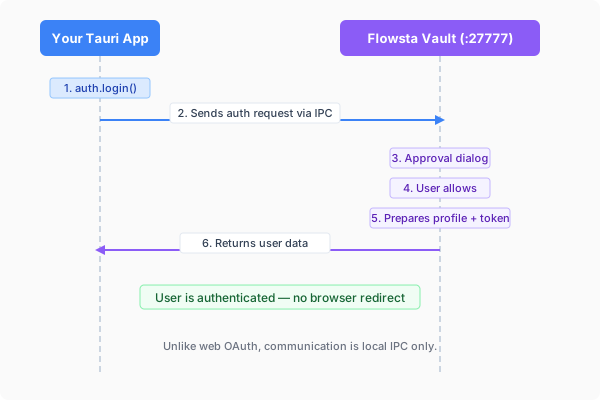
```
Your app ──local IPC──▶ Flowsta Vault ──signature──▶ your app
(user approves in Vault UI)
```
::: caution Native (non-webview) IPC clients
If your app calls the Vault from native code (Rust `reqwest`, Go, Python, …) instead of a webview, you must send an `Origin` header manually on every request - browsers add it automatically, native HTTP clients don't. See the [Origin-header caution in the IPC reference](/vault/ipc-reference#status).
:::
## Quick Start
### 1. Install the SDK
```bash
npm install @flowsta/holochain
```
### 2. Check Vault Status
```typescript
import { getVaultStatus } from '@flowsta/holochain';
const status = await getVaultStatus();
if (status.blocked) {
showMessage('Your browser blocked access to Flowsta Vault - allow local network access');
return;
}
if (!status.running) {
showMessage('Please install and open Flowsta Vault');
return;
}
if (!status.unlocked) {
showMessage('Please unlock Flowsta Vault to continue');
return;
}
console.log('Permanent ID:', status.did); // did:flowsta:… (SDK 3.6.0)
console.log('Agent key:', status.agentPubKey);
console.log('Identity held:', status.activeIdentity); // also reported while locked (Vault 1.5.0, SDK 3.5.0)
// After the user has linked your app, and with the display_name /
// profile_picture / username scopes selected at dev.flowsta.com:
console.log('Name:', status.displayName);
```
The user unlocks the Vault in the Vault's own window - never in yours. `status.activeIdentity` names the identity the Vault holds even while locked, `status.identityEpoch` counts every identity change on that computer, and `status.instanceId` identifies the answering Vault process - see [Identity switching](/vault/identity-switching) for what to do with them.
### 3. Sign the user in
Your backend issues a random nonce, the Vault signs it, and your backend verifies the signature and issues **its own** session. The nonce must not start with `flowsta-`: that prefix is reserved for Flowsta's own protocols and the Vault refuses to sign it for any origin outside `https://*.flowsta.com` (`400 reserved_prefix`). The `/auth/vault/challenge` and `/auth/vault/token` endpoints of the Flowsta API belong to that first-party flow - they mint a Flowsta session, not yours, so do not build on them.
```typescript
import { authenticateWithVault } from '@flowsta/holochain';
// 1. Your backend issues a one-time random nonce (never a "flowsta-…" string)
const { nonce } = await fetch('https://api.yourapp.com/auth/nonce', { method: 'POST' })
.then((r) => r.json());
// 2. The Vault signs it - the user approves in the Vault window
const { signature, agentPubKey, did } = await authenticateWithVault(nonce, {
appName: 'YourApp',
clientId: YOUR_CLIENT_ID, // from dev.flowsta.com
});
// 3. Your backend verifies the signature and issues its own session
const { token } = await fetch('https://api.yourapp.com/auth/vault', {
method: 'POST',
headers: { 'Content-Type': 'application/json' },
body: JSON.stringify({ nonce, signature, agent_pub_key: agentPubKey, did }),
}).then((r) => r.json());
```
The Vault shows an **Authentication Request** dialog with your app name, the requesting origin, and the `reason` you pass (default "Sign in"); the user can tick "Remember this site" to auto-approve next time. It signs the nonce's UTF-8 bytes with the identity's Ed25519 device key and returns the signature as standard base64, the agent key as `uhCAk…`, and the Permanent ID. The user has about 60 seconds to answer (`timeout` otherwise); if the Vault is locked when the request arrives, it brings its unlock screen forward and holds the request for about 55 seconds first.
On your backend, verify with the public key inside the agent key. The agent key is `u` + base64url of 39 bytes: a 3-byte prefix, the 32-byte Ed25519 public key, and a 4-byte checksum. Check that the nonce is one you issued, unused, and recent; then:
```javascript
// Node.js backend - the same check the Flowsta API runs
import nacl from 'tweetnacl';
const keyBytes = Buffer.from(agentPubKey.slice(1), 'base64url'); // 39 bytes
const publicKey = keyBytes.subarray(3, 35); // 32-byte Ed25519 key
const valid = nacl.sign.detached.verify(
new TextEncoder().encode(nonce), // the Vault signed the nonce's UTF-8 bytes
Buffer.from(signature, 'base64'), // 64 bytes, standard base64
publicKey,
);
```
A valid signature proves the person holds that identity's device key. Key your user record by the agent key (or the DID, which embeds it) and issue your session. With `scopes: ['email']` (SDK 3.2.0, Vault 1.3.0+) the dialog also offers the user's verified email address and the result carries `email` + `emailVerified: true` if they allow it.
## What else the Vault does for your app
| Capability | SDK function | Docs |
|---|---|---|
| Link your app's Holochain agent to the user's identity | `linkFlowstaIdentity()` | [Agent Linking](/holochain/agent-linking) |
| Sign documents/files with the user's identity (a linked app publishes to the Sign It network) | `signDocument()` | [Sign It Developer Guide](/sign-it/developer-guide) |
| Automatic encrypted backups of your app's data | `startAutoBackup()` | [Backups](/sdk/holochain#backups) |
| Restore after reinstall | `restoreFromVault()` (replay) or [seed adoption](/sdk/holochain#seed-adoption-shared-dht-apps) (shared DHT) | [Reinstall recovery](/sdk/holochain#reinstall-recovery) |
| Notice an identity switch in the Vault | `onIdentityChanged()`, `reconnectIdentity()` | [Identity switching](/vault/identity-switching) |
## Error Handling
```typescript
import {
FlowstaHolochainError,
VaultNotFoundError,
VaultBlockedError,
VaultLockedError,
UserDeniedError,
IdentityMismatchError,
} from '@flowsta/holochain';
try {
const result = await authenticateWithVault(nonce, { appName: 'YourApp' });
} catch (error) {
if (error instanceof VaultBlockedError) {
showMessage('The browser blocked access to Flowsta Vault - allow local network access for this site');
} else if (error instanceof VaultNotFoundError) {
showMessage('Flowsta Vault is not running - please open it');
} else if (error instanceof VaultLockedError) {
showMessage('Please unlock Flowsta Vault');
} else if (error instanceof UserDeniedError) {
showMessage('Sign-in was declined in the Vault');
} else if (error instanceof IdentityMismatchError) {
// The Vault holds a different identity than the one this app linked
// with. Stop here: offer "switch your Vault back", "open as this
// identity" (a per-identity profile) or "disconnect". Never link again.
showMessage('Your Vault is signed in as someone else');
} else if (error instanceof FlowstaHolochainError && error.code === 'timeout') {
showMessage('No answer from the Vault within 60 seconds');
}
}
```
## Web vs Desktop Auth
| Feature | Web (`@flowsta/auth`) | Desktop (`@flowsta/holochain`) |
|---------|----------------------|-------------------------------|
| **Auth method** | Browser redirect to login.flowsta.com | Local Vault IPC |
| **User approval** | OAuth consent screen | Directly in the Vault UI |
| **Credentials in your app** | Never | Never |
| **Client secret** | Not needed (PKCE) | Not needed (local signatures) |
| **Requires Vault** | Yes - on this computer, or with relay login on another device the user owns | Yes |
## Next Steps
- **[@flowsta/holochain SDK](/sdk/holochain)** - Full SDK reference
- **[Identity Switching](/vault/identity-switching)** - Several identities in one Vault
- **[Agent Linking](/holochain/agent-linking)** - Link identities on Holochain
- **[Vault Overview](/vault/)** - How Flowsta Vault works
- **[IPC Endpoints](/vault/ipc-reference)** - Raw IPC API reference
---
# IPC Endpoints
URL: https://docs.flowsta.com/vault/ipc-reference
# IPC Endpoints
**Reference for Flowsta Vault's local IPC API.**
Flowsta Vault runs an HTTP server on `127.0.0.1:27777` that apps use for identity linking, authentication, backups, and document signing. The `@flowsta/holochain` SDK wraps these endpoints, but you can call them directly if needed. Every signature happens on the user's device with keys that never leave it - no one in between.
This page describes Vault **1.5.0**. Where a field or behavior arrived in a later version than the endpoint, the version is noted; older Vaults omit the field or answer `404` for the route.
## Base URL
```
http://127.0.0.1:27777
```
Vault tries ports 27777, 27778, 27779 in sequence if the previous port is in use.
::: info One Vault per computer user account (Vault 1.5.0+)
The Vault answers only processes of the computer user account (the operating-system account) it runs in. On a computer with several user accounts, each account can run its own Vault, and those Vaults share the three ports: probe all three and use the one that answers. A Vault running in another OS account refuses every request with `403 other_user` and tells the caller nothing else - not even the identity header. "Account" on this page always means that OS account; the thing inside the Vault is an **identity**.
:::
Requests are JSON. Every POST needs `Content-Type: application/json`. The global request body cap is 8 MB; [`POST /backup`](#post-backup) accepts up to 55 MB. A body over the cap is refused with `413 body_too_large`.
## Status
### `GET /status`
Check if Vault is running and unlocked.
**Response:**
```json
{
"unlocked": true,
"initialized": true,
"agent_pub_key": "uhCAk7JpEWfkiV...",
"did": "did:flowsta:uhCAk...",
"active_identity": "uhCAk7JpEWfkiV...",
"identity_epoch": 3,
"instance_id": "ccd9e0e134fee420",
"claims": [],
"version": "1.5.0",
"display_name": "John Doe",
"web_username": "johndoe",
"profile_picture": "data:image/svg+xml;base64,...",
"web_email": null
}
```
::: tip
If the request fails to connect, Vault is not running. The `running` field is not part of the response - a successful response means Vault is running.
:::
::: info Scope enforcement
Profile fields (`display_name`, `web_username`, `profile_picture`) are only returned if your app was granted those scopes by the user at link time - the `username` scope gates the `web_username` field. Fields for ungranted scopes are returned as `null`. Configure which scopes your app requests in your app settings at [dev.flowsta.com](https://dev.flowsta.com).
The `agent_pub_key` and `did` fields are always present when the Vault is unlocked - they are not scope-gated.
`web_email` is first-party only: it is always in the JSON and always `null` for your app. It is pre-fill for Flowsta's own consent page; apps receive an email only through the email grant below.
:::
::: info Email (Vault 1.3.0+)
`email` and `email_verified` appear only for a linked app the user has **allowed to receive their email in a Vault dialog** - the sign-in dialog when your app requests the `email` scope on [`/authenticate`](#post-authenticate), or the relay approval screen. The email scope on its own is not enough, and a remembered site does not imply it: the first request for email always shows the user the address that will be shared. Only a verified address is ever returned, so `email_verified` is always `true` when `email` is present. The same grant is filed with Flowsta, so `/oauth/userinfo` returns the same address for OAuth apps. Both fields are omitted (not `null`) when there is no grant.
```json
{ "email": "user@example.com", "email_verified": true }
```
:::
::: info Identity fields (Vault 1.5.0+)
A Vault can hold more than one identity, with one open at a time.
- `active_identity` - the agent key of the identity the Vault holds, **whether unlocked or locked**; `null` before any identity is set up. `agent_pub_key` is only present while unlocked.
- `identity_epoch` - counts every identity change on this device and never repeats a past value. If it moved since you last looked, the identity may have changed, even if it has changed back since.
- `instance_id` - identifies the running Vault process; it changes when the Vault restarts.
- `claims` - nonces the Vault received through a [`flowsta://claim/v1?nonce=`](#flowsta-urls) link in the last two minutes: 8-64 hex characters each, reported lower-cased, at most the 8 most recent. The operating system delivers that link to the current user's Vault only, so a page that opens it and then finds its nonce in a Vault's `claims` knows that Vault is this user's.
- `initialized` - `false` on a Vault with no identity set up yet.
Older Vaults omit these fields.
:::
::: info Pinning the identity (Vault 1.5.0+)
An app bound to one identity can send `expected_identity` (that identity's agent key) with any request: in the JSON body of a POST, or in the query string of a GET. A Vault holding a different identity refuses with `409 identity_mismatch`, and one with no identity with `409 identity_unconfirmed`, so a request never acts for the wrong person. The check runs again after any unlock or approval wait.
While the Vault is **unlocked**, every response carries the header `x-flowsta-vault-identity` with the agent key of the unlocked identity. A locked Vault sends no header - read `active_identity` from `/status` instead - and an `other_user` refusal never carries it.
:::
:::caution Desktop apps: send an Origin header
Vault resolves scope grants and session approvals by the **`Origin` request header**. Browsers send it automatically, but native HTTP clients (Rust `reqwest`, Go, Python, …) do not - and without it, scope-gated `/status` fields stay `null` and approvals won't stick.
Pick one stable, app-specific origin (for example `yourapp://app`) and send it on **every** Vault request - `/link-identity`, `/authenticate`, and `/status` must all use the same value.
```rust
client.post(format!("http://127.0.0.1:{port}/authenticate"))
.header("Origin", "yourapp://app")
// ...
```
:::
## Agent Linking
### `POST /link-identity`
Request an identity link. Shows an approval dialog in Vault (60-second timeout, `408 timeout` after that). Needs an unlocked Vault (`403 vault_locked`).
**Request:**
```json
{
"app_name": "ChessChain",
"client_id": "flowsta_app_abc123",
"app_agent_pub_key": "uhCAk..."
}
```
Before the dialog the Vault validates the request: an `app_agent_pub_key` that does not decode as a `uhCAk...` key is `400 invalid_agent_pub_key`, and an empty `client_id` is `400 missing_client_id`. The Vault then verifies your `client_id` with Flowsta. **The first link needs internet**: a `client_id` Flowsta does not recognize or has disabled is refused with `403` and Flowsta's own code (`app_not_found`, `app_disabled`, `invalid_client_id`); if Flowsta cannot be reached and the Vault has never verified this `client_id` before, the answer is `503 api_unreachable`. Later links can use the cached registration, so re-linking works offline. The dialog shows the app name, organization, and scopes from your registration, not from the request.
**Response (on approval):**
```json
{
"success": true,
"vault_agent_pub_key": "uhCAk...",
"vault_signature": "base64-encoded-signature"
}
```
**Response (on denial):** HTTP 403 with the standard [error envelope](#error-responses):
```json
{
"error": "user_denied",
"description": "User rejected the identity link request."
}
```
An approved link also approves this origin for [`/authenticate`](#post-authenticate) in this session, and opens a **120-second window** in which a [`POST /sign`](#post-sign) from the same origin (the agent-pair signature of the linking ceremony) proceeds without a second dialog.
**One app agent, one identity (Vault 1.5.0+):** if the same `app_agent_pub_key` is already linked to another identity in this Vault, the request is refused with HTTP 409 `agent_linked_elsewhere`, and the `description` names that identity. Open the app as that identity, or unlink it there first. Many app agents may link to one identity.
### `POST /revoke-identity`
Notify Vault that an identity link has been revoked. No approval dialog.
**Who may call it:** a Flowsta page (`https://*.flowsta.com`) may revoke any link. Any other origin must be a **linked app revoking its own link**: its origin must resolve to a linked `client_id`, and the `app_agent_pub_key` it names must belong to that app's link record. Every other caller gets `403 forbidden` - otherwise any local page could unlink the user's apps.
**Request:**
```json
{
"app_name": "ChessChain",
"app_agent_pub_key": "uhCAk..."
}
```
**Response:** `{ "success": true }`
### `GET /link-status`
Check if a specific agent is still linked. No link or unlock required.
**Query parameters:** `app_agent_pub_key` (the key looked up), `client_id` (accepted, currently unused)
```
GET /link-status?client_id=flowsta_app_abc123&app_agent_pub_key=uhCAk...
```
**Response:**
```json
{
"linked": true,
"app_name": "ChessChain"
}
```
When the agent is not linked the response is `{ "linked": false }` - `app_name` is omitted.
## Authentication (Desktop Apps)
### `POST /authenticate`
Authenticate a desktop app. Shows an approval dialog in Vault with a 60-second timeout (`408 timeout` after that). If the Vault is locked when the request arrives, it brings its unlock screen forward and holds the request for about 55 seconds; an unlock inside that window carries the same request straight on to approval, otherwise the response is `403 vault_locked`.
**Approval model:** if the user approved a `/link-identity` request from the same origin, `/authenticate` is approved automatically - so the standard first-run sequence (link, then authenticate) shows **one** dialog, not two. A site the user chose to **remember** in the dialog stays approved across locking the Vault and across restarts, until the user revokes it in the Vault's Connections page (Vault 1.3.0+; earlier Vaults forgot remembered sites at every lock). One exception: the first time an app requests the `email` scope, the dialog is shown even for a remembered site, because something new is being shared.
**Request:**
```json
{
"app_name": "Your Desktop App",
"client_id": "flowsta_app_abc123",
"challenge": "base64-challenge-to-sign",
"reason": "Login to Your Desktop App",
"scopes": ["email"]
}
```
The `client_id`, `challenge` and `scopes` fields are optional. The `reason` field is shown in the approval dialog.
**`challenge`:** base64 (standard alphabet) of the bytes to sign; anything else is `400 invalid_challenge`. Decoded bytes that start with `flowsta-` are refused with `400 reserved_prefix` - that prefix belongs to Flowsta's own sign-in protocols, and signing it from a generic dialog would let an app mint a real Flowsta session. The one carve-out is the web login challenge (`flowsta-auth-challenge:v1:...`, issued by `POST /auth/vault/challenge`), which the Vault signs **only for an `https://*.flowsta.com` origin**. Third-party apps therefore cannot have a `/auth/vault/challenge` string signed: issue your own random challenge from your backend, have the Vault sign it here, and verify the Ed25519 signature against `agent_pub_key` yourself.
**`scopes` (Vault 1.3.0+):** requires `client_id`. Scopes are checked against your app's registration at dev.flowsta.com; anything your app is not registered for is ignored. Today `email` is the scope that changes the dialog: it shows the user the address that will be shared and states that your app receives it as text it can keep. If they allow, the address comes back in the response. The grant is **recorded** (so later sign-ins auto-approve as usual) and filed with Flowsta under a device signature only when your origin is bound to that `client_id` - a Flowsta page, or an origin linked to it through `/link-identity`; an unlinked origin gets the address for this sign-in only and is asked again next time. An unverified email is never offered - the dialog tells the user why - and the response then carries no `email`.
**Response:**
```json
{
"success": true,
"did": "did:flowsta:uhCAk...",
"agent_pub_key": "uhCAk...",
"signature": "base64-encoded-ed25519-signature",
"signed_at": "2026-07-07T18:30:00Z",
"email": "user@example.com",
"email_verified": true
}
```
`signed_at` is an ISO-8601 string and is always present. Only `signature` is conditional - it is `null` unless a `challenge` was provided. `email` and `email_verified` are present only when `email` was requested and allowed.
## Document Signing (Sign It)
### `POST /sign-document`
Sign a file hash with the user's identity key - the [Sign It](/sign-it/developer-guide) endpoint. Shows an approval dialog in Vault with the app name, file label, and hash. The SDK wraps this as [`signDocument()`](/sdk/holochain#signdocument).
**Who may call it:** any origin may request a **signature** - the user approves each one in the dialog, and the dialog names the app (for a linked app, the name from its registration; otherwise `app_name` or the origin). **Publishing** (`commit: true`) is limited to Flowsta pages and **linked apps**; any other origin asking to publish gets `403 tier_forbidden` before the dialog.
**Request:**
```json
{
"file_hash": "a7f3b9c1e2d4...",
"label": "Illustration.png",
"intent": "authorship",
"ai_generation": "none",
"content_rights": { "license": "cc-by", "ai_training": "not_allowed" },
"app_name": "ArtStudio",
"client_id": "flowsta_app_abc123",
"commit": true
}
```
| Field | Required | Description |
|-------|----------|-------------|
| `file_hash` | Yes | SHA-256 of the file as a 64-character hex string (`400 invalid_file_hash` otherwise). A hash whose bytes start with `flowsta-` is refused with `403 reserved_prefix` |
| `label` | No | Human-readable name shown in the approval dialog |
| `intent` | No | Why the file is signed: `authorship`, `approval`, `witness`, `receipt`, `agreement` |
| `ai_generation` | No | AI disclosure: `none`, `assisted`, `generated` |
| `content_rights` | No | Content rights manifest (`license`, `commercial_licensing`, `ai_training`, `contact_preference`) |
| `app_name` | No | Shown in the approval dialog (falls back to your origin). A linked app's registered name wins over this field |
| `client_id` | No | Your developer `client_id` - enables usage tracking and [sponsored signing](#sponsored-signing). For a linked app the linked `client_id` is used regardless |
| `comment` | No | Signer note stored with a published signature (280 characters max, `400 invalid_comment`) |
| `perceptual_hash` | No | Image/audio/video fingerprint for fuzzy matching on the verify page |
| `thumbnail` | No | Small preview image (`data:image/...` URI, under 300 KB, `400 invalid_thumbnail`) committed after a published signature, in the background |
| `supersedes` | No | Hex action hash (39 bytes) of an earlier signature this one amends (`400 invalid_supersedes`) |
| `commit` | No | Publish the signature to the Sign It network from this device. Flowsta pages and linked apps; any other origin gets `403 tier_forbidden`. Draws on the signing quota (`403 quota_exceeded`) |
| `job` | No | Run as an [async job](#get-op-status-job-id): respond immediately with a `job_id` |
**Response:**
```json
{
"success": true,
"file_hash": "a7f3b9c1e2d4...",
"signature": "base64-encoded-ed25519-signature",
"agent_pub_key": "uhCAk...",
"signed_at": "2026-07-07T18:30:00Z",
"action_hash": "84202484..."
}
```
`action_hash` is set when the signature was published to the Sign It network (`commit: true`) - it's the hex action hash of the committed record. Otherwise it is `null` and your app receives the raw signature to use as it sees fit. A publish that was requested but could not happen is an error (`503 conductor_not_ready` or `500 commit_failed`), never a silent signature-only response.
**Timing.** A locked Vault answers third-party callers `403 vault_locked` at once. For a **Flowsta page** the Vault instead brings its unlock screen forward and holds the request (60 s, or 180 s as a job); an unlock inside that window carries the request on to approval. When publishing, the Vault checks the quota and waits for its conductor **before** asking for approval (up to 90 s, or 300 s as a job; `503 conductor_not_ready` after that), so an approval can always land. The approval dialog itself waits 60 s (120 s as a job) and then answers `408 timeout`.
**Async job mode:** with `job: true` the endpoint validates and immediately returns `{ "job_id": "sign-..." }`. Poll [`GET /op-status/:job_id`](#get-op-status-job-id) for progress; the request rides through unlock, conductor startup, and the approval dialog without holding a connection open. Identical double-submits join the in-flight job instead of signing twice.
#### Sponsored signing
If the request carries a `client_id` whose organization sponsors signing, a published signature draws from the **organization's signing pool** instead of the user's personal quota - and the approval dialog tells the user exactly that. If the sponsor pool for the period is used up, the signature falls back to the user's personal quota, and the dialog labels that honestly too. When both are dry, the request fails with `quota_exceeded` and a description explaining the state.
## Signature & Profile Management
These endpoints let the flowsta.com dashboard operate on the user's own device-held records. They are restricted to Flowsta origins (`403 tier_forbidden` otherwise) and each mutation passes a per-action approval dialog in Vault. All of them accept `job: true` for [async job mode](#get-op-status-job-id) and share the [timing](#post-sign-document) of `/sign-document`: a locked Vault holds the request through the unlock, the conductor is awaited before the dialog, and the dialog answers `408 timeout` when the user does not respond.
### `POST /profile-update`
Update the display name and/or profile picture stored in the user's own cell.
**Request:** `{ "display_name": "New Name", "profile_picture": "data:image/...", "job": false }` - at least one of the two fields, else `400 nothing_to_update`. `display_name` is trimmed and must be 80 characters or fewer (`400 invalid_display_name`); `profile_picture` must be a `data:image/...` URI or an `https://` URL under 800 KB (`400 invalid_profile_picture`). **Response:** `{ "success": true }`.
### `POST /revoke-signature`
Revoke a published signature.
**Request:** `{ "action_hash": "", "reason": "optional, 280 chars max" }` (`400 invalid_action_hash`, `400 invalid_reason`). **Response:** `{ "success": true, "revocation_hash": "..." }`. A failed write is `500 revoke_failed`.
### `POST /set-thumbnail`
Attach a preview image to a published signature.
**Request:** `{ "action_hash": "", "thumbnail": "data:image/... (under 300 KB)" }` (`400 invalid_action_hash`, `400 invalid_thumbnail`). **Response:** `{ "success": true, "thumbnail_hash": "..." }`. A failed write is `500 write_failed`.
### `GET /op-status/:job_id`
Poll an async job started with `job: true`.
**Response:**
```json
{
"job_id": "sign-1774321234-a1b2c3d4",
"stage": "awaiting_approval"
}
```
`job_id` is `--` with `op` one of `sign`, `profile`, `revoke`, `thumbnail`. `stage` is one of `waiting_unlock`, `preparing`, `awaiting_approval`, `publishing`, `done`, `failed`. A fresh job starts at `preparing` and can move to `waiting_unlock` when the Vault turns out to be locked, so do not expect a strict order - treat every stage but `done` and `failed` as "still working". When `done`, the response includes `result` (the operation's normal response body); when `failed`, it includes `error` and `description`. Jobs expire 10 minutes after their last update (`404 unknown_job`).
### `GET /signatures`
Read the user's signatures from the Vault - the source of truth for their own records. Flowsta origins only; read-only, so no approval dialog. A locked Vault answers `403 vault_locked` **without** raising its unlock screen (a background read must not interrupt the user); a conductor not ready within 5 seconds answers `503 conductor_not_ready`.
**Response:** `{ "source": "vault", "signatures": [...] }` - the user's own signatures plus linked-agent history.
### `GET /connections`
Read the registry of identity-linked apps and trusted origins. Flowsta origins only; read-only. A locked Vault answers `403 vault_locked`.
**Response:**
```json
{
"apps": [
{
"app_name": "ChessChain",
"app_agent_pub_key": "uhCAk...",
"linked_at": 1774321234,
"client_id": "flowsta_app_abc123",
"scopes": ["openid", "display_name"]
}
],
"trusted_origins": [{ "origin": "yourapp://app", "first_seen": 1774321234 }]
}
```
`first_seen` is `null` for an origin the Vault remembers but has no first-contact record for.
## Backups
Every backup route except [`GET /backup/limits`](#get-backup-limits) requires a **linked origin** (`403 not_linked`) and a `client_id` that matches the one linked to that origin (`403 client_id_mismatch`) - an app never reads, writes, or deletes another app's backups. Writing and retrieving work while the Vault is locked, as long as it has been unlocked once this session (`403 vault_never_unlocked` before that); listing and deleting need an **unlocked** Vault (`403 vault_locked`).
### `POST /backup`
Store app data in the Vault's encrypted local storage. Works while the Vault is locked (after first unlock in session).
Each call without a `label` creates a new timestamped snapshot (`backup-`, up to 10 per app, oldest auto-rotated). Pass an explicit `label` to overwrite a named backup - named backups are app-managed state and are **never** auto-rotated, so an app can keep as many named objects as its data needs (for example, one per conversation or document).
Payload size is capped **per object**, not per app - read the cap from [`GET /backup/limits`](#get-backup-limits) and split larger payloads into parts (e.g. `mydata.p0`, `mydata.p1`). For compressed or binary payloads, send `data_base64` instead of `data` with a matching `content_type` (e.g. `application/json+gzip`) - the bytes are stored and returned verbatim, and gzipped JSON stays human-readable in the user's Your Data exports. Exactly one of `data` / `data_base64` must be present (`400 invalid_data`). This route accepts request bodies up to 55 MB (`413 body_too_large` above that); an object over the 50 MB cap is `413 backup_too_large`.
**Restore hold:** right after the Vault was rebuilt from a restored identity, and until its owner has imported their export or chosen to start fresh, every write and delete is refused with `403 restore_choice_pending` (reads stay open). Treat it as "retry later" - an app that wrote first would claim an empty slot the user's import was about to fill.
**Request:**
```json
{
"client_id": "flowsta_app_abc123",
"app_name": "ChessChain",
"content_type": "application/json",
"data": {
"polls_created": { "count": 2, "polls": [...] },
"votes_cast": { "count": 5, "votes": [...] },
"private_data": {
"_readme": "Decrypted from encrypted DHT entries.",
"vote_rationales": { "count": 1, "rationales": [...] },
"drafts": { "count": 0, "drafts": [] }
}
}
}
```
::: tip Human-readable backups
Include `_readme` fields, use human-readable names (`poll_title` not just hashes), and decrypt any encrypted entries before including them. The Vault encrypts the backup at rest - no need to double-encrypt.
:::
::: tip Use the canonical payload shape
When `data` follows the [canonical v1 backup shape](#canonical-backup-payload-v1) (top-level `version: 1`, a `cells` array, and a `_summary`), the Vault lights up extra UI: per-entry-type counts on the Your Data page ("12 polls, 38 votes"), and the user's CAL §4.2.1 data export inlines the readable view of each record instead of raw bytes. Any other JSON shape still works, but you don't get those features.
:::
**Response:**
```json
{
"success": true,
"label": "backup-1774321234",
"data_size": 1024,
"created_at": 1774321234
}
```
### `GET /backup/limits`
The Vault's backup contract, so your app sizes its objects against the Vault it's actually talking to instead of hardcoding limits. No link required.
**Response:**
```json
{
"max_object_bytes": 52428800,
"auto_snapshot_keep": 10,
"named_labels_rotate": false,
"gzip_supported": true
}
```
| Field | Meaning |
|---|---|
| `max_object_bytes` | Maximum size of ONE backup object. Split larger payloads into named parts |
| `auto_snapshot_keep` | How many timestamped (label-less) snapshots are kept before the oldest rotates |
| `named_labels_rotate` | `false` = named backups are never auto-deleted; store as many objects as your data needs |
| `gzip_supported` | The Vault decompresses `content_type` values containing `gzip` for readable exports; raw bytes always round-trip verbatim |
Vaults released before this endpoint existed respond `404` - treat that as a single-snapshot world: one backup up to 50 MB, and named labels may rotate at the 10-backup cap.
### `GET /backup/list`
List **your app's** backups. The Vault filters the answer to the caller's own `client_id` - it never lists other apps' backups to you, because that would reveal which apps the user has linked. Needs a linked origin and an **unlocked** Vault (`403 vault_locked`), unlike `/backup` and `/backup/retrieve`.
**Response:**
```json
{
"app_count": 1,
"total_backups": 3,
"total_size": 4096,
"apps": [
{
"client_id": "flowsta_app_abc123",
"app_name": "ChessChain",
"backup_count": 3,
"total_size": 4096,
"last_backup_at": 1709251200,
"latest_summary": {
"counts_by_entry_type": { "Game": 12, "Move": 84 },
"total_records": 96
},
"has_manifest": false,
"conversation_count": 0,
"labels": ["manifest", "game-42", "game-43"]
}
]
}
```
`apps` has one entry (yours) or none. The `latest_summary` field is present when the most recent backup follows the [canonical v1 shape](#canonical-backup-payload-v1); it is **omitted** for older / non-canonical backups. `has_manifest` and `conversation_count` are hints for the Vault's own Your Data page (apps that store per-object backups under a `manifest` label plus `conv-*` labels); most apps can ignore them.
`labels` (Vault 1.3.0+) lists every label the app has stored, so an app can reconcile its own index against what the Vault holds in one call instead of retrieving per label. Unlabeled snapshots are not listed, and the field is omitted when there are no labels (and by earlier Vaults).
### `POST /backup/retrieve`
Retrieve a stored backup. Omit `label` to get the backup labeled `latest` if one exists, otherwise the newest backup of any label. Works while locked after the first unlock of the session.
**Request:**
```json
{
"client_id": "flowsta_app_abc123",
"label": "backup-1774321234"
}
```
**Response:**
```json
{
"success": true,
"client_id": "flowsta_app_abc123",
"app_name": "ChessChain",
"label": "backup-1774321234",
"created_at": 1774321234,
"data_size": 1024,
"content_type": "application/json",
"data": { "...": "the stored JSON" }
}
```
A `content_type` containing `gzip` comes back as `data_base64` (the stored bytes, verbatim) instead of `data`; a JSON content type comes back parsed in `data`; any other content type comes back as a hex string in `data`.
**Errors are part of the contract** - a write guard must be able to tell an empty slot from one it must not touch:
| Status | `error` | Meaning |
|---|---|---|
| 404 | `backup_not_found` | The slot is genuinely empty - safe to write into |
| 409 | `identity_mismatch` | A backup exists under this label but does not decrypt under the active identity's key: it was written by a different identity (or is corrupted). **Never overwrite it** |
| 500 | `backup_unreadable` | Present but damaged before decryption (unparseable file, I/O error) |
### `POST /backup/delete`
Delete one stored backup, or all of your app's backups. Needs an **unlocked** Vault (`403 vault_locked`) and is held during the [restore hold](#post-backup) (`403 restore_choice_pending`).
**Request:**
```json
{
"client_id": "flowsta_app_abc123",
"label": "latest"
}
```
An omitted `label` means `latest` - it does not delete everything. To delete every backup for your app, send `"delete_all": true` instead of a label.
**Response:** `{ "success": true }` for one label (`404 backup_not_found` when that label does not exist), or `{ "success": true, "deleted_count": 3 }` with `delete_all`. An I/O failure is `500 delete_failed`, never reported as absence.
### Canonical backup payload (v1)
When you post a backup whose `data` follows this shape, the Vault recognizes it and unlocks per-entry-type summaries on the Your Data page plus human-readable inlining in the user's CAL §4.2.1 data export.
```json
{
"version": 1,
"_readme": "Your YourApp data, backed up automatically by Flowsta Vault…",
"license": "Cryptographic Autonomy License v1.0 (CAL-1.0)",
"app": { "name": "YourApp", "client_id": "flowsta_app_…" },
"agent_pub_key": "uhCAk…",
"exported_at_iso": "2026-05-29T03:42:11Z",
"_summary": {
"countsByEntryType": { "Game": 12, "Move": 84 },
"totalRecords": 96
},
"cells": [
{
"role_name": "games",
"_readme": "Each record below is one thing you did…",
"records": [
{
"entryType": "Game",
"actionHash": "uhCkk…",
"createdAtMs": 1716969780000,
"human_readable": {
"name": "Friday Night Chess",
"opponent": "uhCAk…",
"started_at": 1716969780000
},
"raw_record": {
"entry_b64": "",
"action_address": "uhCkk…",
"action_type": "Create"
}
}
]
}
]
}
```
**What the Vault checks, and what the SDK needs.** Recognition needs `version: 1` and a `cells` array; the Your Data counts need `_summary.totalRecords` and `_summary.countsByEntryType`. The Vault does not inspect individual records. The two views per record are what the export and the restore consume:
- `human_readable` - the decoded entry as plain JSON. This is what the user sees in their downloadable CAL data export.
- `raw_record` - at minimum, `entry_b64` (the entry's MessagePack bytes, base64-encoded). This is what `restoreFromVault` hands to your `restore_record` dispatcher when the user reinstalls.
**Extra top-level fields** are preserved verbatim through the export pipeline. Apps that generate an independent Holochain agent key not derived from the Flowsta seed carry it in an `app_keys` block at the top level - it is what makes their data export self-sufficient (records **and** the means of authorship), and what a fresh machine [adopts](/sdk/holochain#seed-adoption-shared-dht-apps) to continue as the same agent:
```json
{
"version": 1,
…
"app_keys": {
"_readme": "The agent seed YourApp signs with. Import it on a new machine to keep authoring as the same agent.",
"device_seed_hex": "abc123…",
"version": 1
}
}
```
An app whose install predates its escrowable seed should write an explicit `"device_seed_hex": null` with a `_readme` saying how to upgrade, rather than omitting the block - an honest "no key here" beats a silent one. Writers that carry `app_keys` must also guard the slot: retrieve before writing, and refuse to overwrite a backup escrowing a different key than the local one (see [the write guards](/sdk/holochain#when-restore-runs)).
The SDK's [`dumpCellStateForBackup()`](/sdk/holochain#dumpcellstateforbackup) builds this shape from an `AdminWebsocket` instance. For apps whose frontend only has an `AppWebsocket`, generate it from a Tauri command using zome queries - see [ProofPoll's `build_canonical_backup`](https://github.com/WeAreFlowsta/ProofPoll/blob/main/src-tauri/src/commands.rs) for a worked example.
## Raw Signing
### `POST /sign`
Sign raw data with the Vault's agent key. **Linked apps only** (`403 not_linked`) - otherwise any local process could forge Holochain signatures as the user - and the Vault must be unlocked (`403 vault_locked`). For document/file signing, use [`/sign-document`](#post-sign-document) instead.
**Approval:** every request shows an approval dialog naming the app, with one exception: within **120 seconds** of the user approving a `/link-identity` from the same origin, the request proceeds without a dialog - that is the linking ceremony's own agent-pair signature, covered by the approval just given. The dialog waits 60 seconds; a denial **or** no answer in time is `403 user_denied` (this route does not use `408 timeout`).
**Request (`type: "bytes"`):**
```json
{
"type": "bytes",
"bytes": "base64-encoded-data",
"reason": "Sign this document"
}
```
`type` is required and must be `"bytes"` or `"action"` (`400 unknown_type`). `bytes` is base64 with the standard alphabet (`400 missing_bytes`, `400 invalid_base64`). Decoded bytes starting with `flowsta-` are refused with `403 reserved_prefix` - Flowsta's own sign-in protocols sign strings with that prefix, and a linked app must not be able to mint one. The `reason` field is accepted for audit; the dialog shows the app name, the type, and the payload size.
**Response (`bytes`):**
```json
{
"success": true,
"signature": "base64-encoded-ed25519-signature",
"agent_pub_key": "uhCAk..."
}
```
**Request (`type: "action"`):** `{ "type": "action", "action": { ...a JSON object... } }` (`400 missing_action`, `400 invalid_action`). The Vault serializes the object to JSON bytes and signs those.
**Response (`action`):**
```json
{
"success": true,
"signed_action": { "...": "the action you sent" },
"signature": "base64-encoded-ed25519-signature",
"agent_pub_key": "uhCAk...",
"did": "did:flowsta:uhCAk...",
"signed_at": "2026-07-07T18:30:00Z"
}
```
## `flowsta://` URLs {#flowsta-urls}
The Vault registers the `flowsta://` URL scheme when it is installed. A web page opens one of these links from a click (the browser's protocol hand-off needs a user gesture), the operating system delivers it to the **current user's** Vault, and the Vault comes to the front. Success is not detectable from the page - if no Vault is installed most browsers show nothing - so always keep your fallback visible (a typed code, a download link).
| URL | What the Vault does |
|---|---|
| `flowsta://open/v1` | Brings the Vault window to the front. Any `flowsta://` URL the Vault does not otherwise recognize does the same |
| `flowsta://relay/v1?code=XXXX-XXXX` | Hands a relay login code to the Vault (normalized to its 8 letters), which shows the approval screen - locked or unlocked. The SDK's `openVaultDeepLink()` opens this URL |
| `flowsta://claim/v1?nonce=` | Records the nonce (8-64 hex characters, lower-cased) so it appears in [`/status`](#get-status) `claims` for **two minutes** (at most the 8 most recent are kept). Vault 1.5.0+; older Vaults only come to the front |
**Why `claim` exists.** Loopback ports are shared by every user account on a computer, so a page probing 27777-27779 cannot tell whose Vault answered. The operating system can: it routes `flowsta://` to the handler of the person at the keyboard. A page that makes a fresh nonce, opens `flowsta://claim/v1?nonce=...`, and then looks for that nonce in each port's `/status` has found this user's Vault.
## Error Responses
All endpoints return errors as a non-2xx HTTP status with this envelope - there is no `success` or `message` field:
```json
{
"error": "error_code",
"description": "Human-readable description"
}
```
`description` may be `null` for some errors. The SDK maps these codes to typed error classes (`VaultLockedError`, `UserDeniedError`, …).
Malformed requests are rejected by the HTTP layer **before** the envelope applies, as plain text: invalid JSON is `400`, a missing required field is `422`, and a POST without `Content-Type: application/json` is `415`.
| Error Code | HTTP Status | Description |
|------------|-------------|-------------|
| `vault_locked` | 403 | Vault is locked - ask the user to unlock it |
| `vault_never_unlocked` | 403 | Vault hasn't been unlocked yet this session (`/backup` and `/backup/retrieve` need one unlock first) |
| `user_denied` | 403 | User rejected the approval dialog (on `/sign`, also no answer within 60 s) |
| `not_linked` | 403 | Your origin isn't a linked app - call `/link-identity` first (`/sign` and every backup route except `/backup/limits`) |
| `client_id_mismatch` | 403 | The `client_id` in the request doesn't match the one linked to your origin |
| `tier_forbidden` | 403 | Flowsta pages and linked apps only (`commit: true` on `/sign-document`); Flowsta pages only (`/profile-update`, `/revoke-signature`, `/set-thumbnail`, `/signatures`, `/connections`) |
| `forbidden` | 403 | `/revoke-identity` from an origin that is neither Flowsta nor the linked app revoking its own link |
| `reserved_prefix` | 403 / 400 | The bytes to sign start with `flowsta-` - reserved for Flowsta's own protocols (403 on `/sign` and `/sign-document`; 400 on `/authenticate`) |
| `quota_exceeded` | 403 | The period's signing quota is used up (sponsor pool and personal quota) |
| `restore_choice_pending` | 403 | The Vault was just restored and waits for its owner to import or start fresh - backup writes and deletes resume after that; retry later |
| `app_not_found` / `app_disabled` / `invalid_client_id` | 403 | Flowsta did not recognize, or has disabled, this `client_id` (passed through from the registration check on `/link-identity`) |
| `other_user` | 403 | This Vault belongs to another user account on this computer - look for the one that answers you (1.5.0+) |
| `identity_mismatch` | 409 | The Vault holds a different identity than `expected_identity` (1.5.0+); or, on `/backup/retrieve`, the stored backup was written by a different identity - never overwrite it |
| `identity_unconfirmed` | 409 | `expected_identity` was sent but the Vault has no identity set up (1.5.0+) |
| `agent_linked_elsewhere` | 409 | This app agent is already linked to another identity in this Vault (1.5.0+) |
| `missing_client_id` | 400 | No `client_id` provided on `/link-identity` |
| `invalid_agent_pub_key` | 400 | `app_agent_pub_key` is not a `uhCAk...` key |
| `invalid_challenge` | 400 | `/authenticate` `challenge` is not valid base64 |
| `missing_bytes` / `invalid_base64` / `missing_action` / `invalid_action` / `unknown_type` | 400 | `/sign` request shape errors |
| `invalid_file_hash` / `invalid_comment` / `invalid_supersedes` / `invalid_thumbnail` | 400 | `/sign-document` and `/set-thumbnail` field limits (64 hex chars; 280 chars; 39-byte hex hash; `data:image/...` under 300 KB) |
| `invalid_action_hash` / `invalid_reason` | 400 | `/revoke-signature` and `/set-thumbnail`: 39-byte hex action hash; reason 280 chars max |
| `invalid_display_name` / `invalid_profile_picture` / `nothing_to_update` | 400 | `/profile-update` field limits (80 chars; `data:image/...` or `https://` under 800 KB; at least one field) |
| `invalid_data` | 400 | `/backup`: provide exactly one of `data` (JSON) or `data_base64` (valid base64) |
| `backup_failed` | 400 | `/backup`: the Vault could not store the object (the `description` says why) |
| `backup_not_found` | 404 | No backup under that label (`/backup/retrieve`, `/backup/delete`) - the slot is empty |
| `unknown_job` | 404 | `/op-status`: no such job, or it expired (10 minutes after its last update) |
| `timeout` | 408 | User didn't respond to the approval dialog within 60 seconds (`/link-identity`, `/authenticate`, `/sign-document`, and the management routes) |
| `backup_too_large` | 413 | One backup object exceeds the Vault's 50 MB limit (`max_object_bytes`) |
| `body_too_large` | 413 | Request body over the route's cap (8 MB; 55 MB on `/backup`) |
| `api_unreachable` | 503 | Cannot reach Flowsta to verify a `client_id` on its first link (502 if Flowsta answered with an unusable body) |
| `conductor_not_ready` | 503 | The Vault's conductor is still starting up - retry in a moment |
| `backup_unreadable` | 500 | `/backup/retrieve`: the file is present but damaged before decryption |
| `commit_failed` | 500 | `/sign-document` with `commit: true`: the signature was not published; nothing changed |
| `write_failed` / `revoke_failed` / `delete_failed` | 500 | A profile, thumbnail, revocation, or backup-delete write failed on the device |
| `no_device_seed` | 500 | The Vault was created before signing support and has no device seed - the user re-creates it |
| `internal_error` | 500 | The approval channel closed unexpectedly, or the response could not be encoded |
## Next Steps
- **[@flowsta/holochain SDK](/sdk/holochain)** - SDK that wraps these endpoints
- **[Agent Linking](/holochain/agent-linking)** - Identity attestation guide
- **[Building Holochain Apps](/holochain/build)** - Integration guide
- **[Sign It Developer Guide](/sign-it/developer-guide)** - Document signing integration
---
# Sign It - Document Signing & Verification
URL: https://docs.flowsta.com/sign-it/
# Sign It
Decentralized document signing and verification. Signing happens in your own Flowsta Vault - your keys never leave your device, you approve every signature, and there's no one in between.
## What It Does
Sign It lets you cryptographically sign any file to prove:
- **You signed it** - Ed25519 signature made with your key, on your device, tied to your Flowsta identity
- **When you signed it** - timestamp recorded on Flowsta's tamper-proof network, built on Holochain
- **Your terms** - license, commercial availability, AI training policy, plus an optional Public Note
- **Content integrity** - steganography and hidden content checks
Anyone can verify a signed file at [flowsta.com/sign-it/verify](https://flowsta.com/sign-it/verify/) - no sign-in needed. For an exact check the file is hashed in your browser and nothing is uploaded; similar-file detection sends the file to the server for fingerprinting and discards it.
## How It Works
### Sign
Signing lives in [Flowsta Vault](/vault/), the desktop app that holds your keys:
1. **Drop files into Vault** - Drag one or multiple files (up to 10 GB each). Vault hashes each file locally, runs integrity checks, and generates perceptual hashes for fuzzy matching. Integrity checks and perceptual hashing are skipped for files over 500 MB; the file is still hashed and signed.
2. **Choose metadata** - Set content rights, AI disclosure, contact preferences, and an optional Public Note. Shared metadata applies to all files in a batch.
3. **Sign** - Vault signs each hash with your Ed25519 key and commits it to your local Holochain conductor. The key never leaves your device.
4. **Publish** - Signatures gossip to Flowsta's tamper-proof network automatically. Verifiable by anyone, typically within minutes.
When a third-party app requests a signature, the same rule holds: Vault shows you an approval dialog for **every** signature - the app name (or the requesting page's origin), the file label, and the first characters of the hash. When the signature will be published to the network, the dialog also says whose quota pays - your own, or the app's sponsored pool. The dialog does not show the license, AI disclosure or intent the app supplied. Nothing is signed without your explicit yes.
### Verify
1. **Go to [flowsta.com/sign-it/verify](https://flowsta.com/sign-it/verify/)** - Drop the file, or click **Choose File**.
2. **Exact match** - SHA-256 hash lookup on the network. For this step the file never leaves your browser.
3. **Fuzzy match** - When there is no exact match, images, audio and video are sent to the server for perceptual fingerprinting and discarded. This finds re-encoded, resized, or trimmed versions.
4. **Results** - See all signers, when they signed, their content rights, AI disclosure, Public Notes, and revocation status.
Verification is free on every plan. The public API is rate-limited per IP address.
## Key Features
### Batch Signing
Sign multiple files at once in Vault - drop a folder or select multiple files. Each file gets its own independently verifiable signature, while shared metadata (license, AI policy, Public Note) applies to the whole batch.
### Content Rights Manifest
Attach a machine-readable rights declaration to your signature:
- **License** - All Rights Reserved, CC0, CC BY, CC BY-SA, CC BY-NC, CC BY-NC-SA, MIT, Apache 2.0, GPL 3.0. The network also accepts a custom license string (up to 128 characters); the Vault does not offer it, so you will only meet it in records made by other apps.
- **Commercial Licensing** - Whether you're open to licensing inquiries
- **AI Training Policy** - Allowed, allowed with attribution, requires license, not allowed
- **Contact Preference** - Whether verifiers can contact you (via blind relay - your email is never exposed)
### Public Note
Add a signer comment of up to 280 characters - context, dedication, terms, anything you want verifiers to see alongside your signature.
### AI Generation Disclosure
Declare whether the content was made with AI. The Vault offers three choices (plus "Not declared"):
| Vault label | On the network | Meaning |
|-------------|----------------|---------|
| **No AI** | `None` | Human-created, no AI involvement |
| **Part AI Generated** | `Assisted` | Partly AI-generated |
| **AI Generated** | `Generated` | Fully AI-generated |
### Perceptual Hashing (Fuzzy Matching)
Signatures include perceptual hashes that survive common transformations:
| Media Type | Algorithm | `hash_type` on the network | Survives |
|-----------|-----------|----------------------------|----------|
| **Images** (PNG, JPEG, BMP, TIFF, GIF) | Gradient dHash (64 bits) | `ImagePHash` | Resize, recompress, color change |
| **Audio** (MP3, WAV, FLAC, OGG) | Chromaprint fingerprint | `AudioChromaprint` | Re-encode, resample, compression, trim |
| **Video** (MP4, MKV, AVI, WebM) | Audio track Chromaprint | `VideoPHash` | Re-encode, resize, trim |
### File Integrity Analysis
Before signing, Vault checks your file for hidden content:
- Post-EOF data (data appended after file end markers)
- LSB steganography (statistical analysis of pixel values - PNG, BMP and TIFF images)
- Unicode steganography (zero-width characters, homoglyphs - text-like files)
- Metadata anomalies (suspicious PNG chunks, JPEG comments, PDF JavaScript)
- Entropy analysis (regions of unusual randomness)
- Appended file detection (embedded files within files)
Results are recorded in the signature. The Vault shows them before you sign; the web verify page does not display them yet.
### Multi-Signer Support
Multiple people can sign the same file hash. Useful for contracts (all parties sign), approvals (multiple approvers), and attestations (witnesses).
### Revocation
Signers can revoke their own signatures. The original record stays on the network but is marked as revoked with a timestamp and optional reason.
## What a signature record holds
Being on the network is what makes a signature checkable by anyone, so it is worth being exact about what is there and what is not.
**On Flowsta's tamper-proof network, signed by the signer's key, readable by anyone:**
- the file's SHA-256 hash and the Ed25519 signature over it
- the signer's agent public key (the permanent ID is derived from it) and the time
- the intent, if declared: Authorship, Approval, Witness, Receipt or Agreement (the Vault always records Authorship)
- the AI disclosure, if declared: None, Assisted or Generated
- the content rights, each optional: license, commercial licensing, AI training policy, contact preference
- the integrity report from signing (metadata, hidden data, appended files) and the perceptual hash, both computed by the signer's own app at signing time and committed as the signer's claims
- the edit chain (which earlier record this one replaces), an optional expiry, up to 5 tags of 32 characters, and the public note of up to 280 characters (the Vault sets no expiry or tags today)
- beside it: the signer's thumbnail (square as the Vault makes it; the network itself enforces only the `data:image/` form and the 15 KB cap) and any revocation, with its time and reason
**Not on the network:** the file itself, and the file's name. Sign It signs a hash. The name of a file you drop on the verify page is your file's name, not the record's. The display name, username and picture shown next to a signature are Flowsta's record of who holds that key, kept off the public network on purpose because they identify a person.
Two consequences for anything you build on this:
- A thumbnail is the signer's preview, not evidence of the file's content. The hash is the evidence.
- "Verified" on the verify page means: the file's hash matches a record on the network, made by that key, not revoked.
## For Developers
Third-party apps request signatures through the user's Vault. Your app never touches keys - the user approves each signature in a Vault dialog. What your app gets back depends on how it talks to the Vault:
- **A Holochain app linked to the person's identity** (`@flowsta/holochain` 3.6.0+, linked through `linkFlowstaIdentity`) asks the Vault to **publish** the signature to the Sign It network from the person's own device. Anyone can then verify the file.
- **A web app** (`@flowsta/auth`) gets a signature the Vault made for it and returns to the app. It is **not** on the network, so nobody else can verify the file by it. People publish from their own Vault's Sign It page.
```typescript
import { signDocument } from '@flowsta/holochain';
// A linked app: publishes from the person's device by default
const result = await signDocument({
clientId: 'your_client_id',
appName: 'ArtStudio',
fileHash: hash, // SHA-256 hex, 64 characters
label: 'Illustration.png', // shown in the Vault dialog
intent: 'authorship',
contentRights: { license: 'cc-by', aiTraining: 'not_allowed' },
});
if (result.published) {
console.log('On the network:', result.actionHash);
}
```
Published signatures made through your app are **sponsored** when your organization has a signing plan: they draw from your organization's monthly signing pool, not the user's personal quota - and the Vault dialog tells the user so. See [Signing quotas & sponsored signing](/sign-it/developer-guide#signing-quotas-sponsored-signing).
See the [Developer Guide](/sign-it/developer-guide) for full integration instructions.
## Architecture
Sign It uses a **dedicated Holochain signing DNA** separate from the identity and private DNAs. This provides:
- Privacy separation from identity profiles
- Independent iteration without identity DNA migrations
- Optimized file-hash lookups and perceptual hash band queries
The signing DNA runs on your local Vault conductor and on Flowsta's network nodes. Your Vault commits the signature locally; it then gossips to the rest of the network - typically verifiable everywhere within minutes. Signatures from all your linked devices appear in one signatures list, stitched together through Holochain agent linking - no central server required.
## Next Steps
- [Quickstart](/sign-it/quickstart) - Sign your first file
- [Content Rights](/sign-it/content-rights) - Detailed rights manifest guide
- [Developer Guide](/sign-it/developer-guide) - Vault signing for third-party apps, quotas, sponsored signing
- [Verification API](/sign-it/verification-api) - Programmatic file verification
- [SDK Reference](/sign-it/sdk-reference) - All SDK methods for signing and verification
---
# Sign It Quickstart
URL: https://docs.flowsta.com/sign-it/quickstart
# Quickstart
Sign a file and verify it in under a minute. Signing happens in your Flowsta Vault - your keys never leave your device.
## Sign a File
### Prerequisites
- [Flowsta Vault](/vault/) installed and set up with a recovery phrase
### Sign
1. Open Flowsta Vault and unlock it
2. Click **Sign It** in the sidebar
3. Drag files onto the drop zone (or click **Choose Files** to select one or more)
4. Vault hashes each file and runs integrity checks automatically (integrity checks and perceptual hashing are skipped for files over 500 MB)
5. Choose your metadata:
- **AI Generation** - No AI, Part AI Generated, or AI Generated (or leave it undeclared)
- **Content Rights** - License, commercial availability, AI training policy, contact preference
- **Public Note** - Optional signer comment (up to 280 characters) shown to verifiers
6. Click **Sign File** (or **Sign N Files** for a batch)
7. Vault signs each hash with your key and commits it to your local conductor
Your signatures publish to Flowsta's tamper-proof network, built on Holochain, via peer-to-peer gossip - typically verifiable by anyone within minutes. Works offline too: signatures made offline publish when you reconnect.
### View Your Signatures
- **Recent Signatures** shows your latest 5 on the Sign It page
- Click **View all** to see everything; revoked signatures sit behind a **Show revoked** toggle
## Verify a File
1. Go to [flowsta.com/sign-it/verify](https://flowsta.com/sign-it/verify/)
2. Drop the file onto the page (or click **Choose File**)
3. **Exact match**: the file is hashed in your browser and the hash is looked up - for this step the file never leaves your device
4. **Fuzzy match**: when nothing matches exactly, images, audio and video are sent to the server for perceptual fingerprinting and discarded - this finds similar versions (resized, re-encoded, trimmed)
5. See all signatures: who signed, when, their declared rights, AI disclosure, Public Notes, and revocation status
Verification is free on every plan - no sign-in needed. The public API is rate-limited per IP address.
## Verify via API
```bash
curl "https://auth-api.flowsta.com/api/v1/sign-it/verify?hash=a7f3b9c1e2d4f5a6b7c8d9e0f1a2b3c4d5e6f7a8b9c0d1e2f3a4b5c6d7e8f9a0"
```
Returns all signatures for that SHA-256 hash, including metadata and revocation status. See the [Verification API](/sign-it/verification-api).
## Request Signatures from Your App (for developers)
Your app never signs anything itself - it asks the user's Vault, and the user approves each signature in a Vault dialog. Two paths:
- **Linked Holochain apps** (`@flowsta/holochain` 3.6.0+) can ask the Vault to **publish** the signature to the Sign It network from the person's own device. Published signatures your app initiates draw from your organization's [sponsored signing pool](/sign-it/developer-guide#signing-quotas-sponsored-signing) when you have one, not the user's personal quota.
- **Web apps** (`@flowsta/auth`) get a signature the Vault made for the app. It is returned to your app and is **not** published, so nobody else can verify the file by it. People publish from their own Vault.
### Web Apps (OAuth + Vault)
```typescript
import { FlowstaAuth, hashFile } from '@flowsta/auth';
const flowsta = new FlowstaAuth({
clientId: 'your_client_id',
redirectUri: 'https://your-app.com/callback',
scopes: ['openid', 'display_name', 'sign'],
});
// After user logs in...
const hash = await hashFile(file);
const result = await flowsta.signFile({
fileHash: hash,
intent: 'Authorship',
contentRights: { license: 'cc-by', aiTraining: 'not_allowed' },
});
// result.agent_pub_key - who approved; result.action_hash is null (not published)
```
`signFile()` detects the user's running Vault and signs through it - the user approves in the Vault dialog and the key stays on their device. The result confirms the approval and carries the signer's agent key and the time; the signature stays with your app and is not on the network. If no Vault can sign, it throws `VaultRequiredError` so you can prompt the user to open or install Vault; if the browser blocked the page from reaching the Vault, it throws `VaultBlockedError` instead (2.5.0).
### Desktop Holochain Apps (Vault IPC)
```typescript
import { signDocument } from '@flowsta/holochain';
const result = await signDocument({
clientId: 'flowsta_app_abc123...',
appName: 'ArtStudio',
fileHash: 'a7f3b9c1e2d4f5a6b7c8d9e0f1a2b3c4d5e6f7a8b9c0d1e2f3a4b5c6d7e8f9a0',
label: 'Illustration.png',
intent: 'authorship',
contentRights: { license: 'cc-by', aiTraining: 'not_allowed' },
});
if (result.published) {
console.log('Published, action hash:', result.actionHash);
}
```
The user sees an approval dialog in Vault - your app name, the file label, the first characters of the hash, and, for a published signature, whose signing quota pays. If approved, the Vault signs the hash and, when your app is linked to the person's identity (`linkFlowstaIdentity`), publishes the signature from their device to the Sign It network; it then gossips to the rest of the network, typically verifiable within minutes. An app that is not linked gets the signature back unpublished (`published: false`, `actionHash: null`); asking such an app to publish (`publish: true`) throws `PublishForbiddenError`.
## Next Steps
- [Content Rights](/sign-it/content-rights) - Full guide to the rights manifest
- [Developer Guide](/sign-it/developer-guide) - Vault signing integration, quotas, sponsored signing
- [Verification API](/sign-it/verification-api) - Programmatic file verification
- [SDK Reference](/sign-it/sdk-reference) - Complete SDK reference
---
# Content Rights Manifest
URL: https://docs.flowsta.com/sign-it/content-rights
# Content Rights
When you sign a file with Sign It, you can attach a **Content Rights manifest** - a machine-readable declaration of your terms, backed by your cryptographic signature. You approve it in your own Vault; no one in between can alter it.
## Why It Matters
There's no standardized way for creators to declare terms for commercial use and AI training that is:
- **Verifiable** - cryptographically signed, can't be forged
- **Discoverable** - on Flowsta's tamper-proof network, built on Holochain, not buried in metadata
- **Machine-readable** - AI crawlers and pipelines can check programmatically
- **Persistent** - not dependent on a single server
Sign It addresses this gap. Your rights declaration is attached to cryptographic proof of authorship.
## Fields
All fields are optional. You control what to include at signing time.
Each table shows the label the Vault offers, the value an app sends through the SDKs or the REST API, and the enum form the network stores and every verification response returns.
### License
| Vault label | Value you send | On the network | Meaning |
|-------------|----------------|----------------|---------|
| Copyright protected | `all-rights-reserved` | `AllRightsReserved` | No permissions granted |
| Public domain (CC0) | `cc0` | `CC0` | Public domain dedication |
| Free to share with credit (CC BY) | `cc-by` | `CCBY` | Attribution required |
| Free to share with credit, same license (CC BY-SA) | `cc-by-sa` | `CCBYSA` | Attribution + ShareAlike |
| Free for non-commercial use with credit (CC BY-NC) | `cc-by-nc` | `CCBYNC` | Attribution + NonCommercial |
| Non-commercial, credit, same license (CC BY-NC-SA) | `cc-by-nc-sa` | `CCBYNCSA` | Attribution + NonCommercial + ShareAlike |
| MIT License | `mit` | `MIT` | MIT License |
| Apache 2.0 License | `apache-2` | `Apache2` | Apache License 2.0 |
| GPL 3.0 License | `gpl-3` | `GPL3` | GNU GPL v3 |
The network also stores a custom license as `{ "Custom": "" }`, up to 128 characters. The Vault does not offer it, and neither SDK maps to it; you may meet it in records made by other apps, so treat `license` as `string | { Custom: string }` when you read responses.
### Commercial Licensing
| Vault label | Value you send | On the network | Meaning |
|-------------|----------------|----------------|---------|
| Not available for licensing | `not_available` | `NotAvailable` | Not open to commercial licensing |
| Open to licensing enquiries | `open_to_licensing` | `OpenToLicensing` | Contact me to discuss licensing (via Flowsta relay) |
### AI Training Policy
| Vault label | Value you send | On the network | Meaning |
|-------------|----------------|----------------|---------|
| Anyone can use this to train AI | `allowed` | `Allowed` | Free to include in AI training data |
| Can train AI if they credit me | `allowed_with_attribution` | `AllowedWithAttribution` | May train on, but credit the creator |
| Get permission before training AI | `requires_license` | `RequiresLicense` | Must obtain a license before training |
| Do not use to train AI | `not_allowed` | `NotAllowed` | Do not include in AI training data |
### Contact Preference
| Vault label | Value you send | On the network | Meaning |
|-------------|----------------|----------------|---------|
| Do not contact me | `no_contact` | `NoContact` | Do not contact me about this file |
| Allow contact requests | `allow_contact_requests` | `AllowContactRequests` | I'm open to messages via Flowsta's blind relay |
## Contact Relay
When a signer sets "Allow contact requests", the verification page shows a **Contact signer about licensing** button under that signature. The requester fills in their name, email, purpose, and a message in the **Contact Signer** form. Flowsta relays this as an email to the signer.
**Privacy guarantees:**
- The signer's email is **never** exposed to the requester
- The API returns the same response whether the signer exists or not (prevents enumeration)
- Rate limited: 3 messages per hour per IP
- The signer decides whether to reply
## What It Does NOT Do
- It's **not DRM** - it doesn't prevent copying or training
- It's **not legally binding** by itself - but a signed, timestamped, publicly verifiable declaration is strong evidence in disputes
- It doesn't enforce compliance - but it makes terms clear and discoverable
## Example
A photographer signs a photo in their Vault with:
```
Intent: Authorship
AI Content: No AI
License: CC BY-NC
Commercial: Open to licensing enquiries
AI Training: Get permission before training AI
Contact: Allow contact requests
```
This means: "I created this photo without AI. You can share it non-commercially with attribution. For commercial use or AI training, contact me to arrange a license."
Anyone verifying the file sees this declaration, backed by the photographer's cryptographic identity.
## API Endpoint
For AI training pipelines, search engines, and content platforms that need to check rights programmatically, Sign It exposes a machine-readable endpoint.
### Request
```
GET https://auth-api.flowsta.com/api/v1/sign-it/content-rights?hash=
```
**Parameters:**
| Name | Required | Description |
|------|----------|-------------|
| `hash` | yes | 64-character hex SHA-256 of the file you want to check. Anything else returns `400 invalid_hash` |
### Response
```json
{
"file_hash": "abc123...",
"signed": true,
"signer_count": 2,
"content_rights": {
"ai_training": "NotAllowed",
"licenses": ["CCBYNC"],
"contact_available": true
},
"signers": [
{
"signer": "uhCAkynvT4p77x...",
"signed_at": 1680000000000,
"license": "CCBYNC",
"ai_training": "NotAllowed",
"commercial_licensing": "OpenToLicensing",
"contact_preference": "AllowContactRequests"
},
{
"signer": "uhCAkq83bT9mzz...",
"signed_at": 1680000001000,
"license": "CCBYNC",
"ai_training": "RequiresLicense",
"commercial_licensing": null,
"contact_preference": null
}
],
"verify_url": "https://flowsta.com/sign-it/?hash=abc123..."
}
```
Notes on the shape:
- `content_rights` is the **aggregate** across all active (non-revoked) signers. It's `null` if no active signature declared any rights.
- `content_rights.licenses` is **always an array** of the distinct declared licenses, in the network's raw enum form (`CCBYNC`, `AllRightsReserved`, `MIT`, ...) - not prose like "CC BY-NC 4.0". One value when all signers agree; more when they don't. A custom license arrives as an object, `{ "Custom": "..." }`.
- `content_rights.contact_available` is `true` if any active signer allows contact requests.
- `signers` lists each active signer's own declaration (values `null` where the signer didn't declare that field), so you can inspect disagreements yourself.
If the file has never been signed:
```json
{
"file_hash": "abc123...",
"signed": false,
"signer_count": 0,
"content_rights": null,
"signers": [],
"verify_url": "https://flowsta.com/sign-it/?hash=abc123..."
}
```
### Aggregation Rules
When multiple signers set different AI training policies, the **most restrictive policy wins**:
```
NotAllowed > RequiresLicense > AllowedWithAttribution > Allowed
```
Licenses are not ranked - `licenses` simply lists every distinct declared value. Revoked signatures are excluded from the aggregation entirely.
### Rate Limit & Cache
60 requests/minute per IP. Responses include `Cache-Control: public, max-age=300` (5 minutes) - safe for CDN edge caching, so pipelines checking millions of files won't flood the API.
### For AI Training Pipelines
Before adding a file to a training corpus, check:
```python
import hashlib, requests
def is_training_allowed(file_bytes: bytes) -> bool:
h = hashlib.sha256(file_bytes).hexdigest()
r = requests.get(
"https://auth-api.flowsta.com/api/v1/sign-it/content-rights",
params={"hash": h},
timeout=5,
)
if r.status_code != 200 or not r.json().get("signed"):
return True # No signature, no explicit objection
rights = r.json().get("content_rights") or {}
policy = rights.get("ai_training")
return policy in (None, "Allowed", "AllowedWithAttribution")
```
If the policy is `RequiresLicense`, use `contact_available` (and the `verify_url`) to reach the signer before proceeding.
### Unsigned Files
The endpoint returns `signed: false` for any hash that has never been signed. Absence of a signature is not an objection - it just means the creator hasn't declared rights through Sign It. Pipelines should fall back to site-level signals (robots.txt, terms of service, licensing metadata).
## Adopting the Standard
The Content Rights field set is open - there's no proprietary schema, no license to use, and no API key required to query. If you're building a content-rights system, we'd love the same enum values to become a de-facto standard so a single query surfaces rights regardless of which service signed the file.
Contact us at [hello@flowsta.com](mailto:hello@flowsta.com) if you're implementing this on your platform.
---
# Sign It Badge & Widget
URL: https://docs.flowsta.com/sign-it/badge
# Badge & Widget
Show visitors that your file is cryptographically signed. Drop a snippet on any page; the widget fetches the badge summary for your hash and renders a card, a badge pill, or a minimal text link.
No build step. No framework requirements. No dependencies. About 6 KB, served as plain (unminified) JavaScript.
## Quick Start
```html
```
Replace `abc123...` with the SHA-256 hash of your file. When the script runs, it finds every `[data-flowsta-hash]` element on the page, shows "Checking signature..." in it, fetches `GET /badge?format=json` for the hash, and replaces the placeholder with the rendered markup. It runs once; elements added to the page later are not picked up.
## Attributes
| Attribute | Values | Default | Notes |
|-----------|--------|---------|-------|
| `data-flowsta-hash` | 64-char hex SHA-256 | - | **Required.** Anything that is not 64 characters renders "Invalid file hash". |
| `data-flowsta-style` | `card`, `badge`, `minimal` | `card` | See examples below. Unknown values fall back to `card`. |
| `data-flowsta-theme` | `light`, `dark` | `light` | Only the `card` style reads it. There is no system-theme detection. |
| `data-flowsta-api` | API base URL | `https://auth-api.flowsta.com` | Override for self-hosted deployments. |
## Styles
### Card (default)
A bordered card (max width 360 px, system font) with:
- a status dot (green when signed, gray when not) and the heading **Signed with Flowsta** or **Not signed**
- for a signed file, one muted line built from the badge summary: the signature count, then the license, the AI training policy and the intent of the first active signature when they are declared - for example `1 signature · CC BY-NC · No AI · Authorship`
- a **Verify on Flowsta →** link to the verification page
The card does not show the signer's name, picture or the signing time - the badge summary it renders from does not carry them. For per-signer detail, render the [Verification API](/sign-it/verification-api) yourself.
```html
```
Best for landing pages, portfolio items, release notes.
### Badge
A compact two-segment pill, shields style: a gray **Flowsta** segment and a colored status segment reading **Signed** (green, followed by ` · ` when one is declared, e.g. `Signed · CC BY`) or **Not signed** (gray). The whole pill links to the verification page. There is no signer name and no tooltip.
```html
```
Best for blog posts, file download pages, image captions.
### Minimal
A plain text link: **✓ Signed** in green, or **Not signed** in gray. For density-constrained UI.
```html
```
## Theming
`data-flowsta-theme="light|dark"` switches the card's background, border and text colors. The badge and minimal styles use fixed colors and ignore the attribute. The widget does not read `prefers-color-scheme`; pick the theme that matches your page.
Styling is applied as inline styles on ordinary elements (no shadow DOM), so your site's CSS can restyle the widget - useful when you want to adjust it, and worth knowing if a global rule for links or `div`s touches it.
## Content Security Policy
If your site has a strict CSP, allow:
```
script-src https://flowsta.com
connect-src https://auth-api.flowsta.com
```
## Multiple Badges
The widget handles an unlimited number of hashes on the same page. Each `[data-flowsta-hash]` element is rendered independently.
```html
```
## Custom Rendering - Badge API
For full control over layout, skip the widget and call the badge endpoint directly.
### SVG
```
GET https://auth-api.flowsta.com/api/v1/sign-it/badge?hash=&format=svg
```
Returns a shields.io-style SVG image you can embed directly. For a signed file the right-hand text is `signed` (one active signature) or `N signatures`, followed by the license and AI training policy of the first active signature when declared (e.g. `signed · CC BY-NC · No AI`). Unsigned hashes render `not signed`; a malformed hash renders `invalid hash`; a lookup failure renders `error`. `format=svg` is the default.
```html
```
### JSON
```
GET https://auth-api.flowsta.com/api/v1/sign-it/badge?hash=&format=json
```
Response:
```json
{
"signed": true,
"active_signatures": 1,
"revoked_signatures": 0,
"license": "CCBYNC",
"ai_training": "NotAllowed",
"intent": "Authorship",
"verify_url": "https://flowsta.com/sign-it/?hash=abc123..."
}
```
| Field | Type | Description |
|-------|------|-------------|
| `signed` | `boolean` | `true` if the file has at least one active (non-revoked) signature |
| `active_signatures` | `number` | Count of active signatures |
| `revoked_signatures` | `number` | Count of revoked signatures |
| `license` | `string \| object \| null` | License from the first active signature, in raw enum form (`CCBYNC`, `AllRightsReserved`, ...). A custom license is an object: `{ "Custom": "..." }` |
| `ai_training` | `string \| null` | AI training policy from the first active signature (`NotAllowed`, `Allowed`, ...) |
| `intent` | `string \| null` | Intent of the first active signature (e.g. `Authorship`) |
| `verify_url` | `string` | Link to the verification page for this hash |
A malformed `hash` returns `400 { "error": "invalid_hash" }` in JSON format.
This endpoint is a compact summary for badges. For per-signer details, use the [Verification API](/sign-it/verification-api); for aggregated rights across all signers, use [Content Rights](/sign-it/content-rights).
Render it however you like - React, server-side, static site generator, anything.
### Rate Limit & Cache
60 requests/minute per IP. Both SVG and JSON responses include `Cache-Control: public, max-age=300` (5 minutes) - safe for CDN edge caching.
## Getting Your File's Hash
Use any SHA-256 tool, or via the SDK:
```typescript
import { hashFile } from '@flowsta/auth';
const hash = await hashFile(file); // "abc123..."
```
Or in the terminal:
```bash
# macOS / Linux
shasum -a 256 yourfile.jpg
# Windows
certutil -hashfile yourfile.jpg SHA256
```
## Examples
### WordPress / Blog Post
Paste this inside any post:
```html
```
The `
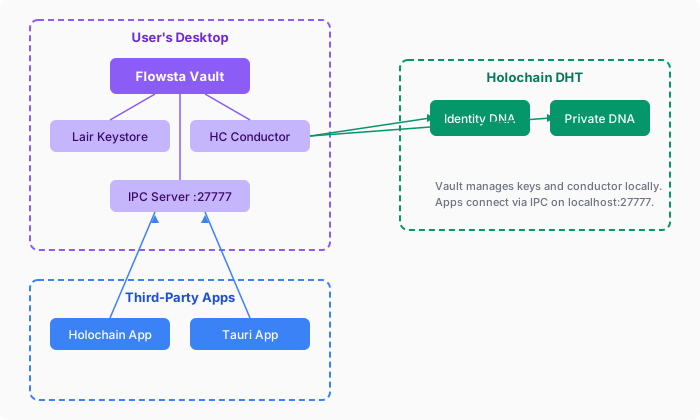 ## Setting up a Vault
Creating an identity takes three steps:
1. **Your details** - email, display name and a Vault password.
2. **Recovery phrase** - the Vault generates the 24 words; the person writes them down. The phrase is what recreates the identity on another computer.
3. **Ready** - the Vault starts the person's node and joins the network.
Two other paths start on the same screen: **restore** an identity from its recovery phrase, and **move** an identity created on flowsta.com before July 2026 into the Vault.
Requirements: Windows 10 or 11 (64-bit), macOS 12 or later, or Linux (`.deb` and `.rpm`). Download at [flowsta.com/vault](https://flowsta.com/vault/).
## What your app can ask the Vault for
Beyond approval, a linked app gets a set of services it would otherwise build itself. All of them go through [`@flowsta/holochain`](/sdk/holochain), which is the Vault's client for any desktop app, with or without Holochain.
| You want | The Vault provides | Guide |
|---|---|---|
| **The person's profile** | Display name, picture and username, scope-gated by the person at link time. No signup form, no avatar upload. | [`getVaultStatus()`](/sdk/holochain#getvaultstatus) |
| **An identity link on your DHT** | A signed attestation that your app's agent and the person's Flowsta identity are the same person. | [Build a Holochain app](/holochain/build) |
| **Backups and reinstall recovery** | Encrypted storage for your app's data in the person's own Vault, and a restore on a new machine. | [Backups](/sdk/holochain#backups) |
| **The CAL data export** | **Export Data** produces the person's records and keys in readable JSON - the export a CAL-licensed app must provide. You write a small decoder per entry type. | [CAL compliance](/holochain/#cal-compliance) |
| **Document signing** | A signature over a file hash, published to the Sign It network for a linked app. | [Sign It developer guide](/sign-it/developer-guide) |
| **Private data on a public DHT** | A pattern for entries only their author can read, with peers carrying the ciphertext. | [Encrypted entries](/sdk/holochain#encrypted-entries-on-public-dht) |
| **Support for several identities** | The status fields and rules for an app when the person switches identity. | [Identity switching](/vault/identity-switching) |
## Next steps
- **[Start here](/getting-started/)** - pick your path
- **[Security & Privacy](/security/)** - what the server holds, what the Vault sends home, how data leaves with the person
- **[Identity switching](/vault/identity-switching)** - several identities in one Vault
- **[IPC reference](/vault/ipc-reference)** - every route on the local bridge
---
# Security & Privacy
URL: https://docs.flowsta.com/security/
# Security & Privacy
**Flowsta Auth is designed so that no one in between - not even Flowsta - can access your private data.**
## Security Architecture
| Layer | Protection |
|-------|-----------|
| **Authentication** | OAuth 2.0 + PKCE, no client secrets, CSRF protection |
| **Identity & keys** | 24-word BIP39 recovery phrase → HMAC-SHA256 key derivation → Ed25519 keypair, held on your device in Flowsta Vault |
| **Private data** | Sealed records encrypted on your device - never gossiped to Flowsta or any third party |
| **Public data** | Identity and Sign It signatures on Flowsta's tamper-proof network, built on Holochain |
| **Sessions** | Access tokens (24h), SSO session cookie (7d), refresh tokens (30d) |
## Core Principles
### Zero-Knowledge Privacy
Your keys and private data live on your device in Flowsta Vault, kept per identity: each Flowsta identity on a device has its own folder for its keys, records and app backups. Keys derive from your 24-word recovery phrase; no account password exists on any server, so there is no server-side password to steal, phish, or leak. The only password is the one that unlocks your Vault, and it never leaves your device. Flowsta's server holds an email hash and lookup metadata, the public profile you choose to publish (display name, username, picture), your OAuth consents, and usage counters - see [what Flowsta can see](/security/zero-knowledge#what-flowsta-can-see). It never holds keys and cannot decrypt anything.
**[Zero-Knowledge Architecture](/security/zero-knowledge)** - Detailed explanation
### User-Owned Keys
Every identity is anchored to an Ed25519 keypair derived from a BIP39 recovery phrase via HMAC-SHA256. You own your keys - Flowsta cannot revoke, modify, or access them. Your DID never changes for the life of your identity, and your recovery phrase restores your identity on any device.
### No Client Secrets
Flowsta uses PKCE (Proof Key for Code Exchange) instead of client secrets. This is equally secure and works safely in browsers and mobile apps without exposing secrets.
### Data Portability
The **Export** button under **Export Data** on Flowsta Vault's Your Data page produces a structured JSON export containing your identity, keys, decrypted private records, app data backups, and Sign It signatures. Your data, in a format you can read and take anywhere.
**[Data Portability](/security/data-portability)** - How users access their data
## For Developers
- **[OAuth Security Guide](/auth/security)** - PKCE implementation, token handling, production checklist
- **[Sessions](/security/sessions)** - Token lifetimes, refresh flow, revocation
- **[Backups & CAL Compliance](/sdk/holochain#backups)** - Meeting CAL license requirements
## Next Steps
- **[Zero-Knowledge Architecture](/security/zero-knowledge)** - How device-held keys work
- **[Data Portability](/security/data-portability)** - User data export and restore
- **[Sessions](/security/sessions)** - Token management
- **[OAuth Security](/auth/security)** - Developer security guide
---
# Zero-Knowledge Architecture
URL: https://docs.flowsta.com/security/zero-knowledge
# Zero-Knowledge Architecture
**Your keys and your private data live on your device. Flowsta physically cannot access them - and neither can anyone in between.**
No password exists on any server. The only password is the one that unlocks your Vault, and it never leaves your device. Your identity is a set of cryptographic keys derived from your 24-word recovery phrase, held on your device in [Flowsta Vault](/vault/). Flowsta's server never sees the phrase, never sees the keys, and stores nothing it could decrypt.
## What Only You Hold
Everything sensitive stays on your device:
| Data | Where it lives |
|------|----------------|
| 24-word recovery phrase | With you - written down, never transmitted |
| Ed25519 device keys | Derived on-device from the phrase via HMAC-SHA256 |
| Private records | Sealed (encrypted) on your device in Flowsta Vault |
| App data backups | Stored locally by the Vault |
Sealed private records do not gossip to Flowsta or to anyone else. They never leave your device unless you export them yourself.
## What Flowsta Can See
Flowsta's server stores only what it needs to route sign-ins:
| Data | Purpose |
|------|---------|
| Email hash | Look up your identity at sign-in - a one-way SHA-256 hash, not your address |
| Lookup metadata | Recovery lookup hash, agent public key, DID |
| Display name, username & profile picture | Your public profile, served by Flowsta's API and cached for flowsta.com and app sign-ins (you chose to make these public) |
| OAuth consent records | Audit trail of which apps you authorized |
| Usage counters | Active-connection and signing-quota counts, keyed by an opaque pseudonym - see [What the Vault Sends Home](/security/usage-data) |
What Flowsta does **not** hold for a Vault identity: no password hash, no keys, no recovery phrase, no private records. There is nothing on Flowsta's servers that could decrypt your data - not for staff, not for attackers, not for anyone.
## Public, Verifiable Data
Two kinds of data are public by design, on Flowsta's tamper-proof network, built on Holochain:
### Identity DNA (Public)
Your public identity record - and nothing that identifies you as a person:
- Your DID (`did:flowsta:
## Setting up a Vault
Creating an identity takes three steps:
1. **Your details** - email, display name and a Vault password.
2. **Recovery phrase** - the Vault generates the 24 words; the person writes them down. The phrase is what recreates the identity on another computer.
3. **Ready** - the Vault starts the person's node and joins the network.
Two other paths start on the same screen: **restore** an identity from its recovery phrase, and **move** an identity created on flowsta.com before July 2026 into the Vault.
Requirements: Windows 10 or 11 (64-bit), macOS 12 or later, or Linux (`.deb` and `.rpm`). Download at [flowsta.com/vault](https://flowsta.com/vault/).
## What your app can ask the Vault for
Beyond approval, a linked app gets a set of services it would otherwise build itself. All of them go through [`@flowsta/holochain`](/sdk/holochain), which is the Vault's client for any desktop app, with or without Holochain.
| You want | The Vault provides | Guide |
|---|---|---|
| **The person's profile** | Display name, picture and username, scope-gated by the person at link time. No signup form, no avatar upload. | [`getVaultStatus()`](/sdk/holochain#getvaultstatus) |
| **An identity link on your DHT** | A signed attestation that your app's agent and the person's Flowsta identity are the same person. | [Build a Holochain app](/holochain/build) |
| **Backups and reinstall recovery** | Encrypted storage for your app's data in the person's own Vault, and a restore on a new machine. | [Backups](/sdk/holochain#backups) |
| **The CAL data export** | **Export Data** produces the person's records and keys in readable JSON - the export a CAL-licensed app must provide. You write a small decoder per entry type. | [CAL compliance](/holochain/#cal-compliance) |
| **Document signing** | A signature over a file hash, published to the Sign It network for a linked app. | [Sign It developer guide](/sign-it/developer-guide) |
| **Private data on a public DHT** | A pattern for entries only their author can read, with peers carrying the ciphertext. | [Encrypted entries](/sdk/holochain#encrypted-entries-on-public-dht) |
| **Support for several identities** | The status fields and rules for an app when the person switches identity. | [Identity switching](/vault/identity-switching) |
## Next steps
- **[Start here](/getting-started/)** - pick your path
- **[Security & Privacy](/security/)** - what the server holds, what the Vault sends home, how data leaves with the person
- **[Identity switching](/vault/identity-switching)** - several identities in one Vault
- **[IPC reference](/vault/ipc-reference)** - every route on the local bridge
---
# Security & Privacy
URL: https://docs.flowsta.com/security/
# Security & Privacy
**Flowsta Auth is designed so that no one in between - not even Flowsta - can access your private data.**
## Security Architecture
| Layer | Protection |
|-------|-----------|
| **Authentication** | OAuth 2.0 + PKCE, no client secrets, CSRF protection |
| **Identity & keys** | 24-word BIP39 recovery phrase → HMAC-SHA256 key derivation → Ed25519 keypair, held on your device in Flowsta Vault |
| **Private data** | Sealed records encrypted on your device - never gossiped to Flowsta or any third party |
| **Public data** | Identity and Sign It signatures on Flowsta's tamper-proof network, built on Holochain |
| **Sessions** | Access tokens (24h), SSO session cookie (7d), refresh tokens (30d) |
## Core Principles
### Zero-Knowledge Privacy
Your keys and private data live on your device in Flowsta Vault, kept per identity: each Flowsta identity on a device has its own folder for its keys, records and app backups. Keys derive from your 24-word recovery phrase; no account password exists on any server, so there is no server-side password to steal, phish, or leak. The only password is the one that unlocks your Vault, and it never leaves your device. Flowsta's server holds an email hash and lookup metadata, the public profile you choose to publish (display name, username, picture), your OAuth consents, and usage counters - see [what Flowsta can see](/security/zero-knowledge#what-flowsta-can-see). It never holds keys and cannot decrypt anything.
**[Zero-Knowledge Architecture](/security/zero-knowledge)** - Detailed explanation
### User-Owned Keys
Every identity is anchored to an Ed25519 keypair derived from a BIP39 recovery phrase via HMAC-SHA256. You own your keys - Flowsta cannot revoke, modify, or access them. Your DID never changes for the life of your identity, and your recovery phrase restores your identity on any device.
### No Client Secrets
Flowsta uses PKCE (Proof Key for Code Exchange) instead of client secrets. This is equally secure and works safely in browsers and mobile apps without exposing secrets.
### Data Portability
The **Export** button under **Export Data** on Flowsta Vault's Your Data page produces a structured JSON export containing your identity, keys, decrypted private records, app data backups, and Sign It signatures. Your data, in a format you can read and take anywhere.
**[Data Portability](/security/data-portability)** - How users access their data
## For Developers
- **[OAuth Security Guide](/auth/security)** - PKCE implementation, token handling, production checklist
- **[Sessions](/security/sessions)** - Token lifetimes, refresh flow, revocation
- **[Backups & CAL Compliance](/sdk/holochain#backups)** - Meeting CAL license requirements
## Next Steps
- **[Zero-Knowledge Architecture](/security/zero-knowledge)** - How device-held keys work
- **[Data Portability](/security/data-portability)** - User data export and restore
- **[Sessions](/security/sessions)** - Token management
- **[OAuth Security](/auth/security)** - Developer security guide
---
# Zero-Knowledge Architecture
URL: https://docs.flowsta.com/security/zero-knowledge
# Zero-Knowledge Architecture
**Your keys and your private data live on your device. Flowsta physically cannot access them - and neither can anyone in between.**
No password exists on any server. The only password is the one that unlocks your Vault, and it never leaves your device. Your identity is a set of cryptographic keys derived from your 24-word recovery phrase, held on your device in [Flowsta Vault](/vault/). Flowsta's server never sees the phrase, never sees the keys, and stores nothing it could decrypt.
## What Only You Hold
Everything sensitive stays on your device:
| Data | Where it lives |
|------|----------------|
| 24-word recovery phrase | With you - written down, never transmitted |
| Ed25519 device keys | Derived on-device from the phrase via HMAC-SHA256 |
| Private records | Sealed (encrypted) on your device in Flowsta Vault |
| App data backups | Stored locally by the Vault |
Sealed private records do not gossip to Flowsta or to anyone else. They never leave your device unless you export them yourself.
## What Flowsta Can See
Flowsta's server stores only what it needs to route sign-ins:
| Data | Purpose |
|------|---------|
| Email hash | Look up your identity at sign-in - a one-way SHA-256 hash, not your address |
| Lookup metadata | Recovery lookup hash, agent public key, DID |
| Display name, username & profile picture | Your public profile, served by Flowsta's API and cached for flowsta.com and app sign-ins (you chose to make these public) |
| OAuth consent records | Audit trail of which apps you authorized |
| Usage counters | Active-connection and signing-quota counts, keyed by an opaque pseudonym - see [What the Vault Sends Home](/security/usage-data) |
What Flowsta does **not** hold for a Vault identity: no password hash, no keys, no recovery phrase, no private records. There is nothing on Flowsta's servers that could decrypt your data - not for staff, not for attackers, not for anyone.
## Public, Verifiable Data
Two kinds of data are public by design, on Flowsta's tamper-proof network, built on Holochain:
### Identity DNA (Public)
Your public identity record - and nothing that identifies you as a person:
- Your DID (`did:flowsta: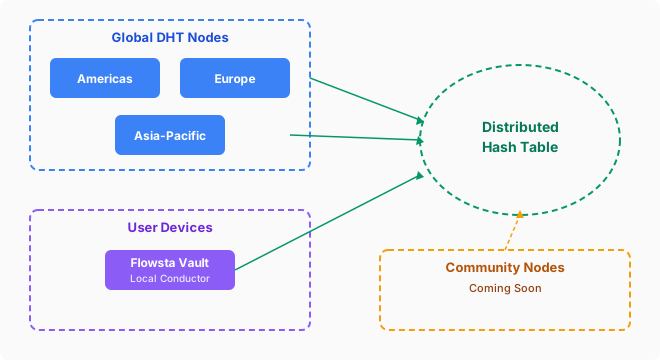 ### Flowsta-Operated Nodes
Flowsta operates infrastructure across three regions:
- **Americas (Iowa)** - the API node, which also runs a full conductor
- **Europe** - a DHT-only node
- **Asia-Pacific (Singapore)** - a DHT-only node
- **A dedicated bootstrap/relay server** - helps peers discover each other and traverse NATs
### Community DHT Nodes
Community-run nodes are **live today** - anyone can run one. The [flowsta-dht-node](https://github.com/WeAreFlowsta/flowsta-dht-node) repository has a step-by-step README that takes you from a fresh machine to a gossiping DHT node.
A community node can also serve as an independent bootstrap/relay, giving the network discovery and relay paths that don't depend on Flowsta's infrastructure at all. Every community node strengthens the network's resilience: the network keeps running even if our cloud provider goes down.
### Flowsta Vault (Local)
When users install [Flowsta Vault](/vault/), it runs a local Holochain conductor that joins the same network. This means:
- The user's public data is replicated locally
- Agent linking attestations and signatures gossip across the network
- The network becomes more resilient with each Vault install
## Key Derivation

Every user's keypair is deterministically derived from their recovery phrase. This means:
- Same phrase always produces the same identity
- Users can restore their identity on any device
- No key escrow or central key server needed
## Holochain Version
Flowsta runs on **Holochain 0.6.1** with the kitsune2 networking layer and Iroh-based peer connectivity.
## Next Steps
- **[Identity & DIDs](/holochain/identity)** - W3C Decentralized Identifiers
- **[For Holochain Developers](/holochain/)** - Integration guide for Holochain devs
- **[Agent Linking](/holochain/agent-linking)** - Identity attestations on your own DHT
- **[Zero-Knowledge Architecture](/security/zero-knowledge)** - Encryption details
- **[Vault Overview](/vault/)** - Local conductor and key management
---
# Identity & DIDs
URL: https://docs.flowsta.com/holochain/identity
# Identity & DIDs
**Every Flowsta user gets a W3C-compliant Decentralized Identifier.**
In the Vault and on flowsta.com it is shown as the **Permanent ID**. The way to explain it to a person: your username is how people find you; your permanent ID is how your signatures and sign-ins prove they came from you. It never changes, and anyone can verify a signature against it without asking Flowsta - the public key is inside the identifier. People never need to read or type it; everything that must keep pointing at them after a username change points at it.
## W3C DIDs
Flowsta generates a [W3C DID](https://www.w3.org/TR/did-core/) for each user based on their Ed25519 public key:
```
did:flowsta:uhCAk7JpEWfkiV_RdAFfCnRZcJ9PwJR4yTLN-E3EcVU7KYCnRRZc
```
### DID Properties
| Property | Value |
|----------|-------|
| **Method** | `did:flowsta` |
| **Key type** | Ed25519 |
| **Self-sovereign** | User owns the DID, not Flowsta |
| **Resolvable** | Flowsta's DID resolver (`GET /did/{did}`) returns a W3C DID Document; the embedded key is a standard Ed25519 key any library can verify with |
| **Verifiable** | Cryptographically linked to user's keypair |
| **Deterministic** | Same recovery phrase always produces the same DID |
### Accessing a User's DID
**Via OAuth:**
```typescript
const auth = new FlowstaAuth({
clientId: 'your_client_id',
redirectUri: 'https://yourapp.com/callback',
scopes: ['openid', 'did']
});
const user = await auth.handleCallback();
console.log('DID:', user.did);
// did:flowsta:uhCAk7JpEWfkiV_RdAFfCnRZcJ9PwJR4yTLN-E3EcVU7KYCnRRZc
```
**Via userinfo API:**
```json
{
"sub": "550e8400-...",
"did": "did:flowsta:uhCAk...",
"agent_pub_key": "hCAk7JpEWfkiV/RdAFfCnRZcJ9PwJR4yTLN+E3EcVU7..."
}
```
Note the two spellings: the DID carries the agent key as `uhCAk` + base64url, while `/oauth/userinfo` returns `agent_pub_key` as plain standard base64 of the same 39 bytes. Compare keys by decoding to bytes, never by string equality.
**Via the Vault (desktop):** `getVaultStatus()` returns `did` (SDK 3.6.0) and `agentPubKey` while the Vault is unlocked.
## Agent Public Keys
Each user also has a Holochain agent public key (`uhCAk...` format). This is the raw Ed25519 public key used for:
- Signing Holochain actions
- Agent linking attestations
- Identity verification on the DHT
For an identity created in the Vault, the DID and the agent public key are the same Ed25519 key in different formats. An identity moved into the Vault from flowsta.com keeps the DID it always had, built on its original web agent key, while the Vault signs with the device key derived from the recovery phrase - so for those identities the DID's key and the Vault's agent key differ. Verify a Vault signature with the agent key the Vault returns alongside it, and treat the DID as the stable identifier.
## Identity Linking
Users can prove their Flowsta identity across multiple Holochain apps using [agent linking](/holochain/agent-linking). Each app has its own agent key, but `IsSamePersonEntry` attestations on the DHT prove they belong to the same person.
## Next Steps
- **[Agent Linking](/holochain/agent-linking)** - Cross-app identity verification
- **[Holochain Architecture](/holochain/architecture)** - DHT and DNA details
- **[For Holochain Developers](/holochain/)** - Integration guide
---
# Sign in with Flowsta
URL: https://docs.flowsta.com/auth/
# Sign in with Flowsta
**Add "Sign in with Flowsta" to your application and let users sign in with their Flowsta identity.**
Sign in with Flowsta works like "Login with Google" or "Sign in with Apple" from your side of the integration: standard OAuth 2.0 with PKCE, a pre-built button, and a `/oauth/userinfo` endpoint. The difference is what happens on Flowsta's side - there is no one in between. A Flowsta identity lives on the user's own device, secured by a 24-word recovery phrase and the Flowsta Vault app. The user approves every sign-in with keys only they hold.
## How Flowsta Identities Work {#how-flowsta-accounts-work}
- **Device-hosted identity** - the user's identity is a keypair on their device, backed by a 24-word recovery phrase. Flowsta never holds the keys.
- **No password to phish** - the login page has no password field. When a user signs in on `login.flowsta.com`, their Flowsta Vault signs a one-time challenge to prove they hold their keys.
- **Standard OAuth for you** - your app never touches any of this. You implement ordinary OAuth 2.0 Authorization Code + PKCE; Flowsta handles the Vault interaction on its login page.
- **The Vault decides who is signing in** - on a computer, a remembered browser session is only reused when it belongs to the identity the Vault holds right now. If the Vault holds a different identity, the sign-in runs again as that identity; if the Vault is locked or closed, the user unlocks or opens it first. On phones, and in browsers that cannot reach a Vault, the remembered session stands.
## Why Sign in with Flowsta?
### For Your Users
- **One identity, everywhere** - sign in across all Flowsta partner sites
- **Keys only they hold** - no password to phish, no credential database to breach
- **Every sign-in approved** - the user's own Vault signs each login challenge
- **W3C DIDs** - self-sovereign, portable identity
### For Developers
- **Quick integration** - add a button, configure OAuth, done
- **Standard OAuth 2.0** - industry-standard protocol with PKCE
- **Multiple frameworks** - React, Vue, Qwik, Vanilla JS support
- **Beautiful UI** - pre-built login buttons and hosted auth pages
- **Free tier** - get started without a credit card
## How It Works
### Flowsta-Operated Nodes
Flowsta operates infrastructure across three regions:
- **Americas (Iowa)** - the API node, which also runs a full conductor
- **Europe** - a DHT-only node
- **Asia-Pacific (Singapore)** - a DHT-only node
- **A dedicated bootstrap/relay server** - helps peers discover each other and traverse NATs
### Community DHT Nodes
Community-run nodes are **live today** - anyone can run one. The [flowsta-dht-node](https://github.com/WeAreFlowsta/flowsta-dht-node) repository has a step-by-step README that takes you from a fresh machine to a gossiping DHT node.
A community node can also serve as an independent bootstrap/relay, giving the network discovery and relay paths that don't depend on Flowsta's infrastructure at all. Every community node strengthens the network's resilience: the network keeps running even if our cloud provider goes down.
### Flowsta Vault (Local)
When users install [Flowsta Vault](/vault/), it runs a local Holochain conductor that joins the same network. This means:
- The user's public data is replicated locally
- Agent linking attestations and signatures gossip across the network
- The network becomes more resilient with each Vault install
## Key Derivation

Every user's keypair is deterministically derived from their recovery phrase. This means:
- Same phrase always produces the same identity
- Users can restore their identity on any device
- No key escrow or central key server needed
## Holochain Version
Flowsta runs on **Holochain 0.6.1** with the kitsune2 networking layer and Iroh-based peer connectivity.
## Next Steps
- **[Identity & DIDs](/holochain/identity)** - W3C Decentralized Identifiers
- **[For Holochain Developers](/holochain/)** - Integration guide for Holochain devs
- **[Agent Linking](/holochain/agent-linking)** - Identity attestations on your own DHT
- **[Zero-Knowledge Architecture](/security/zero-knowledge)** - Encryption details
- **[Vault Overview](/vault/)** - Local conductor and key management
---
# Identity & DIDs
URL: https://docs.flowsta.com/holochain/identity
# Identity & DIDs
**Every Flowsta user gets a W3C-compliant Decentralized Identifier.**
In the Vault and on flowsta.com it is shown as the **Permanent ID**. The way to explain it to a person: your username is how people find you; your permanent ID is how your signatures and sign-ins prove they came from you. It never changes, and anyone can verify a signature against it without asking Flowsta - the public key is inside the identifier. People never need to read or type it; everything that must keep pointing at them after a username change points at it.
## W3C DIDs
Flowsta generates a [W3C DID](https://www.w3.org/TR/did-core/) for each user based on their Ed25519 public key:
```
did:flowsta:uhCAk7JpEWfkiV_RdAFfCnRZcJ9PwJR4yTLN-E3EcVU7KYCnRRZc
```
### DID Properties
| Property | Value |
|----------|-------|
| **Method** | `did:flowsta` |
| **Key type** | Ed25519 |
| **Self-sovereign** | User owns the DID, not Flowsta |
| **Resolvable** | Flowsta's DID resolver (`GET /did/{did}`) returns a W3C DID Document; the embedded key is a standard Ed25519 key any library can verify with |
| **Verifiable** | Cryptographically linked to user's keypair |
| **Deterministic** | Same recovery phrase always produces the same DID |
### Accessing a User's DID
**Via OAuth:**
```typescript
const auth = new FlowstaAuth({
clientId: 'your_client_id',
redirectUri: 'https://yourapp.com/callback',
scopes: ['openid', 'did']
});
const user = await auth.handleCallback();
console.log('DID:', user.did);
// did:flowsta:uhCAk7JpEWfkiV_RdAFfCnRZcJ9PwJR4yTLN-E3EcVU7KYCnRRZc
```
**Via userinfo API:**
```json
{
"sub": "550e8400-...",
"did": "did:flowsta:uhCAk...",
"agent_pub_key": "hCAk7JpEWfkiV/RdAFfCnRZcJ9PwJR4yTLN+E3EcVU7..."
}
```
Note the two spellings: the DID carries the agent key as `uhCAk` + base64url, while `/oauth/userinfo` returns `agent_pub_key` as plain standard base64 of the same 39 bytes. Compare keys by decoding to bytes, never by string equality.
**Via the Vault (desktop):** `getVaultStatus()` returns `did` (SDK 3.6.0) and `agentPubKey` while the Vault is unlocked.
## Agent Public Keys
Each user also has a Holochain agent public key (`uhCAk...` format). This is the raw Ed25519 public key used for:
- Signing Holochain actions
- Agent linking attestations
- Identity verification on the DHT
For an identity created in the Vault, the DID and the agent public key are the same Ed25519 key in different formats. An identity moved into the Vault from flowsta.com keeps the DID it always had, built on its original web agent key, while the Vault signs with the device key derived from the recovery phrase - so for those identities the DID's key and the Vault's agent key differ. Verify a Vault signature with the agent key the Vault returns alongside it, and treat the DID as the stable identifier.
## Identity Linking
Users can prove their Flowsta identity across multiple Holochain apps using [agent linking](/holochain/agent-linking). Each app has its own agent key, but `IsSamePersonEntry` attestations on the DHT prove they belong to the same person.
## Next Steps
- **[Agent Linking](/holochain/agent-linking)** - Cross-app identity verification
- **[Holochain Architecture](/holochain/architecture)** - DHT and DNA details
- **[For Holochain Developers](/holochain/)** - Integration guide
---
# Sign in with Flowsta
URL: https://docs.flowsta.com/auth/
# Sign in with Flowsta
**Add "Sign in with Flowsta" to your application and let users sign in with their Flowsta identity.**
Sign in with Flowsta works like "Login with Google" or "Sign in with Apple" from your side of the integration: standard OAuth 2.0 with PKCE, a pre-built button, and a `/oauth/userinfo` endpoint. The difference is what happens on Flowsta's side - there is no one in between. A Flowsta identity lives on the user's own device, secured by a 24-word recovery phrase and the Flowsta Vault app. The user approves every sign-in with keys only they hold.
## How Flowsta Identities Work {#how-flowsta-accounts-work}
- **Device-hosted identity** - the user's identity is a keypair on their device, backed by a 24-word recovery phrase. Flowsta never holds the keys.
- **No password to phish** - the login page has no password field. When a user signs in on `login.flowsta.com`, their Flowsta Vault signs a one-time challenge to prove they hold their keys.
- **Standard OAuth for you** - your app never touches any of this. You implement ordinary OAuth 2.0 Authorization Code + PKCE; Flowsta handles the Vault interaction on its login page.
- **The Vault decides who is signing in** - on a computer, a remembered browser session is only reused when it belongs to the identity the Vault holds right now. If the Vault holds a different identity, the sign-in runs again as that identity; if the Vault is locked or closed, the user unlocks or opens it first. On phones, and in browsers that cannot reach a Vault, the remembered session stands.
## Why Sign in with Flowsta?
### For Your Users
- **One identity, everywhere** - sign in across all Flowsta partner sites
- **Keys only they hold** - no password to phish, no credential database to breach
- **Every sign-in approved** - the user's own Vault signs each login challenge
- **W3C DIDs** - self-sovereign, portable identity
### For Developers
- **Quick integration** - add a button, configure OAuth, done
- **Standard OAuth 2.0** - industry-standard protocol with PKCE
- **Multiple frameworks** - React, Vue, Qwik, Vanilla JS support
- **Beautiful UI** - pre-built login buttons and hosted auth pages
- **Free tier** - get started without a credit card
## How It Works
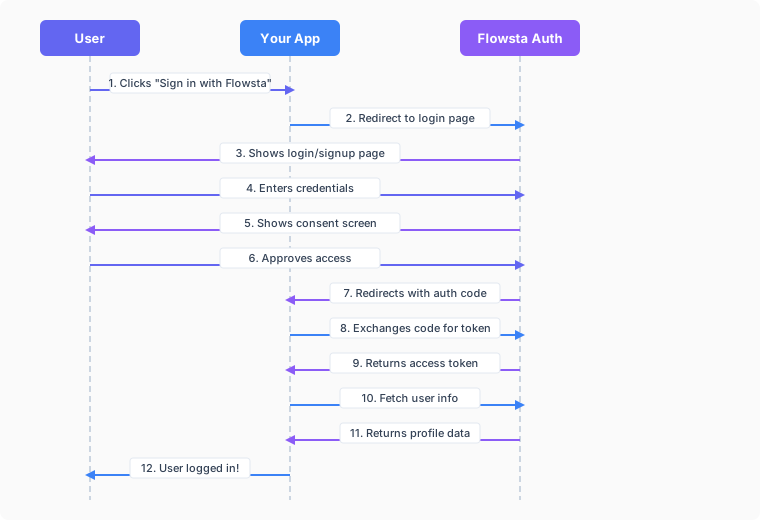 ## OAuth 2.0 Flow
Sign in with Flowsta implements the **OAuth 2.0 Authorization Code Flow with PKCE**:
1. **User clicks** "Sign in with Flowsta" button
2. **Your app redirects** to `login.flowsta.com` (a full-page redirect)
3. **User approves the sign-in** with their Flowsta Vault (or creates an identity in the Vault first)
4. **User grants consent** for the scopes you requested
5. **Flowsta redirects back** to your redirect URI with an authorization code
6. **Your app exchanges** the code for an access token
7. **Your app fetches** user profile data from `/oauth/userinfo`
8. **User is logged in** to your application
## Features
### Security
- **OAuth 2.0 with PKCE** - protection against authorization code interception
- **Refresh tokens** - long-lived sessions (30 days)
- **Token revocation** - refresh tokens can be revoked at any time; access tokens expire within 24 hours
- **Rate limiting** - on the token endpoint (30 requests per minute per IP and client ID)
- **Activity log** - OAuth events per app in your developer dashboard, privacy-preserving (no IP addresses, user agents, or user IDs are stored)
### Email Stays With the User
Flowsta identities are device-hosted, and the server keeps only a hash of the user's email - Flowsta has no email database to hand out.
- The `email` scope means **asking the user to share their address**. On a computer the address comes from the user's Flowsta Vault, which shows its own "share your email" dialog; nothing is typed. On phones and browsers that cannot reach a Vault the user types it at the consent screen and Flowsta verifies it against the hash it holds before accepting it.
- Once shared, `/oauth/userinfo` returns `email` and `email_verified` **for your app only**. Only verified addresses can be shared, so the claim is trustworthy.
- The shared copy is held per-app for delivery and **deleted when the user revokes your app** from their dashboard - design for the possibility that it goes away.
### Customization
- **Pre-built buttons** - responsive designs (light/dark/neutral)
- **Hosted pages** - professional login and consent screens
- **Custom scopes** - request only what you need
## Available Scopes
Flowsta uses **granular scopes** so users only consent to the specific data your app needs:
| Scope | Description | User Data |
|-------|-------------|-----------|
| `openid` | User identifier *(auto-included)* | `sub` (stable user UUID) |
| `display_name` | Display name | `name` |
| `username` | Username | `preferred_username` |
| `email` | Email address | `email`, `email_verified` - only after the user **explicitly shares** it at consent (verified addresses only; revocable) |
| `profile_picture` | Profile picture | `profile_picture`, `has_custom_picture` |
| `did` | Decentralized ID | `did` (W3C DID) |
| `public_key` | Public key | `agent_pub_key` (Holochain) |
| `holochain` | Holochain identity access | `agent_pub_key` and `did` in `/userinfo` |
| `sign` | Sign It signing | Gates Sign It signing endpoints (no extra `/userinfo` fields) |
| `verify` | Sign It verification | Gates Sign It verification endpoints (no extra `/userinfo` fields) |
::: tip Request Only What You Need
Instead of requesting all profile data, choose only the scopes your app actually needs. This builds user trust and simplifies the consent screen.
:::
::: warning Email Is a Gift, Not a Given
The `email` scope asks the user to **share** their address at the consent screen - they can decline by denying, and they can revoke it later (which deletes Flowsta's shared copy). Design your app to work without an email, and treat one you receive as revocable.
:::
## Quick Start
Get Sign in with Flowsta running in 5 minutes:
### 1. Register on dev.flowsta.com {#_1-create-a-flowsta-developer-account}
1. Go to [dev.flowsta.com](https://dev.flowsta.com)
2. Sign in with your Flowsta identity
3. Click **Create New App** - the three steps are app details, **Permissions** (scopes), and **Redirect URIs**
### 2. Configure OAuth Settings
In the create steps (or later, on the app's page, via **Edit Settings** and **Save Settings**):
1. Add **redirect URIs** (where users return after login)
```
https://yourapp.com/auth/callback
```
2. Select the **scopes** your app needs
- `openid` (auto-included, returns user ID)
- `display_name`, `username`, `profile_picture` (profile data)
- `did`, `public_key` (technical identifiers)
- `email` (asks the user to share their address at consent)
A scope that is not ticked here cannot be requested - `/oauth/authorize` answers `invalid_scope`.
### 3. Install the Button Widget
```bash
npm install @flowsta/login-button
```
### 4. Add the Button
The button performs a **full-page redirect** to `login.flowsta.com`. There is no success callback in your app - the authorization code arrives at your redirect URI on a fresh page load, and you handle it there (step 5).
::: code-group
```tsx [React]
import { FlowstaLoginButton } from '@flowsta/login-button/react';
function App() {
return (
## OAuth 2.0 Flow
Sign in with Flowsta implements the **OAuth 2.0 Authorization Code Flow with PKCE**:
1. **User clicks** "Sign in with Flowsta" button
2. **Your app redirects** to `login.flowsta.com` (a full-page redirect)
3. **User approves the sign-in** with their Flowsta Vault (or creates an identity in the Vault first)
4. **User grants consent** for the scopes you requested
5. **Flowsta redirects back** to your redirect URI with an authorization code
6. **Your app exchanges** the code for an access token
7. **Your app fetches** user profile data from `/oauth/userinfo`
8. **User is logged in** to your application
## Features
### Security
- **OAuth 2.0 with PKCE** - protection against authorization code interception
- **Refresh tokens** - long-lived sessions (30 days)
- **Token revocation** - refresh tokens can be revoked at any time; access tokens expire within 24 hours
- **Rate limiting** - on the token endpoint (30 requests per minute per IP and client ID)
- **Activity log** - OAuth events per app in your developer dashboard, privacy-preserving (no IP addresses, user agents, or user IDs are stored)
### Email Stays With the User
Flowsta identities are device-hosted, and the server keeps only a hash of the user's email - Flowsta has no email database to hand out.
- The `email` scope means **asking the user to share their address**. On a computer the address comes from the user's Flowsta Vault, which shows its own "share your email" dialog; nothing is typed. On phones and browsers that cannot reach a Vault the user types it at the consent screen and Flowsta verifies it against the hash it holds before accepting it.
- Once shared, `/oauth/userinfo` returns `email` and `email_verified` **for your app only**. Only verified addresses can be shared, so the claim is trustworthy.
- The shared copy is held per-app for delivery and **deleted when the user revokes your app** from their dashboard - design for the possibility that it goes away.
### Customization
- **Pre-built buttons** - responsive designs (light/dark/neutral)
- **Hosted pages** - professional login and consent screens
- **Custom scopes** - request only what you need
## Available Scopes
Flowsta uses **granular scopes** so users only consent to the specific data your app needs:
| Scope | Description | User Data |
|-------|-------------|-----------|
| `openid` | User identifier *(auto-included)* | `sub` (stable user UUID) |
| `display_name` | Display name | `name` |
| `username` | Username | `preferred_username` |
| `email` | Email address | `email`, `email_verified` - only after the user **explicitly shares** it at consent (verified addresses only; revocable) |
| `profile_picture` | Profile picture | `profile_picture`, `has_custom_picture` |
| `did` | Decentralized ID | `did` (W3C DID) |
| `public_key` | Public key | `agent_pub_key` (Holochain) |
| `holochain` | Holochain identity access | `agent_pub_key` and `did` in `/userinfo` |
| `sign` | Sign It signing | Gates Sign It signing endpoints (no extra `/userinfo` fields) |
| `verify` | Sign It verification | Gates Sign It verification endpoints (no extra `/userinfo` fields) |
::: tip Request Only What You Need
Instead of requesting all profile data, choose only the scopes your app actually needs. This builds user trust and simplifies the consent screen.
:::
::: warning Email Is a Gift, Not a Given
The `email` scope asks the user to **share** their address at the consent screen - they can decline by denying, and they can revoke it later (which deletes Flowsta's shared copy). Design your app to work without an email, and treat one you receive as revocable.
:::
## Quick Start
Get Sign in with Flowsta running in 5 minutes:
### 1. Register on dev.flowsta.com {#_1-create-a-flowsta-developer-account}
1. Go to [dev.flowsta.com](https://dev.flowsta.com)
2. Sign in with your Flowsta identity
3. Click **Create New App** - the three steps are app details, **Permissions** (scopes), and **Redirect URIs**
### 2. Configure OAuth Settings
In the create steps (or later, on the app's page, via **Edit Settings** and **Save Settings**):
1. Add **redirect URIs** (where users return after login)
```
https://yourapp.com/auth/callback
```
2. Select the **scopes** your app needs
- `openid` (auto-included, returns user ID)
- `display_name`, `username`, `profile_picture` (profile data)
- `did`, `public_key` (technical identifiers)
- `email` (asks the user to share their address at consent)
A scope that is not ticked here cannot be requested - `/oauth/authorize` answers `invalid_scope`.
### 3. Install the Button Widget
```bash
npm install @flowsta/login-button
```
### 4. Add the Button
The button performs a **full-page redirect** to `login.flowsta.com`. There is no success callback in your app - the authorization code arrives at your redirect URI on a fresh page load, and you handle it there (step 5).
::: code-group
```tsx [React]
import { FlowstaLoginButton } from '@flowsta/login-button/react';
function App() {
return (






 ```
See the **[Vanilla JS guide](/auth/vanilla-js)** for a complete implementation without npm.
## Next Steps
- **[Button Downloads](/sdk/buttons)** - Download SVG/PNG button assets
- **[@flowsta/auth SDK](/sdk/auth)** - Core authentication SDK
- **[Auth Overview](/auth/)** - OAuth flow documentation
- **[Vanilla JS Guide](/auth/vanilla-js)** - Complete implementation without npm
---
# Sign in with Flowsta Buttons
URL: https://docs.flowsta.com/sdk/buttons
# Sign in with Flowsta Buttons
Official "Sign in with Flowsta" button assets for your website or app.
## Button Variants
We provide 6 button variants in multiple formats:
### Dark Buttons (for light backgrounds)
- **Dark Pill** - Rounded corners, dark background
- **Dark Rectangle** - Square corners, dark background
### Light Buttons (for dark backgrounds)
- **Light Pill** - Rounded corners, light background
- **Light Rectangle** - Square corners, light background
### Neutral Buttons (works on any background)
- **Neutral Pill** - Rounded corners, neutral colors
- **Neutral Rectangle** - Square corners, neutral colors
## Available Formats
All buttons are available in three formats:
- **SVG** - Vector format, scalable without quality loss (recommended)
- **1x PNG** - Standard resolution (175×40px)
- **2x PNG** - High DPI/Retina displays (350×80px)
## Download Buttons
### Dark Pill
### Dark Rectangle
### Light Pill
### Light Rectangle
### Neutral Pill
### Neutral Rectangle
## Using the Buttons
**Building with React, Vue, Qwik, or vanilla JavaScript?** Use the **[@flowsta/login-button](/sdk/login-button)** package - it ships these same assets as ready-made components with PKCE and the OAuth redirect built in.
The options below are for using the raw assets directly.
### Direct Download (Static HTML)
Download a button above, host it yourself, and link it to your OAuth authorization URL:
```html
```
See the **[Vanilla JS guide](/auth/vanilla-js)** for a complete implementation without npm.
## Next Steps
- **[Button Downloads](/sdk/buttons)** - Download SVG/PNG button assets
- **[@flowsta/auth SDK](/sdk/auth)** - Core authentication SDK
- **[Auth Overview](/auth/)** - OAuth flow documentation
- **[Vanilla JS Guide](/auth/vanilla-js)** - Complete implementation without npm
---
# Sign in with Flowsta Buttons
URL: https://docs.flowsta.com/sdk/buttons
# Sign in with Flowsta Buttons
Official "Sign in with Flowsta" button assets for your website or app.
## Button Variants
We provide 6 button variants in multiple formats:
### Dark Buttons (for light backgrounds)
- **Dark Pill** - Rounded corners, dark background
- **Dark Rectangle** - Square corners, dark background
### Light Buttons (for dark backgrounds)
- **Light Pill** - Rounded corners, light background
- **Light Rectangle** - Square corners, light background
### Neutral Buttons (works on any background)
- **Neutral Pill** - Rounded corners, neutral colors
- **Neutral Rectangle** - Square corners, neutral colors
## Available Formats
All buttons are available in three formats:
- **SVG** - Vector format, scalable without quality loss (recommended)
- **1x PNG** - Standard resolution (175×40px)
- **2x PNG** - High DPI/Retina displays (350×80px)
## Download Buttons
### Dark Pill
### Dark Rectangle
### Light Pill
### Light Rectangle
### Neutral Pill
### Neutral Rectangle
## Using the Buttons
**Building with React, Vue, Qwik, or vanilla JavaScript?** Use the **[@flowsta/login-button](/sdk/login-button)** package - it ships these same assets as ready-made components with PKCE and the OAuth redirect built in.
The options below are for using the raw assets directly.
### Direct Download (Static HTML)
Download a button above, host it yourself, and link it to your OAuth authorization URL:
```html












 ```
You'll need to construct the OAuth URL manually - see [OAuth URL Construction](#oauth-url-construction) below and the [OAuth guide](/auth/quickstart).
### Hotlink
Link directly to our hosted buttons:
```html
```
You'll need to construct the OAuth URL manually - see [OAuth URL Construction](#oauth-url-construction) below and the [OAuth guide](/auth/quickstart).
### Hotlink
Link directly to our hosted buttons:
```html
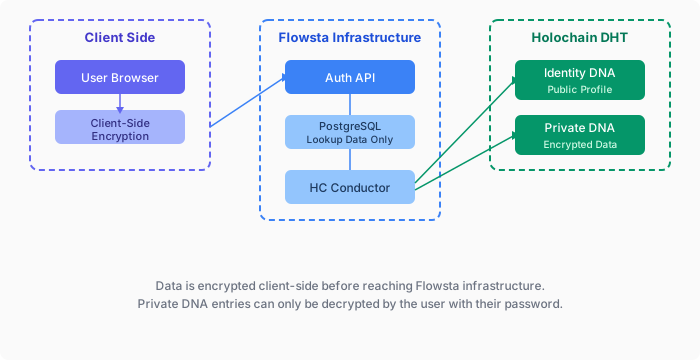 ### Three Holochain DNAs
Flowsta uses three separate Holochain DNAs (current versions: Identity v1.4, Signing v1.4, Private v1.11 plus the device-only Private v2, on Holochain 0.6.1):
**Identity DNA (public)**
- W3C DID and timestamps - nothing else. Display name and profile picture left the public record in v1.2 and v1.4
- Agent linking attestations (`IsSamePersonEntry`)
- Publicly readable by other users
**Private DNA (encrypted, device-only)**
- Profile, login and dashboard activity, OAuth activity, email permissions, privacy settings, analytics id, profile picture
- Every record is an opaque `{cipher, nonce}` blob; entry type, timestamps and relationships live inside the ciphertext
- Encrypted on the device with a key derived from the recovery phrase; gossips only between the person's own devices, which derive the same key
- The recovery phrase itself and 2FA secrets are never stored in any DNA
- The earlier per-user Private cells (v1.x) that flowsta.com identities used are legacy
**Signing DNA (public)**
- File signatures (SHA-256 hash + Ed25519 signature)
- Content rights manifests (license, AI training policy)
- Perceptual hashes for fuzzy file matching
- Publicly verifiable by anyone
::: info Zero-knowledge guarantee
Private records are encrypted on the user's device with keys derived from their recovery phrase - no password is involved in that encryption, and the ciphertext travels only to the user's own devices. Flowsta's servers never hold the data or the keys.
:::
**[Architecture](/holochain/architecture)** - nodes, DNAs and versions. **[Identity & DIDs](/holochain/identity)** - what the Permanent ID is and how to resolve it.
## Next steps
- **[Build a Holochain app](/holochain/build)** - step-by-step integration
- **[Identity switching](/vault/identity-switching)** - the one-agent-one-identity rule and the two app models
- **[Agent linking](/holochain/agent-linking)** - attestation mechanics
- **[Desktop apps](/desktop/)** - sign in through the Vault without Holochain
- **[Encrypted entries](/sdk/holochain#encrypted-entries-on-public-dht)** - private data on a public DHT
- **[`@flowsta/holochain`](/sdk/holochain)** - the SDK reference
## Learn more about Holochain
- [Holochain.org](https://holochain.org) - official Holochain website
- [Holochain Developer Portal](https://developer.holochain.org) - build on Holochain
- [Holochain Forum](https://forum.holochain.org) - community discussions
---
# Building Holochain Apps with Flowsta
URL: https://docs.flowsta.com/holochain/build
# Build a Holochain app
**Let users prove their Flowsta identity on your Holochain app's DHT.**
When users link their Flowsta identity to your app, a cryptographic attestation (`IsSamePersonEntry`) is committed to your DHT. Anyone on your network can verify the link using Ed25519 cryptography - no shared DNA or API dependency required.
## Required and optional
**Required** for every Holochain app that links a Flowsta identity:
- The two agent-linking zomes in your DNA (Step 1) and `@flowsta/holochain` in your front end (Step 2).
- A registered app at [dev.flowsta.com](https://dev.flowsta.com) - the Vault refuses a link request without a `client_id`.
- The link ceremony (Steps 4-5), and the rule that comes with it: **one app agent links to one Flowsta identity.** A Vault that holds a different identity than the one your app linked with is a stop, never a prompt to link again - see [Identity switching](/vault/identity-switching).
**Optional**, each a few lines once the link exists: the user's profile fields (Step 3 scopes), [encrypted backups and reinstall recovery](#user-data-backups-reinstall-recovery), [encrypted private data](#encrypted-private-data), [document signing](/sign-it/developer-guide) through Sign It, and per-identity profiles so the app works for several identities on one computer ([Model 2](/vault/identity-switching#model-2-one-agent-per-identity)).
## Prerequisites
1. A Holochain application with its own DNA
2. A registered app at [dev.flowsta.com](https://dev.flowsta.com) (for `client_id`)
3. Users have [Flowsta Vault](/vault/) installed on their desktop
::: tip Works with any framework
This guide applies to Tauri, Electron, and any other desktop framework. The `@flowsta/holochain` SDK communicates with Flowsta Vault via its localhost IPC server and works in any JavaScript environment - no framework-specific adapter needed.
:::
## Step 1: Add Agent-Linking Zomes
Add the [`flowsta-agent-linking`](https://github.com/WeAreFlowsta/flowsta-agent-linking) crates to your DNA, pinned to a release tag:
```toml
# integrity/Cargo.toml
[dependencies]
flowsta-agent-linking-integrity = { git = "https://github.com/WeAreFlowsta/flowsta-agent-linking", tag = "v0.3.0" }
```
```toml
# coordinator/Cargo.toml
[dependencies]
flowsta-agent-linking-coordinator = { git = "https://github.com/WeAreFlowsta/flowsta-agent-linking", tag = "v0.3.0" }
```
Tag `v0.3.0` (integrity 0.2.0, coordinator 0.3.0) targets Holochain 0.6. The crates pin exact HDK versions, so your DNA's `hdi` and `hdk` must be on the same line - `hdi = "=0.7.0"` and `hdk = "=0.6.0"` for this tag - or the build fails with trait-resolution errors. Build the zomes with `RUSTFLAGS='--cfg getrandom_backend="custom"' cargo build --release --target wasm32-unknown-unknown`.
Reference them in your `dna.yaml`:
```yaml
integrity:
zomes:
- name: agent_linking_integrity
bundled: ../../target/wasm32-unknown-unknown/release/flowsta_agent_linking_integrity.wasm
coordinator:
zomes:
- name: agent_linking
bundled: ../../target/wasm32-unknown-unknown/release/flowsta_agent_linking_coordinator.wasm
dependencies:
- name: agent_linking_integrity
```
Keep the zome names `agent_linking_integrity` and `agent_linking`: the SDK's `getFlowstaIdentity` calls the coordinator zome `agent_linking` by default.
## Step 2: Install the SDK
```bash
npm install @flowsta/holochain
```
## Step 3: Configure Scopes
In your app's settings at [dev.flowsta.com](https://dev.flowsta.com), select the scopes your app needs. Scopes control which Flowsta profile fields the Vault's local IPC server (`GET /status`) returns to your app once the user has linked it. The user sees the scope list in the Vault approval dialog before they approve.
| Scope | What you receive | Notes |
|-------|-----------------|-------|
| `openid` | Basic identity *(auto-included)* | Always present - not shown to the user |
| `did` | The user's Permanent ID (`did:flowsta:…`) | Always returned by `/status` while unlocked; the scope is shown in the dialog for transparency |
| `public_key` | The Vault's Holochain agent public key | Always returned by `/status` while unlocked; the scope is shown in the dialog for transparency |
| `holochain` | "Holochain identity" line in the dialog | Default scope for Holochain-type apps. No runtime effect in the Vault; at the Flowsta API it adds `agent_pub_key` to `/oauth/userinfo` |
| `display_name` | User's display name | Profile UI |
| `username` | User's @username | Profile UI |
| `profile_picture` | Avatar (data URI or URL) | Profile UI |
Profile fields for scopes you haven't selected are returned as `null` from `/status`, even if the user has that data in their Vault, and all profile fields are `null` until the user has linked your app (the Vault recognizes your app by the origin it linked from). Note that the `username` scope yields the `web_username` field in the `/status` response (`webUsername` in the SDK). The Vault stores the granted scopes at link time: a scope change at dev.flowsta.com takes effect the next time the user links your app - no rebuild needed, but no effect on an already-linked install until it re-links.
## Step 4: Request Identity Linking
```typescript
import { linkFlowstaIdentity } from '@flowsta/holochain';
// Request link from Vault
const result = await linkFlowstaIdentity({
appName: 'ChessChain',
clientId: 'flowsta_app_abc123', // from dev.flowsta.com
localAgentPubKey: myAgentKey, // uhCAk... format
});
// result.payload contains:
// - vaultAgentPubKey: the Vault's agent key
// - vaultSignature: Ed25519 signature of the 78-byte linking payload (base64)
```
Linking also **binds** your app to that Vault identity (SDK v3): later write-shaped calls - backups, document signing, Vault sign-in - refuse with `IdentityMismatchError` when the Vault holds a different identity. See [Identity binding](/sdk/holochain#identity-binding-v3).
::: warning One app agent, one identity
Linking attests on your public DHT that this app agent and this Flowsta identity are the same person. Never link the same app agent to a second identity: a Vault that holds another identity is a stop, not a prompt to call `linkFlowstaIdentity` again. Since Vault 1.5.0 one Vault can hold several identities on one computer, so your app will meet this case. The Vault refuses an agent that another identity in the same Vault already links (`409 agent_linked_elsewhere`), and the zome refuses a second live link to a different identity. Read [Identity switching](/vault/identity-switching) before you ship.
:::
## Step 5: Commit to Your DHT
```typescript
import { decodeHashFromBase64 } from '@holochain/client';
// The Vault's signature arrives base64-encoded; the zome wants the raw 64 bytes.
const signatureBytes = (b64: string) =>
Uint8Array.from(atob(b64), (c) => c.charCodeAt(0));
await appWebsocket.callZome({
role_name: 'my-role',
zome_name: 'agent_linking',
fn_name: 'create_external_link',
payload: {
external_agent: decodeHashFromBase64(result.payload.vaultAgentPubKey),
external_signature: signatureBytes(result.payload.vaultSignature),
},
});
```
The `create_external_link` function:
1. Refuses when your agent already holds a live link to a *different* external agent (linking the same one again is allowed - reinstall, restore)
2. Verifies the Vault's Ed25519 signature
3. Creates a local signature from your app's agent key
4. Commits an `IsSamePersonEntry` with both signatures
5. Creates lookup links for querying
## Step 6: Query Linked Agents
```typescript
import { getFlowstaIdentity } from '@flowsta/holochain';
const linkedAgents = await getFlowstaIdentity({
appWebsocket,
roleName: 'my-role',
agentPubKey: someAgentKey,
});
// linkedAgents is Uint8Array[] - array of linked agent public keys
if (linkedAgents.length > 0) {
console.log(`Linked to ${linkedAgents.length} Flowsta identities`);
}
```
Or call the zome directly:
```typescript
const linkedAgents = await appWebsocket.callZome({
role_name: 'my-role',
zome_name: 'agent_linking',
fn_name: 'get_linked_agents',
payload: myAgentKey,
});
```
## Error Handling
Handle Vault availability gracefully:
```typescript
import { getVaultStatus, linkFlowstaIdentity } from '@flowsta/holochain';
// Check if Vault is available first
const status = await getVaultStatus();
if (status.blocked) {
showMessage('Your browser blocked access to Flowsta Vault - allow local network access for this site');
return;
}
if (!status.running) {
showMessage('Please install and start Flowsta Vault');
return;
}
if (!status.unlocked) {
showMessage('Please unlock your Flowsta Vault');
return;
}
try {
const result = await linkFlowstaIdentity({ /* ... */ });
} catch (error: any) {
if (error.name === 'UserDeniedError') {
showMessage('Identity linking was canceled');
} else if (error.name === 'InvalidClientIdError') {
showMessage('App registration error');
} else if (error.code === 'agent_linked_elsewhere') {
// Another identity in this Vault already links this app agent.
showMessage(error.description);
}
}
```
`status.blocked` (SDK 3.1.0) means the browser refused the loopback request - Chrome 142+ asks for a Local Network Access permission - so the Vault may well be running; write-shaped calls throw `VaultBlockedError` in that case. See the full error reference in [Agent Linking](/holochain/agent-linking#error-handling).
## When the user switches identity
From Vault 1.5.0 one Vault holds several identities on one computer, one unlocked at a time. Your app is linked and bound to one of them. When the Vault holds another, every write-shaped SDK call refuses with `IdentityMismatchError` and the Vault answers `409 identity_mismatch` to any request that names the expected identity. Show the state and offer to switch back, open the app as the identity the Vault holds now, or disconnect - never link the same agent again. The full contract, and the two ways to build for it, are on [Identity switching](/vault/identity-switching).
## User Data Backups & Reinstall Recovery
Integrate the [canonical-shape backup pipeline](/sdk/holochain#backups) so your users never lose data on reinstall, device wipe, or move to a new machine. Start by [choosing your recovery model](/sdk/holochain#choose-your-recovery-model): **recognition + seed adoption** (shared DHT - the network is the durability; the backup escrows the app's agent seed, so a new machine [adopts the seed](/sdk/holochain#seed-adoption-shared-dht-apps) and continues as the same author while data re-syncs, nothing replayed), **replay** (per-user DHT or single-author data - the Vault backup is the durability; walk it and re-commit records), or **extension blocks** for data that isn't on Holochain at all (settings, local files, images). All three ride the same payload, and most real apps mix them.
For replay apps, you write two small Tauri commands - `decode_record_for_export` (decode an entry to plain JSON for the user's data export) and `restore_record` (re-create an entry by calling the matching zome function). When you add a new entry type, you add one `match` arm in each. The SDK handles the rest: it captures the user's source chain, runs your decoder per record, posts the canonical-shape payload to Vault. On reinstall, the SDK's `restoreFromVault` walks the backup and calls your `restore_record` once per entry. For shared-DHT apps, you instead generate your agent seed app-side, escrow it in the payload's `app_keys` block, and reuse the [adoption flow](/sdk/holochain#seed-adoption-shared-dht-apps) on restore. Either way, Vault provides the encryption, storage, the Your Data UI, and the [CAL §4.2.1](https://github.com/holochain/cryptographic-autonomy-license)-compliant data export with the user's cryptographic keys included.
From one payload, users get the full story on Vault's **Your Data** page: your app listed with per-entry-type counts, a per-app **Export** of just your app's data, the all-app **Export Data** section (one **Export** button for everything), and delete. Backups are encrypted at rest with the user's Vault key and stored per identity.
Auto-backups run on every write (debounced 30s) plus a 30-minute heartbeat retry. They work even when the Vault is locked, as long as it has been unlocked at least once in the current session. Three write guards protect the reinstall window, where the first auto-backup fires before recovery: `backupToVault` refuses an empty payload over a non-empty backup (on by default; since SDK v3 the guard covers every write path, not just auto-backup), refuses to write while the Vault holds a different identity than the one your app [linked and bound to](/sdk/holochain#identity-binding-v3) (`IdentityMismatchError`, v3), and apps whose payload carries `app_keys` must also refuse to overwrite a backup escrowing a different key than the local one - see [the guard contract](/sdk/holochain#when-restore-runs). Each backup object is capped at 50 MB (`BackupTooLargeError`); the SDK does not split payloads, so split larger data into named parts yourself.
If your app stores [encrypted entries](#encrypted-private-data) on the public DHT, decrypt them when you build the `human_readable` view so the user's export remains readable - the Vault encrypts the backup at rest, so no double-encryption is needed.
## Encrypted Private Data
Your app can store private data on the public DHT using client-side encryption: peers replicate the ciphertext for resilience, but only the key-holder can decrypt. **Pick the key model before the cipher** - it decides whether the data is readable on a second device and whether it survives losing the first one:
- **Agent-keyed data** - encrypt with the agent's lair-managed keys (xsalsa20poly1305 crypto_box, 256-bit). Generate the agent seed app-side and escrow it in `app_keys` so the key survives device loss - after [seed adoption](/sdk/holochain#seed-adoption-shared-dht-apps) the restored device decrypts everything the lost one authored. [ProofPoll](https://github.com/WeAreFlowsta/ProofPoll) is the working reference.
- **Multi-device / recoverable data** - derive a symmetric key from a user-level secret (recovery phrase or password) with HMAC and a domain-separation constant. Every device derives the same key, and recovery needs only the secret. Flowsta Vault itself uses this model in production for its own private data.
- **Standalone-first apps** (fully usable before the user links a Flowsta identity) - generate a random symmetric key locally, give the user a key-export UX, and escrow the key in their Vault backup via the `app_keys` block once they link Flowsta - it then rides both their single-app export and their full data export.
Whatever the model: use a generic `"private"` hint on encrypted entries and keep metadata (entry type, relationships) inside the ciphertext - don't leak what kind of private data is stored. If your app keeps data for more than one Flowsta identity on the same computer, name that storage by `partitionKeyFor(agentPubKey)` (SDK 3.3.0) so one identity's data never mixes with another's.
See [Encrypted Entries on Public DHT](/sdk/holochain#encrypted-entries-on-public-dht) for the full pattern and key-model guidance.
## Next Steps
- **[Identity Switching](/vault/identity-switching)** - The rule every linked app must follow, and the two models
- **[Agent Linking](/holochain/agent-linking)** - Detailed attestation mechanics and API reference
- **[Encrypted Entries](/sdk/holochain#encrypted-entries-on-public-dht)** - Private data on public DHT
- **[@flowsta/holochain SDK](/sdk/holochain#backups)** - Backup API reference
- **[IPC Endpoints](/vault/ipc-reference)** - Raw IPC API reference
---
# Agent Linking
URL: https://docs.flowsta.com/holochain/agent-linking
# Agent Linking
**Link your Holochain app's agent key with the user's Flowsta Vault identity.**
Flowsta Vault acts as a local identity provider for Holochain apps. When a user approves a link request, the Vault signs a cryptographic attestation that is committed to your app's DHT as an `IsSamePersonEntry`. Anyone on your DHT can verify the link using Ed25519 cryptography - no shared DNA, no API dependency, no one in between.
## How It Works

### The 78-Byte Payload
Vault constructs the signing payload itself (apps cannot influence what gets signed):
| Bytes | Content |
|-------|---------|
| 0-38 | First agent public key (39 bytes: 3-byte prefix + 32-byte key + 4-byte checksum) |
| 39-77 | Second agent public key (39 bytes, same format) |
The two 39-byte Holochain `AgentPubKey`s are sorted lexicographically to produce a canonical 78-byte payload, and both agents sign the raw 78 bytes (no MessagePack encoding). The dual-signature design means:
- The app agent attests "I am the same person as this Vault agent"
- The Vault agent attests "I am the same person as this app agent"
- Anyone can verify both signatures using the public keys in the payload
Because the attestation is a public claim that two keys are one person, **one app agent links to one Flowsta identity**. A second live link from the same app agent to a different identity would claim that two people are one; the zome refuses it, and so does the Vault. See [Identity switching](/vault/identity-switching).
## Prerequisites
1. **Register your app** at [dev.flowsta.com](https://dev.flowsta.com) to get a `client_id`
2. **Add the `flowsta-agent-linking` zomes** to your DNA (see [Integration Guide](#integration-guide))
3. **Install the SDK**: `npm install @flowsta/holochain`
## Quick Start
```typescript
import { linkFlowstaIdentity, getFlowstaIdentity } from '@flowsta/holochain';
import { decodeHashFromBase64 } from '@holochain/client';
// Link identity
const result = await linkFlowstaIdentity({
appName: 'ChessChain',
clientId: 'flowsta_app_abc123...', // from dev.flowsta.com
localAgentPubKey: myAgentKey, // uhCAk... format
});
// The Vault's signature arrives base64-encoded; the zome wants the raw 64 bytes.
const signatureBytes = (b64: string) =>
Uint8Array.from(atob(b64), (c) => c.charCodeAt(0));
// Commit to your DHT
await appWebsocket.callZome({
role_name: 'chess',
zome_name: 'agent_linking',
fn_name: 'create_external_link',
payload: {
external_agent: decodeHashFromBase64(result.payload.vaultAgentPubKey),
external_signature: signatureBytes(result.payload.vaultSignature),
},
});
// Query linked identities
const linked = await getFlowstaIdentity({
appWebsocket,
roleName: 'chess',
agentPubKey: myAgentKey,
});
```
## Integration Guide
### 1. Add zomes to your DNA
Add the [`flowsta-agent-linking`](https://github.com/WeAreFlowsta/flowsta-agent-linking) crates (MIT) to your DNA's integrity and coordinator zomes, pinned to a release tag:
```toml
# integrity Cargo.toml
[dependencies]
flowsta-agent-linking-integrity = { git = "https://github.com/WeAreFlowsta/flowsta-agent-linking", tag = "v0.3.0" }
# coordinator Cargo.toml
[dependencies]
flowsta-agent-linking-coordinator = { git = "https://github.com/WeAreFlowsta/flowsta-agent-linking", tag = "v0.3.0" }
```
Tag `v0.3.0` (integrity 0.2.0, coordinator 0.3.0) targets Holochain 0.6. The crates pin exact HDK versions, so your DNA's `hdi` and `hdk` must be on the same line - `hdi = "=0.7.0"` and `hdk = "=0.6.0"` for this tag. Build with `RUSTFLAGS='--cfg getrandom_backend="custom"' cargo build --release --target wasm32-unknown-unknown`.
Reference them in your `dna.yaml`:
```yaml
integrity:
zomes:
- name: agent_linking_integrity
bundled: ../../target/wasm32-unknown-unknown/release/flowsta_agent_linking_integrity.wasm
coordinator:
zomes:
- name: agent_linking
bundled: ../../target/wasm32-unknown-unknown/release/flowsta_agent_linking_coordinator.wasm
dependencies:
- name: agent_linking_integrity
```
### 2. Install SDK
```bash
npm install @flowsta/holochain
```
### 3. Register your app
Go to [dev.flowsta.com](https://dev.flowsta.com) and create an app to get a `client_id`.
## API Reference
### SDK Functions
| Function | Description |
|----------|-------------|
| `linkFlowstaIdentity(options)` | Request identity link from Vault. Also binds the app to that identity (v3) |
| `getFlowstaIdentity(options)` | Query linked agents on your DHT |
| `getVaultStatus(ipcUrl?)` | Check if Vault is running/unlocked; `did` (v3.6.0), `activeIdentity`, `identityEpoch`, `instanceId` (v3.5.0) |
| `revokeFlowstaIdentity(options)` | Notify Vault of revocation (removes the app from the Vault's connected list; the DHT entry is revoked with `revoke_link`) |
| `getFlowstaLinkStatus(options)` | Check link status - three-state result (`linked`/`unlinked`/`offline`). Recommended. _(v2.3.0)_ |
| `checkFlowstaLinkStatus(options)` | Check if Vault still considers agent linked. **Deprecated** since v2.3.0; use `getFlowstaLinkStatus`. |
| `getVaultIdentity(ipcUrl?)` | The unlocked agent key or `null`, one status read _(v3.4.0)_ |
| `onIdentityChanged(cb, opts?)` | Poll for an identity switch in the Vault; compares the identity epoch on Vault 1.5.0+ _(v3.0.0, epoch v3.5.0)_ |
| `reconnectIdentity(options)` | After a switch: rebind silently when the identity now in the Vault already links this app, else `approval_needed` _(v3.4.0)_ |
| `partitionKeyFor(agentPubKey)` | Folder-safe key to keep one identity's data apart from another's _(v3.3.0)_ |
| `resolveVaultUrl(ipcUrl?)` | Probe ports 27777-27779 in parallel and pick the best Vault _(v3.0.0, parallel since v3.4.0)_ |
The full list, with the backup and signing functions, is on the [SDK page](/sdk/holochain#function-reference).
### Zome Functions
These are the Holochain zome calls available after adding the `flowsta-agent-linking` zomes to your DNA:
| Function | Input | Output | Description |
|----------|-------|--------|-------------|
| `create_external_link` | `ExternalLinkInput` | `ActionHash` | Commit attestation to DHT. Refuses when the calling agent already holds a live link to a different external agent |
| `get_linked_agents` | `AgentPubKey` | `Vec
### Three Holochain DNAs
Flowsta uses three separate Holochain DNAs (current versions: Identity v1.4, Signing v1.4, Private v1.11 plus the device-only Private v2, on Holochain 0.6.1):
**Identity DNA (public)**
- W3C DID and timestamps - nothing else. Display name and profile picture left the public record in v1.2 and v1.4
- Agent linking attestations (`IsSamePersonEntry`)
- Publicly readable by other users
**Private DNA (encrypted, device-only)**
- Profile, login and dashboard activity, OAuth activity, email permissions, privacy settings, analytics id, profile picture
- Every record is an opaque `{cipher, nonce}` blob; entry type, timestamps and relationships live inside the ciphertext
- Encrypted on the device with a key derived from the recovery phrase; gossips only between the person's own devices, which derive the same key
- The recovery phrase itself and 2FA secrets are never stored in any DNA
- The earlier per-user Private cells (v1.x) that flowsta.com identities used are legacy
**Signing DNA (public)**
- File signatures (SHA-256 hash + Ed25519 signature)
- Content rights manifests (license, AI training policy)
- Perceptual hashes for fuzzy file matching
- Publicly verifiable by anyone
::: info Zero-knowledge guarantee
Private records are encrypted on the user's device with keys derived from their recovery phrase - no password is involved in that encryption, and the ciphertext travels only to the user's own devices. Flowsta's servers never hold the data or the keys.
:::
**[Architecture](/holochain/architecture)** - nodes, DNAs and versions. **[Identity & DIDs](/holochain/identity)** - what the Permanent ID is and how to resolve it.
## Next steps
- **[Build a Holochain app](/holochain/build)** - step-by-step integration
- **[Identity switching](/vault/identity-switching)** - the one-agent-one-identity rule and the two app models
- **[Agent linking](/holochain/agent-linking)** - attestation mechanics
- **[Desktop apps](/desktop/)** - sign in through the Vault without Holochain
- **[Encrypted entries](/sdk/holochain#encrypted-entries-on-public-dht)** - private data on a public DHT
- **[`@flowsta/holochain`](/sdk/holochain)** - the SDK reference
## Learn more about Holochain
- [Holochain.org](https://holochain.org) - official Holochain website
- [Holochain Developer Portal](https://developer.holochain.org) - build on Holochain
- [Holochain Forum](https://forum.holochain.org) - community discussions
---
# Building Holochain Apps with Flowsta
URL: https://docs.flowsta.com/holochain/build
# Build a Holochain app
**Let users prove their Flowsta identity on your Holochain app's DHT.**
When users link their Flowsta identity to your app, a cryptographic attestation (`IsSamePersonEntry`) is committed to your DHT. Anyone on your network can verify the link using Ed25519 cryptography - no shared DNA or API dependency required.
## Required and optional
**Required** for every Holochain app that links a Flowsta identity:
- The two agent-linking zomes in your DNA (Step 1) and `@flowsta/holochain` in your front end (Step 2).
- A registered app at [dev.flowsta.com](https://dev.flowsta.com) - the Vault refuses a link request without a `client_id`.
- The link ceremony (Steps 4-5), and the rule that comes with it: **one app agent links to one Flowsta identity.** A Vault that holds a different identity than the one your app linked with is a stop, never a prompt to link again - see [Identity switching](/vault/identity-switching).
**Optional**, each a few lines once the link exists: the user's profile fields (Step 3 scopes), [encrypted backups and reinstall recovery](#user-data-backups-reinstall-recovery), [encrypted private data](#encrypted-private-data), [document signing](/sign-it/developer-guide) through Sign It, and per-identity profiles so the app works for several identities on one computer ([Model 2](/vault/identity-switching#model-2-one-agent-per-identity)).
## Prerequisites
1. A Holochain application with its own DNA
2. A registered app at [dev.flowsta.com](https://dev.flowsta.com) (for `client_id`)
3. Users have [Flowsta Vault](/vault/) installed on their desktop
::: tip Works with any framework
This guide applies to Tauri, Electron, and any other desktop framework. The `@flowsta/holochain` SDK communicates with Flowsta Vault via its localhost IPC server and works in any JavaScript environment - no framework-specific adapter needed.
:::
## Step 1: Add Agent-Linking Zomes
Add the [`flowsta-agent-linking`](https://github.com/WeAreFlowsta/flowsta-agent-linking) crates to your DNA, pinned to a release tag:
```toml
# integrity/Cargo.toml
[dependencies]
flowsta-agent-linking-integrity = { git = "https://github.com/WeAreFlowsta/flowsta-agent-linking", tag = "v0.3.0" }
```
```toml
# coordinator/Cargo.toml
[dependencies]
flowsta-agent-linking-coordinator = { git = "https://github.com/WeAreFlowsta/flowsta-agent-linking", tag = "v0.3.0" }
```
Tag `v0.3.0` (integrity 0.2.0, coordinator 0.3.0) targets Holochain 0.6. The crates pin exact HDK versions, so your DNA's `hdi` and `hdk` must be on the same line - `hdi = "=0.7.0"` and `hdk = "=0.6.0"` for this tag - or the build fails with trait-resolution errors. Build the zomes with `RUSTFLAGS='--cfg getrandom_backend="custom"' cargo build --release --target wasm32-unknown-unknown`.
Reference them in your `dna.yaml`:
```yaml
integrity:
zomes:
- name: agent_linking_integrity
bundled: ../../target/wasm32-unknown-unknown/release/flowsta_agent_linking_integrity.wasm
coordinator:
zomes:
- name: agent_linking
bundled: ../../target/wasm32-unknown-unknown/release/flowsta_agent_linking_coordinator.wasm
dependencies:
- name: agent_linking_integrity
```
Keep the zome names `agent_linking_integrity` and `agent_linking`: the SDK's `getFlowstaIdentity` calls the coordinator zome `agent_linking` by default.
## Step 2: Install the SDK
```bash
npm install @flowsta/holochain
```
## Step 3: Configure Scopes
In your app's settings at [dev.flowsta.com](https://dev.flowsta.com), select the scopes your app needs. Scopes control which Flowsta profile fields the Vault's local IPC server (`GET /status`) returns to your app once the user has linked it. The user sees the scope list in the Vault approval dialog before they approve.
| Scope | What you receive | Notes |
|-------|-----------------|-------|
| `openid` | Basic identity *(auto-included)* | Always present - not shown to the user |
| `did` | The user's Permanent ID (`did:flowsta:…`) | Always returned by `/status` while unlocked; the scope is shown in the dialog for transparency |
| `public_key` | The Vault's Holochain agent public key | Always returned by `/status` while unlocked; the scope is shown in the dialog for transparency |
| `holochain` | "Holochain identity" line in the dialog | Default scope for Holochain-type apps. No runtime effect in the Vault; at the Flowsta API it adds `agent_pub_key` to `/oauth/userinfo` |
| `display_name` | User's display name | Profile UI |
| `username` | User's @username | Profile UI |
| `profile_picture` | Avatar (data URI or URL) | Profile UI |
Profile fields for scopes you haven't selected are returned as `null` from `/status`, even if the user has that data in their Vault, and all profile fields are `null` until the user has linked your app (the Vault recognizes your app by the origin it linked from). Note that the `username` scope yields the `web_username` field in the `/status` response (`webUsername` in the SDK). The Vault stores the granted scopes at link time: a scope change at dev.flowsta.com takes effect the next time the user links your app - no rebuild needed, but no effect on an already-linked install until it re-links.
## Step 4: Request Identity Linking
```typescript
import { linkFlowstaIdentity } from '@flowsta/holochain';
// Request link from Vault
const result = await linkFlowstaIdentity({
appName: 'ChessChain',
clientId: 'flowsta_app_abc123', // from dev.flowsta.com
localAgentPubKey: myAgentKey, // uhCAk... format
});
// result.payload contains:
// - vaultAgentPubKey: the Vault's agent key
// - vaultSignature: Ed25519 signature of the 78-byte linking payload (base64)
```
Linking also **binds** your app to that Vault identity (SDK v3): later write-shaped calls - backups, document signing, Vault sign-in - refuse with `IdentityMismatchError` when the Vault holds a different identity. See [Identity binding](/sdk/holochain#identity-binding-v3).
::: warning One app agent, one identity
Linking attests on your public DHT that this app agent and this Flowsta identity are the same person. Never link the same app agent to a second identity: a Vault that holds another identity is a stop, not a prompt to call `linkFlowstaIdentity` again. Since Vault 1.5.0 one Vault can hold several identities on one computer, so your app will meet this case. The Vault refuses an agent that another identity in the same Vault already links (`409 agent_linked_elsewhere`), and the zome refuses a second live link to a different identity. Read [Identity switching](/vault/identity-switching) before you ship.
:::
## Step 5: Commit to Your DHT
```typescript
import { decodeHashFromBase64 } from '@holochain/client';
// The Vault's signature arrives base64-encoded; the zome wants the raw 64 bytes.
const signatureBytes = (b64: string) =>
Uint8Array.from(atob(b64), (c) => c.charCodeAt(0));
await appWebsocket.callZome({
role_name: 'my-role',
zome_name: 'agent_linking',
fn_name: 'create_external_link',
payload: {
external_agent: decodeHashFromBase64(result.payload.vaultAgentPubKey),
external_signature: signatureBytes(result.payload.vaultSignature),
},
});
```
The `create_external_link` function:
1. Refuses when your agent already holds a live link to a *different* external agent (linking the same one again is allowed - reinstall, restore)
2. Verifies the Vault's Ed25519 signature
3. Creates a local signature from your app's agent key
4. Commits an `IsSamePersonEntry` with both signatures
5. Creates lookup links for querying
## Step 6: Query Linked Agents
```typescript
import { getFlowstaIdentity } from '@flowsta/holochain';
const linkedAgents = await getFlowstaIdentity({
appWebsocket,
roleName: 'my-role',
agentPubKey: someAgentKey,
});
// linkedAgents is Uint8Array[] - array of linked agent public keys
if (linkedAgents.length > 0) {
console.log(`Linked to ${linkedAgents.length} Flowsta identities`);
}
```
Or call the zome directly:
```typescript
const linkedAgents = await appWebsocket.callZome({
role_name: 'my-role',
zome_name: 'agent_linking',
fn_name: 'get_linked_agents',
payload: myAgentKey,
});
```
## Error Handling
Handle Vault availability gracefully:
```typescript
import { getVaultStatus, linkFlowstaIdentity } from '@flowsta/holochain';
// Check if Vault is available first
const status = await getVaultStatus();
if (status.blocked) {
showMessage('Your browser blocked access to Flowsta Vault - allow local network access for this site');
return;
}
if (!status.running) {
showMessage('Please install and start Flowsta Vault');
return;
}
if (!status.unlocked) {
showMessage('Please unlock your Flowsta Vault');
return;
}
try {
const result = await linkFlowstaIdentity({ /* ... */ });
} catch (error: any) {
if (error.name === 'UserDeniedError') {
showMessage('Identity linking was canceled');
} else if (error.name === 'InvalidClientIdError') {
showMessage('App registration error');
} else if (error.code === 'agent_linked_elsewhere') {
// Another identity in this Vault already links this app agent.
showMessage(error.description);
}
}
```
`status.blocked` (SDK 3.1.0) means the browser refused the loopback request - Chrome 142+ asks for a Local Network Access permission - so the Vault may well be running; write-shaped calls throw `VaultBlockedError` in that case. See the full error reference in [Agent Linking](/holochain/agent-linking#error-handling).
## When the user switches identity
From Vault 1.5.0 one Vault holds several identities on one computer, one unlocked at a time. Your app is linked and bound to one of them. When the Vault holds another, every write-shaped SDK call refuses with `IdentityMismatchError` and the Vault answers `409 identity_mismatch` to any request that names the expected identity. Show the state and offer to switch back, open the app as the identity the Vault holds now, or disconnect - never link the same agent again. The full contract, and the two ways to build for it, are on [Identity switching](/vault/identity-switching).
## User Data Backups & Reinstall Recovery
Integrate the [canonical-shape backup pipeline](/sdk/holochain#backups) so your users never lose data on reinstall, device wipe, or move to a new machine. Start by [choosing your recovery model](/sdk/holochain#choose-your-recovery-model): **recognition + seed adoption** (shared DHT - the network is the durability; the backup escrows the app's agent seed, so a new machine [adopts the seed](/sdk/holochain#seed-adoption-shared-dht-apps) and continues as the same author while data re-syncs, nothing replayed), **replay** (per-user DHT or single-author data - the Vault backup is the durability; walk it and re-commit records), or **extension blocks** for data that isn't on Holochain at all (settings, local files, images). All three ride the same payload, and most real apps mix them.
For replay apps, you write two small Tauri commands - `decode_record_for_export` (decode an entry to plain JSON for the user's data export) and `restore_record` (re-create an entry by calling the matching zome function). When you add a new entry type, you add one `match` arm in each. The SDK handles the rest: it captures the user's source chain, runs your decoder per record, posts the canonical-shape payload to Vault. On reinstall, the SDK's `restoreFromVault` walks the backup and calls your `restore_record` once per entry. For shared-DHT apps, you instead generate your agent seed app-side, escrow it in the payload's `app_keys` block, and reuse the [adoption flow](/sdk/holochain#seed-adoption-shared-dht-apps) on restore. Either way, Vault provides the encryption, storage, the Your Data UI, and the [CAL §4.2.1](https://github.com/holochain/cryptographic-autonomy-license)-compliant data export with the user's cryptographic keys included.
From one payload, users get the full story on Vault's **Your Data** page: your app listed with per-entry-type counts, a per-app **Export** of just your app's data, the all-app **Export Data** section (one **Export** button for everything), and delete. Backups are encrypted at rest with the user's Vault key and stored per identity.
Auto-backups run on every write (debounced 30s) plus a 30-minute heartbeat retry. They work even when the Vault is locked, as long as it has been unlocked at least once in the current session. Three write guards protect the reinstall window, where the first auto-backup fires before recovery: `backupToVault` refuses an empty payload over a non-empty backup (on by default; since SDK v3 the guard covers every write path, not just auto-backup), refuses to write while the Vault holds a different identity than the one your app [linked and bound to](/sdk/holochain#identity-binding-v3) (`IdentityMismatchError`, v3), and apps whose payload carries `app_keys` must also refuse to overwrite a backup escrowing a different key than the local one - see [the guard contract](/sdk/holochain#when-restore-runs). Each backup object is capped at 50 MB (`BackupTooLargeError`); the SDK does not split payloads, so split larger data into named parts yourself.
If your app stores [encrypted entries](#encrypted-private-data) on the public DHT, decrypt them when you build the `human_readable` view so the user's export remains readable - the Vault encrypts the backup at rest, so no double-encryption is needed.
## Encrypted Private Data
Your app can store private data on the public DHT using client-side encryption: peers replicate the ciphertext for resilience, but only the key-holder can decrypt. **Pick the key model before the cipher** - it decides whether the data is readable on a second device and whether it survives losing the first one:
- **Agent-keyed data** - encrypt with the agent's lair-managed keys (xsalsa20poly1305 crypto_box, 256-bit). Generate the agent seed app-side and escrow it in `app_keys` so the key survives device loss - after [seed adoption](/sdk/holochain#seed-adoption-shared-dht-apps) the restored device decrypts everything the lost one authored. [ProofPoll](https://github.com/WeAreFlowsta/ProofPoll) is the working reference.
- **Multi-device / recoverable data** - derive a symmetric key from a user-level secret (recovery phrase or password) with HMAC and a domain-separation constant. Every device derives the same key, and recovery needs only the secret. Flowsta Vault itself uses this model in production for its own private data.
- **Standalone-first apps** (fully usable before the user links a Flowsta identity) - generate a random symmetric key locally, give the user a key-export UX, and escrow the key in their Vault backup via the `app_keys` block once they link Flowsta - it then rides both their single-app export and their full data export.
Whatever the model: use a generic `"private"` hint on encrypted entries and keep metadata (entry type, relationships) inside the ciphertext - don't leak what kind of private data is stored. If your app keeps data for more than one Flowsta identity on the same computer, name that storage by `partitionKeyFor(agentPubKey)` (SDK 3.3.0) so one identity's data never mixes with another's.
See [Encrypted Entries on Public DHT](/sdk/holochain#encrypted-entries-on-public-dht) for the full pattern and key-model guidance.
## Next Steps
- **[Identity Switching](/vault/identity-switching)** - The rule every linked app must follow, and the two models
- **[Agent Linking](/holochain/agent-linking)** - Detailed attestation mechanics and API reference
- **[Encrypted Entries](/sdk/holochain#encrypted-entries-on-public-dht)** - Private data on public DHT
- **[@flowsta/holochain SDK](/sdk/holochain#backups)** - Backup API reference
- **[IPC Endpoints](/vault/ipc-reference)** - Raw IPC API reference
---
# Agent Linking
URL: https://docs.flowsta.com/holochain/agent-linking
# Agent Linking
**Link your Holochain app's agent key with the user's Flowsta Vault identity.**
Flowsta Vault acts as a local identity provider for Holochain apps. When a user approves a link request, the Vault signs a cryptographic attestation that is committed to your app's DHT as an `IsSamePersonEntry`. Anyone on your DHT can verify the link using Ed25519 cryptography - no shared DNA, no API dependency, no one in between.
## How It Works

### The 78-Byte Payload
Vault constructs the signing payload itself (apps cannot influence what gets signed):
| Bytes | Content |
|-------|---------|
| 0-38 | First agent public key (39 bytes: 3-byte prefix + 32-byte key + 4-byte checksum) |
| 39-77 | Second agent public key (39 bytes, same format) |
The two 39-byte Holochain `AgentPubKey`s are sorted lexicographically to produce a canonical 78-byte payload, and both agents sign the raw 78 bytes (no MessagePack encoding). The dual-signature design means:
- The app agent attests "I am the same person as this Vault agent"
- The Vault agent attests "I am the same person as this app agent"
- Anyone can verify both signatures using the public keys in the payload
Because the attestation is a public claim that two keys are one person, **one app agent links to one Flowsta identity**. A second live link from the same app agent to a different identity would claim that two people are one; the zome refuses it, and so does the Vault. See [Identity switching](/vault/identity-switching).
## Prerequisites
1. **Register your app** at [dev.flowsta.com](https://dev.flowsta.com) to get a `client_id`
2. **Add the `flowsta-agent-linking` zomes** to your DNA (see [Integration Guide](#integration-guide))
3. **Install the SDK**: `npm install @flowsta/holochain`
## Quick Start
```typescript
import { linkFlowstaIdentity, getFlowstaIdentity } from '@flowsta/holochain';
import { decodeHashFromBase64 } from '@holochain/client';
// Link identity
const result = await linkFlowstaIdentity({
appName: 'ChessChain',
clientId: 'flowsta_app_abc123...', // from dev.flowsta.com
localAgentPubKey: myAgentKey, // uhCAk... format
});
// The Vault's signature arrives base64-encoded; the zome wants the raw 64 bytes.
const signatureBytes = (b64: string) =>
Uint8Array.from(atob(b64), (c) => c.charCodeAt(0));
// Commit to your DHT
await appWebsocket.callZome({
role_name: 'chess',
zome_name: 'agent_linking',
fn_name: 'create_external_link',
payload: {
external_agent: decodeHashFromBase64(result.payload.vaultAgentPubKey),
external_signature: signatureBytes(result.payload.vaultSignature),
},
});
// Query linked identities
const linked = await getFlowstaIdentity({
appWebsocket,
roleName: 'chess',
agentPubKey: myAgentKey,
});
```
## Integration Guide
### 1. Add zomes to your DNA
Add the [`flowsta-agent-linking`](https://github.com/WeAreFlowsta/flowsta-agent-linking) crates (MIT) to your DNA's integrity and coordinator zomes, pinned to a release tag:
```toml
# integrity Cargo.toml
[dependencies]
flowsta-agent-linking-integrity = { git = "https://github.com/WeAreFlowsta/flowsta-agent-linking", tag = "v0.3.0" }
# coordinator Cargo.toml
[dependencies]
flowsta-agent-linking-coordinator = { git = "https://github.com/WeAreFlowsta/flowsta-agent-linking", tag = "v0.3.0" }
```
Tag `v0.3.0` (integrity 0.2.0, coordinator 0.3.0) targets Holochain 0.6. The crates pin exact HDK versions, so your DNA's `hdi` and `hdk` must be on the same line - `hdi = "=0.7.0"` and `hdk = "=0.6.0"` for this tag. Build with `RUSTFLAGS='--cfg getrandom_backend="custom"' cargo build --release --target wasm32-unknown-unknown`.
Reference them in your `dna.yaml`:
```yaml
integrity:
zomes:
- name: agent_linking_integrity
bundled: ../../target/wasm32-unknown-unknown/release/flowsta_agent_linking_integrity.wasm
coordinator:
zomes:
- name: agent_linking
bundled: ../../target/wasm32-unknown-unknown/release/flowsta_agent_linking_coordinator.wasm
dependencies:
- name: agent_linking_integrity
```
### 2. Install SDK
```bash
npm install @flowsta/holochain
```
### 3. Register your app
Go to [dev.flowsta.com](https://dev.flowsta.com) and create an app to get a `client_id`.
## API Reference
### SDK Functions
| Function | Description |
|----------|-------------|
| `linkFlowstaIdentity(options)` | Request identity link from Vault. Also binds the app to that identity (v3) |
| `getFlowstaIdentity(options)` | Query linked agents on your DHT |
| `getVaultStatus(ipcUrl?)` | Check if Vault is running/unlocked; `did` (v3.6.0), `activeIdentity`, `identityEpoch`, `instanceId` (v3.5.0) |
| `revokeFlowstaIdentity(options)` | Notify Vault of revocation (removes the app from the Vault's connected list; the DHT entry is revoked with `revoke_link`) |
| `getFlowstaLinkStatus(options)` | Check link status - three-state result (`linked`/`unlinked`/`offline`). Recommended. _(v2.3.0)_ |
| `checkFlowstaLinkStatus(options)` | Check if Vault still considers agent linked. **Deprecated** since v2.3.0; use `getFlowstaLinkStatus`. |
| `getVaultIdentity(ipcUrl?)` | The unlocked agent key or `null`, one status read _(v3.4.0)_ |
| `onIdentityChanged(cb, opts?)` | Poll for an identity switch in the Vault; compares the identity epoch on Vault 1.5.0+ _(v3.0.0, epoch v3.5.0)_ |
| `reconnectIdentity(options)` | After a switch: rebind silently when the identity now in the Vault already links this app, else `approval_needed` _(v3.4.0)_ |
| `partitionKeyFor(agentPubKey)` | Folder-safe key to keep one identity's data apart from another's _(v3.3.0)_ |
| `resolveVaultUrl(ipcUrl?)` | Probe ports 27777-27779 in parallel and pick the best Vault _(v3.0.0, parallel since v3.4.0)_ |
The full list, with the backup and signing functions, is on the [SDK page](/sdk/holochain#function-reference).
### Zome Functions
These are the Holochain zome calls available after adding the `flowsta-agent-linking` zomes to your DNA:
| Function | Input | Output | Description |
|----------|-------|--------|-------------|
| `create_external_link` | `ExternalLinkInput` | `ActionHash` | Commit attestation to DHT. Refuses when the calling agent already holds a live link to a different external agent |
| `get_linked_agents` | `AgentPubKey` | `Vec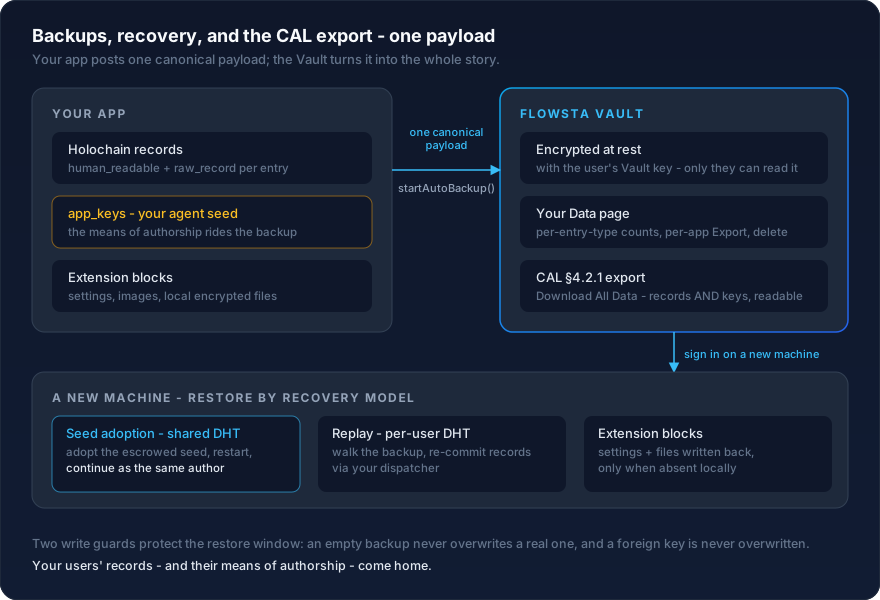 ::: tip Backups work while the Vault is locked
As of `@flowsta/holochain` v2.1.0, backups can be stored and retrieved even when the Vault is locked - as long as it has been unlocked at least once in the current session. Listing (`listVaultBackups`) and deleting need the Vault **unlocked**; locked, `listVaultBackups` returns empty stats.
:::
### Choose your recovery model
Backup and restore are not one-size-fits-all - the right shape depends on where your data's durability comes from. All three models use the same Vault pipeline and canonical payload, so you can start small and add more later without changing what your users see.
| Your data lives | Durability comes from | You back up | Restore works by |
|---|---|---|---|
| On a **shared DHT** (many users, one network) | The network - peers keep replicating entries | The canonical payload (feeds the CAL export), plus the app's agent seed in [`app_keys`](#cal-complete-backups) | **Recognition + seed adoption** - the app [adopts the escrowed seed](#seed-adoption-shared-dht-apps) and continues as the **same author**; published data re-syncs from the DHT. Nothing is replayed. |
| On a **per-user DHT** (each user is their own network) or authored by a single agent | The Vault backup - the user's own devices are usually the only peers | The canonical payload with `human_readable` + `raw_record` per record | **Replay** - walk the backup and re-commit each record via your zome functions ([`restoreFromVault`](#restorefromvault) or your own walker). New action hashes are minted; remap any stored references. |
| **Outside Holochain** (settings, local encrypted files, images) | The Vault backup | [Extension blocks](#non-holochain-data-extension-blocks) on the same payload | **File restore** - read the block back, write the file or settings when absent locally |
Real apps mix models. [ProofPoll](https://github.com/WeAreFlowsta/ProofPoll) is recognition plus seed adoption (shared polls DHT; its agent seed rides `app_keys`, so a restore continues as the same author). [Your Own AI](https://github.com/WeAreFlowsta/Your-Own-AI) is replay (per-user transcript DHTs) plus extension blocks - its AI configurations, per-AI images, and profile-memory file ride the same backup as its Holochain records.
### What your users see
You post one payload; the Vault turns it into the whole user-facing story:
- **Your Data page** - your app appears with per-entry-type counts ("12 polls, 38 votes") whenever the payload is canonical-shape.
- **Per-app Export** - the Export button next to your app's backup downloads just your app's data: every record's `human_readable` view plus your extension blocks, `app_keys` included.
- **Download All Data** - the full [CAL §4.2.1](https://github.com/holochain/cryptographic-autonomy-license) export: the user's identity, their keys, and every connected app's backup in one readable file. See [Data Portability](/security/data-portability).
- **Delete** - users can delete your app's backups at any time. Backups are retained after unlinking until the user deletes them.
Backups are encrypted at rest on the user's device with their Vault key; the downloadable export is the user's off-machine copy.
### When restore runs
- **Recognition apps:** after sign-in, compare the seed escrowed in the Vault backup against the local one. When they differ (a fresh install after machine loss), offer the [seed adoption](#seed-adoption-shared-dht-apps) step; once the app runs under the adopted seed, published data re-syncs from the DHT on its own.
- **Replay apps:** detect "fresh install, non-empty Vault backup" right after sign-in (empty local state + [`listVaultBackups`](#listvaultbackups) shows records for your `clientId`) and run the restore in your startup sequence, visibly. If your app keeps its own data key in `app_keys`, restore the key **first**, then replay records.
- **Extension blocks:** restore alongside either model - write files back only when they're absent locally.
- Make restore **idempotent** (dedupe on a content id or timestamp inside your records) - users will run it twice.
::: warning Three write guards protect the restore window
**An empty backup never overwrites a real one (every write since v3; introduced 2.6.0).** Auto-backup runs immediately on start - including the first start after a reinstall, when the local chain is empty but the user's Vault backup is not. The guard lives inside `backupToVault` itself, so every write path is protected: an empty canonical payload that would replace a non-empty backup throws `EmptyBackupSkippedError` (code `empty_backup_skipped`); under `startAutoBackup` it arrives via `onError` - a skip, not a failure; the next non-empty backup writes normally. Opt out with `protectNonEmpty: false`.
**A wrong identity never writes (v3).** With an [identity bound](#identity-binding-v3) (automatic after `linkFlowstaIdentity`), a Vault holding a different identity throws `IdentityMismatchError` before anything lands in their slot. Unlike the empty-payload skip, a mismatch must stop and tell the user - never retry it after a restore.
**A foreign key is never overwritten.** If your payload carries [`app_keys`](#cal-complete-backups), refuse to write whenever the backup already stored in the Vault escrows a **different** key than the local one - a fresh install's first backup would otherwise destroy the very key the user needs to restore. Retrieve the existing backup, compare its `app_keys` against yours, and hold the write (fail closed, including when the check itself fails) until the user restores the key or explicitly keeps the new one. [ProofPoll's `backup_escrow_gate`](https://github.com/WeAreFlowsta/ProofPoll/blob/main/src-tauri/src/seed_adopt.rs) is the working reference.
:::
### What you write vs what Flowsta provides
| Component | What it does | Approximate lines |
|---|---|---|
| `decode_record_for_export` Tauri command | One `match` per entry type: `rmp_serde::from_slice(bytes)` → `serde_json::to_value(struct)`. Used at backup time so the user's data export is human-readable. | ~5 per entry type |
| `restore_record` Tauri command | One `match` per entry type: decode entry bytes → call the matching zome function. Used by `restoreFromVault` to replay records on reinstall. | ~5 per entry type |
| `startAutoBackup` call in your app's startup | Tells the SDK to back up after every write (debounced) plus a heartbeat retry. | ~10 |
| Restore-on-first-launch modal (recommended) | Detect empty local state + Vault backup, prompt user, call `restoreFromVault`. | ~30 (UX is yours) |
| Seed escrow + adoption (shared-DHT apps only) | Generate the agent seed app-side, escrow it in `app_keys`, adopt it on restore. | copy the [reference](#seed-adoption-shared-dht-apps), adapt paths |
When you add a new entry type to your DNA, you add one `match` arm in each of the two Tauri commands. That's the entire ongoing backup-related maintenance - Vault provides encryption, storage, the Your Data UI, the restore walker, and the CAL data export.
### Canonical-shape backups (v2.4.0+)
The canonical payload format carries two views per record: a `human_readable` view (decoded entry as plain JSON, for the user's CAL export) and a `raw_record` view (the signed Holochain record, for restore + verification).
```typescript
import { startAutoBackup } from '@flowsta/holochain';
import { invoke } from '@tauri-apps/api/core';
const controller = startAutoBackup({
clientId: 'flowsta_app_abc123',
appName: 'ChessChain',
adminWebsocket: adminWs, // your AdminWebsocket instance
cellId: gamesCellId, // [DnaHash, AgentPubKey] tuple
cellRoleName: 'games',
agentPubKey: myAgentBytes, // filter source chain to user's own records
decodeRecordForExport: (entryType, entryB64) =>
invoke('decode_record_for_export', { entryType, entryBytesB64: entryB64 }),
triggerOnWrite: true, // default; back up after each write
debounceSeconds: 30, // default; debounce window for write-triggered backups
heartbeatMinutes: 30, // default; safety-net retry (0 disables)
label: 'latest', // default since 3.6.0; single overwriting backup
onSuccess: (r) => console.log('Backed up:', r.dataSize, 'bytes'),
onError: (e) => console.warn('Backup skipped:', e.message),
});
// Call after each successful zome write to debounce-trigger a backup:
controller.triggerBackupSoon();
// On sign-out / app close:
controller.stop();
```
On the Rust side, your `decode_record_for_export` command:
```rust
use base64::Engine as _;
#[tauri::command]
pub async fn decode_record_for_export(
entry_type: String,
entry_bytes_b64: String,
) -> Result
::: tip Backups work while the Vault is locked
As of `@flowsta/holochain` v2.1.0, backups can be stored and retrieved even when the Vault is locked - as long as it has been unlocked at least once in the current session. Listing (`listVaultBackups`) and deleting need the Vault **unlocked**; locked, `listVaultBackups` returns empty stats.
:::
### Choose your recovery model
Backup and restore are not one-size-fits-all - the right shape depends on where your data's durability comes from. All three models use the same Vault pipeline and canonical payload, so you can start small and add more later without changing what your users see.
| Your data lives | Durability comes from | You back up | Restore works by |
|---|---|---|---|
| On a **shared DHT** (many users, one network) | The network - peers keep replicating entries | The canonical payload (feeds the CAL export), plus the app's agent seed in [`app_keys`](#cal-complete-backups) | **Recognition + seed adoption** - the app [adopts the escrowed seed](#seed-adoption-shared-dht-apps) and continues as the **same author**; published data re-syncs from the DHT. Nothing is replayed. |
| On a **per-user DHT** (each user is their own network) or authored by a single agent | The Vault backup - the user's own devices are usually the only peers | The canonical payload with `human_readable` + `raw_record` per record | **Replay** - walk the backup and re-commit each record via your zome functions ([`restoreFromVault`](#restorefromvault) or your own walker). New action hashes are minted; remap any stored references. |
| **Outside Holochain** (settings, local encrypted files, images) | The Vault backup | [Extension blocks](#non-holochain-data-extension-blocks) on the same payload | **File restore** - read the block back, write the file or settings when absent locally |
Real apps mix models. [ProofPoll](https://github.com/WeAreFlowsta/ProofPoll) is recognition plus seed adoption (shared polls DHT; its agent seed rides `app_keys`, so a restore continues as the same author). [Your Own AI](https://github.com/WeAreFlowsta/Your-Own-AI) is replay (per-user transcript DHTs) plus extension blocks - its AI configurations, per-AI images, and profile-memory file ride the same backup as its Holochain records.
### What your users see
You post one payload; the Vault turns it into the whole user-facing story:
- **Your Data page** - your app appears with per-entry-type counts ("12 polls, 38 votes") whenever the payload is canonical-shape.
- **Per-app Export** - the Export button next to your app's backup downloads just your app's data: every record's `human_readable` view plus your extension blocks, `app_keys` included.
- **Download All Data** - the full [CAL §4.2.1](https://github.com/holochain/cryptographic-autonomy-license) export: the user's identity, their keys, and every connected app's backup in one readable file. See [Data Portability](/security/data-portability).
- **Delete** - users can delete your app's backups at any time. Backups are retained after unlinking until the user deletes them.
Backups are encrypted at rest on the user's device with their Vault key; the downloadable export is the user's off-machine copy.
### When restore runs
- **Recognition apps:** after sign-in, compare the seed escrowed in the Vault backup against the local one. When they differ (a fresh install after machine loss), offer the [seed adoption](#seed-adoption-shared-dht-apps) step; once the app runs under the adopted seed, published data re-syncs from the DHT on its own.
- **Replay apps:** detect "fresh install, non-empty Vault backup" right after sign-in (empty local state + [`listVaultBackups`](#listvaultbackups) shows records for your `clientId`) and run the restore in your startup sequence, visibly. If your app keeps its own data key in `app_keys`, restore the key **first**, then replay records.
- **Extension blocks:** restore alongside either model - write files back only when they're absent locally.
- Make restore **idempotent** (dedupe on a content id or timestamp inside your records) - users will run it twice.
::: warning Three write guards protect the restore window
**An empty backup never overwrites a real one (every write since v3; introduced 2.6.0).** Auto-backup runs immediately on start - including the first start after a reinstall, when the local chain is empty but the user's Vault backup is not. The guard lives inside `backupToVault` itself, so every write path is protected: an empty canonical payload that would replace a non-empty backup throws `EmptyBackupSkippedError` (code `empty_backup_skipped`); under `startAutoBackup` it arrives via `onError` - a skip, not a failure; the next non-empty backup writes normally. Opt out with `protectNonEmpty: false`.
**A wrong identity never writes (v3).** With an [identity bound](#identity-binding-v3) (automatic after `linkFlowstaIdentity`), a Vault holding a different identity throws `IdentityMismatchError` before anything lands in their slot. Unlike the empty-payload skip, a mismatch must stop and tell the user - never retry it after a restore.
**A foreign key is never overwritten.** If your payload carries [`app_keys`](#cal-complete-backups), refuse to write whenever the backup already stored in the Vault escrows a **different** key than the local one - a fresh install's first backup would otherwise destroy the very key the user needs to restore. Retrieve the existing backup, compare its `app_keys` against yours, and hold the write (fail closed, including when the check itself fails) until the user restores the key or explicitly keeps the new one. [ProofPoll's `backup_escrow_gate`](https://github.com/WeAreFlowsta/ProofPoll/blob/main/src-tauri/src/seed_adopt.rs) is the working reference.
:::
### What you write vs what Flowsta provides
| Component | What it does | Approximate lines |
|---|---|---|
| `decode_record_for_export` Tauri command | One `match` per entry type: `rmp_serde::from_slice(bytes)` → `serde_json::to_value(struct)`. Used at backup time so the user's data export is human-readable. | ~5 per entry type |
| `restore_record` Tauri command | One `match` per entry type: decode entry bytes → call the matching zome function. Used by `restoreFromVault` to replay records on reinstall. | ~5 per entry type |
| `startAutoBackup` call in your app's startup | Tells the SDK to back up after every write (debounced) plus a heartbeat retry. | ~10 |
| Restore-on-first-launch modal (recommended) | Detect empty local state + Vault backup, prompt user, call `restoreFromVault`. | ~30 (UX is yours) |
| Seed escrow + adoption (shared-DHT apps only) | Generate the agent seed app-side, escrow it in `app_keys`, adopt it on restore. | copy the [reference](#seed-adoption-shared-dht-apps), adapt paths |
When you add a new entry type to your DNA, you add one `match` arm in each of the two Tauri commands. That's the entire ongoing backup-related maintenance - Vault provides encryption, storage, the Your Data UI, the restore walker, and the CAL data export.
### Canonical-shape backups (v2.4.0+)
The canonical payload format carries two views per record: a `human_readable` view (decoded entry as plain JSON, for the user's CAL export) and a `raw_record` view (the signed Holochain record, for restore + verification).
```typescript
import { startAutoBackup } from '@flowsta/holochain';
import { invoke } from '@tauri-apps/api/core';
const controller = startAutoBackup({
clientId: 'flowsta_app_abc123',
appName: 'ChessChain',
adminWebsocket: adminWs, // your AdminWebsocket instance
cellId: gamesCellId, // [DnaHash, AgentPubKey] tuple
cellRoleName: 'games',
agentPubKey: myAgentBytes, // filter source chain to user's own records
decodeRecordForExport: (entryType, entryB64) =>
invoke('decode_record_for_export', { entryType, entryBytesB64: entryB64 }),
triggerOnWrite: true, // default; back up after each write
debounceSeconds: 30, // default; debounce window for write-triggered backups
heartbeatMinutes: 30, // default; safety-net retry (0 disables)
label: 'latest', // default since 3.6.0; single overwriting backup
onSuccess: (r) => console.log('Backed up:', r.dataSize, 'bytes'),
onError: (e) => console.warn('Backup skipped:', e.message),
});
// Call after each successful zome write to debounce-trigger a backup:
controller.triggerBackupSoon();
// On sign-out / app close:
controller.stop();
```
On the Rust side, your `decode_record_for_export` command:
```rust
use base64::Engine as _;
#[tauri::command]
pub async fn decode_record_for_export(
entry_type: String,
entry_bytes_b64: String,
) -> Result
