

Flowsta Vault
Desktop identity manager for Holochain applications.
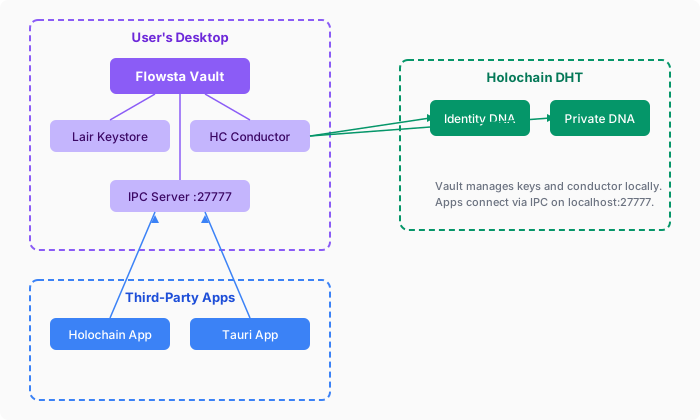
Flowsta Vault is a desktop app (built with Tauri v2) that runs a local Holochain conductor and lair keystore. It gives users full control over their cryptographic identity while enabling third-party apps to request identity linking.
What Vault Does
| Feature | Description |
|---|---|
| Local Holochain conductor | Runs both Identity DNA and Private DNA locally |
| Key management | BIP39 recovery phrase generates deterministic Ed25519 keypair |
| Agent linking | Third-party apps request identity attestations via IPC |
| Connected apps | Users see and manage which apps are linked |
| Auto-backups | Apps can trigger CAL-compliant source chain backups |
| Data export | Users can export their Holochain data and keys at any time |
How It Works
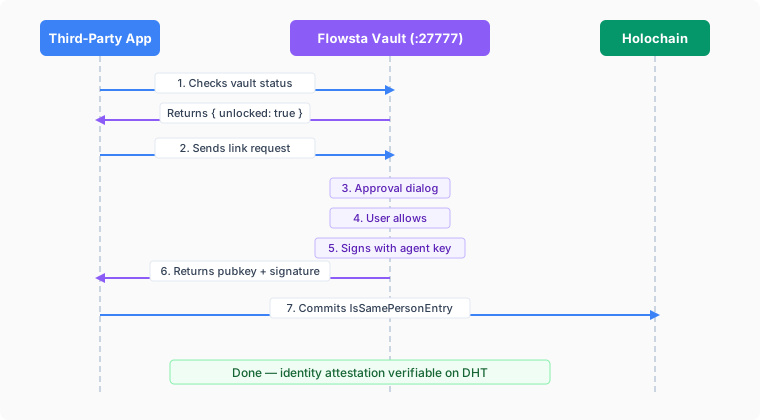
Vault communicates with third-party apps via an IPC server on localhost:27777. Apps use the @flowsta/holochain SDK to interact with the IPC server.
User Experience
When a user installs Flowsta Vault:
- Create or restore identity - Generate a new BIP39 recovery phrase or enter an existing one
- Set passphrase - Protects the local lair keystore
- Vault starts - Local conductor connects to the Holochain DHT
- Apps can link - Third-party apps request identity linking via IPC
Users manage their connected apps directly in Vault under Connected Apps. Web applications connected through OAuth are managed separately at flowsta.com/dashboard/connected-sites.
For Developers
Choose the right integration path:
Building a Holochain App?
Use @flowsta/holochain for agent linking. Your app requests identity attestation from Vault, then commits the result to your DHT.
Building Holochain Apps - Full integration guide
Building a Tauri Desktop App?
Use @flowsta/auth-tauri for OAuth-style authentication through Vault's IPC.
Tauri App Authentication - Desktop auth guide
Need User Data Backups?
Use Vault's backup endpoints for CAL-compliant data export.
Backups & CAL Compliance - Backup integration guide
Architecture
Next Steps
- Building Holochain Apps - Integrate agent linking into your Holochain app
- Agent Linking - How identity attestations work
- Backups & CAL Compliance - Data portability and license compliance
- Tauri App Authentication - Desktop OAuth through Vault
- IPC Endpoints - Complete IPC API reference