

Security Best Practices
Learn how to implement "Sign in with Flowsta" securely and protect your users.
Overview
OAuth 2.0 is secure when implemented correctly. This guide covers best practices, common pitfalls, and security patterns for Sign in with Flowsta.
A note on what you're integrating with: Flowsta identities are device-hosted. Users hold their own keys, backed by a 24-word recovery phrase and the Flowsta Vault app, and approve every sign-in by signing a challenge - no password is entered on the login page, and no one is in between. Your side of the integration is standard OAuth 2.0 hygiene, covered below.
Critical Security Measures
1. Always Use PKCE
Proof Key for Code Exchange (PKCE) prevents authorization code interception attacks.
Required for Public Clients
If your application runs in the browser (SPA) or on mobile devices, PKCE is mandatory. Without it, attackers can steal authorization codes.
How PKCE Works (browser, in a <script type="module">):
function randomString(length) {
  const charset = 'ABCDEFGHIJKLMNOPQRSTUVWXYZabcdefghijklmnopqrstuvwxyz0123456789-._~';
  const bytes = new Uint8Array(length);
  crypto.getRandomValues(bytes);
  return Array.from(bytes, (b) => charset[b % charset.length]).join('');
}

function base64url(buffer) {
  return btoa(String.fromCharCode(...new Uint8Array(buffer)))
    .replace(/\+/g, '-').replace(/\//g, '_').replace(/=+$/, '');
}

// 1. Generate a random code verifier (43-128 characters)
const codeVerifier = randomString(128);

// 2. Create the code challenge: SHA-256 of the verifier, base64url-encoded
const codeChallenge = base64url(
  await crypto.subtle.digest('SHA-256', new TextEncoder().encode(codeVerifier))
);

// 3. Store the verifier for the callback page
sessionStorage.setItem('code_verifier', codeVerifier);

// 4. Send the challenge in the authorization request
const params = new URLSearchParams({
  response_type: 'code',
  client_id: 'your_client_id',
  redirect_uri: 'https://yourapp.com/auth/callback',
  scope: 'openid display_name',
  state: randomString(32),
  code_challenge: codeChallenge,
  code_challenge_method: 'S256',
});
const authUrl = `https://auth-api.flowsta.com/oauth/authorize?${params}`;

// 5. On the callback page, send the verifier with the token exchange:
// POST /oauth/token { grant_type, code, redirect_uri, client_id, code_verifier }Automatic PKCE
The @flowsta/login-button package handles PKCE automatically. You don't need to implement it yourself.
2. Implement CSRF Protection with State
The state parameter prevents Cross-Site Request Forgery (CSRF) attacks.
Implementation:
// Login page: generate and store state (Flowsta requires at least 8 characters)
const state = Array.from(crypto.getRandomValues(new Uint8Array(16)), (b) => b.toString(16).padStart(2, '0')).join('');
sessionStorage.setItem('oauth_state', state);
// ...include `state` in the authorization request parameters

// Callback page: verify it before exchanging the code
const returned = new URLSearchParams(window.location.search).get('state');
const stored = sessionStorage.getItem('oauth_state');
sessionStorage.removeItem('oauth_state');

if (!returned || returned !== stored) {
  throw new Error('State mismatch - possible CSRF attack');
}

// Continue with the token exchange...If your backend does the exchange, keep the state in your server session instead and compare it there - the rule is the same: generated fresh per login, compared once, never skipped.
Always Verify State
Never skip state verification. An attacker can trick a user into authorizing an app under the attacker's control.
3. Use HTTPS Everywhere
Use HTTPS for every production redirect URI. When you register a URI, Flowsta accepts both http: and https: (so http://localhost:3000/... works for development) and checks for an exact string match at authorization time - it does not reject a plain-http production URI for you. Keeping production on HTTPS is on you.
✅ Correct:
// Production
redirectUri: 'https://yourapp.com/auth/callback'

// Development (localhost exception)
redirectUri: 'http://localhost:3000/auth/callback'❌ Wrong:
// ⚠️ Insecure in production
redirectUri: 'http://yourapp.com/auth/callback'4. Validate Redirect URIs
Always configure exact redirect URIs in your app settings. Wildcard URIs are dangerous.
✅ Correct:
https://yourapp.com/auth/callback
https://app.yourapp.com/callback
http://localhost:3000/callback❌ Wrong:
https://*.yourapp.com/callback  ⚠️ Wildcard allows subdomains
https://yourapp.com/* ⚠️ Allows any path5. Store Tokens Securely
Backend (Node.js/Express):
// ✅ Secure: HTTP-only cookies
res.cookie('access_token', accessToken, {
  httpOnly: true,
  secure: process.env.NODE_ENV === 'production',
  sameSite: 'lax',
  maxAge: 86400000, // 24 hours
});

// ✅ Secure: Server-side session
req.session.accessToken = accessToken;Frontend (SPA):
// The @flowsta/auth SDK stores tokens in localStorage
// This is acceptable for PKCE flows (no client secrets to protect)
// PKCE verifiers and state are stored in sessionStorage (cleared after use)

// If you prefer maximum security, use HTTP-only cookies on the backend
// and don't store tokens in the browser at allToken Storage
- Best: Server-side sessions with HTTP-only cookies
- Good:
localStoragewith PKCE (what the@flowsta/authSDK uses - acceptable since there are no client secrets) - Good:
sessionStorage(cleared on tab close, but loses session on refresh) - Never: Exposed JavaScript variables or URL parameters
6. Treat Access Tokens as Opaque
Flowsta access tokens are signed with a server-only secret (HS256) and carry no iss claim. There is no public key to verify against, so your app cannot validate them locally - do not try to jwt.verify() them.
To validate a token or resolve the user behind it, call /oauth/userinfo:
// ✅ Correct: validate by calling userinfo
async function validateAccessToken(accessToken) {
  const res = await fetch('https://auth-api.flowsta.com/oauth/userinfo', {
    headers: { 'Authorization': `Bearer ${accessToken}` },
  });

  if (res.status === 401) {
    // Token is invalid, expired, or revoked
    return null;
  }

  return res.json(); // { sub, name, ... }
}

// ❌ Wrong: local JWT verification is impossible
// jwt.verify(token, ???) - there is no key you can holdA 401 from /oauth/userinfo covers expiration, revocation, and forgery in one check. Cache the result briefly if you need to avoid a network call per request, and key your own sessions on the stable sub UUID.
Common Security Vulnerabilities
1. Authorization Code Interception
Attack: Attacker intercepts authorization code before it reaches your app.
Prevention:
- ✅ Use PKCE (mandatory for public clients)
- ✅ Short-lived codes (10 minutes)
- ✅ One-time use codes
// PKCE prevents this attack
const codeChallenge = generateCodeChallenge(codeVerifier);

// Even if attacker steals the code, they can't exchange it
// without the code_verifier2. Cross-Site Request Forgery (CSRF)
Attack: Attacker tricks user into authorizing their malicious app.
Prevention:
- ✅ Always use
stateparameter - ✅ Verify state matches stored value
- ✅ Use cryptographically random state
// Generate cryptographically secure state (Web Crypto)
const state = Array.from(crypto.getRandomValues(new Uint8Array(32)), (b) => b.toString(16).padStart(2, '0')).join('');

// Verify in callback
if (callbackState !== storedState) {
  throw new Error('CSRF attack detected');
}3. Token Leakage
Attack: Access tokens exposed through browser history, logs, or referrer headers.
Prevention:
- ✅ Use POST requests for sensitive data
- ✅ Never include tokens in URLs
- ✅ Clear sensitive data from browser history
// ✅ Good: Token in Authorization header
fetch('/api/user', {
  headers: {
    'Authorization': `Bearer ${accessToken}`
  }
});

// ❌ Bad: Token in URL
fetch(`/api/user?token=${accessToken}`); // Visible in logs!4. Open Redirect Vulnerability
Attack: Attacker manipulates redirect_uri to send user to malicious site.
Prevention:
- ✅ Whitelist exact redirect URIs
- ✅ No wildcard patterns
- ✅ Server validates redirect_uri
Flowsta automatically enforces this - you must pre-configure all redirect URIs in your app settings.
5. Insufficient Token Validation
Attack: Accepting expired, revoked, or forged tokens.
Prevention:
- ✅ Validate every token by calling
/oauth/userinfo(a401means invalid, expired, or revoked) - ✅ Never accept a token just because it "looks like" a JWT - you cannot verify Flowsta access tokens locally (see Treat Access Tokens as Opaque)
- ✅ Clear your local session when validation fails
// ✅ The userinfo call IS the validation
const res = await fetch('https://auth-api.flowsta.com/oauth/userinfo', {
  headers: { 'Authorization': `Bearer ${token}` },
});

if (!res.ok) {
  clearLocalSession();
  redirectToLogin();
}Token Management
Access Token Lifecycle
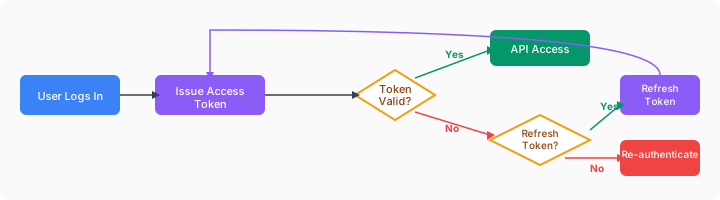
Refresh Token Security
Best Practices:
- Store securely (server-side or HTTP-only cookie)
- Revoke on logout (call
/oauth/revoke) - Plan for expiry - refresh tokens live 30 days from issue and are not rotated: the refresh grant returns a new access token only, no new refresh token. When the refresh token expires, send the user back through the authorization flow.
// Refresh access token
async function refreshAccessToken(refreshToken) {
  const response = await fetch('https://auth-api.flowsta.com/oauth/token', {
    method: 'POST',
    headers: { 'Content-Type': 'application/json' },
    body: JSON.stringify({
      grant_type: 'refresh_token',
      refresh_token: refreshToken,
      client_id: process.env.FLOWSTA_CLIENT_ID,
    }),
  });

  // Response contains access_token but NO new refresh_token -
  // keep using the original refresh token until its 30-day expiry.
  const { access_token } = await response.json();

  return { accessToken: access_token };
}Token Revocation
Always revoke tokens on logout:
async function logout(refreshToken) {
  // Revoke refresh token
  await fetch('https://auth-api.flowsta.com/oauth/revoke', {
    method: 'POST',
    headers: {
      'Content-Type': 'application/json',
    },
    body: JSON.stringify({
      token: refreshToken,
      token_type_hint: 'refresh_token',
      client_id: process.env.FLOWSTA_CLIENT_ID,
    }),
  });

  // Clear local tokens
  req.session.destroy();
  res.clearCookie('access_token');
  res.clearCookie('refresh_token');
}SSO Session Management
Flowsta uses HTTP-only cookies to enable seamless Single Sign-On (SSO) across all applications.
How SSO Sessions Work
When a user signs into Flowsta (their Vault signs a login challenge - directly or as part of an OAuth flow), a secure flowsta_session cookie is created:
- HTTP-only: Cannot be accessed by JavaScript (protects against XSS)
- Secure: Only transmitted over HTTPS in production
- SameSite: Set to
Laxto prevent CSRF attacks - Domain:
.flowsta.com(shared across all Flowsta apps) - Duration: 7 days
This cookie lets users authenticate across multiple apps without approving a new sign-in each time - with the Vault having the final say on a computer:
User Flow:
1. User signs into App A → flowsta_session cookie created
2. User visits App B → the OAuth flow finds the session cookie
3. On a computer, the consent page checks the session against the identity
   in the user's Vault. Same identity (or no Vault reachable): App B's
   consent screen appears with no new sign-in. Different identity: the
sign-in runs again as the identity the Vault holds.Implementing Proper Logout
Your logout ends your app's session. It does not end the user's Flowsta session, and it does not need to:
- Revoke the refresh token you hold (
POST /oauth/revoke), then clear your own tokens, cookies, or server session. POST /auth/logoutis the endpoint that clears theflowsta_sessioncookie. It needs a Flowsta session token - the one Flowsta's own pages hold - and answers401to an OAuth access token, so a third-party app cannot call it.logout()in@flowsta/authclears the SDK's local state (threelocalStoragekeys) and calls no endpoint.- Sign-out is per site. While the user's Flowsta session is valid, their next "Sign in with Flowsta" on your site may complete without a new prompt - as with any single sign-on. Which identity that sign-in belongs to is decided in their Vault (see Switching Identities).
Correct Logout Implementation
Backend session (Node.js/Express):
app.post('/logout', async (req, res) => {
  // 1. Revoke the refresh token you hold
  if (req.session.refreshToken) {
    await fetch('https://auth-api.flowsta.com/oauth/revoke', {
      method: 'POST',
      headers: { 'Content-Type': 'application/json' },
      body: JSON.stringify({
        token: req.session.refreshToken,
        token_type_hint: 'refresh_token',
      }),
    });
  }

  // 2. Clear your own session
  req.session.destroy(() => {
    res.clearCookie('access_token');
    res.redirect('/');
  });
});Browser app using @flowsta/auth:
import { FlowstaAuth } from '@flowsta/auth';

const auth = new FlowstaAuth({
  clientId: 'your_client_id',
  redirectUri: 'https://yourapp.com/auth/callback',
});

async function handleLogout() {
  // 1. Revoke the refresh token the SDK stored (the SDK never uses it itself)
  const refreshToken = localStorage.getItem('flowsta_refresh_token');
  if (refreshToken) {
    await fetch('https://auth-api.flowsta.com/oauth/revoke', {
      method: 'POST',
      headers: { 'Content-Type': 'application/json' },
      body: JSON.stringify({ token: refreshToken, token_type_hint: 'refresh_token' }),
    }).catch(() => {});
  }

  // 2. Clear the SDK's local session (localStorage only - no endpoint is called)
  auth.logout();

  // 3. Redirect
  window.location.href = '/';
}SSO Cookie Scope
/oauth/revoke revokes your app's refresh token; the user stays signed in to Flowsta. That is expected for an OAuth app. The flowsta_session cookie belongs to the user and is cleared only by Flowsta's own pages (POST /auth/logout with a Flowsta session token) or by its 7-day expiry.
Session Expiration
The SSO session cookie expires after 7 days. After that, the next "Sign in with Flowsta" asks for the Vault's approval again.
Your app's access token is separate: it expires after 24 hours whatever the state of the Flowsta session. A 401 from /oauth/userinfo means your token is invalid, expired, or revoked - refresh it with the refresh token or send the user through the flow again:
// Detect an expired or revoked access token
fetch('https://auth-api.flowsta.com/oauth/userinfo', {
  headers: { 'Authorization': `Bearer ${accessToken}` }
})
.then(res => {
  if (res.status === 401) {
    // Token is done - clear local tokens, then refresh or sign in again
    clearLocalTokens();
    redirectToLogin();
  }
});Switching Identities
A web session belongs to the identity that signed in. Switching identity in the Vault does not end or move it - your app keeps the session it has. The next sign-in follows the Vault: on a computer, when the user clicks "Sign in with Flowsta" again, the login page signs them in as the identity the Vault holds now (unlocking or opening it first if needed). On phones, and in browsers that cannot reach a Vault, the remembered Flowsta session stands.
So there is nothing for your app to call:
- Key everything on
sub- a new sign-in may be a different person. - Sign-out is per site - your logout clears your session and revokes your refresh token, nothing more.
- A page that can reach the Vault may notice the switch and offer to sign in again - never switch automatically.
import { FlowstaAuth, agentKeysMatch } from '@flowsta/auth';

const auth = new FlowstaAuth({
  clientId: 'your_client_id',
  redirectUri: 'https://yourapp.com/auth/callback',
  scopes: ['openid', 'display_name', 'public_key'], // public_key (or holochain) fills user.agentPubKey
});

async function offerSwitchIfVaultDiffers() {
  const vault = await auth.detectVault();
  const user = auth.getUser();

  if (
    vault.running && vault.agentPubKey && user?.agentPubKey &&
    agentKeysMatch(user.agentPubKey, vault.agentPubKey) === false
  ) {
    // The Vault holds a different identity than this session.
    // Show a button: "Sign in as the identity in your Vault" -> auth.login()
  }
}Testing identity switching
- Sign in to your app as identity A.
- In the Vault, switch to identity B. Your app still shows A - the session belongs to A.
- Click "Sign in with Flowsta" again. The login page signs in as B, and your app receives B's
sub.
Email and Device-Hosted Identities
Flowsta identities are device-hosted: identity lives on the user's device, and the server stores only a hash of the user's email - Flowsta has no email database.
The email scope therefore works by asking the user to share their address. On a computer the user's Flowsta Vault shows its own "share your email" dialog and nothing is typed. On phones, and in browsers that cannot reach a Vault, the user types the address at the consent screen and Flowsta checks it against the hash it holds. Only verified addresses can be shared, and the shared copy is held on your app's grant only.
What This Means for Your App
/oauth/userinforeturnsemailandemail_verifiedonly after the user shares the address at consent - the scope alone guarantees nothing.- Only verified addresses can be shared, so an email you receive is a trustworthy claim.
- When the user revokes your app, the shared copy is deleted - the email disappears from
/oauth/userinfo. Treat it as revocable data, not a permanent attribute.
Implementation
// Request the email scope only if your app genuinely needs an address -
// the user is asked to share it explicitly at the consent screen.
const authUrl = buildAuthUrl({
  scopes: ['openid', 'display_name', 'email'],
  // ...
});

// Handle the case where no email was shared (or it was later revoked)
const userInfo = await fetchUserInfo(accessToken);

if (!userInfo.email) {
  // The user chose not to share, or revoked it - ask them yourself
  showEmailCollectionForm();
}Design Email-Optional
Key your accounts on the stable sub UUID and let email be an enhancement, not a requirement. An address shared through Flowsta is verified and revocable; an address you collect yourself is yours to verify and keep.
Production Checklist
Before Deploying
- [ ] PKCE implemented for all clients
- [ ] State parameter used for CSRF protection
- [ ] HTTPS used for all redirect URIs
- [ ] Redirect URIs whitelisted in app settings
- [ ] Tokens stored in HTTP-only cookies or server-side sessions
- [ ] Token validation via
/oauth/userinfo(tokens are opaque - no local verification) - [ ] Refresh token handling implemented (no rotation - plan for the 30-day expiry)
- [ ] Logout revokes your refresh token and clears your own session (sign-out is per site)
- [ ] Identity switching tested (switch identity in the Vault, then sign in again - your app receives the new
sub) - [ ] No email dependency - app works when
/oauth/userinforeturns no email - [ ] Error handling doesn't leak sensitive information
- [ ] Rate limiting respected (
RateLimit-*headers on/oauth/token: 30 requests per minute per IP and client ID) - [ ] Activity log reviewed in the developer dashboard
Security Headers
Add security headers to your responses:
app.use((req, res, next) => {
  // Prevent clickjacking
  res.setHeader('X-Frame-Options', 'DENY');

  // Prevent MIME sniffing
  res.setHeader('X-Content-Type-Options', 'nosniff');

  // Enable XSS protection
  res.setHeader('X-XSS-Protection', '1; mode=block');

  // HTTPS only
  res.setHeader('Strict-Transport-Security', 'max-age=31536000; includeSubDomains');

  // Content Security Policy
  res.setHeader('Content-Security-Policy', "default-src 'self'; script-src 'self' 'unsafe-inline'");

  next();
});Monitoring & Alerts
Enable security monitoring:
Review the Activity log in the developer dashboard regularly - it lists OAuth events per app (sign-ins, tokens issued and refreshed, revocations, denied consents) without IP addresses or user IDs
Watch your own logs for suspicious patterns:
- Repeated failed token exchanges or state mismatches
- High token refresh rates
- Failed token validations (
401from/oauth/userinfo)
Set up alerts for:
429 rate_limitedfrom/oauth/tokeninvalid_clientresponses- Token revocation spikes
Common Mistakes to Avoid
1. Skipping State Verification
// ❌ DON'T DO THIS
app.get('/callback', (req, res) => {
  const { code } = req.query;
  // No state verification! Vulnerable to CSRF
  exchangeCodeForToken(code);
});Fix: Always verify the state parameter.
2. Storing Tokens Insecurely
// ❌ DON'T DO THIS
document.cookie = `token=${token}`; // Not HttpOnly, accessible to XSS
window.token = token; // Global variable, accessible to any scriptFix: Use the @flowsta/auth SDK (uses localStorage with PKCE), or HTTP-only cookies on the backend.
3. Not Using PKCE
// ❌ DON'T DO THIS
const authUrl = buildAuthUrl({
  // No PKCE! Vulnerable to code interception
});Fix: Always use PKCE - it's required for all Flowsta OAuth flows.
4. Ignoring Token Expiration
// ❌ DON'T DO THIS
const token = getStoredToken();
await api.call(token); // Might be expired!Fix: Check expiration and refresh if needed.
Incident Response
If You Suspect a Breach
Revoke every refresh token you hold - one
POST /oauth/revokeper token - and clear your sessions:javascriptfor (const token of refreshTokensYouHold) { await fetch('https://auth-api.flowsta.com/oauth/revoke', { method: 'POST', headers: { 'Content-Type': 'application/json' }, body: JSON.stringify({ token, token_type_hint: 'refresh_token' }), }); }Access tokens cannot be revoked; they expire within 24 hours.
Notify users if personal data was exposed
Review the Activity log in the developer dashboard
Contact support: dev.flowsta.com/support
No Client Secrets to Regenerate
With PKCE, there are no client secrets to manage or rotate. Each OAuth flow generates a unique code_verifier per session, providing security without long-lived secrets.
Compliance & Standards
Standards Supported
- ✅ OAuth 2.0 (RFC 6749)
- ✅ PKCE (RFC 7636)
- ✅ W3C DIDs (Decentralized Identifiers)
Privacy by Design
- Consent-gated data - every field your app receives sits behind a scope the user approved on the consent screen
- Device-hosted identity - users hold their own keys; there is no password database, and the server keeps only a hash of each email
- Revocable email - an address is shared only on explicit consent and deleted from your app's grant when the user revokes it
- Data portability - DIDs are portable and user-owned
Additional Resources
Official Specifications
Security Guides
Need Help?
- 💬 Discord: Join our community
- 🆘 Support: Find out about Flowsta support options
- 🐙 GitHub: github.com/WeAreFlowsta