

Agent Linking
Link your Holochain app's agent key with the user's Flowsta Vault identity.
Flowsta Vault acts as a local identity provider for Holochain apps. When a user approves a link request, the Vault signs a cryptographic attestation that is committed to your app's DHT as an IsSamePersonEntry. Anyone on your DHT can verify the link using Ed25519 cryptography - no shared DNA, no API dependency, no one in between.
How It Works
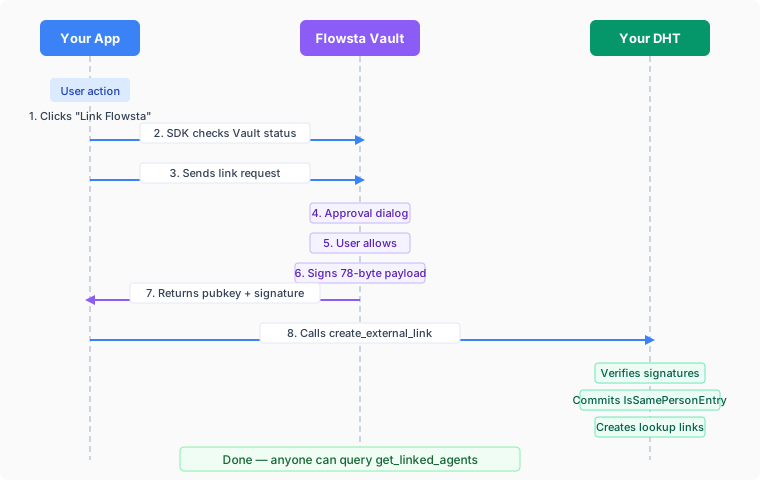
The 78-Byte Payload
Vault constructs the signing payload itself (apps cannot influence what gets signed):
| Bytes | Content |
|---|---|
| 0-38 | First agent public key (39 bytes: 3-byte prefix + 32-byte key + 4-byte checksum) |
| 39-77 | Second agent public key (39 bytes, same format) |
The two 39-byte Holochain AgentPubKeys are sorted lexicographically to produce a canonical 78-byte payload, and both agents sign the raw 78 bytes (no MessagePack encoding). The dual-signature design means:
- The app agent attests "I am the same person as this Vault agent"
- The Vault agent attests "I am the same person as this app agent"
- Anyone can verify both signatures using the public keys in the payload
Prerequisites
- Register your app at dev.flowsta.com to get a
client_id - Add the
flowsta-agent-linkingzomes to your DNA (see Integration Guide) - Install the SDK:
npm install @flowsta/holochain
Quick Start
import { linkFlowstaIdentity, getFlowstaIdentity } from '@flowsta/holochain';

// Link identity
const result = await linkFlowstaIdentity({
  appName: 'ChessChain',
  clientId: 'flowsta_app_abc123...', // from dev.flowsta.com
  localAgentPubKey: myAgentKey,      // uhCAk... format
});

// Commit to your DHT
await appWebsocket.callZome({
  role_name: 'chess',
  zome_name: 'agent_linking',
  fn_name: 'create_external_link',
  payload: {
    external_agent: decodeHashFromBase64(result.payload.vaultAgentPubKey),
    external_signature: base64ToSignature(result.payload.vaultSignature),
  },
});

// Query linked identities
const linked = await getFlowstaIdentity({
  appWebsocket,
  roleName: 'chess',
  agentPubKey: myAgentKey,
});Integration Guide
1. Add zomes to your DNA
Add the flowsta-agent-linking crate to your DNA's integrity and coordinator zomes:
# integrity Cargo.toml
[dependencies]
flowsta-agent-linking-integrity = { git = "https://github.com/WeAreFlowsta/flowsta-agent-linking" }

# coordinator Cargo.toml
[dependencies]
flowsta-agent-linking-coordinator = { git = "https://github.com/WeAreFlowsta/flowsta-agent-linking" }Reference them in your dna.yaml:
integrity:
  zomes:
    - name: agent_linking_integrity
      bundled: ../../target/.../flowsta_agent_linking_integrity.wasm
coordinator:
  zomes:
    - name: agent_linking
      bundled: ../../target/.../flowsta_agent_linking_coordinator.wasm
      dependencies:
- name: agent_linking_integrity2. Install SDK
npm install @flowsta/holochain3. Register your app
Go to dev.flowsta.com and create an app to get a client_id.
API Reference
SDK Functions
| Function | Description |
|---|---|
linkFlowstaIdentity(options) | Request identity link from Vault |
getFlowstaIdentity(options) | Query linked agents on your DHT |
getVaultStatus(ipcUrl?) | Check if Vault is running/unlocked |
revokeFlowstaIdentity(options) | Notify Vault of revocation |
getFlowstaLinkStatus(options) | Check link status - three-state result (linked/unlinked/offline). Recommended. (v2.3.0) |
checkFlowstaLinkStatus(options) | Check if Vault still considers agent linked. Deprecated since v2.3.0; use getFlowstaLinkStatus. |
Zome Functions
These are the Holochain zome calls available after adding the flowsta-agent-linking zomes to your DNA:
| Function | Input | Output | Description |
|---|---|---|---|
create_external_link | ExternalLinkInput | ActionHash | Commit attestation to DHT |
get_linked_agents | AgentPubKey | Vec<AgentPubKey> | Get all linked agents |
are_agents_linked | AgentPair | bool | Check if two agents are linked |
revoke_link | ActionHash | ActionHash | Revoke a link (either agent can revoke) |
ExternalLinkInput
{
  external_agent: Uint8Array,     // 39-byte Holochain AgentPubKey
  external_signature: Uint8Array, // 64-byte Ed25519 signature
}create_external_link verifies the external agent's signature over the 78-byte payload, adds a local signature from your app's agent key, commits the IsSamePersonEntry with both signatures, and creates lookup links for querying.
Error Handling
| Error | Cause | Suggested UX |
|---|---|---|
VaultNotFoundError | Vault not running or not installed | "Install or start Flowsta Vault" |
VaultLockedError | Vault is locked (passphrase required) | "Please unlock your Flowsta Vault" |
UserDeniedError | User rejected the approval dialog | "Identity linking cancelled" |
InvalidClientIdError | client_id not registered or invalid | Developer error - check registration |
MissingClientIdError | No client_id provided | Developer error |
ApiUnreachableError | Can't reach Flowsta API to verify app | "Check internet connection" |
Data Backups
Once linked, your app can back up user data to Flowsta Vault's encrypted local storage. Users can view, export, or delete their backups at any time from the Vault UI.
Holochain apps are licensed under the Cryptographic Autonomy License (CAL), which requires that users can get a copy of their own data and the keys needed to use it. Flowsta Vault handles the key export - your app just needs to back up the user's own data (not the entire DHT).
See the Backup functions in the SDK reference for implementation details and examples.
Security
- User-custodied keys: Private keys never leave the user's device (Flowsta Vault)
- Purpose-specific signatures: Vault computes the signing payload itself, preventing apps from tricking users into signing arbitrary data
- User approval required: Every link request shows an approval dialog in Vault
- Verifiable on-chain: Anyone on your DHT can verify the attestation using Ed25519 public key cryptography
- Revocable: Either agent can revoke a link at any time
- No shared infrastructure: Verification requires no API calls or shared DNAs - no one in between
Next Steps
- Building Holochain Apps - Step-by-step integration guide
- SDK Reference - Full
@flowsta/holochaindocumentation - Backup Guide - CAL-compliant data backups
- IPC Endpoints - Raw IPC API for custom implementations
- Holochain Architecture - How Flowsta's Holochain infrastructure works