
Holochain Architecture
How Flowsta uses Holochain for decentralized, zero-knowledge identity.
Three-DNA Architecture
Flowsta separates public, private, and signing data into three Holochain DNAs. Current versions: Identity v1.4, Signing v1.4, Private v1.11 plus the device-only Private v2.
Identity DNA (Public)
| Field | Description |
|---|---|
| DID | The user's Permanent ID, did:flowsta:<agent key> |
| Timestamps | Created and updated times of the record |
| Agent links | IsSamePersonEntry attestations from agent linking |
That is the whole public record. Display name left it in v1.2 and profile picture in v1.4; both now live in the encrypted Private cell, and the public profile pages read them through the Flowsta API. The Identity DNA is publicly readable: any participant in the network can verify a DID and its agent-link attestations - no one in between.
Signing DNA (Public)
The Sign It DNA carries publicly verifiable document signatures:
| Field | Description |
|---|---|
| Signature records | SHA-256 file hash + Ed25519 signature + timestamp |
| Content rights | License, AI-training policy, contact preference |
| Perceptual hashes | Image/audio/video fingerprints for fuzzy matching |
| Revocations & amendments | Signatures can be revoked or superseded by their author |
Signatures live on Flowsta's tamper-proof network, built on Holochain - anyone can verify a signature against a file without asking Flowsta.
Private DNA (Encrypted)
Two generations exist:
- Private v2 (device-only) - what Flowsta Vault installs for every identity. Each record is an opaque
{cipher, nonce}blob sealed on the user's device with a key derived from their recovery phrase (HMAC-SHA256 with a domain-separation constant, XSalsa20-Poly1305); entry type, timestamps and relationships live inside the ciphertext. The cell runs on a per-user network whose seed is also derived from the phrase, so the ciphertext gossips only between the person's own devices - which derive the same key and need no key exchange. It holds the profile, activity logs, email permissions, privacy settings, analytics id and profile picture. The recovery phrase and 2FA secrets are never written to any DNA. - Private v1.x (legacy) - the per-user private cells that flowsta.com identities used before the Vault. The Vault still installs v1.11 so an identity moved from flowsta.com can read its earlier records. New integrations should not depend on the Private DNA in either generation: your app's private data belongs in your own DHT, encrypted (below), or in the user's Vault backups.
Encrypted Public Entries (Third-Party Apps)
Third-party Holochain apps can also store private data on the public DHT using client-side encryption. Entries are encrypted with lair's xsalsa20poly1305 crypto_box (256-bit X25519 key exchange) before being committed. Peers replicate the ciphertext for resilience, but only the author can decrypt.
This pattern is used for:
- Vote rationales - private notes explaining why a user voted
- Draft content - encrypted until the user publishes
- Any user-owned private data - the entry type hint is always
"private"to prevent metadata leakage
See Encrypted Entries on Public DHT for implementation details.
Infrastructure
Flowsta-Operated Nodes
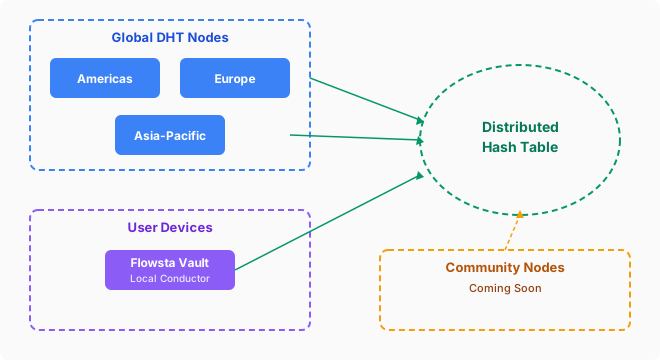
Flowsta operates infrastructure across three regions:
- Americas (Iowa) - the API node, which also runs a full conductor
- Europe - a DHT-only node
- Asia-Pacific (Singapore) - a DHT-only node
- A dedicated bootstrap/relay server (
bootstrap.flowsta.com) - where devices on Flowsta's networks register and find each other, and the relay for devices that cannot reach each other directly. It checks a sign-in and only admits apps with auth material Flowsta issued: the Vault and Flowsta's own apps. Your app's network uses whatever bootstrap you configure in your conductor; ours is optional and comes with registering your app (Where the devices meet).
Community DHT Nodes
Community-run nodes are live today - anyone can run one. The flowsta-dht-node repository has a step-by-step README that takes you from a fresh machine to a gossiping DHT node.
A community node can also serve as an independent bootstrap/relay, giving the network discovery and relay paths that don't depend on Flowsta's infrastructure at all. Every community node strengthens the network's resilience: the network keeps running even if our cloud provider goes down.
Flowsta Vault (Local)
When users install Flowsta Vault, it runs a local Holochain conductor that joins the same network. This means:
- The user's public data is replicated locally
- Agent linking attestations and signatures gossip across the network
- The network becomes more resilient with each Vault install
Key Derivation
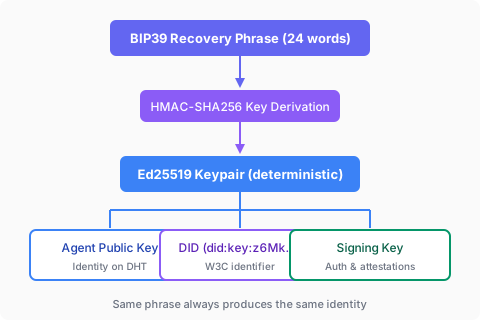
Every user's keypair is deterministically derived from their recovery phrase. This means:
- Same phrase always produces the same identity
- Users can restore their identity on any device
- No key escrow or central key server needed
Holochain Version
Flowsta runs on Holochain 0.6.1 with the kitsune2 networking layer and Iroh-based peer connectivity.
Next Steps
- Identity & DIDs - W3C Decentralized Identifiers
- For Holochain Developers - Integration guide for Holochain devs
- Agent Linking - Identity attestations on your own DHT
- Zero-Knowledge Architecture - Encryption details
- Vault Overview - Local conductor and key management