

Holochain apps
Pick the option that fits your app. Linking an agent to a Flowsta identity is the one with rules; the rest is optional.
Required and optional
If your app links a Flowsta identity through the Vault (Option 2 below), this is required:
- The two
flowsta-agent-linkingzomes in your DNA and@flowsta/holochainin the front end. - A
client_idfrom dev.flowsta.com - the Vault refuses a link request without one. - One app agent links to one Flowsta identity. Linking binds your app to the identity it linked with; when the Vault holds a different one, your app stops and says so - it never links the same agent again. Since Vault 1.5.0 one Vault can hold several identities on one computer, so every linked app meets this case. Read Identity switching before you ship.
Everything else is optional: the user's profile fields, encrypted backups and reinstall recovery, document signing through Sign It, the email scope on sign-in, and per-identity profiles so the app works for several identities on one computer. Option 1 (sign-in only) and Option 3 (desktop sign-in) carry none of the linking requirements.
Option 1: Sign-in only
Use Flowsta's OAuth for user authentication while managing your own Holochain infrastructure:
import { FlowstaAuth } from '@flowsta/auth';

const auth = new FlowstaAuth({
  clientId: 'your-client-id',
  redirectUri: 'https://yourapp.com/callback',
  scopes: ['openid', 'public_key', 'did']
});

const user = await auth.handleCallback();
console.log('DID:', user.did);
console.log('Flowsta agent key:', user.agentPubKey);Best for: apps that want a consistent user identity across the Flowsta ecosystem but run their own conductor and agent keys. Key your records by sub (the stable user id): a person who switches identity in their Vault and signs in again arrives with a different sub and is a different user to your app, never the same user with new fields.
Web apps guide - the OAuth integration, the login button, and webhooks.
Option 2: Link your app's agent to a Flowsta identity
Let users prove their Flowsta identity on your DHT with cryptographic attestations:
import { linkFlowstaIdentity } from '@flowsta/holochain';
import { decodeHashFromBase64 } from '@holochain/client';

const result = await linkFlowstaIdentity({
  appName: 'YourApp',
  clientId: 'your-client-id',
  localAgentPubKey: myAgentKey,
});

// The Vault's signature arrives base64-encoded; the zome wants the raw 64 bytes.
const signatureBytes = (b64: string) =>
  Uint8Array.from(atob(b64), (c) => c.charCodeAt(0));

// Commit to your DHT
await appWebsocket.callZome({
  role_name: 'my-role',
  zome_name: 'agent_linking',
  fn_name: 'create_external_link',
  payload: {
    external_agent: decodeHashFromBase64(result.payload.vaultAgentPubKey),
    external_signature: signatureBytes(result.payload.vaultSignature),
  },
});Best for: apps where users need a verifiable identity across Holochain networks. Users need Flowsta Vault installed. The link binds your app to that identity - what that means when the Vault switches is on Identity switching.
Full guide: Build a Holochain app - the six steps from zomes to a queried link.
What a linked app gets
The agent link is the foundation. Once your app is linked, the same SDK provides, for about fifty more lines in total:
- The user's display name, profile picture and username via
getVaultStatus(). Read once; no signup form, no avatar upload, no profile-management UI to build. Scope-gated at link time so the user controls what your app sees. - Automatic encrypted backups of your users' Holochain data to their Vault, debounced after writes plus a heartbeat retry. Store as many named backup objects as your data needs (50 MB per object - split larger payloads into named parts yourself) plus rotated snapshots. The Vault handles the encryption, the storage, and the user-facing Your Data page.
- Reinstall recovery - when a user reinstalls your app, the SDK walks the Vault backup and replays each entry through a small dispatcher you write; shared-DHT apps escrow their agent seed instead, so a new machine continues as the same author.
- The CAL §4.2.1 data export - the Vault's Export on the Your Data page produces a portable JSON file with the user's cryptographic keys, your app's records as human-readable JSON, and the Cryptographic Autonomy License citation. The export a CAL-licensed app is obliged to provide; you write nothing.
- Document signing via
signDocument()if your app produces user-authored content worth signing. A linked app publishes the signature to the Sign It network from the user's own device, so anyone can verify it. With sponsored signing, your organization's signing pool pays for app-initiated signatures instead of the user's personal quota - the Vault approval dialog tells the user so.
These compose: a public game in your app uses the player's display name and avatar; the next backup includes those names in the human-readable view; the CAL export inlines them alongside the user's keys.
@flowsta/holochain reference has the full API. ProofPoll (MIT) is the live reference implementation: linking, the profile fields, backups and reinstall recovery, and one profile per Flowsta identity.
Option 3: A desktop app without Holochain
Sign the user in to any desktop app through the Vault's local bridge - no browser redirect, and your app never handles credentials:
import { getVaultStatus, authenticateWithVault } from '@flowsta/holochain';

const status = await getVaultStatus();
if (status.unlocked) {
  console.log('Permanent ID:', status.did);
  // Have the Vault sign a random nonce from YOUR backend, which verifies
  // the signature and issues its own session - see the Desktop guide
}Best for: Tauri, Electron and other desktop apps that want Flowsta sign-in without a browser redirect. Despite its name, @flowsta/holochain is the Vault's client for any desktop app: it needs no Holochain in yours, and it runs in any JavaScript environment. Full guide: Desktop apps
Adding the agent-linking zomes
For Option 2, add the flowsta-agent-linking zomes to your DNA, pinned to a release tag:
# integrity/Cargo.toml
[dependencies]
flowsta-agent-linking-integrity = { git = "https://github.com/WeAreFlowsta/flowsta-agent-linking", tag = "v0.3.0" }

# coordinator/Cargo.toml
[dependencies]
flowsta-agent-linking-coordinator = { git = "https://github.com/WeAreFlowsta/flowsta-agent-linking", tag = "v0.3.0" }Tag v0.3.0 targets Holochain 0.6: your DNA's hdi and hdk must be on the same line (hdi = "=0.7.0", hdk = "=0.6.0"). Name the zomes agent_linking_integrity and agent_linking in your dna.yaml - the full manifest is in Build a Holochain app.
The zomes provide:
create_external_link- commit the identity attestation (refuses a second live link to a different identity)get_linked_agents- query linked agentsare_agents_linked- check whether two agents are linkedrevoke_link- revoke a link (the app-side agent, on your DHT)
CAL compliance
Holochain itself is licensed under the Cryptographic Autonomy License (CAL), and many hApps adopt it. If yours does, §4.2.1 requires that users can access their data and the cryptographic keys needed to use it. Flowsta Vault makes that easy - integrate auto-backups so users can export their data at any time. The canonical-shape signature dumps the user's source chain and runs your per-entry-type decoder, so backups stay human-readable and restorable:
import { startAutoBackup } from '@flowsta/holochain';

const backups = startAutoBackup({
  clientId: 'flowsta_app_abc123',
  appName: 'YourApp',
  adminWebsocket,                  // @holochain/client AdminWebsocket
  cellId: myCellId,                // your app's primary cell
  cellRoleName: 'my-role',
  agentPubKey: myAgentKey,         // Uint8Array
  decodeRecordForExport: async (entryType, entryBytesB64) => {
    // Decode one entry to plain JSON for the user's data export -
    // one match arm per entry type.
    return decodeMyEntry(entryType, entryBytesB64);
  },
});

// Call from zome-write success handlers (debounced internally):
backups.triggerBackupSoon();

// On sign-out / unmount:
backups.stop();The returned controller has triggerBackupSoon() and stop(); a heartbeat retry runs every 30 minutes by default. The original getData-based signature still works, but new integrations should use the canonical shape - it unlocks per-entry-type counts in the Vault UI, readable CAL data exports, and reinstall recovery.
If your app stores encrypted entries on the DHT, decrypt them in decodeRecordForExport so the user's export remains readable. The Vault encrypts backups at rest - no need to double-encrypt. Every time you add a new entry type, add a decoder arm for it.
How Flowsta uses Holochain
Flowsta uses Holochain as the foundation for its zero-knowledge architecture. Private records are encrypted on the user's own device before anything leaves it, and the ciphertext is shared only with the user's own devices. Public data, like the Permanent ID and Sign It signatures, lives on Flowsta's tamper-proof network, built on Holochain, where anyone can verify it and no one can silently alter it.
| Feature | How Holochain helps |
|---|---|
| Zero-knowledge storage | Private records are encrypted on the user's device with a key derived from their recovery phrase - Flowsta staff physically cannot read them |
| Decentralized identity | Each user has an agent public key that serves as their cryptographic identity |
| W3C DIDs | User identities are W3C Decentralized Identifiers anchored to Holochain |
| Censorship resistance | No central authority can revoke or modify user identities |
| Data portability | Users own their data and can export it anytime |
| Backups and recovery | Connected apps back up into the user's own Vault - encrypted, restorable on a new machine, CAL-export ready |
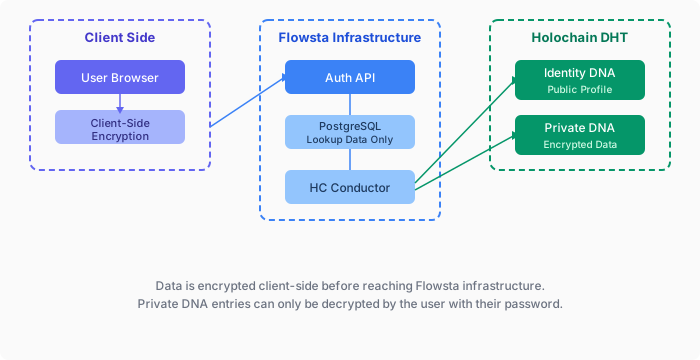
Three Holochain DNAs
Flowsta uses three separate Holochain DNAs (current versions: Identity v1.4, Signing v1.4, Private v1.11 plus the device-only Private v2, on Holochain 0.6.1):
Identity DNA (public)
- W3C DID and timestamps - nothing else. Display name and profile picture left the public record in v1.2 and v1.4
- Agent linking attestations (
IsSamePersonEntry) - Publicly readable by other users
Private DNA (encrypted, device-only)
- Profile, login and dashboard activity, OAuth activity, email permissions, privacy settings, analytics id, profile picture
- Every record is an opaque
{cipher, nonce}blob; entry type, timestamps and relationships live inside the ciphertext - Encrypted on the device with a key derived from the recovery phrase; gossips only between the person's own devices, which derive the same key
- The recovery phrase itself and 2FA secrets are never stored in any DNA
- The earlier per-user Private cells (v1.x) that flowsta.com identities used are legacy
Signing DNA (public)
- File signatures (SHA-256 hash + Ed25519 signature)
- Content rights manifests (license, AI training policy)
- Perceptual hashes for fuzzy file matching
- Publicly verifiable by anyone
Zero-knowledge guarantee
Private records are encrypted on the user's device with keys derived from their recovery phrase - no password is involved in that encryption, and the ciphertext travels only to the user's own devices. Flowsta's servers never hold the data or the keys.
Architecture - nodes, DNAs and versions. Identity & DIDs - what the Permanent ID is and how to resolve it.
Next steps
- Build a Holochain app - step-by-step integration
- Identity switching - the one-agent-one-identity rule and the two app models
- Agent linking - attestation mechanics
- Desktop apps - sign in through the Vault without Holochain
- Encrypted entries - private data on a public DHT
@flowsta/holochain- the SDK reference
Learn more about Holochain
- Holochain.org - official Holochain website
- Holochain Developer Portal - build on Holochain
- Holochain Forum - community discussions